1. Introduction
This manual provides essential information for setting up, operating, and maintaining your Hisense 55 Inch Class QD6 Series 4K QLED Smart Fire TV. Please read these instructions carefully before using your television to ensure proper function and safety. Keep this manual for future reference.

Figure 1.1: Front view of the Hisense 55 Inch Class QD6 Series 4K QLED Smart Fire TV. This image shows the television with its stand, displaying the screen and the Hisense logo.
2. Setup
2.1 Unpacking
- Carefully remove the TV from its packaging.
- Ensure all accessories are present: Remote Control, power cord, stand components, and screws.
- Retain the packaging materials for potential future transport or service.
2.2 Stand Installation
To install the TV stand:
- Place the TV screen-down on a soft, flat surface to prevent damage.
- Align the stand legs with the corresponding screw holes on the bottom of the TV.
- Secure each leg using the provided screws. Ensure they are tightened firmly.
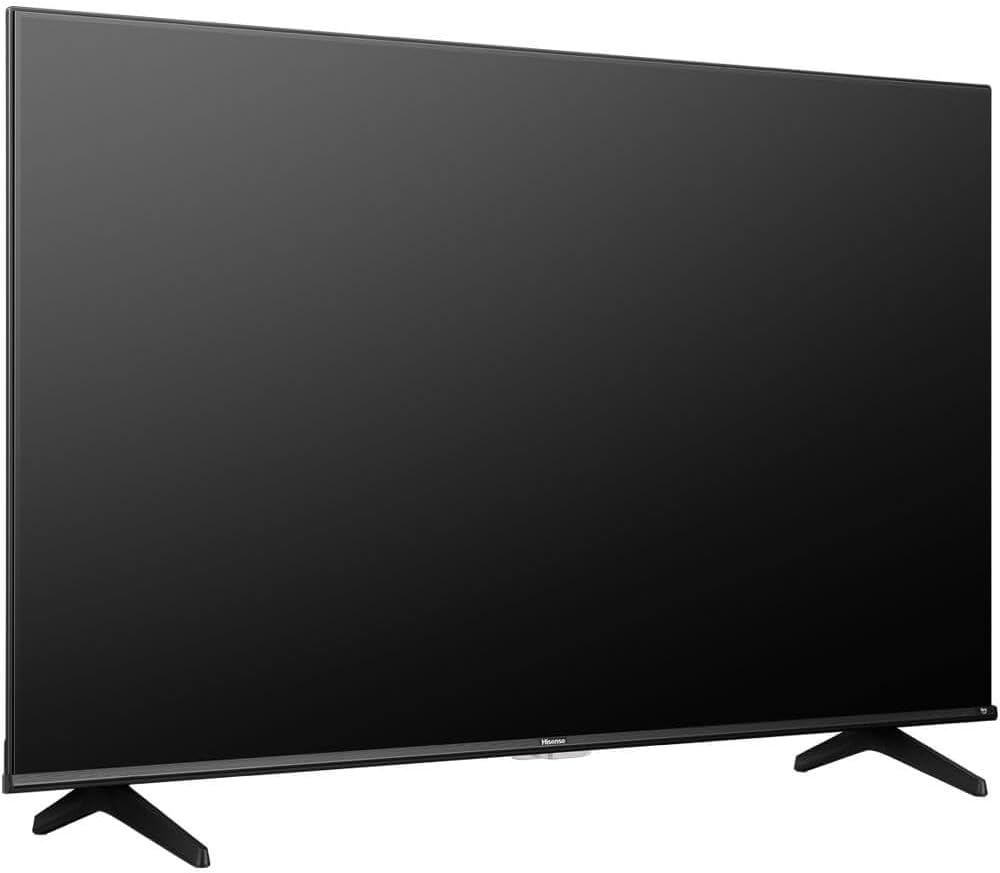
Figure 2.1: Angled view of the Hisense TV with its stand attached. This illustrates the TV's profile and the installed stand legs.
2.3 Connections
Connect external devices to your TV using the appropriate ports on the back panel.
- HDMI Ports (3 total): For connecting Blu-ray players, game consoles, cable/satellite boxes, and other HDMI-enabled devices.
- USB Ports: For connecting USB storage devices to play media files.
- Ethernet (LAN) Port: For a wired internet connection.
- Antenna/Cable Input: For connecting an antenna or cable TV signal.
- Digital Audio Out (Optical): For connecting to a soundbar or audio receiver.
- AV In: For connecting older devices using composite video and stereo audio cables.

Figure 2.2: Detailed view of the TV's rear connection panel. This image highlights the various input and output ports, including HDMI, USB, Ethernet, and audio connections.
3. Operating Instructions
3.1 Power On/Off
- Power On: Connect the power cord to the TV and a power outlet. Press the Power button on the remote control or on the TV.
- Power Off: Press the Power button on the remote control to put the TV into standby mode. Unplug the power cord from the outlet for complete power disconnection.
3.2 Remote Control
The included Alexa Voice Remote allows for easy navigation and voice commands. Insert two AAA batteries (not included) into the remote control, observing polarity.
- Voice Control: Press and hold the microphone button and speak your command to search for content, launch apps, or control TV functions.
- Navigation: Use the directional pad and OK button to navigate menus and select items.
- Volume/Channel: Dedicated buttons for adjusting volume and changing channels.
3.3 Smart TV Features (Fire TV OS)
Your TV is powered by Fire TV OS, providing access to a wide range of streaming services and applications.
- Home Screen: Access your favorite apps, live TV, and recommended content from the customizable home screen.
- App Store: Download additional apps like Netflix, Prime Video, YouTube, and Disney+ from the integrated app store.
- Settings: Adjust picture, sound, network, and system settings through the Fire TV menu.
3.4 Input Selection
To switch between connected devices or TV sources:
- Press the Input button on your remote control.
- Select the desired input source (e.g., HDMI 1, USB, TV) from the on-screen menu.
4. Maintenance
4.1 Cleaning
- Screen: Gently wipe the screen with a soft, lint-free cloth. For stubborn marks, use a screen cleaner specifically designed for TVs, applied to the cloth, not directly to the screen.
- Body: Wipe the TV frame and stand with a soft, dry cloth. Avoid using abrasive cleaners or solvents.
- Always unplug the TV before cleaning.
4.2 Software Updates
Your TV may receive software updates to improve performance and add new features.
- Ensure your TV is connected to the internet.
- Navigate to the Settings menu on your Fire TV.
- Select Device & Software, then About, and finally Check for System Update.
- Follow the on-screen prompts to install any available updates. Do not power off the TV during an update.
5. Troubleshooting
If you encounter issues with your TV, refer to the following common solutions:
| Problem | Possible Solution |
|---|---|
| No Power | Check if the power cord is securely plugged into the TV and the wall outlet. Try a different outlet. |
| No Picture, but Sound is Present | Ensure the correct input source is selected. Check cable connections to external devices. |
| No Sound, but Picture is Present | Check the volume level and mute status. Verify audio cable connections. Check TV audio output settings. |
| Remote Control Not Working | Replace batteries. Ensure there are no obstructions between the remote and the TV. Re-pair the remote if necessary (refer to Fire TV remote pairing instructions). |
| Network Connection Issues | Restart your router and modem. Check Wi-Fi password. For wired connections, ensure the Ethernet cable is properly connected. |
| Picture Quality Issues (e.g., blurry, distorted) | Check the source resolution. Adjust picture settings (brightness, contrast, sharpness) in the TV menu. Ensure cables are not damaged. |
6. Specifications
Key technical specifications for the Hisense 55 Inch Class QD6 Series 4K QLED Smart Fire TV (Model: 55QD65QFKIT1):
- Screen Size: 55 Inches
- Display Technology: QLED
- Resolution: 4K (3840 x 2160)
- Refresh Rate: 60Hz
- Operating System: Fire TV OS
- Connectivity: 3 x HDMI, USB, Ethernet, Wi-Fi, Bluetooth
- Audio: Built-In Speaker, Digital Audio Out (Optical)
- HDR Support: Dolby Vision, HDR10
- Dimensions (D x W x H): 2.9" x 48.5" x 30.7" (with stand)
- VESA Mount Standard: 200 x 200 mm
- Power Consumption: 150W

Figure 6.1: Visual representation of QLED color technology. This image shows a television displaying vibrant, rich colors, emphasizing the 'Billion+ shades of vivid colour' feature.
7. Warranty and Support
7.1 Warranty Information
This Hisense television comes with a 12-month manufacturer's warranty from the date of purchase. This warranty covers manufacturing defects and workmanship under normal use. Please retain your proof of purchase for warranty claims.
7.2 Customer Support
For technical assistance, troubleshooting beyond this manual, or warranty service, please contact Hisense customer support. Refer to the official Hisense website or your product registration card for contact details specific to your region.


