
1. Introduction
Thank you for choosing the Pioneer MVH-145BR Car Stereo MP3 Player. This manual provides essential information for the proper installation, operation, and maintenance of your new car stereo. Please read it thoroughly before use to ensure optimal performance and safety.
Key Features:
- Media Receiver with Bluetooth, USB, and FM Radio.
- Bluetooth 5.4 connection for hands-free calls and music streaming.
- Power output: 4x23W RMS.
- Audio customization: 2-band equalizer, loudness function, and 2x (1V) pre-outs.
- USB compatibility: Supports MP3, WMA, WAV, and FLAC formats via front USB 0.5A port.
- Steering wheel control input and integrated microphone for convenience.
- FM Radio: Extended range 76–108 MHz, 18 station memory, and RDS functionality.
- Display: 8-character LCD with cyan illuminated buttons and dimmer function.
2. Product Overview
Familiarize yourself with the main components and features of your Pioneer MVH-145BR.
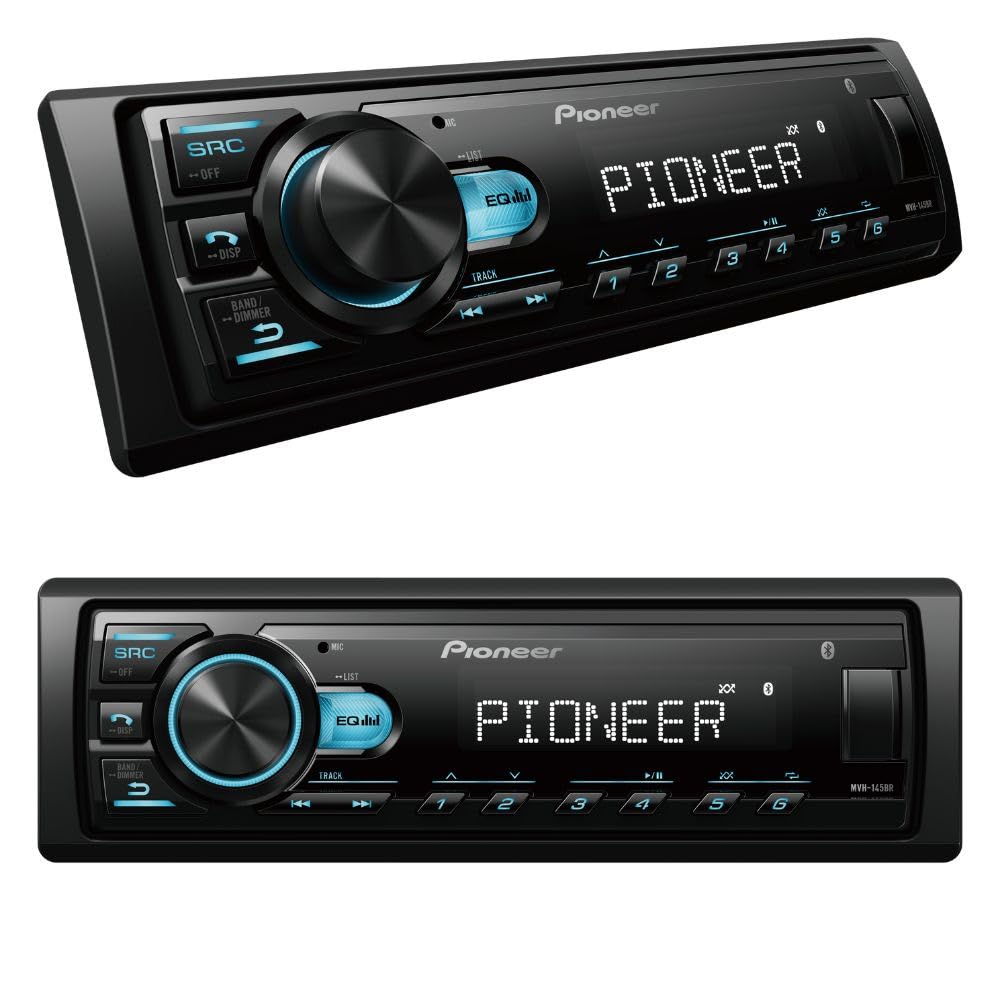
Figure 1: Angled view of the Pioneer MVH-145BR Car Stereo.

Figure 2: Front view of the Pioneer MVH-145BR Car Stereo, showing the display, control knob, and buttons.
3. Setup and Installation
3.1. Package Contents
Before beginning installation, ensure all components are present:
- Pioneer MVH-145BR Media Receiver
- Power Cable
- Installation Kit (mounting hardware)
- Quick Start Guide (this manual)
3.2. Wiring and Mounting
Installation should be performed by a qualified professional to prevent damage to the unit or your vehicle. Refer to the detailed wiring diagram provided in the separate installation guide for specific connections. Ensure proper grounding and secure mounting to avoid vibrations and ensure stable operation.
4. Operating Instructions
4.1. Basic Operation
- Power On/Off: Press the SRC (Source) button to turn the unit on. Press and hold the SRC button to turn it off.
- Volume Control: Rotate the large central knob to adjust the volume level.
- Source Selection: Press the SRC button repeatedly to cycle through available sources (FM, USB, Bluetooth Audio, AUX).
4.2. Bluetooth Connectivity
The MVH-145BR features Bluetooth 5.4 for wireless audio streaming and hands-free communication.
- Pairing a Device:
- Ensure Bluetooth is enabled on your mobile device.
- Select the Bluetooth source on the MVH-145BR. The unit will enter pairing mode.
- On your mobile device, search for available Bluetooth devices and select "Pioneer MVH-145BR".
- Confirm the pairing on both devices if prompted.
- Hands-Free Calling: Once paired, you can make and receive calls through the car stereo using the integrated microphone. Use the call buttons on the unit to answer, end, or reject calls.
- Audio Streaming: Play music from your paired mobile device directly through the car stereo. Use the unit's controls for play/pause, skip track, and volume adjustment.
4.3. USB Playback
Connect a USB storage device to the front USB port to play compatible audio files.
- Connecting a USB Device: Insert your USB device into the front USB port. The unit will automatically switch to the USB source and begin playback.
- Supported Audio Formats: The MVH-145BR supports MP3, WMA, WAV, and FLAC audio formats.
4.4. Radio Operation
Enjoy your favorite FM radio stations with the built-in tuner.
- Tuning FM Stations: Press the BAND button to select the FM band. Use the seek buttons (<< / >>) to automatically search for stations.
- Storing Presets: Tune to your desired station, then press and hold one of the numbered preset buttons (1-6) to save it.
- RDS Functionality: The Radio Data System (RDS) displays station information such as program type and station name, where available.
4.5. Audio Settings
Customize your sound experience using the audio adjustment features.
- Equalizer: Access the 2-band equalizer to adjust bass and treble levels.
- Loudness: Activate the loudness function to boost bass and treble at low volume levels.
- Pre-Outs: The unit features 2x (1V) pre-outs for connecting external amplifiers.
4.6. Display and Illumination
- LCD Display: The 8-character LCD displays current source, track information, radio frequency, and other relevant data.
- Button Illumination: The buttons are illuminated in cyan. The dimmer function allows you to adjust the brightness.
4.7. Steering Wheel Control
The MVH-145BR includes an input for connecting to your vehicle's steering wheel controls, allowing you to operate basic functions without taking your hands off the wheel. An adapter (sold separately) may be required depending on your vehicle model.
5. Maintenance
To ensure the longevity and optimal performance of your Pioneer MVH-145BR, follow these maintenance guidelines:
- Cleaning: Use a soft, dry cloth to clean the unit's surface. Do not use abrasive cleaners or solvents.
- USB Port: Keep the USB port free from dust and debris.
- Temperature: Avoid exposing the unit to extreme temperatures or direct sunlight for prolonged periods.
6. Troubleshooting
If you encounter issues with your MVH-145BR, refer to the following common troubleshooting steps:
- No Power: Check the power connections and vehicle's fuse. Ensure the unit is properly grounded.
- No Sound: Verify speaker connections, volume level, and source selection. Check if the mute function is active.
- Bluetooth Pairing Issues: Ensure Bluetooth is enabled on both devices and the unit is in pairing mode. Try unpairing and re-pairing the device.
- USB Playback Errors: Check if the USB device is formatted correctly and contains supported audio files. Try a different USB device.
- Radio Reception Poor: Check the antenna connection. Ensure you are in an area with good signal strength.
If the problem persists after trying these steps, contact Pioneer customer support or a qualified service technician.
7. Specifications
| Feature | Specification |
|---|---|
| Brand | Pioneer |
| Model Number | MVH-145BR |
| Connectivity Technology | Bluetooth |
| Controller Type | Button |
| Special Features | Built-in Bluetooth, 2-band equalizer, Loudness, Integrated microphone, RDS |
| Compatible Devices | Speaker |
| Connector Type | RCA |
| Audio Output Mode | Stereo |
| Surround Sound Channel Configuration | 4.0 |
| Output Power (per channel) | 23 Watts RMS |
| Total Output Power | 92 Watts |
| Number of Channels | 4 |
| Supported Formats | MP3, WMA, WAV, FLAC |
| Illumination Color | Cyan |
| Included Components | Power Cable, Installation Kit, Pioneer MVH-145BR |
| External Test Certification | ANATEL: 029282507463 |
| Item Weight | 720 Grams |
8. Warranty and Support
8.1. Warranty Information
The Pioneer MVH-145BR comes with a 12-month factory warranty against manufacturing defects. Please retain your proof of purchase for warranty claims. The warranty does not cover damage caused by improper installation, misuse, accidents, or unauthorized repairs.
8.2. Customer Support
For technical assistance, service, or further information, please contact Pioneer customer support through their official website or authorized service centers. Refer to the contact information provided with your product packaging or on the Pioneer official website.