1. Introduction
The Generic KWS-X1 is a versatile USB-C Voltmeter Ammeter Tester designed for monitoring and testing various parameters of USB-C power delivery systems. This device supports high-current detection up to 12A and voltage measurements from 4V to 30V, making it suitable for fast-charge verification, cable quality assessment, and general mobile device diagnostics. It features an IPS display for real-time data and a durable aluminum shell.
2. Key Features
- High-Current Measurement Range: Supports precise voltage detection from 4-30V and current measurement up to 12A.
- Fast-Charge Protocol Compatibility: Works with PD 2.0-3.1 AVS EPR, QC 2.0-4.0+, MTK, and other quick-charge standards.
- 240W Cable Performance Testing: Accurately evaluates cable transmission speed, voltage, current, and quality.
- Durable Metal Shell & IPS Display: Features a CNC-machined aluminum enclosure and a high-definition IPS screen for real-time data.
- Compact Multi-Mode Functionality: Lightweight design with 3 switchable display modes, offline save, gravity-rotation screen, and protocol combination testing.
3. Setup and Connection
To begin using your KWS-X1 tester, connect it in-line between your power source (charger, power bank) and the device you wish to test (smartphone, tablet, laptop). The tester has a male USB-C connector on one end and a female USB-C port on the other.
- Connect the male USB-C connector of the KWS-X1 tester into the USB-C output port of your charger or power source.
- Connect your device's USB-C charging cable into the female USB-C port on the KWS-X1 tester.
- Ensure all connections are secure. The tester's IPS display will automatically power on and begin displaying real-time measurement data.

Image: The KWS-X1 tester connected to a mobile phone, displaying voltage, current, and power readings.
4. Operating Instructions
The KWS-X1 tester provides various measurement modes and functions accessible via its physical buttons and on-screen interface.
4.1 Main Display Modes
Upon connection, the tester defaults to a main display showing real-time voltage (V), current (A), and power (W). It also displays accumulated charge (mAh), energy (mWh), elapsed time (T), and device temperature (℃).

Image: A close-up of the KWS-X1's IPS display showing detailed real-time charging data including voltage, current, power, and temperature.
Use the physical buttons on the side of the device to cycle through different display modes or access specific functions. The exact button functions may vary slightly depending on the firmware version, but typically include short press for mode switching and long press for menu access or resetting data.
4.2 Fast Charge Protocol Detection
The KWS-X1 can automatically detect and display supported fast charge protocols from the connected power source. This feature helps verify if a charger is delivering the expected fast charge standard.

Image: The KWS-X1 screen showing the results of an automatic protocol detection test, listing various PD and QC standards with their voltage and current capabilities.
To initiate protocol detection, navigate to the relevant menu option using the device buttons. The tester will then scan and list the supported protocols such as PD (Power Delivery), QC (Quick Charge), and PPS (Programmable Power Supply).
4.3 Cable Performance Testing
This function allows you to assess the quality and performance of USB-C cables, especially those supporting up to 240W. The tester can help identify cables that might be limiting charging speed or data transfer due to high resistance or poor construction.
- Connect the cable to be tested between the KWS-X1 and a power source/load.
- Access the cable test function through the menu.
- The tester will display parameters such as voltage drop, current capacity, and data transmission capabilities.
4.4 Ripple and Curve Measurement
The KWS-X1 can measure voltage ripple and display real-time voltage/current curves, which are useful for diagnosing power supply stability and identifying fluctuations.
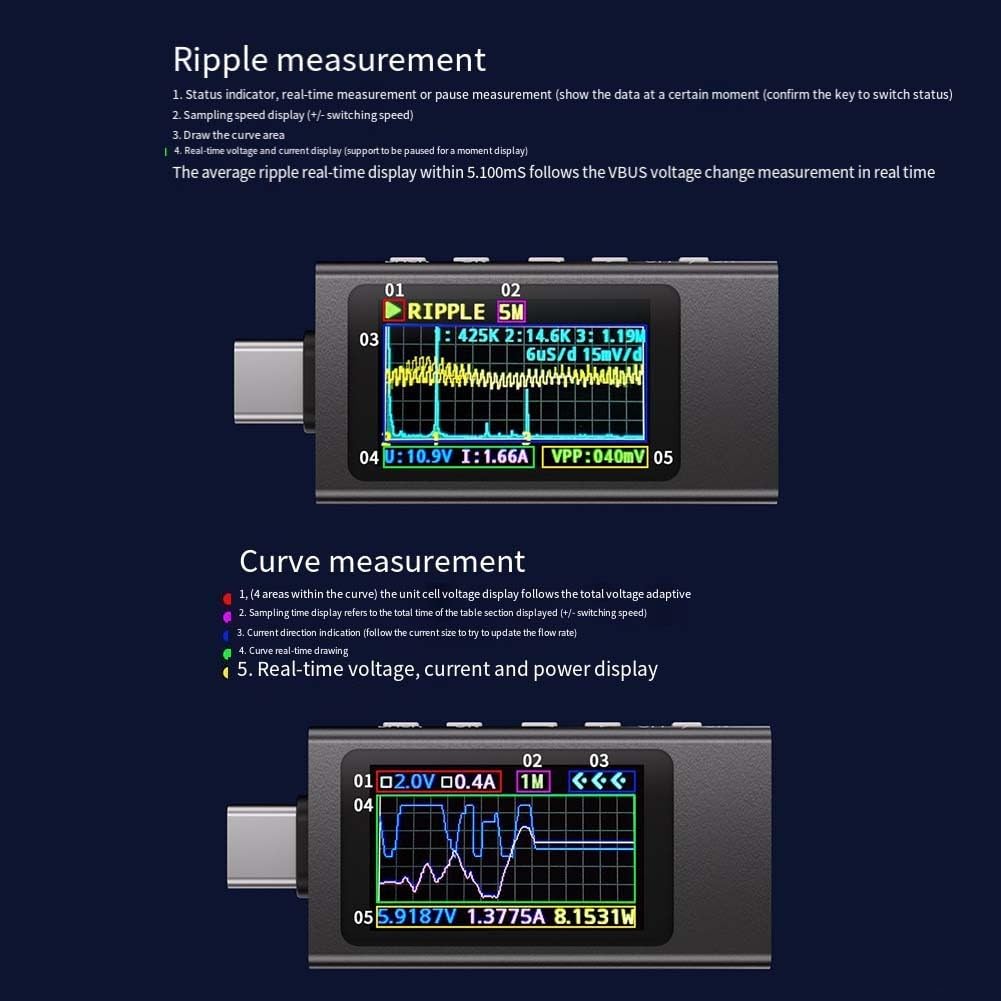
Image: The KWS-X1 screen showing graphical representations of ripple measurement (top) and real-time voltage and current curves (bottom).
- Ripple Measurement: Displays the stability of the output voltage. Access this mode to see a graphical representation of voltage fluctuations over time.
- Curve Measurement: Provides a real-time graph of voltage and current, allowing users to observe dynamic changes during charging or load variations.
5. Maintenance
To ensure the longevity and accurate performance of your KWS-X1 tester, follow these maintenance guidelines:
- Cleaning: Use a soft, dry cloth to clean the device. Avoid using liquid cleaners or solvents, as they may damage the screen or internal components.
- Storage: Store the tester in a cool, dry place away from direct sunlight and extreme temperatures.
- Handling: While the aluminum shell provides durability, avoid dropping the device or subjecting it to strong impacts.
- Connector Care: Keep the USB-C connectors free from dust and debris to ensure reliable connections.
6. Troubleshooting
If you encounter issues with your KWS-X1 tester, refer to the following common troubleshooting steps:
- No Display/No Power:
- Ensure the tester is correctly connected to a working power source.
- Check if the power source itself is functioning correctly.
- Try a different USB-C cable.
- Inaccurate Readings:
- Ensure all connections are secure and free of debris.
- Test with a known good power source and load to verify.
- Readings can be affected by poor quality cables; try a different cable.
- Fast Charge Protocol Not Detected:
- Verify that both the charger and the device support the fast charge protocol you are expecting.
- Some protocols require specific cables; ensure you are using a compatible cable.
- Device Not Charging When Tester is Connected:
- Ensure the tester is inserted in the correct orientation (though most USB-C devices are reversible, some testers might have preferred input/output).
- Check if the power source can deliver enough power for both the tester and the device.
7. Specifications
The following table details the technical specifications of the KWS-X1 USB-C Voltmeter Ammeter Tester:
| Parameter | Value |
|---|---|
| Model | KWS-X1 |
| Measurement Voltage Range | 4-30V (Absolute withstand voltage: 0.0-40.0V) |
| Measurement Current Range | 0.0-8.0A (Maximum 12A, Absolute current: 0.0-16.0A) |
| Measurement Power Range | 0.0-280.0W (Maximum 380.0W) |
| Measurement Accuracy | ±(1% + 5) |
| Temperature Measurement Range | 0.0-99.0 ℃ |
| PD Protocol Support Version | 2.0-3.1 AVS EPR |
| QC Protocol Support Version | 2.0-4.0+ |
| Display | IPS Display |
| Shell Material | Aluminum |
| Dimensions | 54.96 x 24.45 x 11.15 mm (Approx. 1.97 x 1.18 x 0.39 inches) |
| Weight | Approx. 17g (0.529 ounces) |
| Gravity Rotation Screen | Supported |
| Offline Save | Supported |
8. Warranty and Support
Information regarding specific warranty terms and customer support for the Generic KWS-X1 USB-C Voltmeter Ammeter Tester is not provided in this manual. Please refer to the retailer or manufacturer's website for details on warranty coverage and how to obtain technical support.
For general inquiries or assistance, you may also contact the seller directly through the platform where the product was purchased.


