
Orion Motor Tech MPN1VPHV030-N1
Orion Motor Tech 3 Gallon Vacuum Chamber with 3.5 CFM 1 Stage Vacuum Pump User Manual
Model: MPN1VPHV030-N1
Introduction
This manual provides essential instructions for the safe and efficient operation, maintenance, and troubleshooting of your Orion Motor Tech 3 Gallon Vacuum Chamber with 3.5 CFM 1 Stage Vacuum Pump. Please read this manual thoroughly before operating the equipment and retain it for future reference.
Safety Instructions
WARNING: Failure to follow these safety instructions may result in serious injury or property damage.
- Always operate the vacuum pump in a well-ventilated area.
- Ensure all connections are secure before operating to prevent leaks.
- Do not operate the pump without sufficient oil.
- Avoid direct contact with hot surfaces during and after operation.
- Wear appropriate personal protective equipment (PPE), such as safety glasses and gloves.
- Keep children and unauthorized personnel away from the equipment during operation.
- Disconnect power before performing any maintenance or cleaning.
- Do not use the equipment for purposes other than its intended use.
Package Contents
Please check the package contents against the list below. If any items are missing or damaged, contact customer support immediately.
- 1x Vacuum Pump
- 1x Vacuum Chamber (3 Gallon)
- 1x Vacuum Gauge
- Lubricating and Absorptive Oil for the pump
- 1x 5-foot Hose
- Various Fittings (for 1/4, 3/8, and 1/2-inch HVAC hoses)
Setup Instructions
- Unpack Components: Carefully remove all components from the packaging. Inspect for any shipping damage.
- Prepare Vacuum Pump:
- Ensure the pump is placed on a stable, level surface.
- Remove the oil fill cap and fill the pump with the provided lubricating oil to the indicated level. Do not overfill.
- Ensure the brass-fitted tethered safety caps are securely in place to prevent oil leaks.
- Assemble Vacuum Chamber:
- Place the 1.5 mm silicone gasket onto the rim of the 3-gallon stainless steel chamber.
- Carefully place the tempered glass lid onto the silicone gasket, ensuring a tight seal.
- Connect Pump to Chamber:
- Connect one end of the 5-foot hose to the vacuum pump inlet. Use the appropriate fitting (1/4, 3/8, or 1/2-inch) if necessary.
- Connect the other end of the hose to the vacuum chamber's inlet port. Ensure all connections are hand-tightened to prevent leaks.
- Attach the vacuum gauge to the designated port on the chamber lid or manifold.
- Initial Check: Before powering on, double-check all connections and ensure the oil level in the pump is correct.
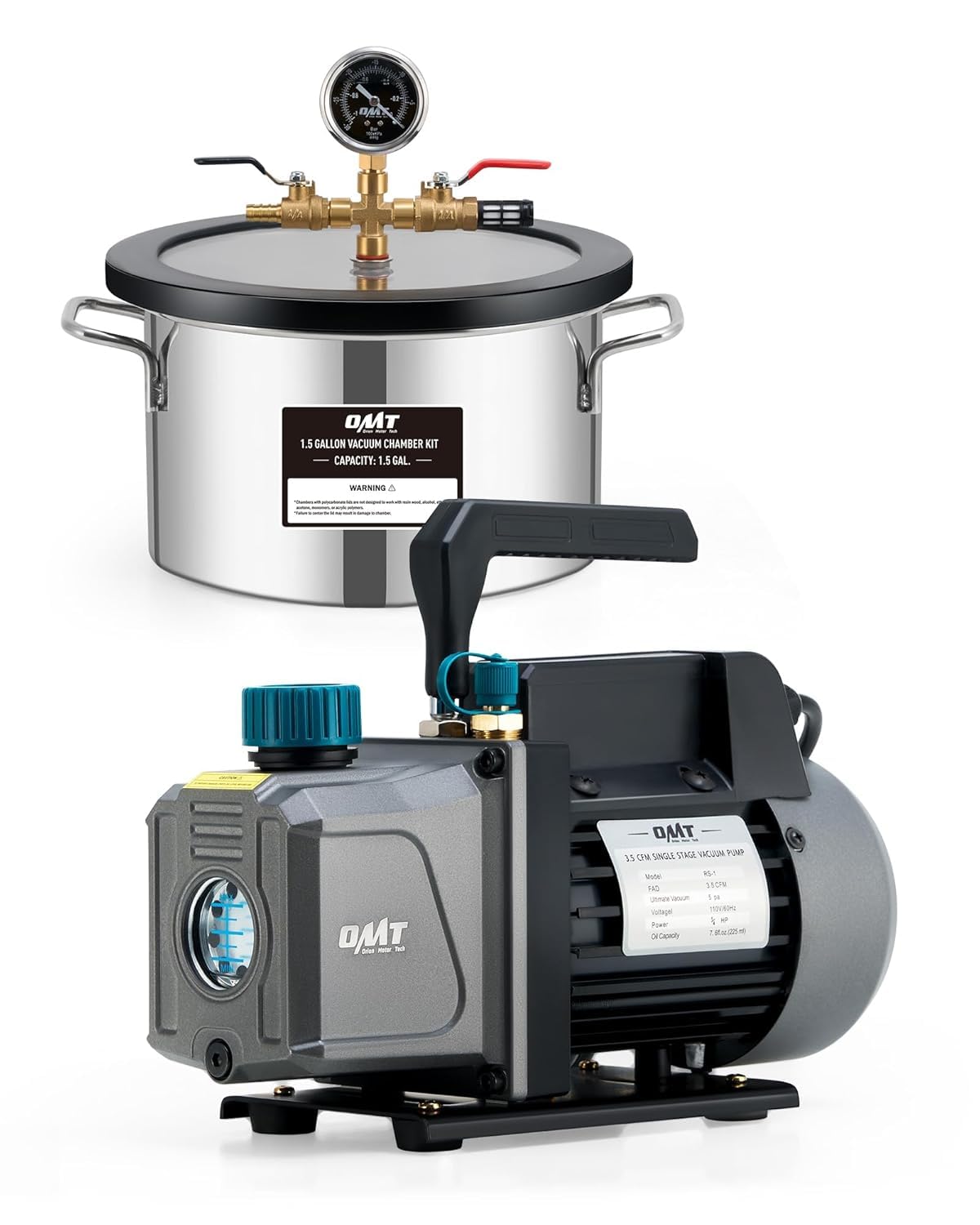
Image: The Orion Motor Tech 3 Gallon Vacuum Chamber and 3.5 CFM 1 Stage Vacuum Pump assembled and ready for operation. This image shows the pump connected to the chamber via a hose, with the gauge attached to the chamber lid.
Operating Instructions (Degassing)
- Place Material: Place the material to be degassed inside the vacuum chamber. Ensure it does not obstruct the vacuum port or the lid's sealing surface.
- Secure Lid: Carefully place the tempered glass lid onto the chamber, ensuring it forms a tight seal with the silicone gasket.
- Close Valves: Ensure both ball valves on the chamber manifold are in the closed position.
- Start Vacuum Pump: Plug in the vacuum pump and turn on its power switch. The pump will begin to run.
- Open Vacuum Valve: Slowly open the ball valve connected to the vacuum pump. You will observe the pressure gauge needle begin to drop, indicating a vacuum is being pulled.
- Monitor Degassing: Observe the material inside the chamber. As the vacuum increases, air bubbles will rise from the material. This is the degassing process.
- Maintain Vacuum: Allow the pump to run until the desired vacuum level is reached and bubbling subsides. The liquid-filled gauge provides easy monitoring.
- Isolate Chamber (Optional): Once the desired vacuum is achieved, you can close the ball valve connected to the pump to isolate the chamber, then turn off the pump. This allows the chamber to hold vacuum independently.
- Release Vacuum: To release the vacuum, slowly open the second ball valve (air release valve) on the chamber manifold. This will allow atmospheric pressure back into the chamber. Do not open too quickly, as this can cause sudden pressure changes.
- Remove Material: Once the pressure gauge reads zero (atmospheric pressure), remove the lid and retrieve your degassed material.
Image: The Orion Motor Tech vacuum chamber in operation, demonstrating the degassing process. The gauge shows the current vacuum level.
Maintenance
Regular maintenance ensures the longevity and optimal performance of your vacuum chamber and pump.
- Vacuum Pump Oil Change:
- Change the vacuum pump oil after the first 10 hours of operation, and then every 20-30 hours of use, or if the oil appears cloudy or discolored.
- Refer to the pump's specific instructions for oil draining and refilling procedures.
- Always use high-quality vacuum pump oil.
- Chamber Cleaning:
- Clean the inside of the stainless steel chamber and the tempered glass lid with a soft cloth and mild, non-abrasive cleaner.
- Ensure the silicone gasket is clean and free of debris to maintain a proper seal.
- Gasket Inspection: Regularly inspect the silicone gasket for cracks, tears, or signs of wear. Replace if damaged to ensure a proper vacuum seal.
- Hose and Fittings: Check the hose and all fittings for any signs of damage or leaks. Replace worn components as necessary.
- Storage: When not in use, store the vacuum chamber and pump in a clean, dry environment, protected from dust and extreme temperatures.
Troubleshooting
| Problem | Possible Cause | Solution |
|---|---|---|
| Pump not starting | No power; faulty switch; motor issue. | Check power connection; ensure switch is ON; contact support if motor is faulty. |
| Cannot achieve full vacuum | Leak in system; insufficient pump oil; worn gasket; faulty gauge. | Check all connections and lid seal; verify pump oil level; inspect/replace gasket; test/replace gauge. |
| Vacuum drops quickly after pump is off | Leak in chamber or connections; air release valve not fully closed. | Inspect chamber, lid, and hose connections for leaks; ensure air release valve is fully closed. |
| Excessive noise or vibration from pump | Low oil level; contaminated oil; pump not on a level surface. | Check and refill oil; change oil; ensure pump is on a stable, level surface. |
Specifications
| Feature | Detail |
|---|---|
| Product Model Number | MPN1VPHV030-N1 |
| Vacuum Pump Flow Rate | 3.5 CFM |
| Vacuum Pump Stage | 1 Stage |
| Vacuum Pump Motor | All-copper |
| Vacuum Chamber Capacity | 3 Gallons |
| Chamber Material | 201 Stainless Steel |
| Chamber Lid Material | Tempered Glass |
| Gasket Material | 1.5 mm Silicone |
| Max Chamber Temperature | Up to 250°F |
| Hose Length | 5 feet |
| Compatible HVAC Hose Sizes | 1/4, 3/8, and 1/2-inch |
| Package Dimensions | 18.2 x 15 x 12.25 inches |
| Item Weight | 23.8 pounds |
| Manufacturer | Orion Motor Tech |
Warranty and Support
Orion Motor Tech products are designed for reliability and performance. For specific warranty details, please refer to the warranty card included with your product or visit the official Orion Motor Tech website.
If you encounter any issues or have questions regarding the operation, maintenance, or troubleshooting of your vacuum chamber and pump, please contact Orion Motor Tech customer support for assistance. Have your model number (MPN1VPHV030-N1) and purchase information ready when contacting support.
Online Support: Visit the Orion Motor Tech Store on Amazon
Ask a question about this manual
Ask about setup, troubleshooting, compatibility, parts, safety, or missing instructions. Manuals+ will review the question and use this page’s manual context to help answer it.