
1. Introduction
Thank you for choosing the QVUUOU Upholstered Bed Frame. This bed frame features a wide velvet headboard, integrated wall sconce lighting, and a convenient USB charging port. This manual provides essential information for safe assembly, operation, maintenance, and troubleshooting to ensure optimal use and longevity of your product.

Image 1.1: Fully assembled QVUUOU Upholstered Bed Frame.
2. Safety Information
- Read all instructions carefully before assembly and use.
- Keep all packaging materials away from children to prevent choking hazards.
- Ensure all fasteners are securely tightened before use. Periodically check and re-tighten as needed.
- Do not use power tools for assembly unless specifically instructed, as this may overtighten and damage components.
- Place the bed frame on a level surface.
- Do not exceed the maximum weight capacity of 600 lbs.
- For electrical components (wall sconce, USB port), ensure proper connection to a suitable power source. Do not overload the USB port.
- Keep liquids away from electrical components.
3. Package Contents
The QVUUOU Upholstered Bed Frame is delivered in two boxes. Carefully unpack all components and verify against the parts list (typically found in the included assembly guide). Ensure all parts are present and undamaged before beginning assembly.
Key included components:
- Upholstered Headboard with integrated Wall Sconce and USB Port
- Upholstered Bed Frame Side Rails
- Upholstered Bed Frame Footboard
- Wooden Support Slats
- Support Legs
- Assembly Hardware (screws, bolts, washers, Allen wrench)
4. Setup and Assembly
Assembly typically requires two adults and takes approximately 40 minutes. Follow the detailed step-by-step instructions provided in the separate assembly guide included with your product. Below is a general overview of the assembly process:
- Prepare the Area: Clear a spacious area for assembly. Lay out all components on a soft, clean surface to prevent scratches.
- Attach Side Rails: Connect the side rails to the headboard and footboard using the provided hardware. Ensure all connections are firm but do not fully tighten until the frame is squared.
- Install Support Legs: Securely attach any central support legs to the frame.
- Place Slats: Distribute and secure the wooden support slats across the bed frame. Ensure they are evenly spaced and properly fastened to provide stable mattress support.
- Final Tightening: Once the entire frame is assembled and squared, go back and fully tighten all bolts and screws.
- Connect Electrical: Plug the power cord for the wall sconce and USB port into a suitable wall outlet.

Image 4.1: View of the bed frame structure with wooden slats and headboard.
5. Operating Instructions
5.1. Adjustable Reading Lamp
The integrated wall sconces on the headboard feature adjustable reading lamps. To operate, locate the switch on the sconce fixture. Press the switch to turn the light on or off. The lamp head can be adjusted to direct light as needed for reading or ambient lighting.
5.2. USB Charging Port
A USB charging port is conveniently located on the headboard. To use, simply plug your USB charging cable into the port and connect your device (e.g., smartphone, tablet). Ensure the bed frame's power cord is plugged into a live electrical outlet for the USB port to function.
6. Maintenance
- Upholstery Care: For the velvet upholstery, gently vacuum regularly to remove dust. For spills, blot immediately with a clean, dry cloth. For stubborn stains, consult a professional upholstery cleaner or use a mild, water-free cleaning solvent designed for velvet. Avoid harsh chemicals or excessive moisture.
- Frame Care: Wipe the bed frame with a soft, damp cloth. Avoid abrasive cleaners.
- Fastener Check: Periodically (e.g., every 3-6 months) check all bolts and screws and re-tighten them to ensure the bed frame remains stable and secure.
- Electrical Components: Ensure the power cord is not pinched or damaged. Do not attempt to repair electrical components yourself; contact a qualified technician if issues arise.
7. Troubleshooting
| Problem | Possible Cause | Solution |
|---|---|---|
| Bed frame is wobbly or squeaks. | Loose fasteners; uneven floor; damaged slats. | Check and tighten all bolts and screws. Ensure the bed is on a level surface. Inspect slats for damage and replace if necessary. |
| Reading lamp does not turn on. | Power cord not plugged in; faulty switch; bulb issue (if replaceable). | Ensure the power cord is securely plugged into a live outlet. Check the lamp's switch. If the bulb is replaceable, check or replace it. |
| USB port is not charging devices. | Power cord not plugged in; device cable issue; overloaded port. | Verify the bed frame's power cord is connected. Try a different USB cable or device. Ensure the port is not overloaded by multiple high-power devices. |
8. Specifications
| Feature | Detail |
|---|---|
| Model Number | N757Q200046G-1 |
| Product Dimensions (L x W x H) | 85.43" x 80.71" x 46.06" |
| Color | Gray |
| Material | Foam, Plywood, Velvet |
| Item Weight | 117.94 Pounds |
| Maximum Weight Capacity | 600 lbs |
| Recommended Mattress Thickness | 10" - 14" |
| Special Features | Upholstered Bed Frame, Adjustable Reading Lamp, USB Port |
| Assembly Required | Yes |
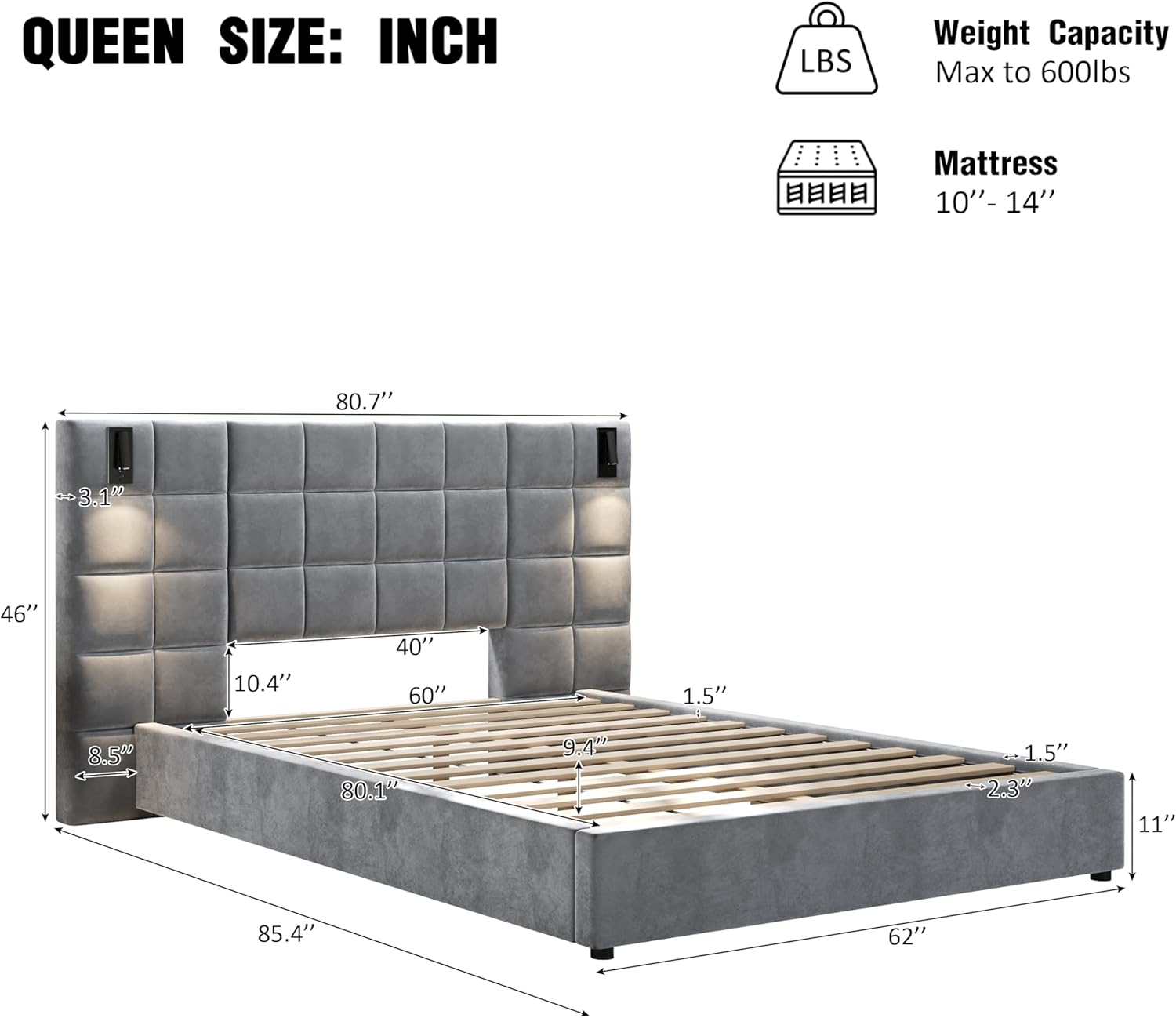
Image 8.1: Detailed dimensions for the Queen size bed frame.
9. Warranty and Support
For warranty information or if you require assistance with your QVUUOU Upholstered Bed Frame, please refer to the warranty card included with your purchase or contact QVUUOU customer support directly. Contact details can typically be found on the product packaging or the brand's official website.
When contacting support, please have your model number (N757Q200046G-1) and purchase date readily available.