
1. Introduction
This manual provides essential information for the proper installation, operation, and maintenance of the KEYAYEYA Compatible for TAMAGAWA Encoder models TS6014N135 and TS6014N138. Please read this manual thoroughly before using the product to ensure safe and efficient operation. This encoder is designed for industrial applications requiring precise position sensing.
2. Product Overview
The KEYAYEYA Compatible for TAMAGAWA Encoder is an industrial-grade rotary encoder designed to provide accurate feedback for motion control systems. It is compatible with TAMAGAWA encoder models TS6014N135 and TS6014N138, offering a reliable solution for various industrial applications.
Key Features:
- High compatibility with TAMAGAWA encoder systems.
- Designed for precise position and speed feedback.
- Robust construction suitable for industrial environments.
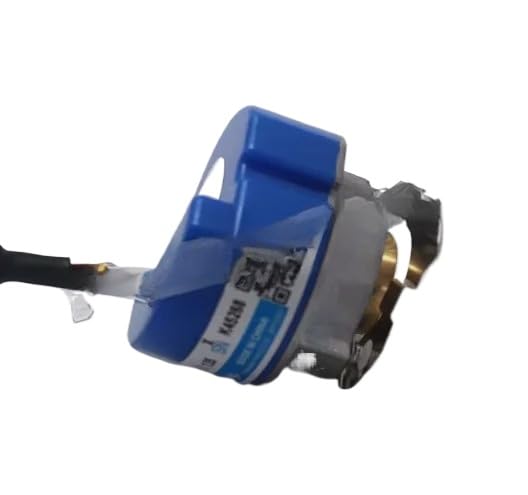
Figure 1: Image of the KEYAYEYA Compatible for TAMAGAWA Encoder TS6014N135. This image displays the general appearance of the industrial rotary encoder, including its housing and connection interface.
3. Setup and Installation
Proper installation is crucial for the accurate and reliable operation of the encoder. Ensure all safety precautions are followed during installation.
3.1 Safety Precautions
- Disconnect all power to the system before installation or maintenance.
- Wear appropriate personal protective equipment (PPE).
- Ensure the mounting surface is clean, stable, and free from vibrations.
3.2 Mounting the Encoder
- Identify the correct mounting position on the machine or motor shaft.
- Securely attach the encoder using appropriate fasteners. Ensure the shaft coupling is properly aligned to prevent stress on the encoder bearings.
- Avoid excessive force during mounting to prevent damage to the encoder or its internal components.
3.3 Electrical Connections
Refer to the wiring diagram provided with your specific system for detailed connection instructions. General guidelines include:
- Connect the power supply (VCC) and ground (GND) according to the specified voltage range.
- Connect the output signals (A, B, Z, and their inverted counterparts if applicable) to the control system's input terminals.
- Ensure all connections are secure and properly insulated to prevent short circuits or signal interference.
- Verify correct polarity before applying power.
4. Operating Instructions
Once installed and connected, the encoder operates by converting rotational motion into electrical signals, which are then interpreted by a control system (e.g., PLC, motor controller).
4.1 Initial Power-Up
- After completing all electrical connections, apply power to the system.
- Observe the control system's feedback to confirm the encoder is providing valid signals.
- If the system includes diagnostic indicators, check for any error codes or warnings.
4.2 Signal Interpretation
The encoder typically outputs quadrature signals (A and B phases) for direction and position, and an index pulse (Z phase) for a reference point. Your control system's software will interpret these signals to determine position, speed, and direction of rotation.
- A/B Phases: Used for incremental position tracking and direction sensing.
- Z Phase (Index): Provides a single pulse per revolution for absolute position referencing.
5. Maintenance
The KEYAYEYA Compatible for TAMAGAWA Encoder is designed for minimal maintenance. However, periodic checks can help ensure long-term reliability.
5.1 Routine Inspection
- Visual Check: Periodically inspect the encoder for any signs of physical damage, loose connections, or excessive dirt/debris accumulation.
- Cable Integrity: Ensure all cables are securely connected and free from cuts, abrasions, or kinks.
- Mounting Security: Verify that the encoder remains securely mounted and that the shaft coupling is intact and free from play.
5.2 Cleaning
If cleaning is necessary, use a soft, dry cloth. Avoid using harsh chemicals or abrasive materials that could damage the encoder's housing or seals.
6. Troubleshooting
This section provides guidance for common issues that may arise during the operation of the encoder.
| Problem | Possible Cause | Solution |
|---|---|---|
| No signal output or incorrect readings. |
|
|
| Intermittent signal or noisy output. |
|
|
| Incorrect direction of rotation. |
|
|
7. Specifications
The following specifications apply to the KEYAYEYA Compatible for TAMAGAWA Encoder models TS6014N135 and TS6014N138.
| Parameter | Value |
|---|---|
| Model Compatibility | TAMAGAWA Encoder TS6014N135, TS6014N138 |
| Package Dimensions | 1 x 1 x 1 inches |
| Item Weight | 4.4 pounds |
| Manufacturer | Original manufacturer (KEYAYEYA) |
| ASIN | B0G6DFBPPB |
| First Available Date | December 11, 2025 |
8. Warranty and Support
This product is backed by a limited warranty and customer support to ensure your satisfaction.
- Warranty: The product is covered by a one-year limited warranty from the date of purchase. This warranty covers manufacturing defects under normal use.
- Technical Support: If you have any questions regarding your model, installation, or operation, please contact the seller for assistance.