
Introduction
This manual provides essential instructions for the safe and efficient operation, setup, and maintenance of your Rclithum 48V 18A Lithium Battery Charger. Please read this manual thoroughly before using the product to ensure proper function and to prevent damage or injury.
Safety Instructions
- Always connect the charger to the battery before plugging it into an AC power outlet.
- Ensure the charger is compatible with your battery type (Lithium Iron Phosphate - LiFePO4).
- Do not charge non-rechargeable batteries.
- Operate the charger in a well-ventilated area.
- Avoid exposing the charger to rain or excessive moisture, despite its IP65 rating.
- Do not disassemble the charger. Refer all servicing to qualified personnel.
- Keep out of reach of children.
- Disconnect the AC power before disconnecting the charger from the battery.
Product Overview
The Rclithum 48V 18A Lithium Battery Charger is designed for efficient and fast charging of 48V LiFePO4 batteries, including those used in golf carts, boats, and marine applications. It features a cooling fan for optimal performance and an IP65 waterproof rating for durability. This charger also includes a battery activation function for batteries under BMS protection.
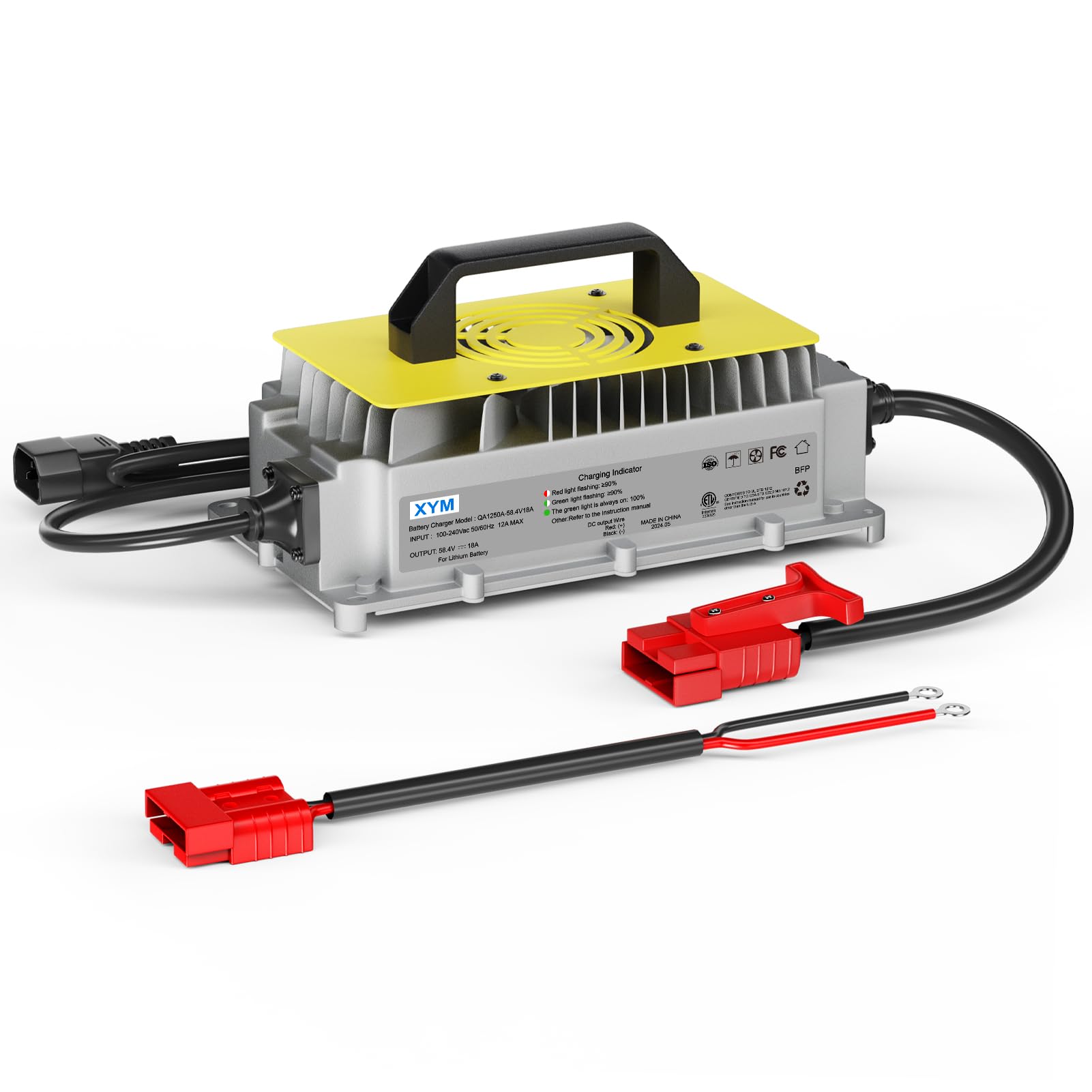
Image Description: The Rclithum 48V 18A Lithium Battery Charger (labeled XYM) is shown connected to a large 51.2V 150Ah LiFePO4 battery. The charger is plugged into a standard wall outlet. The image highlights the charger's ability to activate batteries under BMS protection, indicating it's not just for charging but also for battery management.
Setup
- Unpack the Charger: Carefully remove the charger and all accessories from the packaging. Inspect for any signs of damage.
- Position the Charger: Place the charger on a stable, flat surface in a well-ventilated area, away from direct sunlight, heat sources, and flammable materials.
- Connect to Battery:
- Ensure the battery is a 48V Lithium Iron Phosphate (LiFePO4) type.
- Connect the charger's positive (+) output cable (red) to the battery's positive (+) terminal.
- Connect the charger's negative (-) output cable (black) to the battery's negative (-) terminal.
- Ensure connections are secure and free from corrosion.
- Connect to AC Power: Plug the charger's AC power cord into a standard wall outlet (100-240V AC, 50/60Hz).
- The charger will automatically begin the charging process.
Operating Instructions
Once properly connected, the charger will automatically detect the battery status and initiate the appropriate charging cycle. The charging indicator lights will provide status updates:
- Red Light: Indicates charging in progress.
- Green Light: Indicates charging is complete or the charger is in standby mode (not connected to a battery or battery fully charged).
- Flashing Red/Green: May indicate an error or fault condition. Refer to the Troubleshooting section.
The charger is designed to activate batteries that are under BMS (Battery Management System) protection, allowing them to be charged even if they have entered a low-voltage cutoff state.
When charging is complete, disconnect the AC power cord from the wall outlet first, then disconnect the charger from the battery terminals.
Maintenance
- Cleaning: Wipe the charger's exterior with a soft, dry cloth. Do not use harsh chemicals or abrasive cleaners.
- Storage: Store the charger in a cool, dry place when not in use. Keep it away from extreme temperatures and direct sunlight.
- Cable Inspection: Regularly inspect the power cord and output cables for any signs of damage, fraying, or exposed wires. Replace if damaged.
- Ventilation: Ensure the cooling fan vents are clear of dust and debris to maintain proper airflow.
Troubleshooting
| Problem | Possible Cause | Solution |
|---|---|---|
| Charger not turning on. | No AC power; faulty power cord; internal fault. | Check AC outlet and power cord connection. Try a different outlet. If problem persists, contact support. |
| Red light not illuminating when connected to battery. | Poor battery connection; battery fully charged; battery fault; incorrect battery type. | Ensure secure connections. Verify battery voltage and type. If battery is fully charged, green light should be on. |
| Charger gets excessively hot. | Poor ventilation; overloaded charger; internal fault. | Ensure adequate ventilation. Check if the battery capacity is within the charger's recommended range. Discontinue use and contact support if overheating persists. |
| Flashing Red/Green indicator. | Battery fault; short circuit; reverse polarity. | Disconnect immediately. Check battery for damage. Verify correct polarity. If issue persists, contact support. |
Specifications
- Brand: Rclithum
- Model: 48V 18A Lithium Battery Charger
- Input Voltage: 100-240V AC, 50/60Hz
- Output Voltage: 58.4 Volts (for 48V LiFePO4 batteries)
- Output Current: 18 Amps
- Battery Type: Lithium Iron Phosphate (LiFePO4)
- Dimensions (D x W x H): 5.31" x 7.76" x 12.4"
- Waterproof Rating: IP65
- Features: Cooling Fan, BMS Protection Activation
- UPC: 757158494136
- ASIN: B0G6D2WGWH
Warranty and Support
This Rclithum product comes with a 2-year warranty from the date of purchase. This warranty covers manufacturing defects and workmanship under normal use.
For technical support, warranty claims, or service inquiries, please contact Rclithum customer service through the retailer where the product was purchased or refer to the official Rclithum website for contact information.
Please have your model number (48V 18A Lithium Battery Charger) and proof of purchase available when contacting support.