
MUJERBAY JN-S800
MUJERBAY 12Kpa Portable Spot & Stain Cleaner Shampooer Instruction Manual
Model: JN-S800
1. Important Safety Instructions
Please read and understand all safety instructions before using the MUJERBAY 12Kpa Portable Spot & Stain Cleaner. Failure to follow these instructions may result in electric shock, fire, or serious injury.
- Always disconnect the appliance from the power supply before cleaning or performing maintenance.
- Do not immerse the appliance in water or other liquids.
- Use only MUJERBAY recommended cleaning solutions. Other solutions may cause excessive foaming or damage the appliance.
- Keep hair, loose clothing, fingers, and all parts of the body away from openings and moving parts.
- Do not use the appliance to pick up flammable or combustible liquids, such as gasoline, or use in areas where they may be present.
- Do not pick up anything that is burning or smoking, such as cigarettes, matches, or hot ashes.
- Do not use without tanks in place.
- Store the appliance indoors in a dry place.
2. Package Contents
Verify that all items are included in your package:
- MUJERBAY 12Kpa Portable Spot & Stain Cleaner Main Unit
- Flexible Hose (4ft)
- Water Sucker with Stiff Brush
- Right-angled Water Sucker (T-shape Brush for Gap Cleaning)
- Cleaning Solution Sample
- User Manual

Image: The main MUJERBAY 12Kpa Portable Spot & Stain Cleaner unit with its flexible hose, various cleaning attachments, and power cord.
3. Product Overview
Key Features:
- Powerful 12Kpa Suction: Ensures deep cleaning and effective stain removal.
- Universal Wheels & Handle: Provides 360° maneuverability and portability.
- Separate Water Tanks: 57.5oz clean water tank and 20.5oz sewage tank for hygienic operation.
- One-touch Self-Cleaning: Simplifies maintenance and prevents odors.
- Versatile Cleaning Tools: Includes a water sucker with stiff brush for deep cleaning and a right-angled water sucker for hard-to-reach areas.
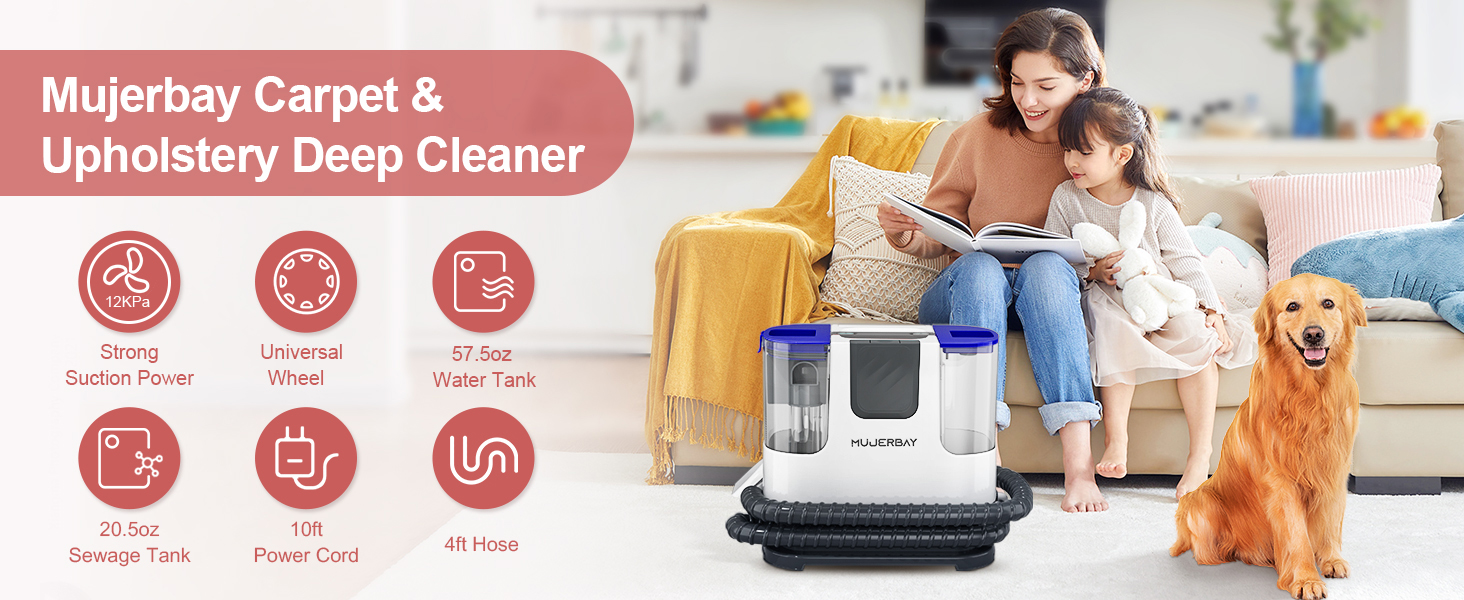
Image: A visual representation highlighting the upgraded 12Kpa strong suction power of the cleaner, designed for permanently removing tough stains.

Image: The cleaner unit featuring 360° omni-directional wheels and a handle, illustrating its easy maneuverability and portability for home cleaning tasks.

Image: Close-up of the unique deep cleaning brush and a T-shape brush, ideal for tackling difficult-to-clean areas on various surfaces like car interiors and upholstery.
4. Setup
Filling the Clean Water Tank:
- Remove the clean water tank (57.5oz capacity) from the main unit.
- Unscrew the cap and fill the tank with warm water (max 140°F/60°C) up to the indicated fill line.
- Add the recommended amount of MUJERBAY cleaning solution to the tank. The cleaning agent ratio is typically 1:30.
- Securely screw the cap back on and place the clean water tank back onto the main unit.

Image: A hand pouring water directly into the clean water tank, demonstrating the easy top-filling design of the unit.
Attaching the Hose and Tools:
- Connect the flexible hose to the designated port on the main unit until it clicks securely into place.
- Attach the desired cleaning tool (water sucker with stiff brush or right-angled water sucker) to the end of the hose.
Video: A demonstration of the carpet cleaner machine, showing how to set it up, fill the tanks, and attach the cleaning tools before beginning the cleaning process.
5. Operating Instructions
General Cleaning Process:
- Plug the power cord into a grounded electrical outlet.
- Press the power button on the main unit to turn on the cleaner.
- Point the cleaning tool at the stained area. Press the spray trigger on the handle to apply cleaning solution.
- Gently scrub the stained area with the brush on the cleaning tool.
- Release the spray trigger and tilt the cleaning tool to engage the suction function, lifting the dirty solution from the surface.
- Repeat steps 3-5 until the stain is removed and the area is as dry as possible.

Image: A three-panel graphic illustrating the simple three-step operation: Spray the cleaning solution, Scrub the stain, and Suction the dirty liquid.
Applications:
The MUJERBAY Spot & Stain Cleaner is suitable for various surfaces:
- Upholstery: Couches, chairs, mattresses.
- Carpets & Rugs: Spot cleaning on area rugs and wall-to-wall carpets.
- Stairs: Easily reaches carpeted stairs.
- Car Interiors: Seats, floor mats, and other fabric surfaces in vehicles.

Image: A collage showing the cleaner effectively tackling various messes on different surfaces, including tissue crumbs, sofa gaps, carpets, car interiors, stairs, and curtains.

Image: Demonstrations of the cleaner being used to refresh a car's interior, showing its application on car seats, air conditioning vents, and car roofs.
Video: A detailed video showcasing the upholstery cleaner in action, highlighting its universal wheels, self-cleaning function, and effectiveness on various surfaces.
6. Maintenance
Emptying the Sewage Tank:
- When the sewage tank (20.5oz capacity) reaches the MAX fill line, the machine's suction power may decrease or stop.
- Carefully remove the sewage tank from the main unit.
- Pour out the dirty water into a sink or drain.
- Rinse the tank thoroughly with clean water before reattaching it to the main unit.

Image: A close-up of the sewage tank indicating the 'MAX' fill line, with a finger pointing to it, reminding users to empty the tank when full to maintain suction.
One-touch Auto Self-cleaning:
The self-cleaning function helps maintain the cleanliness of the brush and hose, preventing odors and secondary pollution.
- After each use, ensure the clean water tank has sufficient water.
- Attach the cleaning tool to the self-cleaning port (if available, or follow manual instructions for hose cleaning).
- Activate the self-cleaning function (refer to the main unit's controls). The machine will flush clean water through the hose and brush, then suction it into the dirty water tank.
- Empty the dirty water tank after the self-cleaning cycle is complete.

Image: A visual comparison showing the cleaning tool and hose 'Before' and 'After' using the one-touch auto self-cleaning function, highlighting its effectiveness in reducing cleaning troubles.
7. Troubleshooting
If you encounter any issues with your MUJERBAY Spot & Stain Cleaner, please refer to the table below for common problems and solutions:
| Problem | Possible Cause | Solution |
|---|---|---|
| No suction or weak suction | Sewage tank is full; Hose or nozzle is clogged; Tank not properly seated. | Empty the sewage tank; Check and clear any blockages in the hose or nozzle; Ensure tanks are securely in place. |
| No spray or inconsistent spray | Clean water tank is empty; Spray nozzle is clogged; Tank not properly seated. | Refill the clean water tank; Clean the spray nozzle; Ensure tanks are securely in place. |
| Machine leaks water | Tanks not properly sealed; Hose connection is loose. | Check that tank caps are tight and tanks are seated correctly; Ensure hose is firmly connected. |
| Unpleasant odor from machine | Dirty water left in tank; Hose/brush not cleaned. | Empty and rinse sewage tank immediately after use; Perform one-touch auto self-cleaning. |
8. Specifications
| Feature | Detail |
|---|---|
| Model Name | JN-S800 |
| Product Dimensions | 12.9"D x 7.5"W x 17.5"H |
| Item Weight | 10.4 Pounds |
| Suction Power | 12Kpa |
| Clean Water Tank Capacity | 57.5 oz |
| Sewage Tank Capacity | 20.5 oz |
| Hose Length | 4 ft |
| Power Cord Length | 10 ft |
9. Warranty and Support
MUJERBAY is committed to providing high-quality products and excellent customer service. We have a professional product and quality team dedicated to researching and solving problems encountered in daily life.
Pro Service: If you encounter any problems with your MUJERBAY Spot & Stain Cleaner, please feel free to contact us via Amazon. Problems will be solved within 2 working days.
We offer comprehensive after-sales support. No matter what opinions or questions you have, please let us know, and we will reply to you as soon as possible.
Related Documents - JN-S800
 |
Wind and Solar Hybrid Series Solar Controller: Product Manual & User Guide Comprehensive product manual for the Wind and Solar Hybrid Series Solar Controller. Details safety, features, installation, operation, maintenance, and technical specifications for efficient wind and solar energy management in off-grid systems. |
 |
JN516x-EK004 Evaluation Kit User Guide This comprehensive user guide introduces the NXP JN516x-EK004 ZigBee Evaluation Kit, designed around the JN516x family of wireless microcontrollers. It details how to set up and run the pre-loaded ZigBee Smart Home Demonstration, explore supported wireless network protocols like IEEE 802.15.4 and ZigBee PRO, and understand IoT connectivity. The guide also provides resources for developing custom JN516x applications. |
 |
iSunergy Wind and Solar Hybrid Solar Controller: Product Manual and Specifications Comprehensive product manual for the iSunergy Wind and Solar Hybrid Series Solar Controller, detailing features, installation, operation, safety guidelines, troubleshooting, technical specifications, and warranty information. |
 |
VEVOR Artificial Plant Wall Installation and Safety Guide Detailed instructions for installing VEVOR Artificial Plant Walls, including technical parameters, safety precautions, and assembly methods for various surfaces like drywall, wood, concrete, brick, block, metal, and aluminum. |
 |
VEVOR Artificial Plant Wall - Installation and Technical Guide This document provides installation instructions, technical parameters, and safety precautions for VEVOR Artificial Plant Walls. It covers various models and mounting methods for different surfaces, ensuring proper setup and use. |
 |
VEVOR Artificial Ferns - Model JN-JL/G/DL Series User Manual Comprehensive user manual for VEVOR Artificial Ferns, Model JN-JL/G/DL Series. Includes setup, safety guidelines, product care, and model specifications for easy maintenance and optimal display. |
Ask a question about this manual
Ask about setup, troubleshooting, compatibility, parts, safety, or missing instructions. Manuals+ will review the question and use this page’s manual context to help answer it.