
Introduction
This manual provides detailed instructions for the setup, operation, and maintenance of your JPHYLL 2.2 Gallon Aquarium Fish Tank Starter Kit. Designed for small fish, shrimp, or betta, this kit includes a 3-in-1 silent pump, 7-color LED light, and a temperature display for optimal aquatic environment management. Please read these instructions thoroughly before use to ensure proper functioning and the well-being of your aquatic pets.
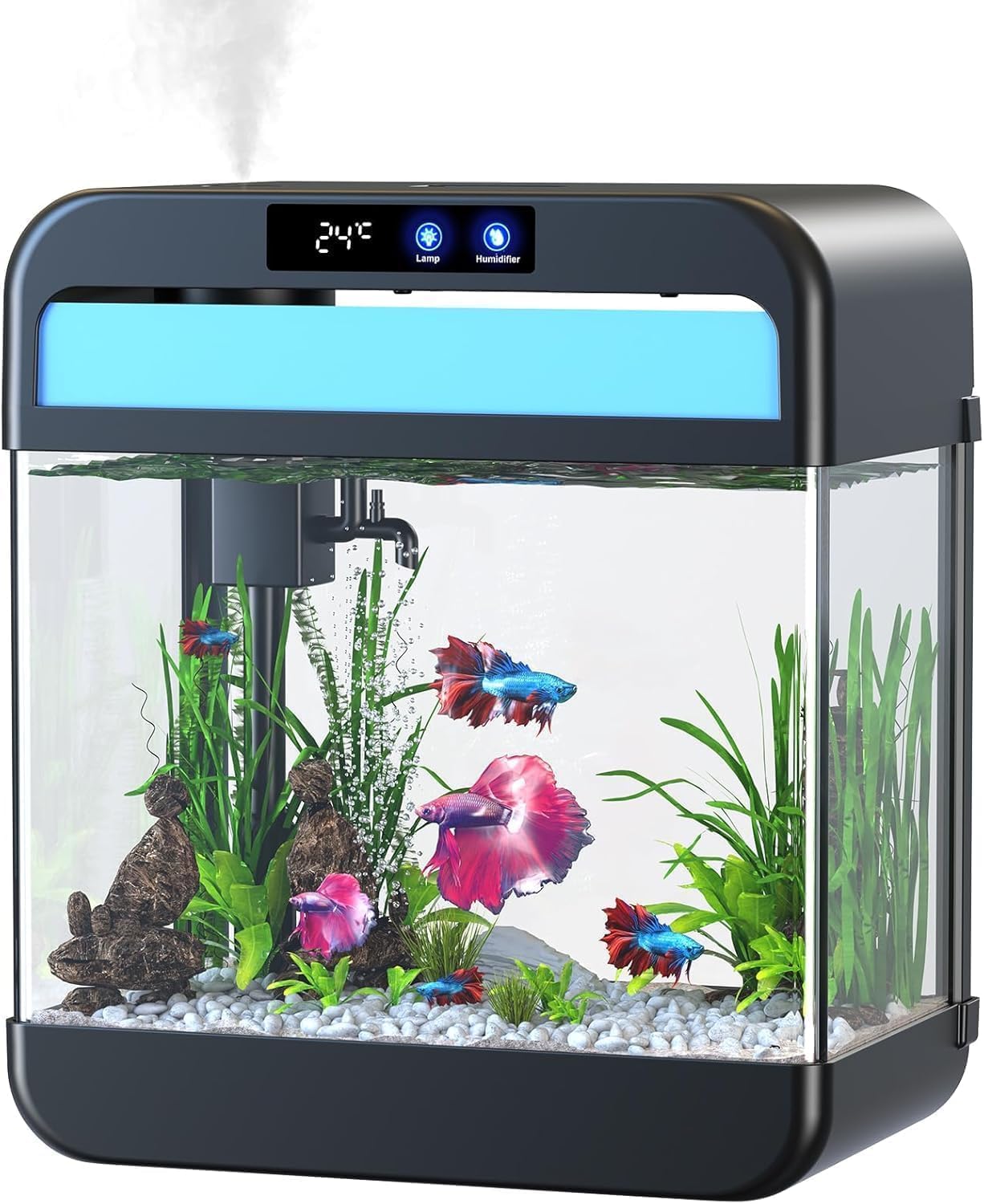
Image: Main view of the JPHYLL 2.2 Gallon Fish Tank, showcasing its compact design and integrated features.
Package Contents
Verify that all items listed below are included in your package. If any parts are missing or damaged, please contact customer support.

Image: Overview of the JPHYLL 2.2 Gallon Fish Tank Starter Kit package contents, including the tank, pump, decorations, and accessories.
- Fish Tank with Lamp Beads
- Plastic Plant Decoration (x3)
- Water Pump Accessories
- Removable PVC Board
- Humidification Kettle
- Filter Sponge
- Oxygen Tube
- USB Adapter
- User Manual
Setup Instructions
- Unpacking and Inspection: Carefully remove all components from the packaging. Inspect the tank and all accessories for any signs of damage.
- Rinsing Components: Rinse the tank, plastic plants, and any other decorations with clean water. Do not use soap or detergents, as these can be harmful to fish.
- Pump Assembly: Assemble the 3-in-1 silent pump according to the diagram in the user manual. Ensure all connections are secure.

Image: Detailed view of the 3-in-1 silent pump components and assembly steps.
- Filter Installation: Place the filter sponge into the designated filter box within the tank's lid assembly.
- Water Filling: Place the tank on a stable, level surface. Carefully fill the tank with dechlorinated water, leaving a small gap from the top.

Image: Front view of the JPHYLL 2.2 Gallon Fish Tank, showing the internal filtration system and water level.
- Decoration Placement: Arrange the plastic plant decorations and any other aquarium-safe ornaments as desired.
- Power Connection: Connect the USB adapter to the tank and plug it into a power outlet.
- Water Cycling: Allow the tank to run for several days before introducing fish to establish a stable aquatic environment.
Operating Instructions
LED Light Control
The tank features a 7-color LED light system. Use the dedicated button on the smart display screen to cycle through different colors and lighting modes. A long press on the button allows you to adjust the brightness (10%, 50%, 100%).

Image: Smart display screen showing temperature, lamp, humidifier, and pump controls, with an illustration of 7-color looping and individual color options for the LED light.
Humidifier Control
The integrated humidifier can be controlled via the smart display. Press the humidifier button to select different spray intervals (P1: 3s intervals, P2: 2s intervals, P3: Continuous spraying). The humidifier has a separate water reservoir, allowing for the safe addition of aromatherapy liquids without affecting the tank water.

Image: Detailed view of the smart display screen, highlighting the water temperature display, aromatherapy humidifier control, and various humidifier spray interval settings (P1, P2, P3).
Pump and Filtration System
The 3-in-1 silent pump provides self-circulating filtration, aeration, and anti-suction water inlet features. The pump ensures clean and oxygenated water for your aquatic environment. The adjustable air valve allows you to control the amount of air bubbles in the tank.
Image: Diagram illustrating the self-cleaning silent submersible pump with features like anti-suction water inlet, rainfall filtration, aeration, and adjustable air valve.
Temperature Display
The smart display screen shows the current water temperature, allowing you to monitor the environment for your fish. Ensure the temperature is suitable for your specific aquatic species.
Maintenance
Regular Water Changes
Perform partial water changes regularly (e.g., 25% weekly) to maintain water quality. Use a siphon to remove old water and replace it with fresh, dechlorinated water of a similar temperature.
Video: An official seller video demonstrating the setup and water change process for the JPHYLL 2.2 Gallon Fish Tank Aquarium. This video shows how to assemble the pump, fill the tank, add decorations, and perform water removal.
Filter Cleaning
Rinse the filter sponge with old tank water during water changes to remove accumulated debris. Replace the filter sponge every 2-4 weeks, or as needed, to ensure effective filtration.
Tank Cleaning
Wipe down the inside and outside of the tank with a soft cloth to remove algae or water spots. Avoid using harsh chemicals.
Troubleshooting
- Pump Not Working:
- Check if the power adapter is securely plugged in.
- Ensure the pump is fully submerged in water.
- Clean the pump impeller for any blockages.
- LED Lights Not Functioning:
- Verify power connection.
- Press the lamp button on the smart display to cycle through modes or turn on.
- Humidifier Not Producing Mist:
- Ensure the humidifier reservoir is filled with water.
- Check for any blockages in the mist outlet.
- Water Quality Issues (Cloudy Water, Odor):
- Perform a partial water change.
- Clean or replace the filter sponge.
- Avoid overfeeding fish.
Specifications
| Brand | JPHYLL |
| Model Name | Fish Tank 2.2 Gallon (Model 288-Smart) |
| Tank Volume | 2.2 Gallons (Imperial Gallons) |
| Material | Glass |
| Item Weight | 7.06 pounds (3.21 Kilograms) |
| Item Package Dimensions (L x W x H) | 14.37 x 12.8 x 7.99 inches |
| Special Features | 3-in-1 Silent Pump, 7-Color LED Light, Temperature Display, Humidifier, Transparent |
| Included Components | Fish Tank, Plastic Plant Decorations, Water Pump Accessories, Removable PVC Board, Humidification Kettle, Filter Sponge, Oxygen Tube, USB Adapter, User Manual |
| Target Audience | Fish, Shrimp, Betta |

Image: Diagram showing the product details and dimensions of the JPHYLL 2.2 Gallon Fish Tank, including components like the smart display, energy-saving lamp beads, humidification bottle, sponge filter box, and non-slip elevated base.
Warranty and Support
For warranty information or technical support, please refer to the contact details provided in your product packaging or visit the official JPHYLL website. Keep your purchase receipt as proof of purchase for any warranty claims.