
1. Introduction
This manual provides instructions for the Kinetijy Flip Cover Phone Case, designed for the easiphone Easyphone Smart 1, which includes a tempered glass screen protector. This case offers comprehensive protection, convenience features, and a unique luminous effect.

Image 1.1: Overview of the Kinetijy Flip Cover Phone Case, showcasing its wallet design, adjustable kickstand, RFID blocking capabilities, and magnetic closure.
2. Package Contents
Please verify that all items are present in the package:
- 1 x Kinetijy Flip Cover Phone Case (LPT-ZSH)
- 1 x Tempered Glass Screen Protector
3. Setup and Installation
3.1 Installing the Phone Case
- Ensure your easiphone Easyphone Smart 1 is clean and free of dust.
- Gently align your phone with the case, starting with one side.
- Press the phone firmly into the case until it is securely seated. Ensure all buttons and ports are accessible and aligned correctly.
3.2 Applying the Tempered Glass Screen Protector

Image 3.1: Features of the included tempered glass screen protector, including its hardness, shatterproof design, transparency, adhesion, case compatibility, and anti-fingerprint properties.
- Clean the Screen: Use an alcohol wipe (not included) to thoroughly clean your phone's screen. Remove any dust or smudges.
- Dry the Screen: Use a microfiber cloth (not included) to dry the screen completely. Ensure no lint or dust remains.
- Peel Off Protective Layer: Carefully peel off the protective film from the adhesive side of the tempered glass screen protector. Avoid touching the adhesive surface.
- Align the Protector: Align the screen protector with your phone's screen, paying attention to the cutouts for the speaker, camera, and home button (if applicable).
- Apply: Once aligned, gently lower the protector onto the screen. It will adhere automatically.
- Remove Bubbles: If any bubbles appear, gently push them towards the edges of the screen using a clean cloth or a plastic card.
Caution: Ensure the screen is completely clean before application to prevent dust bubbles. Avoid repositioning the protector multiple times as this can reduce adhesion.
4. Operating Instructions
4.1 Using the Wallet Design and Magnetic Closure

Image 4.1: The magnetic closure mechanism of the Kinetijy phone case, ensuring the cover remains securely closed.
- The flip cover features integrated card slots and a larger pocket for cash or additional cards. Insert your cards and money into the designated slots.
- To secure the case, simply close the front flap. The integrated magnetic closure will automatically engage, keeping the cover closed and protecting your phone screen and contents.
4.2 Adjustable Kickstand Function

Image 4.2: Demonstration of the adjustable kickstand, allowing for hands-free viewing of content on the phone.
To use the kickstand feature, gently fold the back of the case to create a triangular stand. This allows you to prop your phone horizontally for hands-free viewing of videos, video calls, or other media.
4.3 RFID Blocking Protection
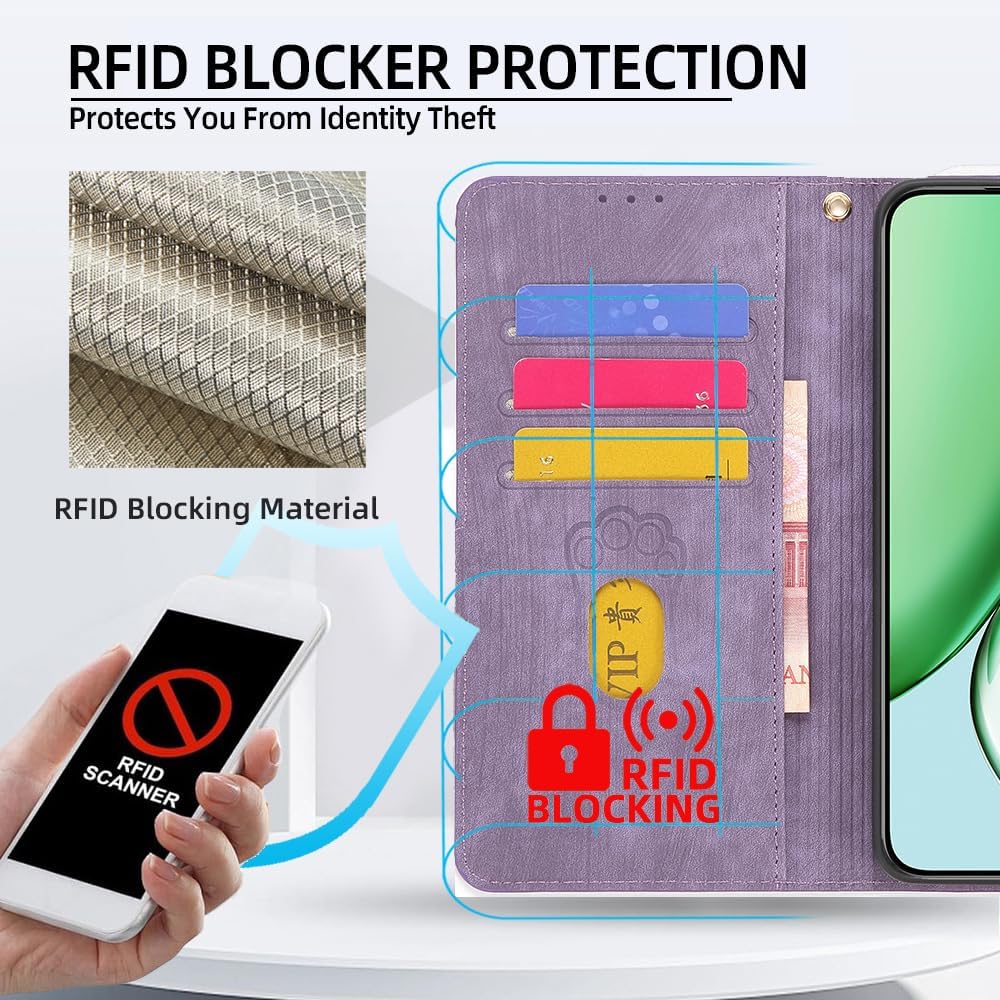
Image 4.3: Visual representation of the RFID blocking material integrated into the case, designed to protect personal information on cards from electronic theft.
The case is equipped with advanced RFID blocking technology. This feature helps to protect your credit cards and other RFID-enabled cards stored in the wallet slots from unauthorized scanning and electronic pickpocketing.
4.4 Luminous Effect

Image 4.4: The luminous effect of the phone case, demonstrating how it glows in the dark after exposure to light.
The case features a luminous effect. After absorbing light from natural sunlight or artificial light sources, the case will emit a soft glow in dark environments. The intensity and duration of the glow depend on the amount and duration of light exposure.
5. Maintenance and Care
- Cleaning the Case: Wipe the PU leather surface with a soft, damp cloth. Avoid using harsh chemicals or abrasive cleaners, as these can damage the material.
- Cleaning the Screen Protector: Use a microfiber cloth to gently wipe the screen protector to remove fingerprints and smudges. For stubborn marks, a screen cleaner spray (not included) designed for electronics can be used.
- Avoid Extreme Conditions: Do not expose the case to extreme temperatures, direct sunlight for prolonged periods, or excessive moisture.
- Prevent Scratches: While the case and screen protector offer protection, avoid placing your phone with sharp objects to prevent unnecessary scratches.
6. Troubleshooting
- Case Not Fitting Properly: Ensure you have the correct model of phone (easiphone Easyphone Smart 1). Gently re-align and press the phone into the case.
- Screen Protector Bubbles: Small bubbles can often be pushed out to the edges with a soft cloth. If large bubbles persist after initial application, it may be due to dust. Re-application is not recommended as it can compromise adhesion.
- Magnetic Closure Not Holding: Check if there are too many cards or items in the wallet section, which might prevent the magnet from engaging properly. Remove excess items if necessary.
- Luminous Effect Not Visible: Ensure the case has been exposed to sufficient light (sunlight or artificial light) for a period of time to charge its luminous properties.
7. Specifications
| Brand | Kinetijy |
| Compatible Phone Models | easiphone Easyphone Smart 1 |
| Model / Color Identifier | LPT-ZSH |
| Material | Polyurethane (PU Leather) |
| Form Factor | Flip Stand |
| Additional Features | Card insertion, Stash the change, Stylish design, RFID Blocking, Luminous Effect, Magnetic Closure, Adjustable Kickstand |
| Item Dimensions | 0.39 x 0.39 x 0.39 inches (Approximate) |
| Included Components | 1 Phone Case, 1 Tempered Glass Screen Protector |
8. Warranty and Support
For warranty information or product support, please refer to the retailer's return policy or contact the seller directly through the platform where the product was purchased. Keep your purchase receipt for any warranty claims.