
1. Introduction
The HotRC DS800 is an 8-channel 2.4GHz FHSS radio control system designed for various RC models including cars, boats, and tanks. It features a 2.0-inch color touch screen for intuitive operation, a built-in rechargeable battery, and advanced functions such as voltage telemetry, cruise control, and 4-wheel steering. This manual provides detailed instructions for the proper setup, operation, and maintenance of your DS800 system.

Image 1: HotRC DS800 Transmitter Overview
2. Product Features
- 2.0-inch Color Touch Screen: Responsive capacitive touch screen for easy navigation and real-time data display, including RSSI signal strength and battery voltage. Supports English and Chinese languages.
- Built-in 1500mAh Lithium Battery: Provides extended operating time and is rechargeable via a standard USB Type-C port.
- 8-Channel FHSS System with Telemetry: Utilizes 2.4GHz FHSS spread spectrum technology for stable, anti-interference performance up to 300m (980ft). Features real-time voltage telemetry with vibration alarms for low battery.
- Advanced Control Functions: Includes Cruise Control for maintaining constant speed and 4-Wheel Steering (4WS) with four switchable modes for enhanced maneuverability. Supports Dual-Mix Control for tanks or dual-motor boats.
- Ergonomic Design: Lightweight (95g) and designed for comfortable one-handed operation.
- Coach Function: Allows two DS800 transmitters to connect via a Type-C cable for training purposes.
- Customization: Supports virtual joystick mapping, channel reverse, failsafe settings, and linear adjustments.

Image 2: Key Features and Specifications Overview
3. Setup
3.1 Charging the Transmitter
The DS800 transmitter comes with a built-in 1500mAh lithium battery. Before first use, fully charge the transmitter using the provided USB Type-C charging cable. Connect the cable to the USB-C port on the transmitter and to a 5V USB power source (e.g., computer USB port, wall adapter, power bank).
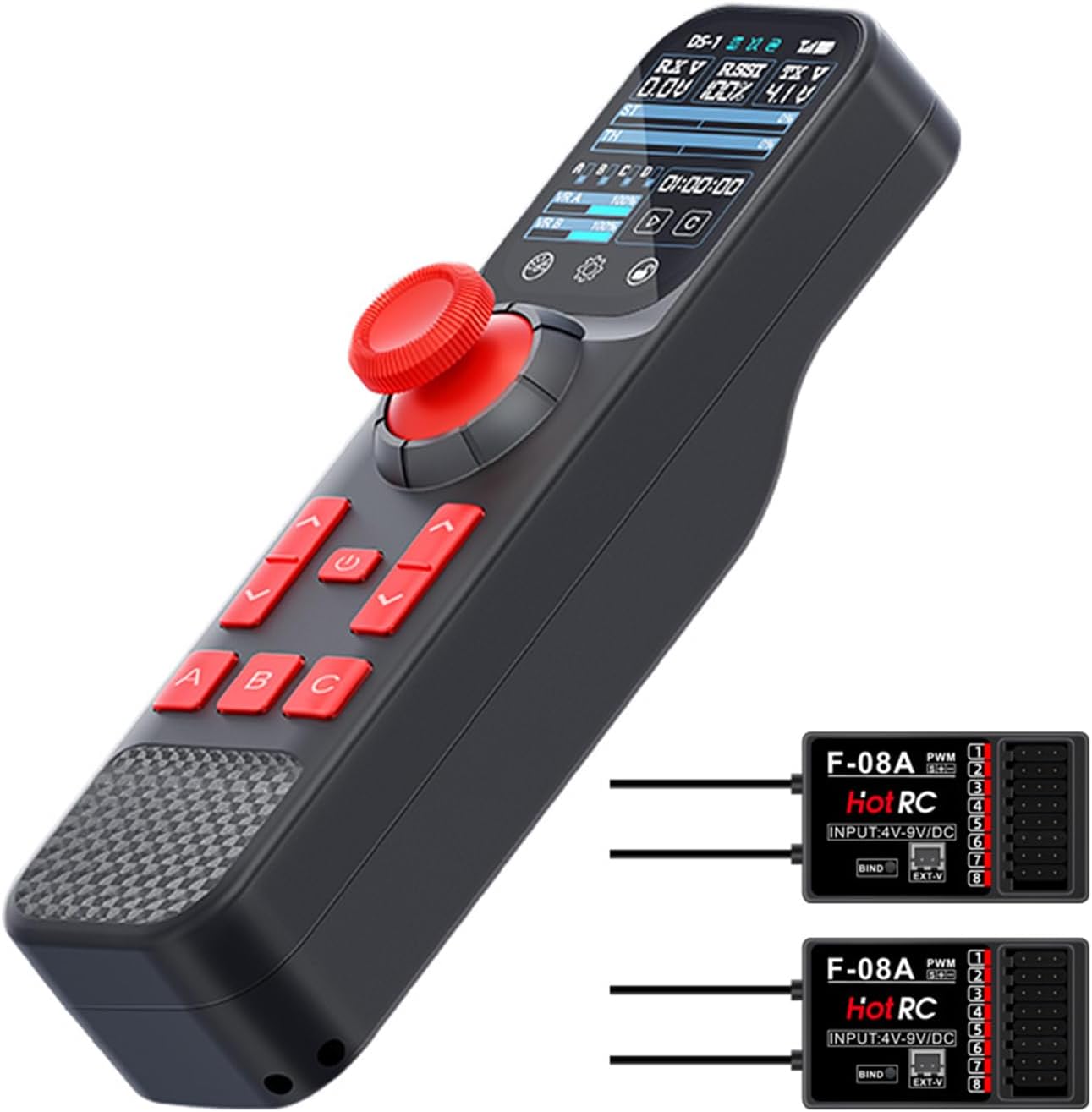
Image 3: Transmitter Charging Port and Internal Battery
3.2 Receiver Connection (F-08A)
Connect the F-08A receiver to your RC model's electronic speed controller (ESC) and servos according to your model's specific wiring diagram. Ensure correct polarity for all connections. The receiver supports a voltage range of DC 4V-9V.
- Connect the ESC to Channel 2 (Throttle).
- Connect the steering servo to Channel 1 (Steering).
- Connect other servos or accessories to Channels 3-8 as needed.
- The provided return voltage line connects to the receiver's voltage feedback interface and to your model's battery for telemetry data.

Image 4: Receiver Wiring Diagram and Transmitter Display Details
3.3 Binding Procedure
To establish communication between the transmitter and receiver:
- Power on the transmitter.
- Press and hold the binding button on the F-08A receiver.
- While holding the binding button, power on the receiver. The receiver's LED indicator will flash rapidly.
- Release the binding button. The LED on the receiver should turn solid, indicating a successful bind.
- If binding fails, repeat the steps. Ensure the transmitter and receiver are close to each other during the process.
4. Operating Instructions
4.1 Touch Screen Interface
The 2.0-inch color touch screen provides access to all settings and real-time data. Tap icons to navigate menus and adjust parameters. The main screen displays:
- RX V (Receiver Voltage): Real-time voltage of the receiver.
- RSSI (Received Signal Strength Indicator): Indicates signal quality.
- TX V (Transmitter Voltage): Current voltage of the transmitter's internal battery.
- Channel Outputs: Visual representation of servo positions for ST (Steering) and TH (Throttle), and other channels (VR A, VR B).
- Timer: For tracking operation time.
- Menu Icons: Access settings like End Point, Reverse, Sub-trim, Failsafe, and more.
4.2 Basic Controls
- Steering Wheel: Controls Channel 1 (Steering).
- Throttle Trigger: Controls Channel 2 (Throttle). Pull for forward/acceleration, push for reverse/brake.
- A/B/C Buttons: Assignable auxiliary channels or functions.
- D/OK Buttons: Used for Cruise Control and menu navigation.
4.3 Advanced Functions

Image 5: Overview of Advanced Control Functions
4.3.1 Cruise Control
Cruise Control allows the model to maintain a fixed speed, useful for crawling or consistent driving. To activate:
- Drive your model to the desired speed.
- Press the 'D' button to engage Cruise Control.
- Use the 'OK' button to adjust acceleration and deceleration while in cruise mode.
4.3.2 4-Wheel Steering (4WS)
The 4WS function provides enhanced steering capabilities for models with independent front and rear steering servos. It offers four switchable modes (M-1, M-2, M-3, M-4). Access the 4WS settings via the touch screen to select and configure the desired mode.
4.3.3 Voltage Telemetry
The DS800 system provides real-time voltage feedback from the receiver (RX V) and, if connected via the return voltage line, from your model's main battery. The transmitter will vibrate to alert you if the voltage drops below a user-defined threshold, helping to protect your LiPo batteries from over-discharge.
4.3.4 Coach Function
The Coach Function enables two DS800 transmitters to be linked via a Type-C cable. This allows an experienced user to guide a beginner, with the master transmitter having primary control and the student transmitter providing input that can be overridden by the master.
4.3.5 Virtual Joystick
The virtual joystick feature allows for adjustable step parameters for VR A and VR B channels, simulating potentiometer functionality for fine-tuning auxiliary controls.
4.4 Failsafe Settings
Configure failsafe settings via the touch screen menu. Failsafe ensures that your model's servos move to a predetermined safe position (e.g., throttle to neutral, steering straight) if signal is lost, preventing runaway models.
5. Maintenance
5.1 Battery Care
- Recharge the transmitter battery when the TX V indicator shows low voltage.
- Avoid fully discharging the battery to prolong its lifespan.
- Store the transmitter in a cool, dry place when not in use.
5.2 Cleaning
Clean the transmitter and receiver with a soft, dry cloth. Avoid using solvents or harsh chemicals that could damage the plastic or electronic components.
6. Troubleshooting
- No Power: Ensure the transmitter battery is charged. Check all connections.
- No Signal/Binding Failure: Re-perform the binding procedure (Section 3.3). Ensure transmitter and receiver are within range and not obstructed. Check for interference from other 2.4GHz devices.
- Erratic Servo Movement: Check all servo connections and ensure they are plugged into the correct channels. Verify battery voltage for both transmitter and receiver.
- Telemetry Data Incorrect: Ensure the return voltage line is correctly connected to both the receiver and the model's battery.
- Touch Screen Unresponsive: Power cycle the transmitter. If the issue persists, contact customer support.
7. Specifications
| Model | DS800 Transmitter & F-08A Receiver |
| Channels | 8 Channels |
| Frequency | 2.4GHz ISM Band (FHSS Spread Spectrum) |
| Modulation Mode | GFSK |
| Screen | 2.0-inch Color Touch Screen |
| Remote Distance | 300m / 980ft (Ground interference-free) |
| Response Speed | PWM <20ms |
| Transmitter Battery | Built-in 1500mAh Lithium Battery |
| Charging Port | USB Type-C (5V) |
| Transmitter Weight | 95g (0.21 lbs) |
| Applicable Models | RC Car, Boat, Tank, Robot |
| Receiver Power Supply | DC 4V-9V |
8. Package Contents
The HotRC DS800 package includes the following items:
- 1 x DS800 Radio Transmitter
- 2 x F-08A Receiver
- 1 x USB-C Charging Cable
- 1 x Lanyard
- 1 x User Manual (this document)
- 1 x Return Voltage Line

Image 6: Standard Package Configuration
9. Safety Information
Please read and understand the following safety precautions before operating your HotRC DS800 system:
- Always operate your RC model in a safe and open area, away from people, pets, and obstacles.
- Never operate your RC model near public roads, power lines, or water bodies.
- Ensure all batteries (transmitter and model) are fully charged before operation.
- Always turn on the transmitter first, then the receiver. When finished, turn off the receiver first, then the transmitter.
- Regularly inspect your RC model and radio system for any damage or loose connections.
- Keep the transmitter and receiver away from moisture, extreme temperatures, and direct sunlight.
- This product is not a toy. It is intended for users aged 18 and above.