1. Introduction
This manual provides detailed instructions for the installation, operation, and maintenance of the Generic ZY-2.1 Bluetooth 5.1 Audio Stereo Amplifier Board. This 2.1 channel amplifier module is designed for DIY audio projects, offering 200W output with adjustable treble, bass, and subwoofer controls. It supports both Bluetooth 5.1 and AUX inputs, making it versatile for various home audio setups.
2. Safety Information
- Ensure the power supply voltage is within the specified DC 12-24V range. Incorrect voltage can damage the device.
- Do not expose the amplifier board to moisture or extreme temperatures.
- Avoid short-circuiting the output terminals.
- Always disconnect power before making any connections or adjustments.
- Keep out of reach of children.
- Use appropriate speaker impedance (4-8Ω) to prevent damage.
3. Package Contents
Verify that all items are present in the package:
- ZY-2.1 Amplifier Board
- Protective Case (top and bottom plates)
- Mounting Hardware (standoffs, screws)
- Control Knobs (for potentiometers)
- Screwdriver
- Quick Start Guide

Image: ZY-2.1 Amplifier Board and included accessories, including the board, protective plates, knobs, and a screwdriver.
4. Product Overview
The ZY-2.1 amplifier board features multiple inputs and controls for a customizable audio experience.

Image: Detailed diagram of the ZY-2.1 Amplifier Module, showing connections for Subwoofer Frequency, Subwoofer Volume, R&L Treble, R&L Bass, Main Volume Control, DC 12-24V power input, Subwoofer (100W) output, Right (50W) output, Left (50W) output, Bluetooth 5.1 module, and AUX Input 3.5mm Socket.

Image: Top-down view of the ZY-2.1 Amplifier Board highlighting the AUX-IN port, speaker wire terminals (R+, R-, L+, L-, S+, S-), and DC12-24V power input.
5. Setup Instructions
5.1 Assembling the Protective Case
The amplifier board comes with a protective case for durability. Follow these steps to assemble:
- Place the bottom plate on a flat surface.
- Align the amplifier board with the standoffs on the bottom plate.
- Secure the board with the provided screws.
- Place the top plate over the board, aligning with the remaining standoffs.
- Secure the top plate with the remaining screws.
- Attach the control knobs to the potentiometers.

Image: Exploded view diagram showing the amplifier board, top and bottom protective plates, standoffs, and screws for assembly.
5.2 Connecting Speakers
Connect your speakers to the appropriate terminals on the amplifier board:
- Left Speaker: Connect to L+ and L- terminals.
- Right Speaker: Connect to R+ and R- terminals.
- Subwoofer: Connect to S+ and S- terminals.
Ensure correct polarity (+ to + and - to -) for optimal sound quality.

Image: Close-up view of the ZY-2.1 amplifier board showing speaker wire connections for Left, Right, and Subwoofer channels, along with the AUX-IN port and DC power input.
5.3 Power Connection
Connect a DC 12-24V power supply to the amplifier board. The board supports two power input methods: a 2-pin socket or a 5.5-2.1MM DC jack. Ensure the power supply is stable and provides sufficient current for your speakers.
6. Operating Instructions
6.1 Input Modes
The ZY-2.1 amplifier supports two audio input modes: Bluetooth and AUX.
- Bluetooth Mode: The amplifier will automatically enter Bluetooth pairing mode when powered on. Search for "BT-AUDIO" or a similar device name on your smartphone, tablet, or other Bluetooth-enabled device and pair. The Bluetooth 5.1 connection offers stable connectivity within 15 meters.
- AUX Mode: To use the 3.5mm AUX input, ensure that no Bluetooth device is actively connected to the amplifier. If a Bluetooth device is connected, disconnect it first. Plug your audio source into the 3.5mm AUX input jack.

Image: The ZY-2.1 amplifier board connected to a mobile phone, MP3 player, and PC, demonstrating both Bluetooth and AUX input capabilities for various audio sources.
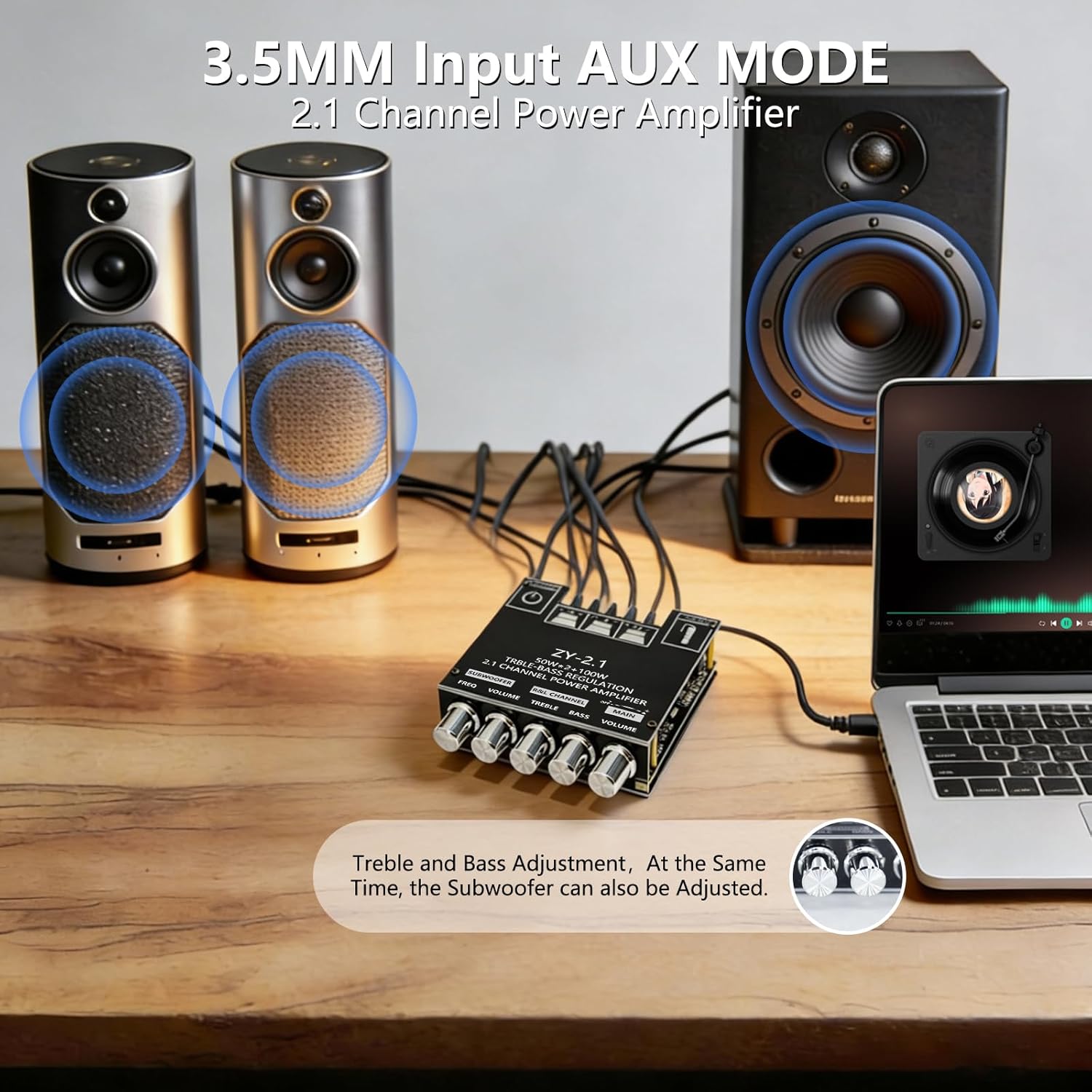
Image: The ZY-2.1 amplifier board connected to a laptop via a 3.5mm AUX cable, driving two speakers and a subwoofer, illustrating its use in AUX input mode.

Image: The ZY-2.1 amplifier board wirelessly connected to a smartphone via Bluetooth 5.1, playing audio through two speakers and a TV, demonstrating stable wireless connection up to 15 meters.
6.2 Controls
The amplifier board features five control knobs:
- Subwoofer Frequency: Adjusts the cutoff frequency for the subwoofer output.
- Subwoofer Volume: Controls the volume level of the subwoofer.
- R&L Treble: Adjusts the high-frequency response for the left and right channels.
- R&L Bass: Adjusts the low-frequency response for the left and right channels.
- Main Volume Control: Controls the overall output volume of all channels.
Video: Demonstration of adjusting the volume and tone controls on the ZY-2.1 amplifier board while playing music through a DIY speaker setup. The video shows the effect of turning the knobs on the audio output.
Video: A close-up demonstration of the subwoofer output from the ZY-2.1 amplifier board, showing the physical movement of the subwoofer cone in response to bass frequencies. This highlights the amplifier's ability to drive a dedicated subwoofer.
7. Maintenance
- Cleaning: Use a soft, dry cloth to clean the amplifier board and case. Do not use liquid cleaners or solvents.
- Storage: Store the device in a cool, dry place away from direct sunlight and excessive dust.
- Heat Management: The amplifier features a large heat sink for efficient heat dissipation. Ensure adequate airflow around the unit, especially during extended high-power use.

Image: Close-up view of the ZY-2.1 amplifier board, highlighting the large heat sink for efficient heat dissipation and large-capacity energy storage capacitors for stable audio signals.
8. Troubleshooting
- No Sound Output:
- Check if the power supply is correctly connected and providing the specified voltage (DC 12-24V).
- Verify all speaker connections for correct polarity and secure contact.
- Ensure the correct input mode (Bluetooth or AUX) is selected and the audio source is playing.
- Adjust the main volume control and individual channel volumes.
- Distorted Sound or Noise:
- Ensure speaker impedance matches the recommended 4-8Ω.
- Use shielded audio cables, especially for AUX input, to minimize interference.
- If using Bluetooth, ensure your device is within range and there are no strong interfering signals.
- Try a different power supply to rule out power-related noise.
- Bluetooth Connection Issues:
- Ensure the amplifier is in Bluetooth pairing mode (usually indicated by a flashing LED).
- Make sure your Bluetooth device is within 15 meters of the amplifier.
- Forget the device from your Bluetooth settings and try pairing again.
- Ensure no other device is currently connected to the amplifier via Bluetooth.
- Missing Knobs or Hardware:
- Refer to the package contents list. If items are missing, contact customer support.
9. Specifications
| Feature | Specification |
|---|---|
| Model Number | ZY-2.1 |
| Input Voltage | DC 12-24V |
| Max Power Output | 50W x 2 (R&L) + 100W (Subwoofer) |
| Number of Channels | 2.1 Channel Stereo Output |
| Output Impedance | 4-8Ω |
| Input Method | Bluetooth & AUX |
| Bluetooth Version | BT 5.1 |
| Product Dimensions (L x W x H) | 3.9 x 3.5 x 0.6 inches (100 x 90 x 15mm) |
| Item Weight | 4.8 ounces (170g) |
| Material | Aluminum (Heat Sink) |
| Manufacturer | TinkerHive |

Image: A graphic displaying key product parameters for the ZY-2.1 amplifier, including input voltage, max power output, input method, channel configuration, output impedance, Bluetooth version, size, and weight.

Image: A table detailing the R&L Channel Output and Subwoofer Output power based on different input voltages (12V, 19V, 24V) and speaker impedances (8Ω, 4Ω).
10. Warranty Information
This product is covered by a standard limited warranty against manufacturing defects. Please retain your proof of purchase for warranty claims. The warranty does not cover damage caused by improper installation, misuse, unauthorized modifications, or natural disasters.
11. Support
For technical assistance, troubleshooting, or warranty inquiries, please contact the retailer or manufacturer directly. Refer to your purchase documentation for specific contact details.


