
1. Safety Information
Please read all safety instructions carefully before operating the SUGON 2020D Hot Air Rework Station. Failure to follow these instructions may result in electric shock, fire, or serious injury.
- Electrical Safety: Ensure the power supply matches the voltage requirements (110 Volts). Do not operate with wet hands or in damp environments. Always unplug the unit when not in use or before cleaning.
- Heat Hazard: The hot air nozzle reaches very high temperatures (up to 932°F / 500°C). Avoid direct contact with skin or flammable materials. Use heat-resistant surfaces and allow the unit to cool completely before storage.
- Ventilation: Operate in a well-ventilated area to prevent the inhalation of fumes produced during soldering or desoldering.
- Personal Protective Equipment: Always wear appropriate safety glasses to protect against splashes and fumes. Heat-resistant gloves are recommended.
- Children and Pets: Keep the device out of reach of children and pets.
- Proper Use: Use the tool only for its intended purpose of hot air rework. Do not modify the unit or use non-approved accessories.
2. Product Overview
The SUGON 2020D is a 700W hot air rework station designed for precise soldering and desoldering of electronic components. It features digital temperature control, adjustable airflow, and programmable preset channels.

Figure 2.1: Front view of the SUGON 2020D Hot Air Rework Station, showing the control panel, LCD display, and hot air handle connected.
2.1. Components
- Main Unit: Houses the control circuitry, air pump, and heating element. Features an LCD display, control knob, and preset buttons.
- Hot Air Handle: The handheld tool that delivers heated air. Connects to the main unit via a cable.
- Nozzle Holder: A metal bracket attached to the main unit for safely resting the hot air handle when not in use.
- Nozzles: Interchangeable tips for directing hot air. Includes various straight and cyclone nozzles.
- Power Cord: For connecting the unit to an electrical outlet.

Figure 2.2: The hot air handle and a selection of straight and cyclone nozzles provided with the unit.
3. Setup
Follow these steps to set up your SUGON 2020D Hot Air Rework Station for the first time.
- Unpack: Carefully remove all components from the packaging. Inspect for any damage.
- Connect Hot Air Handle: Plug the connector of the hot air handle cable into the corresponding port on the front of the main unit. Ensure it is securely fastened.
- Attach Nozzle Holder: Secure the metal nozzle holder to the side of the main unit using the provided screws, if not already attached.
- Place Handle: Rest the hot air handle securely in the nozzle holder. The unit will automatically enter standby mode when the handle is placed in the holder.
- Connect Power: Plug the power cord into the power inlet on the back of the main unit, then plug the other end into a grounded 110V AC electrical outlet.
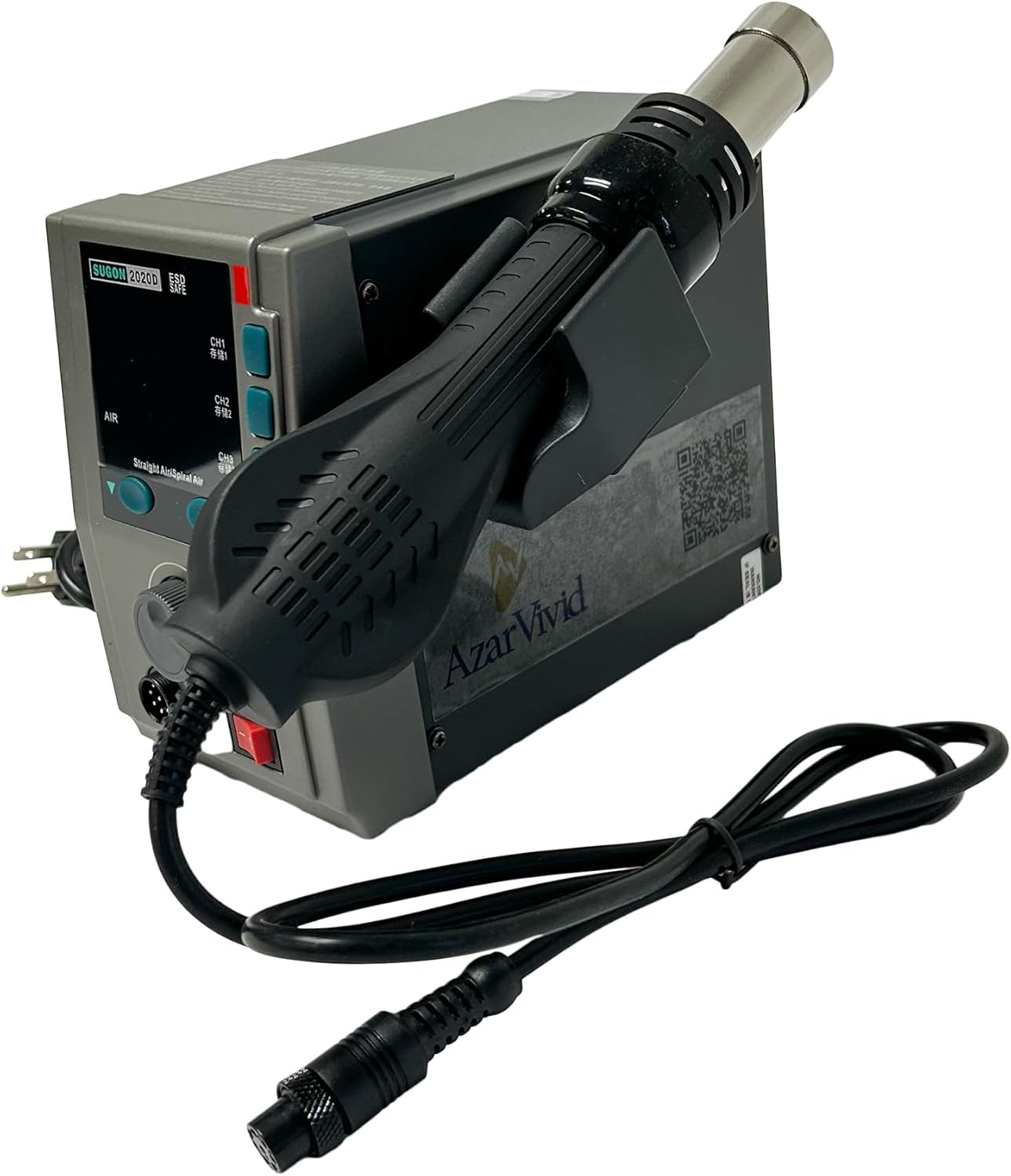
Figure 3.1: The SUGON 2020D station with the hot air handle correctly placed in its holder.
4. Operating Instructions
4.1. Power On/Off
- Flip the main power switch located on the front panel to the 'ON' position. The LCD display will illuminate.
- To power off, flip the main power switch to the 'OFF' position. The unit will cool down before completely shutting off.
4.2. Adjusting Temperature and Airflow
- Temperature Adjustment: Rotate the main control knob to adjust the desired temperature. The temperature range is 212°F to 932°F (100°C to 500°C). The current temperature will be displayed on the LCD.
- Airflow Adjustment: Press the 'AIR' button (if available, or rotate the control knob while in airflow mode) to switch to airflow adjustment. Rotate the control knob to set the airflow level (1-120 levels).
4.3. Using Preset Channels (CH1, CH2, CH3)
The unit features three programmable channels (CH1, CH2, CH3) to store frequently used temperature and airflow settings.
- Set Parameters: Adjust the temperature and airflow to your desired settings.
- Save Preset: Press and hold the desired channel button (CH1, CH2, or CH3) for approximately 3 seconds until a confirmation beep or display change indicates the settings are saved.
- Recall Preset: Briefly press the desired channel button (CH1, CH2, or CH3) to recall the saved settings.
4.4. Changing Nozzles
Ensure the unit is off and the hot air handle has cooled down before changing nozzles.
- Allow the hot air handle to cool completely.
- Carefully remove the current nozzle by pulling it straight off.
- Select the desired straight or cyclone nozzle and push it firmly onto the handle's heating element.
4.5. Temperature Calibration Mode
To enter temperature calibration mode, press and hold the CH1 and CH3 keys simultaneously while the unit is powered on. Follow the on-screen instructions for calibration.
5. Maintenance
Regular maintenance ensures optimal performance and extends the lifespan of your rework station.
- Cleaning Nozzles: Periodically clean the nozzles to remove flux residue and debris. Use a soft brush or non-abrasive tool. Ensure nozzles are cool before cleaning.
- Unit Cleaning: Wipe the main unit and handle with a soft, dry cloth. Do not use abrasive cleaners or solvents. Ensure the unit is unplugged before cleaning.
- Air Filter: Check the air intake vents for dust accumulation. Clean as necessary to maintain proper airflow.
- Storage: Store the unit in a dry, dust-free environment when not in use. Ensure the hot air handle is placed in its holder and the unit is unplugged.
6. Troubleshooting
If you encounter issues with your SUGON 2020D, refer to the following common problems and solutions.
| Problem | Possible Cause | Solution |
|---|---|---|
| Unit does not power on. | No power supply; loose power cord. | Check power cord connection; ensure outlet is functional. |
| No heat from nozzle. | Heating element failure; handle not properly connected; unit in standby. | Ensure handle is removed from holder; check handle connection; contact support if element fails. |
| No airflow. | Air pump failure; blocked air intake/nozzle. | Check for obstructions in nozzle or air intake; contact support if pump fails. |
| Temperature fluctuates erratically. | Sensor issue; poor nozzle connection. | Ensure nozzle is securely attached; perform temperature calibration; contact support. |
7. Specifications
Technical specifications for the SUGON 2020D Hot Air Rework Station.
| Feature | Detail |
|---|---|
| Model Number | 2020D |
| Manufacturer | SUGON |
| Brand | AzarPixel |
| Power | 700 Watts |
| Voltage | 110 Volts AC |
| Temperature Range | 212°F – 932°F (100°C – 500°C) |
| Airflow Levels | 120 Levels |
| Display Type | LED |
| Product Dimensions | 19.99 x 10.8 x 16.79 cm |
| Item Weight | 2.4 kg (5.29 Pounds) |
| Included Components | 1 x Handle, 1 x Power cord, 1 x SUGON 2020D Hot Air Station, 2 x Cyclone nozzle, 3 x Straight nozzle |
| UPC | 850079628298 |
8. Warranty and Support
For warranty information or technical support, please refer to the documentation included with your purchase or contact the retailer. Keep your purchase receipt as proof of purchase.