
1. Introduction
This manual provides essential information for the safe and efficient operation, installation, and maintenance of the KEYAYEYA Invt Frequency Converter, model GD300-01A-015G-4-RT 15KW. Please read this manual thoroughly before installation, operation, or maintenance to ensure proper usage and to prevent personal injury or equipment damage. Keep this manual in a safe place for future reference.
2. Safety Information
WARNING: Improper installation or operation can lead to severe injury or death. Only qualified personnel should install, operate, or maintain this equipment.
- Always disconnect power before performing any installation, wiring, or maintenance.
- Ensure proper grounding of the frequency converter.
- Do not touch electrical components immediately after power disconnection, as residual voltage may be present.
- Protect the unit from moisture, dust, and corrosive gases.
- Verify that the power supply voltage matches the specifications of the frequency converter.
3. Product Overview
The KEYAYEYA Invt Frequency Converter GD300 series is designed to control the speed of AC motors by varying the frequency and voltage of the power supplied to the motor. This specific model, GD300-01A-015G-4-RT 15KW, is suitable for a range of industrial applications requiring precise motor control and energy efficiency.
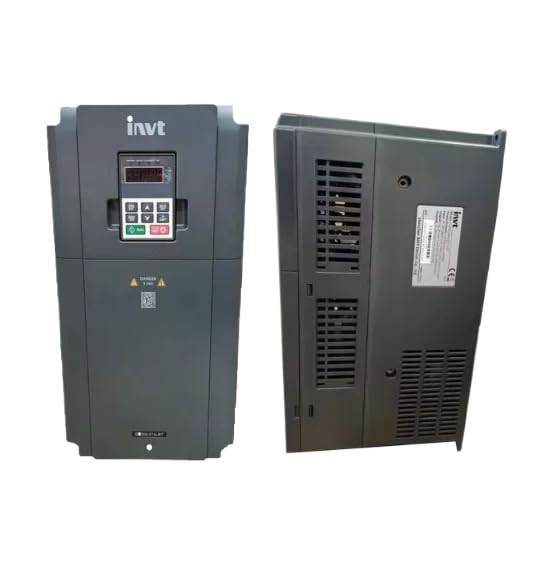
Image showing the KEYAYEYA Invt Frequency Converter, model GD300-01A-015G-4-RT 15KW.
4. Setup and Installation
Proper installation is crucial for the performance and longevity of the frequency converter. Follow these general guidelines:
- Mounting: Install the converter vertically on a non-flammable surface in a well-ventilated area, ensuring adequate clearance for heat dissipation.
- Wiring:
- Connect the main power supply to the input terminals (R, S, T).
- Connect the motor to the output terminals (U, V, W).
- Ensure all connections are secure and correctly phased.
- Connect the ground terminal to a reliable earth ground.
- Control Wiring: Connect control signals (e.g., start/stop, speed reference) according to the wiring diagram provided with the unit.
- Initial Power-Up: Before applying full power, perform a continuity check and verify all connections.
5. Operating Instructions
After successful installation, the frequency converter can be operated. Refer to the specific programming manual for detailed parameter settings.
- Power On: Apply main power to the converter. The display should illuminate.
- Parameter Settings: Use the control panel to set essential parameters such as motor rated frequency, rated voltage, acceleration/deceleration times, and control mode.
- Start/Stop: Initiate motor operation using the start button on the control panel or via external control signals. Stop the motor using the stop button or external signals.
- Speed Adjustment: Adjust the motor speed using the potentiometer on the control panel or through external analog/digital inputs.
- Monitoring: The display shows operational parameters such as output frequency, output current, and motor speed.
6. Maintenance
Regular maintenance ensures optimal performance and extends the lifespan of the frequency converter.
- Cleaning: Periodically clean the cooling fins and fan to prevent dust accumulation, which can hinder heat dissipation. Use compressed air or a soft brush.
- Inspection: Regularly inspect all wiring connections for tightness and signs of wear or damage. Check for any unusual noises or odors during operation.
- Environmental Check: Ensure the operating environment remains within specified temperature and humidity ranges.
- Fan Replacement: Cooling fans have a limited lifespan. Consider replacing them periodically, especially in dusty or high-temperature environments.
7. Troubleshooting
This section provides solutions for common issues. For complex problems, contact technical support.
| Problem | Possible Cause | Solution |
|---|---|---|
| Converter does not power on. | No input power; faulty wiring. | Check power supply and input wiring connections. |
| Motor does not run. | Incorrect parameter settings; motor wiring error; fault condition. | Verify parameter settings; check motor wiring; clear any fault codes. |
| Overcurrent fault. | Motor overload; short circuit in motor or wiring; rapid acceleration. | Reduce load; check motor and wiring for shorts; increase acceleration time. |
| Overvoltage fault. | High input voltage; rapid deceleration; regenerative load. | Check input voltage; increase deceleration time; consider a braking resistor. |
8. Specifications
| Feature | Detail |
|---|---|
| Brand | KEYAYEYA |
| Model Number | GD300-01A-015G-4-RT 15KW |
| ASIN | B0G5DT3BZS |
| Manufacturer | Original Manufacturer |
| Included Components | NEW (This typically refers to the unit being new, not specific components) |
9. Warranty and Support
This product is covered by a one-year limited warranty from the date of purchase. This warranty covers manufacturing defects under normal use.
For any questions regarding your model, technical assistance, or warranty claims, please contact the seller directly. Ensure you have your purchase details and model information available when contacting support.