1. Introduction
This manual provides essential instructions for the safe and efficient operation, setup, maintenance, and troubleshooting of the Mettler Toledo Seven2Go DO Meter S4-Field-Kit. The Seven2Go S4-Field-Kit is a portable dissolved oxygen meter designed for precise measurements in various field, at-line, and laboratory environments, including environmental testing, wastewater analysis, and aquaculture.
The device features a rugged IP67 waterproof design, intuitive one-handed operation, and integrated temperature compensation for reliable performance under harsh conditions.
2. Setup
2.1 Unpacking and Contents Check
Carefully unpack all components and verify that the following items are included in your S4-Field-Kit:
- Seven2Go S4 DO meter
- DO sensor (InLab 605-ISM IP67)
- Calibration materials
- Zero-oxygen tablets
- uGo carrying case
Inspect all items for any signs of damage. If any components are missing or damaged, contact your supplier immediately.
2.2 Battery Installation
The Seven2Go meter operates on standard batteries. To install or replace batteries:
- Locate the battery compartment cover on the back of the meter.
- Use a suitable tool (e.g., a coin) to open the cover by turning it counter-clockwise.
- Insert the batteries, ensuring correct polarity as indicated inside the compartment.
- Replace the cover and turn it clockwise until securely fastened to maintain the IP67 rating.
2.3 Sensor Connection
Connect the InLab 605-ISM IP67 DO sensor to the meter:
- Align the sensor connector with the corresponding port on the meter.
- Gently push the connector into the port until it clicks into place. Ensure a secure connection to maintain the waterproof seal.
- The meter features automatic sensor recognition, simplifying the setup process.
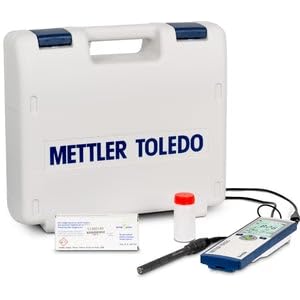
Image 1: Mettler Toledo Seven2Go DO Meter S4-Field-Kit with the InLab 605-ISM IP67 DO sensor connected, ready for use.
2.4 Initial Power-On
Press the power button to turn on the meter. The display will illuminate, and the meter will perform a self-test. Ensure the sensor is connected before proceeding with measurements or calibration.
3. Operating Instructions
3.1 Basic Measurement
To perform a dissolved oxygen measurement:
- Ensure the sensor is properly connected and calibrated.
- Immerse the DO sensor into the sample solution, ensuring the sensing element is fully submerged and free from air bubbles.
- Allow the reading to stabilize on the display. The meter will automatically compensate for temperature variations using its integrated sensor.
- Record the stable dissolved oxygen value (mg/L or ppm) and temperature (°C).
3.2 Navigation and Display
The Seven2Go meter features intuitive T-Pad navigation for easy menu access and setting adjustments. The clear display shows measurement values, temperature, battery status, and other relevant information. Refer to the on-screen prompts for specific functions.
3.3 Calibration
Regular calibration is crucial for accurate measurements. The Seven2Go meter supports calibration using zero-oxygen tablets and air-saturated water. Follow the on-screen instructions for the calibration process. The meter includes a calibration reminder function to ensure timely calibration.
For detailed calibration procedures, refer to the specific instructions provided with the calibration materials.
3.4 Data Storage
The meter can store up to 200 measurements. To save a reading, follow the prompts on the display after a stable measurement is obtained. Stored data can be reviewed directly on the meter.
4. Maintenance
4.1 Cleaning the Meter
Wipe the meter's exterior with a damp cloth. For stubborn dirt, use a mild detergent solution. Avoid abrasive cleaners or solvents that could damage the housing or display. Ensure the battery compartment and sensor port covers are securely closed before cleaning to maintain the IP67 rating.
4.2 Sensor Care
The InLab 605-ISM IP67 DO sensor requires specific care to ensure longevity and accuracy:
- Cleaning: Rinse the sensor thoroughly with distilled or deionized water after each use. If deposits are present, gently clean the membrane with a soft brush or cloth.
- Membrane Replacement: The sensor membrane may require periodic replacement depending on usage and sample conditions. Refer to the sensor's specific manual for replacement instructions.
- Storage: Store the sensor according to the manufacturer's recommendations, typically in a moist environment or a specific storage solution to prevent the membrane from drying out.
4.3 Storage of the Meter
When not in use for extended periods, store the Seven2Go meter in its uGo carrying case in a dry, cool place. Remove batteries if storing for several months to prevent leakage. Ensure the sensor is properly stored as per its specific instructions.
5. Troubleshooting
This section addresses common issues you might encounter with your Seven2Go DO Meter. For more complex problems, contact Mettler Toledo customer support or your local distributor.
| Problem | Possible Cause | Solution |
|---|---|---|
| Meter does not power on | Dead or incorrectly installed batteries | Check battery polarity; replace with fresh batteries. |
| Inaccurate or unstable readings |
|
|
| Sensor not recognized | Loose or faulty sensor connection | Ensure sensor is securely connected. Check for damage to the connector pins. |
6. Specifications
Key technical specifications for the Mettler Toledo Seven2Go DO Meter S4-Field-Kit:
- Model: Seven2Go S4-Field-Kit
- Measuring Range (Dissolved Oxygen): 0.000 to 99.0 mg/L (ppm)
- DO Resolution: 0.01 mg/L
- Temperature Range: 0–60°C (integrated sensor)
- Temperature Accuracy: ±0.2°C
- Ingress Protection (IP) Rating: IP67 (dustproof and water-resistant)
- Data Storage: Up to 200 measurements
- Sensor: InLab 605-ISM IP67 (included)
- Manufacturer: Mettler Toledo