
1. Introduction
The TechniSat VIOLA 200 is a portable digital radio designed for clear reception of both DAB+ and analog FM radio stations. It features a compact design, an intuitive LCD display, and flexible power options, making it suitable for use at home or on the go. This manual provides essential information for setting up, operating, and maintaining your VIOLA 200 radio.
2. Safety Information
- Read all instructions carefully before using the device.
- Keep the radio away from water, moisture, and high humidity environments.
- Do not expose the device to extreme temperatures (hot or cold) or direct sunlight.
- Use only the supplied AC power adapter (DC 5V/600mA) or specified AA batteries.
- Do not attempt to open, disassemble, or repair the radio yourself. Refer all servicing to qualified personnel.
- Ensure proper ventilation around the device during operation.
3. Package Contents
Please check that all items are present in the package:
- TechniSat VIOLA 200 Portable DAB+/FM Radio
- AC Power Adapter (DC 5V/600mA)
- User Manual
4. Product Overview
Familiarize yourself with the main components and controls of your VIOLA 200 radio.

Figure 4.1: Front View of TechniSat VIOLA 200
This image displays the front of the TechniSat VIOLA 200 radio, highlighting its LCD screen, speaker grille, and the central control knob surrounded by function buttons.
Controls and Ports:
- On/Off Button: Powers the radio on or off.
- Tune/Scan Button: Initiates station scanning or fine-tunes frequencies.
- Vol-/OK & Vol+/OK (Main Knob): Rotates to adjust volume or navigate menus; press to confirm selections.
- Fav Button: Accesses and saves favorite stations.
- Info/Menu Button: Displays station information or accesses the main menu.
- DAB+/FM Button: Switches between DAB+ and FM radio modes.
- LCD Display: Two-line display showing station information, time, and menu options.
- Telescopic Antenna: Extend for optimal radio signal reception.
- 3.5mm Headphone Jack: For private listening.
- USB-C (DC IN 5V/0.6A): Power input port.
- Battery Compartment: Located on the back, for 4x AA batteries.

Figure 4.2: Rear View with Ports and Battery Compartment
This image shows the back of the TechniSat VIOLA 200, detailing the 3.5mm headphone jack, the USB-C DC IN port, and the battery compartment.
5. Setup
5.1 Powering the Radio
The VIOLA 200 can be powered using the included AC adapter or with AA batteries.
Using AC Power:
- Connect the small end of the supplied AC power adapter to the USB-C port labeled "DC IN 5V/0.6A" on the back of the radio.
- Plug the other end of the AC power adapter into a standard wall outlet.
Using Battery Power:
For portable use, the radio requires 4x AA batteries (not included).
- Locate the battery compartment on the back of the radio.
- Slide the battery compartment cover open.
- Insert 4x AA batteries, ensuring the correct polarity (+/-) as indicated inside the compartment.
- Close the battery compartment cover securely.
5.2 Antenna Positioning
For optimal radio reception, fully extend the telescopic antenna. Adjust its position and angle to achieve the best signal quality.
6. Operating Instructions
6.1 Power On/Off
Press the On/Off button located on the front panel to turn the radio on or off.
6.2 Selecting Radio Mode (DAB+/FM)
Press the DAB+/FM button to switch between Digital Audio Broadcasting (DAB+) and Frequency Modulation (FM) radio modes.
6.3 DAB+ Radio Operation
- Switch to DAB+ mode using the DAB+/FM button.
- Upon first use, the radio will automatically perform a full scan for available DAB+ stations. This may take a few moments.
- Once the scan is complete, rotate the main knob (Vol-/OK, Vol+/OK) to browse through the list of available stations.
- Press the main knob (OK) to select and start listening to a station.
- To perform a new scan, press and hold the Tune/Scan button.
6.4 FM Radio Operation
- Switch to FM mode using the DAB+/FM button.
- Automatic Scan: Press the Tune/Scan button briefly to automatically scan for the next available FM station.
- Manual Tuning: Rotate the main knob (Vol-/OK, Vol+/OK) to manually tune to a specific frequency.
- The radio supports RDS (Radio Data System), which may display station names and other information on the LCD screen if broadcasted by the station.
6.5 Saving Favorite Stations
You can save up to 40 favorite stations for each mode (DAB+ and FM).
- Tune to the desired station you wish to save.
- Press and hold the Fav button until the display shows a preset number.
- Rotate the main knob to select the desired preset number (e.g., P01, P02, etc.).
- Press the main knob (OK) to confirm and save the station.
Recalling Favorite Stations:
- Press the Fav button briefly.
- Rotate the main knob to scroll through your saved favorite stations.
- Press the main knob (OK) to select and listen to the desired favorite station.
6.6 Volume Control
Rotate the main knob (Vol-/OK, Vol+/OK) clockwise to increase the volume and counter-clockwise to decrease it.
6.7 Headphone Use
To listen privately, plug standard 3.5mm headphones into the headphone jack on the back of the radio. The internal speaker will automatically mute when headphones are connected.
6.8 Display Information
Press the Info/Menu button repeatedly to cycle through various information displayed on the LCD screen, such as program type, signal strength, time, and date.

Figure 6.1: LCD Display
This image provides a close-up of the radio's LCD display, showing typical station information during operation.
7. Maintenance
7.1 Cleaning
To clean the radio, use a soft, dry cloth. Do not use liquid cleaners, abrasive pads, or chemical solvents, as these can damage the surface of the device.
7.2 Battery Replacement
When the batteries are low, the radio's performance may degrade. Replace all four AA batteries simultaneously with new ones, ensuring correct polarity.
7.3 Storage
If the radio will not be used for an extended period, remove the batteries to prevent leakage and store the device in a cool, dry place.
8. Troubleshooting
If you encounter issues with your VIOLA 200, refer to the following common problems and solutions:
| Problem | Possible Cause | Solution |
|---|---|---|
| Radio does not power on. | No power supply or dead batteries. | Check AC adapter connection. If using batteries, ensure they are correctly inserted and charged. |
| Poor or no radio reception. | Antenna not extended, weak signal, or interference. | Fully extend the telescopic antenna. Reposition the radio to a location with better signal. Perform a new station scan. |
| No sound from speaker. | Volume too low, headphones connected, or mute activated. | Increase volume. Disconnect headphones. Check if the radio is muted. |
| Display is blank or unreadable. | Power issue or display settings. | Ensure radio is powered on. Check display brightness settings via the menu. |
9. Specifications
Detailed technical specifications for the TechniSat VIOLA 200 radio:
- Model: VIOLA 200
- Brand: TechniSat
- Tuning Technology: DAB+/FM (with RDS and PLL)
- Power Source: AC Adapter (DC 5V/600mA) or 4x AA Batteries (not included)
- Speaker: Mono, 1W RMS
- Connections: 3.5mm Headphone Jack, USB-C (for power)
- Display: LCD with backlight
- Dimensions (L x W x H): 15.5 cm x 6 cm x 9.3 cm
- Favorite Presets: 40 per band (DAB+, FM)
- Color: Black
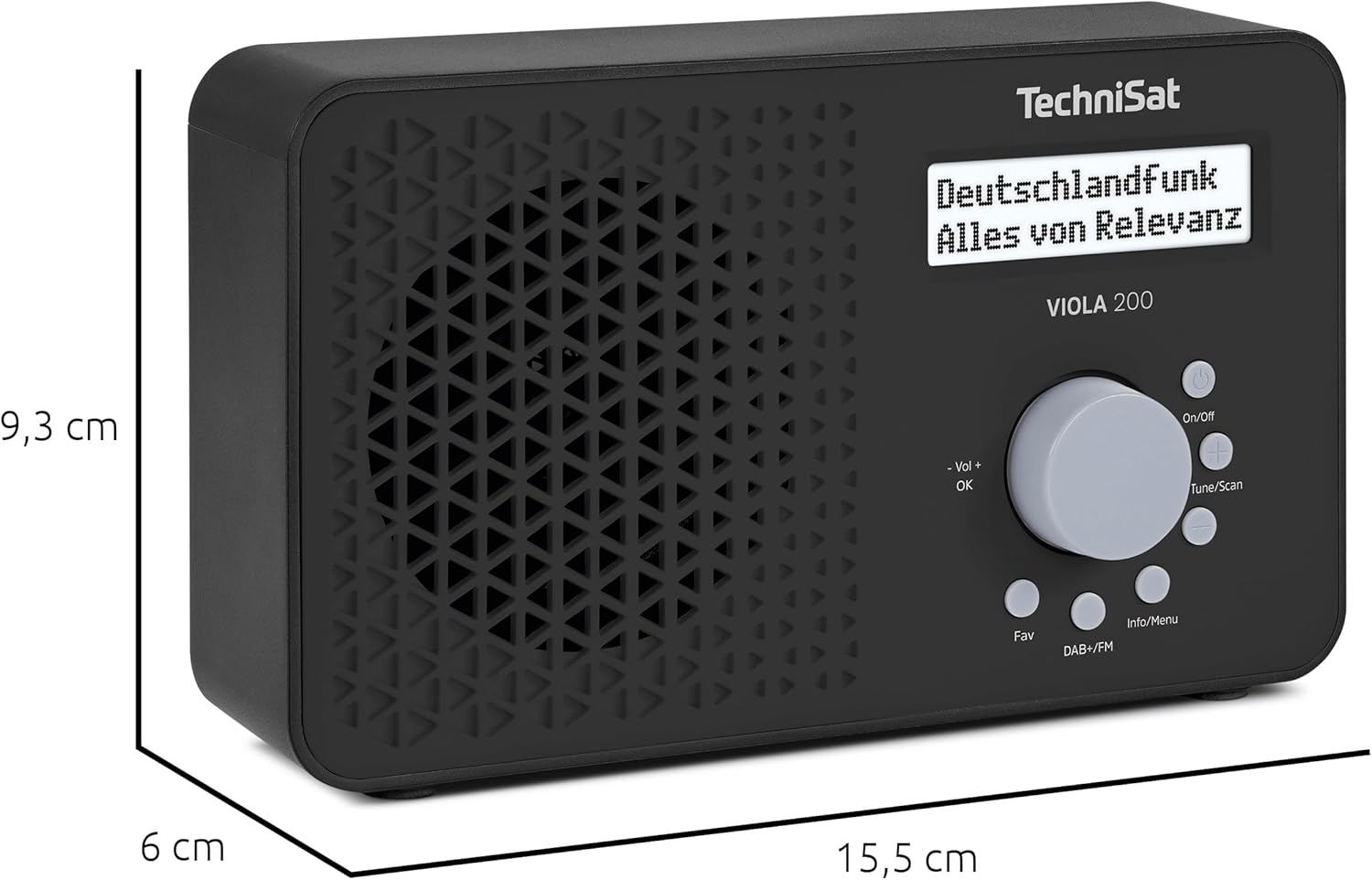
Figure 9.1: Product Dimensions
This image illustrates the physical dimensions of the TechniSat VIOLA 200 radio.
10. Warranty
The TechniSat VIOLA 200 comes with a 2-year manufacturer's warranty. Please retain your proof of purchase for any warranty claims. For detailed terms and conditions, refer to the official TechniSat website or contact their customer support.
11. Support
For further assistance, troubleshooting, or additional product information, please visit the official TechniSat website or contact their customer support department. Contact details can typically be found on the manufacturer's website or in the warranty documentation.


