
Introduction
Welcome to your new Allewie Queen Size Lift Up Hydraulic Storage Bed Frame. This manual provides essential information for the safe assembly, operation, and maintenance of your bed frame. Please read all instructions carefully before beginning assembly and retain this manual for future reference.
Safety Information
Important Safety Warnings
- Do not exceed the maximum weight recommendation of 800 pounds.
- Be cautious of sharp edges and the lift-up mechanism during assembly and use.
- Always follow the assembly instructions carefully to prevent instability or collapse.
- Keep children and pets away from the bed frame during assembly.
- Ensure all connections are secure before use.
Package Contents
Verify All Components
Before assembly, ensure all parts listed below are present. If any parts are missing or damaged, contact customer support.
- Bed Frame components
- Headboard
- LED Lights
- Charging Station
- Lift Bars (Hydraulic mechanism)
- Slats
- Assembly Hardware (screws, bolts, tools if included)
Setup and Assembly
Pre-Assembly Checklist
- Clear a spacious area for assembly.
- Ensure you have all necessary tools (e.g., screwdriver, wrench, if not provided).
- Two people are recommended for assembly.
Assembly Steps
The assembly process involves attaching the headboard, setting up the lift-up mechanism, installing the LED lights and charging station, and securing the slats for mattress support. Detailed instructions are included in the packaging. Follow the numbered steps provided with your product.

Figure 1: Allewie Queen Size bed frame's internal structure, including the wooden slats and metal frame, before a mattress is placed. It highlights the robust support system and the space for the hydraulic lift mechanism.

Figure 2: Detailed view of the hydraulic gas lift bars, which enable smooth and assisted lifting of the bed platform for storage access. It also shows the anti-slip back device designed to keep the mattress securely in place.
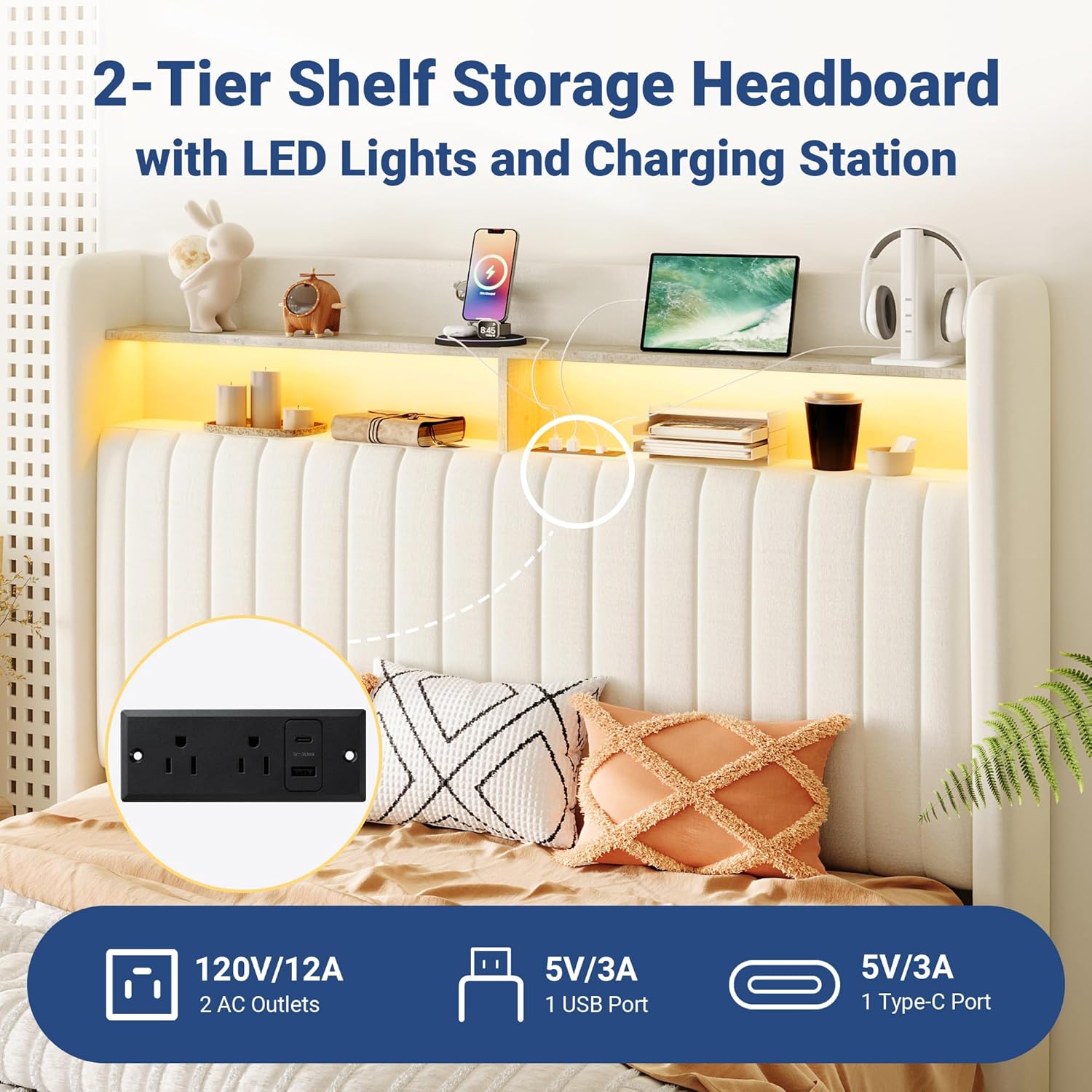
Figure 3: The assembled headboard, featuring two open shelves for storage, integrated LED lighting, and a built-in charging station with USB, Type-C, and AC outlets.
Operating Instructions
Hydraulic Lift-Up Storage
To access the under-bed storage, gently lift the mattress platform from the foot end. The hydraulic mechanism will assist in lifting and holding the platform securely in the open position. To close, gently push the platform down until it locks into place. Ensure no objects obstruct the mechanism.

Figure 4: The spacious under-bed storage area, accessible via the hydraulic lift mechanism. Various items like storage boxes, quilts, and luggage cases are shown neatly stored within.
LED Lights Operation
The integrated RGB LED lights can be controlled via a dedicated remote control or a smartphone application. Refer to the separate LED light instruction sheet for detailed pairing and operation of the remote and app. The lights offer over 60,000 colors and multiple modes.

Figure 5: The customizable RGB LED lighting feature of the headboard, showcasing various color options and the remote control used for adjusting settings, including color, mode, and time schedule.
Charging Station Usage
The headboard features a built-in charging station with 2 AC outlets (120V/12A), 1 USB port (5V/3A), and 1 Type-C port (5V/3A). Connect your electronic devices to these ports for convenient charging. Ensure the bed frame is plugged into a functional power outlet.
Maintenance
Cleaning
For general cleaning, wipe the bed frame surfaces with a dry cloth. Avoid using harsh chemicals or abrasive cleaners, which may damage the finish or fabric. For the velvet headboard, a soft brush or vacuum with an upholstery attachment can be used to remove dust.
Regular Checks
Periodically check all bolts and screws to ensure they remain tight. Re-tighten if necessary to maintain stability. Inspect the hydraulic lift mechanism for smooth operation and any signs of wear.
Troubleshooting
Common Issues and Solutions
- Bed Frame is Wobbly: Ensure all bolts and screws are securely tightened. Verify that the bed frame is on a level surface.
- Hydraulic Lift Not Working Smoothly: Check for any obstructions in the lift mechanism. Ensure the gas lift bars are properly installed according to the assembly instructions. If the issue persists, contact customer support.
- LED Lights Not Turning On: Check if the power adapter for the LED lights is securely plugged into both the headboard and a working wall outlet. Ensure the remote control batteries are functional and correctly inserted.
- Charging Station Not Functioning: Confirm the bed frame's main power cord is plugged into a live electrical outlet. Test the outlets and ports with different devices to isolate the issue.
Specifications
| Size | Queen |
| Material | Fabric (Velvet Headboard) |
| Product Dimensions (L x W x H) | 84.1" x 64" x 46.9" |
| Maximum Weight Recommendation | 800 Pounds |
| Storage Options | Lift Up Storage, Headboard Shelves |
| Special Features | Charging Station (USB, Type-C, AC), LED Lights, Wingback Headboard |
| Box Spring Required | No |
| Model Number | KRQSCZW002 |
| UPC | 099641712922 |
Warranty Information
Allewie products typically come with a limited manufacturer's warranty. Please refer to the warranty card included in your product packaging or visit the official Allewie website for specific warranty terms and conditions. Keep your proof of purchase for warranty claims.
Customer Support
For assistance with assembly, missing parts, or any other inquiries, please contact Allewie customer support. You can usually find contact information on the manufacturer's website or through the retailer where you purchased the product.
- Online Support: Visit the official Allewie website.
- Email Support: Refer to your product documentation for the customer service email address.
- Phone Support: Refer to your product documentation for the customer service phone number.