
IDEALHOUSE qdSEoLgJIMkVDFBXzJ0J8ASoaK0L
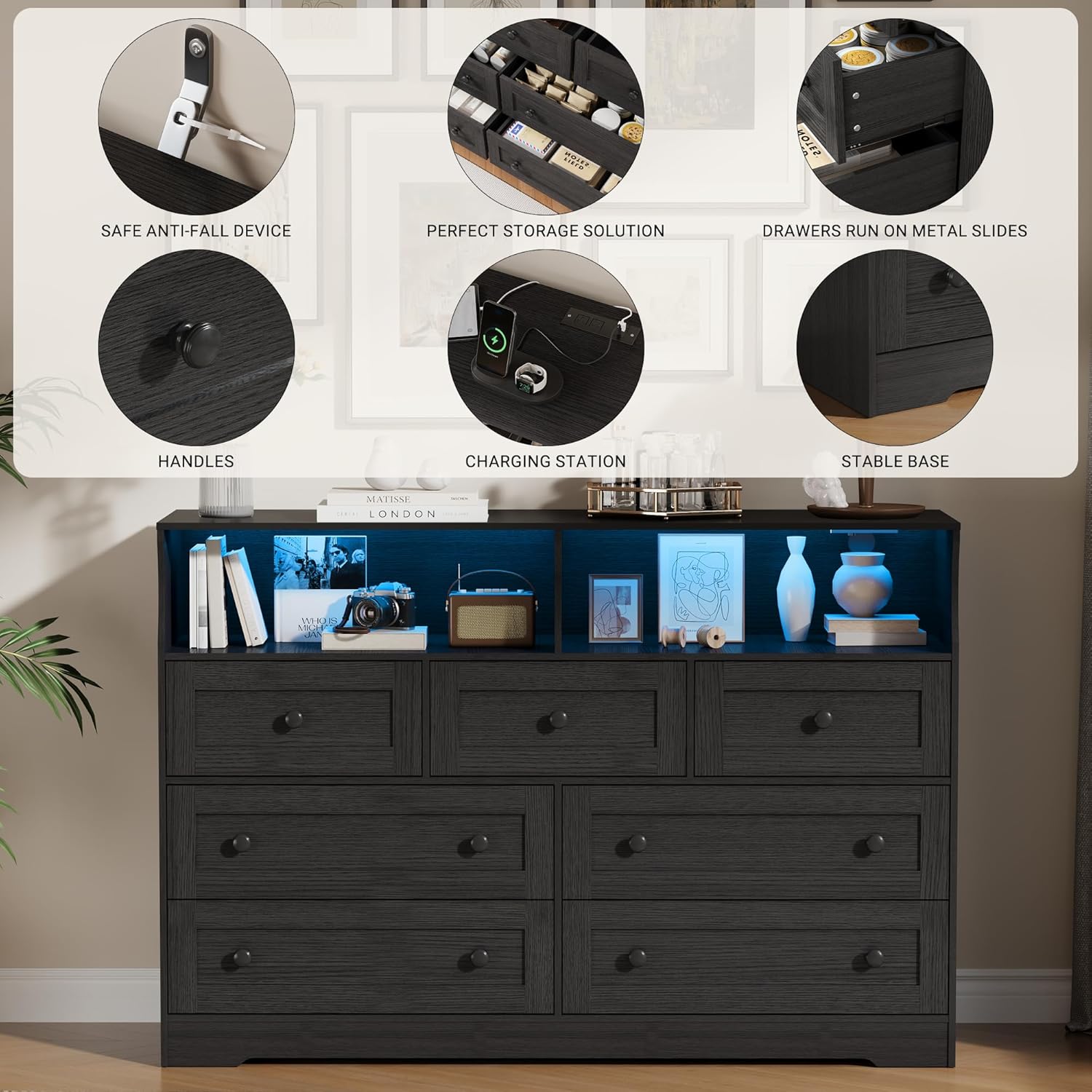
IDEALHOUSE 7-Drawer Dresser with LED Lights & Charging Station
Model: qdSEoLgJIMkVDFBXzJ0J8ASoaK0L
Introduction
Thank you for choosing the IDEALHOUSE 7-Drawer Dresser. This manual provides essential information for the safe assembly, operation, and maintenance of your new furniture. Please read these instructions carefully before use and retain them for future reference.
This dresser combines ample storage with modern features, including integrated LED lighting and a convenient charging station, designed to enhance your bedroom or living space.
Safety Information
Your safety is paramount. Please adhere to the following guidelines:
- Anti-Tip Device: For your safety, always use the included wall anchor hardware to secure the dresser to a wall. This is especially important in households with children or pets to prevent tipping injuries.
- Weight Distribution: To ensure stability, distribute weight evenly in each drawer. Avoid overloading drawers, as this can affect stability and drawer mechanism function.
- Assembly: Follow all assembly instructions precisely. Do not skip steps or use unauthorized parts.
- Placement: Place the dresser on a flat, stable surface. Avoid placing it near heat sources or in direct sunlight to prevent material damage.
- Electrical Safety: When using the charging station, ensure all cables are properly routed and not pinched. Do not exceed the rated power capacity of the charging ports.

Packing List
Before beginning assembly, please verify that all components are present:
- 1 x Chest of Drawers (all panels and parts)
- 1 x Installation Manual
- 1 x Hardware Bag (containing screws, dowels, anti-tip kit, etc.)
If any parts are missing or damaged, please contact customer support immediately.
Setup and Assembly
The IDEALHOUSE dresser is designed for straightforward assembly. Please follow the detailed instructions provided in the separate Installation Manual included in your package.
- Preparation: Clear a spacious area for assembly. Lay out all parts and hardware. It is recommended to assemble the dresser on a soft, clean surface to prevent scratches.
- Follow Manual: Refer to the step-by-step diagrams and instructions in the dedicated Installation Manual. All parts are labeled for easy identification.
- Secure Connections: Ensure all screws and fasteners are tightened securely, but do not overtighten to avoid damaging the material.
- Anti-Tip Installation: Crucially, install the anti-tip wall anchor hardware as instructed in the manual and shown in Figure 1.

Operating Instructions
Drawers
The dresser features four small drawers (16.7'' x 13.4'' x 5.8'') and three large drawers (26.7'' x 13.4'' x 5.8''), along with two open storage compartments. All drawers run on metal slides for smooth operation.
- To open a drawer, gently pull the handle.
- To close a drawer, push it firmly until it is fully seated.
- Avoid forcing drawers open or closed, especially if they feel stuck. Check for obstructions.
LED Lights
The integrated LED lighting enhances the ambiance and illuminates the open storage spaces. The lights are adjustable RGB strips.
- Power On/Off: Locate the power switch for the LED lights, typically found near the charging station or on the back of the dresser.
- Color and Brightness Adjustment: The LED lights are adjustable RGB strips. Refer to the specific instructions provided with the LED light kit for details on how to change colors, adjust brightness, or utilize any smart features (e.g., Bluetooth control via a smartphone app).


Charging Station
The dresser includes a built-in charging station for your electronic devices.
- Connection: Plug the dresser's power cord into a standard wall outlet.
- Usage: Connect your phone, tablet, or other electronic devices to the available charging ports (e.g., USB ports, power outlets) on the charging station.
- Safety: Do not overload the charging station. Disconnect devices once fully charged.

Maintenance
Proper care will ensure the longevity and appearance of your IDEALHOUSE dresser.
- Cleaning: Wipe the dresser regularly with a soft, damp cloth. Avoid using harsh chemicals, abrasive cleaners, or polishes that may damage the finish.
- Spills: Clean up spills immediately with a dry cloth to prevent staining or water damage.
- Drawer Slides: Periodically check drawer slides for smooth operation. If they become stiff, a small amount of silicone lubricant can be applied.
- Fasteners: Occasionally check all screws and fasteners to ensure they remain tight. Retighten if necessary.
Troubleshooting
If you encounter issues with your dresser, refer to the following common solutions:
- Drawers not closing smoothly:
- Check for obstructions inside the drawer or on the slides.
- Ensure the drawer is properly aligned on its slides.
- Verify that the dresser is on a level surface.
- LED lights not working:
- Check if the dresser's power cord is securely plugged into a working outlet.
- Ensure the LED light power switch is in the "On" position.
- Inspect the wiring for any visible damage.
- Charging station not providing power:
- Confirm the dresser's power cord is plugged in.
- Test the outlet with another device to ensure it is functional.
- Try a different charging cable or device to rule out device-specific issues.
For issues not covered here, please contact IDEALHOUSE customer support.
Specifications
| Brand | IDEALHOUSE |
| Model Name | qdSEoLgJIMkVDFBXzJ0J8ASoaK0L |
| Product Dimensions (L x W x H) | 55.1'' x 15.7'' x 37.8'' (15.7"D x 55.1"W x 37.8"H) |
| Small Drawer Dimensions (W x D x H) | 16.7'' x 13.4'' x 5.8'' (approx.) |
| Large Drawer Dimensions (W x D x H) | 26.7'' x 13.4'' x 5.8'' (approx.) |
| Number of Drawers | 7 |
| Material | Engineered Wood (Frame), Iron (Material Type) |
| Color | Black |
| Features | Integrated Charging Station, Adjustable RGB LED Lights, Anti-Tip Design, Metal Drawer Slides |
| Assembly Required | Yes |
| Item Weight | 131 Pounds |
| UPC | 800072209628 |
| ASIN | B0G5128QRT |
Customer Support
For further assistance, missing parts, or warranty inquiries, please contact IDEALHOUSE customer support through the retailer where you purchased the product or visit the official IDEALHOUSE store page on Amazon:
Ask a question about this manual
Ask about setup, troubleshooting, compatibility, parts, safety, or missing instructions. Manuals+ will review the question and use this page’s manual context to help answer it.