
1. Introduction
This manual provides essential information for the safe and effective installation, operation, and maintenance of your new Generic washing machine mainboard. This mainboard is designed as a replacement part compatible with various Samsung washing machine models, including DC92-01776L, DC92-01769C, DC92-01781D, DC41-00254A, and DC41-00203B. It aims to restore the original functionality of your washing machine by replacing faulty components.
The mainboard is manufactured to strict production standards, ensuring performance close to the original part. Its design focuses on stable circuit operation and anti-interference capabilities, making it suitable for the humid environment of washing machines.
2. Safety Information
Before attempting any installation or maintenance, please read and understand all safety instructions. Failure to follow these instructions may result in electric shock, fire, or personal injury.
- Disconnect Power: Always ensure the washing machine is completely disconnected from the main power supply before beginning any work.
- Qualified Personnel: If you are not confident in your ability to perform the installation safely, seek assistance from a qualified technician.
- Handle with Care: Electronic components are sensitive. Avoid touching circuit boards directly with bare hands to prevent electrostatic discharge.
- Inspect Components: Before installation, visually inspect the mainboard for any signs of damage. Do not install damaged components.
- Proper Tools: Use appropriate insulated tools for electrical work.
3. Product Overview
The washing machine mainboard is the central control unit responsible for managing various functions of your appliance, including washing programs, speed adjustments, and overall function response. This replacement board is designed to seamlessly integrate with compatible Samsung models.
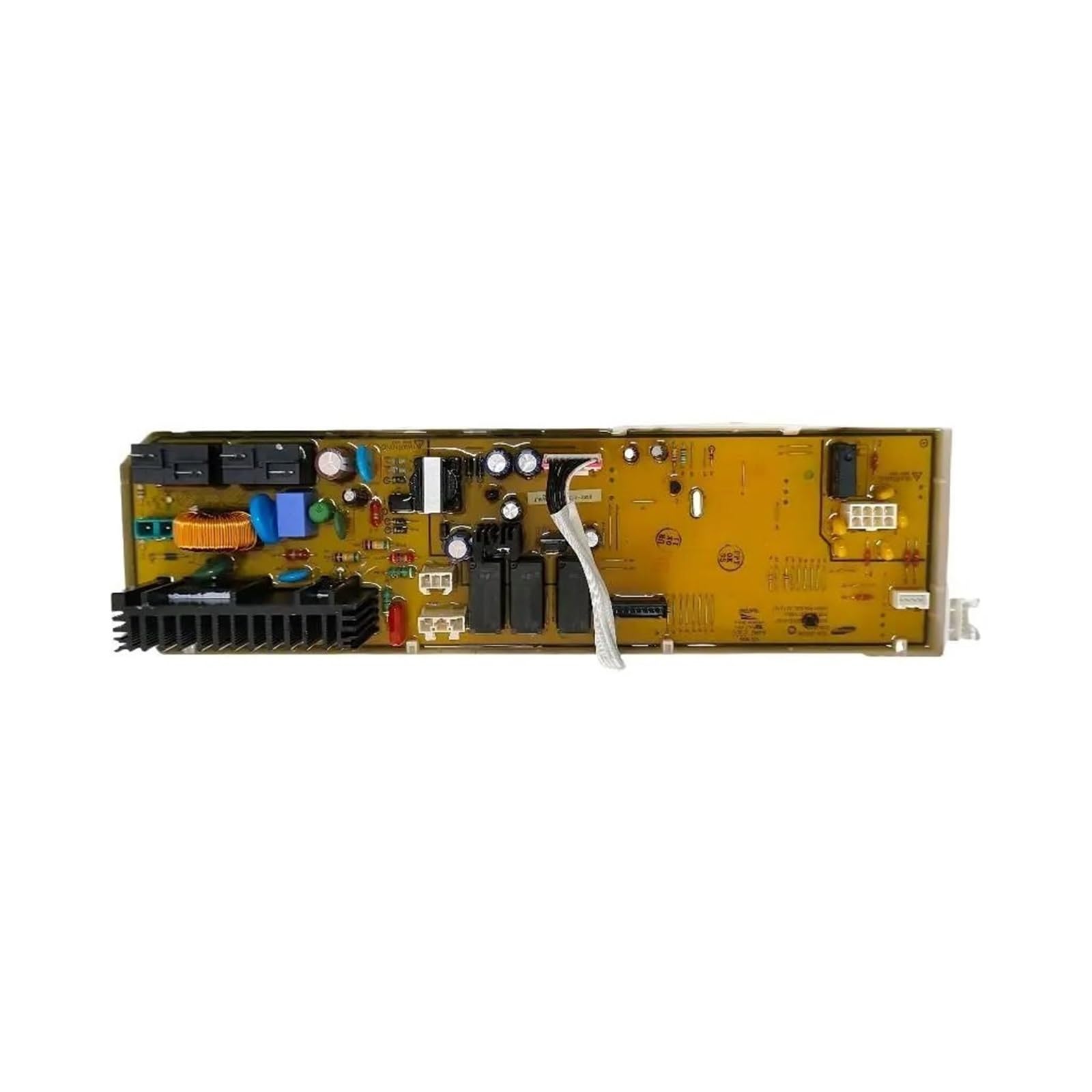
Figure 3.1: Overall view of the Generic washing machine mainboard. This image displays the full board with its rotary selector, various connection ports, and a digital display panel.
Key features of this mainboard include:
- Stable circuit and anti-interference ability.
- Designed for humid working environments.
- Restores washing program control and speed adjustment.
- Ensures stable operation of the washing machine.

Figure 3.2: Close-up view of a section of the mainboard, highlighting the label with model number DC92-01776L and other component markings. This helps in verifying compatibility.

Figure 3.3: Another close-up view of the mainboard, showing a different label with model number DC92-01769C. This confirms compatibility with multiple specified Samsung models.
4. Setup and Installation
The installation process is designed to be straightforward, requiring no specialized professional skills. However, careful attention to safety and proper alignment is crucial.
4.1. Preparation
- Power Disconnection: Unplug the washing machine from the electrical outlet.
- Access Panel: Locate and remove the access panel(s) that cover the existing mainboard. This usually involves unscrewing a few fasteners.
- Documentation: Take photos of the existing wiring connections before disconnecting anything. This will serve as a reference during reassembly.
4.2. Mainboard Replacement
- Disconnect Wires: Carefully disconnect all wiring harnesses and connectors from the old mainboard. Note their positions if not already documented.
- Remove Old Mainboard: Unscrew or unclip the old mainboard from its mounting brackets.
- Install New Mainboard: Position the new mainboard, aligning it with the original mounting points. Secure it with screws or clips.
- Reconnect Wires: Reconnect all wiring harnesses and connectors to the new mainboard, ensuring each connection is firm and correctly seated. Refer to your photos taken in step 4.1 if needed.
4.3. Final Steps
- Secure Panels: Reattach any access panels removed earlier.
- Power On: Plug the washing machine back into the electrical outlet.
- Test Functionality: Run a short test cycle to ensure all washing machine functions are operating correctly.
5. Operating Instructions
This mainboard is a replacement component designed to restore the original operating capabilities of your washing machine. Once installed, the washing machine should function according to its original manufacturer's specifications. Refer to your washing machine's original user manual for specific operating instructions, program selections, and feature usage.
The mainboard ensures that functions such as washing mode, water level control, spin cycles, and other programmed operations are executed accurately and reliably.
6. Maintenance
The mainboard itself requires minimal maintenance. To ensure its longevity and reliable performance:
- Keep Dry: Ensure the area around the mainboard remains dry and free from moisture.
- Cleanliness: Periodically, with the power disconnected, gently clean any dust accumulation around the mainboard using a soft brush or compressed air.
- Avoid Impact: Protect the washing machine from physical impacts that could damage internal components, including the mainboard.
7. Troubleshooting
If your washing machine experiences issues after mainboard replacement, consider the following troubleshooting steps:
- No Power/Startup Failure:
- Check if the washing machine is properly plugged into a working electrical outlet.
- Verify that the circuit breaker has not tripped.
- Ensure all mainboard connections are secure and correctly seated.
- Program Disorder/Incorrect Function:
- Double-check all wiring connections to the mainboard against your reference photos.
- Ensure the correct mainboard model was installed for your specific washing machine.
- Try resetting the washing machine by unplugging it for 5 minutes and then plugging it back in.
- Error Codes:
- Refer to your washing machine's original user manual for the meaning of any displayed error codes.
- Some error codes may indicate issues with other components, not necessarily the mainboard.
If problems persist after attempting these steps, it is recommended to consult a professional appliance repair technician.
8. Specifications
| Attribute | Value |
|---|---|
| Manufacturer | Generic |
| Item Weight | 1.76 ounces |
| Product Dimensions | 3.94 x 3.94 x 3.94 inches |
| Voltage | 1 Kilovolts |
| Batteries Required | No |
| Compatible Models | Samsung DC92-01776L, DC92-01769C, DC92-01781D, DC41-00254A, DC41-00203B |
9. Warranty and Support
For information regarding warranty coverage, return policies, or technical support, please refer to the specific terms provided by your retailer or seller at the time of purchase. Typically, a 30-day refund/replacement policy may apply. Keep your purchase receipt or order details for any warranty claims or support inquiries.