
1. Introduction
This manual provides essential information for the safe installation, operation, and maintenance of your VEVOR 4000W Hybrid Solar Inverter. Please read this manual thoroughly before installation and operation to ensure optimal performance and safety. This inverter is designed to convert 24V DC power from batteries and solar panels into 230V AC single-phase pure sine wave power, suitable for various household and off-grid applications.
2. Safety Information
WARNING: Failure to follow these safety instructions may result in electric shock, fire, serious injury, or death.
- Installation must be performed by qualified personnel in accordance with local electrical codes and regulations.
- Do not attempt to disassemble, repair, or modify the inverter. Contact VEVOR support for assistance.
- Ensure all connections are secure and properly insulated to prevent short circuits.
- Keep the inverter away from flammable materials, moisture, and direct sunlight.
- Verify that the battery voltage and polarity match the inverter's specifications before connecting.
- Always disconnect power from both AC and DC sources before performing any maintenance or wiring.
3. Key Features
- 2-in-1 Hybrid Design: Integrates inverter and charge controller for efficient power management.
- 4000W Pure Sine Wave Output: Delivers stable 230V AC single-phase power, safe for sensitive electronics.
- Built-in 120A MPPT Solar Charge Controller: Maximizes solar energy harvesting with up to 99% conversion efficiency.
- Smart WiFi Module: Enables real-time remote monitoring of system performance via a dedicated app.
- Wide Battery Compatibility: Supports 24V lithium, lead-acid (SLD, FLD, GEL, AGM), and custom battery types.
- Multiple Security Protections: Includes over-temperature, over-current, over-voltage, under-voltage, short circuit, and overload protection.
4. Package Contents
Verify that all items are present in the package:
- 1x VEVOR 4000W Hybrid Solar Inverter (Model: GD5548JMH)
- 1x Wi-Fi Module
- 2x Expansion Screws
- 1x Fuse
- 1x Mounting Accessories Set
- 3x Screws
- 2x Terminal Blocks
- 1x User Manual

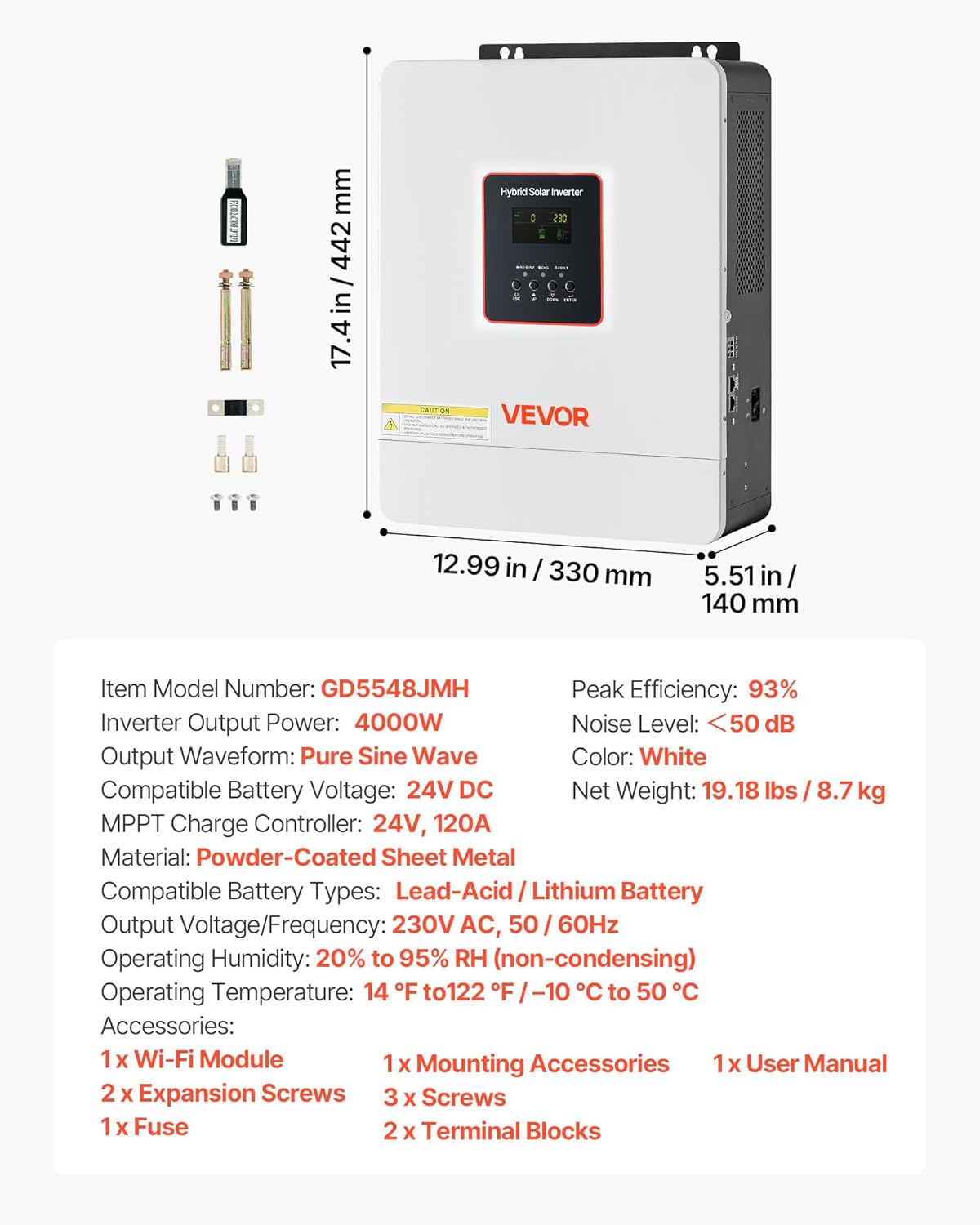
This image displays the VEVOR 4000W Hybrid Solar Inverter along with its physical dimensions and a list of included accessories, ensuring you have all necessary components for installation.
5. Product Overview
5.1. Physical Dimensions
- Height: 17.4 inches (442 mm)
- Width: 12.99 inches (330 mm)
- Depth: 5.51 inches (140 mm)
- Net Weight: 19.18 lbs (8.7 kg)
5.2. Front Panel

The front panel of the VEVOR 4000W Hybrid Solar Inverter features an LCD display and control buttons for monitoring and configuration. The VEVOR brand logo and support information are also visible.
The front panel features an LCD display for real-time monitoring of system status, battery charge, and power flow. Control buttons allow for navigation through menus and settings adjustments.
5.3. Rear Panel Connections
The rear panel provides all necessary connection terminals for AC input, AC output, PV input, and battery connections. Ensure proper wiring as indicated on the unit.
6. Setup and Installation
6.1. Site Selection
- Install the inverter in a well-ventilated area, free from dust, moisture, and corrosive gases.
- Ensure adequate clearance around the unit for heat dissipation.
- Operating temperature range: 14 °F to 122 °F (-10 °C to 50 °C).
- Operating humidity: 20% to 95% RH (non-condensing).
6.2. Mounting the Inverter
Use the provided mounting accessories and expansion screws to securely attach the inverter to a sturdy wall or vertical surface. Refer to the mounting template in the full user manual for precise hole placement.
6.3. Wiring Connections
Before making any connections, ensure the inverter's power switch is in the OFF position and all power sources (solar panels, utility, batteries) are disconnected.
- Battery Connection: Connect the 24V battery bank to the 'BATTERY POS+' and 'BATTERY NEG-' terminals. Ensure correct polarity.
- PV Input Connection: Connect the solar panel array to the 'PV IN +' and 'PV IN -' terminals. Observe correct polarity and ensure the PV input voltage is within the inverter's specified range.
- AC Input Connection: Connect the utility grid or generator to the 'AC IN L' and 'AC IN N' terminals.
- AC Output Connection: Connect your loads (appliances) to the 'AC OUT L' and 'AC OUT N' terminals. For appliances requiring other voltages, a transformer may be required (not included).
- Grounding: Connect the inverter to a reliable ground source using the designated grounding terminal.

This image shows the VEVOR 4000W Hybrid Solar Inverter installed on a wall, demonstrating its connection to various 24V battery types, highlighting its wide compatibility.

A diagram illustrating the typical setup of a home solar power system, showing the flow of energy from solar panels and AC charging through the inverter to power appliances, emphasizing efficient solar conversion.
7. Operating Instructions
7.1. Initial Power-Up
- After all connections are made and verified, switch on the battery breaker (if applicable).
- Switch on the solar panel breaker (if applicable).
- Turn the inverter's power switch to the 'ON' position.
- The LCD display will illuminate, showing system status.
7.2. LCD Display and Control Buttons
The LCD provides real-time data such as input voltage, output voltage, battery status, and charging/discharging priority. Use the 'ESC', 'UP', 'DOWN', and 'ENTER' buttons to navigate through the display menus and adjust settings as needed.

The VEVOR 4000W Hybrid Solar Inverter is shown powering various household appliances, illustrating its capability to deliver 4000W max AC output power and 230V AC single-phase output voltage for home use.
7.3. WiFi Monitoring
Install the dedicated VEVOR monitoring app on your smartphone or tablet. Connect the inverter's built-in WiFi module to your local network. This allows for remote monitoring of system performance, energy yield, and fault diagnostics from anywhere.

A smartphone screen displays the VEVOR inverter's monitoring application, showcasing features like wireless connection, real-time performance monitoring, and data analysis for convenient remote management.
8. Maintenance
Regular maintenance ensures the longevity and optimal performance of your inverter.
- Cleaning: Periodically clean the exterior of the inverter and ventilation openings to prevent dust buildup, which can impede cooling. Use a dry, soft cloth. Do not use liquid cleaners.
- Connections Check: Annually inspect all electrical connections (battery, PV, AC input/output) for tightness and signs of corrosion. Tighten any loose connections.
- Battery Inspection: Follow the manufacturer's maintenance guidelines for your specific battery type.
- Environmental Check: Ensure the installation environment remains within the specified temperature and humidity ranges.
9. Troubleshooting
If the inverter is not operating correctly, refer to the following common issues and solutions. For persistent problems, contact VEVOR technical support.
| Problem | Possible Cause | Solution |
|---|---|---|
| Inverter not turning on | No battery connection or low battery voltage | Check battery connections and ensure battery voltage is above minimum operating level. |
| No AC output | Overload, short circuit, or inverter fault | Reduce load, check for short circuits, or restart the inverter. Check fault codes on LCD. |
| Low solar charging | Insufficient sunlight, dirty panels, or PV connection issue | Ensure panels are clean and unshaded. Check PV wiring and connections. |
| WiFi monitoring not working | No network connection or incorrect setup | Verify WiFi module connection and network settings. Refer to app instructions. |
This diagram illustrates the comprehensive security protections integrated into the VEVOR 4000W Hybrid Solar Inverter, including safeguards against over-temperature, over-current, over-voltage, under-voltage, short circuits, and overloads, ensuring safe operation.
10. Specifications
| Feature | Specification |
|---|---|
| Model Name | GD5548JMH |
| Inverter Output Power | 4000W |
| Output Waveform | Pure Sine Wave |
| Compatible Battery Voltage | 24V DC |
| MPPT Charge Controller | 24V, 120A |
| Material | Powder-Coated Sheet Metal |
| Compatible Battery Types | Lead-Acid / Lithium Battery |
| Output Voltage/Frequency | 230V AC, 50/60Hz |
| Operating Humidity | 20% to 95% RH (non-condensing) |
| Operating Temperature | 14 °F to 122 °F / -10 °C to 50 °C |
| Peak Efficiency | 93% |
| Noise Level | <50 dB |
| Color | White |
| Net Weight | 19.18 lbs / 8.7 kg |
11. Warranty and Support
VEVOR provides technical support and an e-warranty certificate for this product. For assistance, please visit the official VEVOR support website:
Please have your model number (GD5548JMH) and purchase information ready when contacting support.