
1. Introduction
Thank you for choosing the Lysole Walking Vibration Pad Treadmill. This manual provides essential information for the safe and efficient operation, maintenance, and troubleshooting of your new fitness equipment. Please read it thoroughly before first use and retain it for future reference.
Important Safety Information: Always consult with a healthcare professional before starting any new exercise program. Ensure the treadmill is placed on a flat, stable surface. Keep children and pets away from the treadmill during operation. Do not use the treadmill if you weigh more than 340 pounds (154 kg).
2. Product Features
- 4-in-1 Portable Design: Functions as a walking pad, jogging pad, running pad, and climbing pad with adjustable incline.
- Adjustable 5% Incline: Manually adjustable incline to simulate mountaineering, targeting glutes and leg muscles more effectively.
- Powerful & Quiet Motor: Equipped with a 2.5 HP motor, operating at less than 45dB, suitable for home and office use without significant noise disruption.
- Large LED Display & Remote Control: Real-time tracking of speed, distance, time, and calories burned. Remote control allows for easy speed adjustments and immediate stops.
- Non-Slip Running Belt & Shock Reduction: Features a spacious 16.54" x 40" running belt with five non-slip layers and eight soft rubber shock absorbers for a quiet and stable experience.
- Easy Storage & Portability: Slim design with transport wheels for convenient movement and storage under furniture or against a wall.
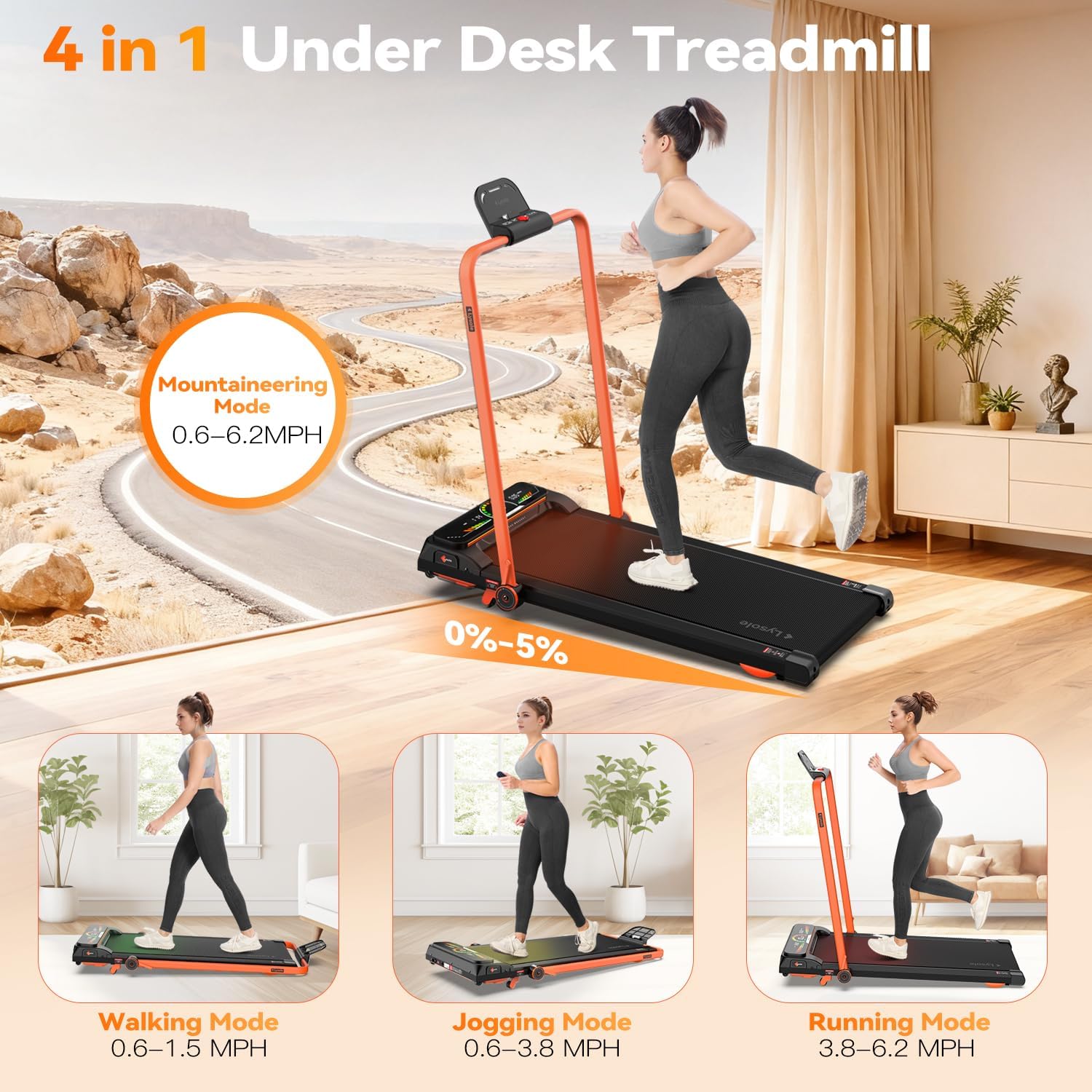
Figure 2.1: The 4-in-1 functionality of the Lysole treadmill, including walking, jogging, running, and mountaineering modes.
3. Package Contents
Please check the package carefully to ensure all items are present and undamaged.
- Lysole Walking Pad Treadmill x 1
- Remote Control x 1
- L-Shaped Wrench x 1
- User Manual x 1

Figure 3.1: Contents included in the Lysole Walking Pad Treadmill package.
4. Setup Instructions
The Lysole Walking Pad Treadmill requires minimal assembly. Follow these steps for initial setup:
- Unpack: Carefully remove the treadmill and all accessories from the packaging.
- Placement: Place the treadmill on a flat, stable, and non-slip surface. Ensure there is adequate space around the unit for safe operation.
- Power Connection: Plug the power cord into the treadmill's power input and then into a grounded electrical outlet.
- Power On: Locate the main power switch (usually at the front or side of the treadmill) and turn it to the 'ON' position. The LED display should illuminate.
- Remote Control Setup: Insert 2 AAA batteries (not included) into the remote control. The remote is pre-paired with the treadmill.
- Incline Adjustment (Optional): To adjust the incline, locate the orange levers at the front of the treadmill. Push them back to raise the front of the treadmill, creating a 5% incline. Ensure both sides are securely engaged.
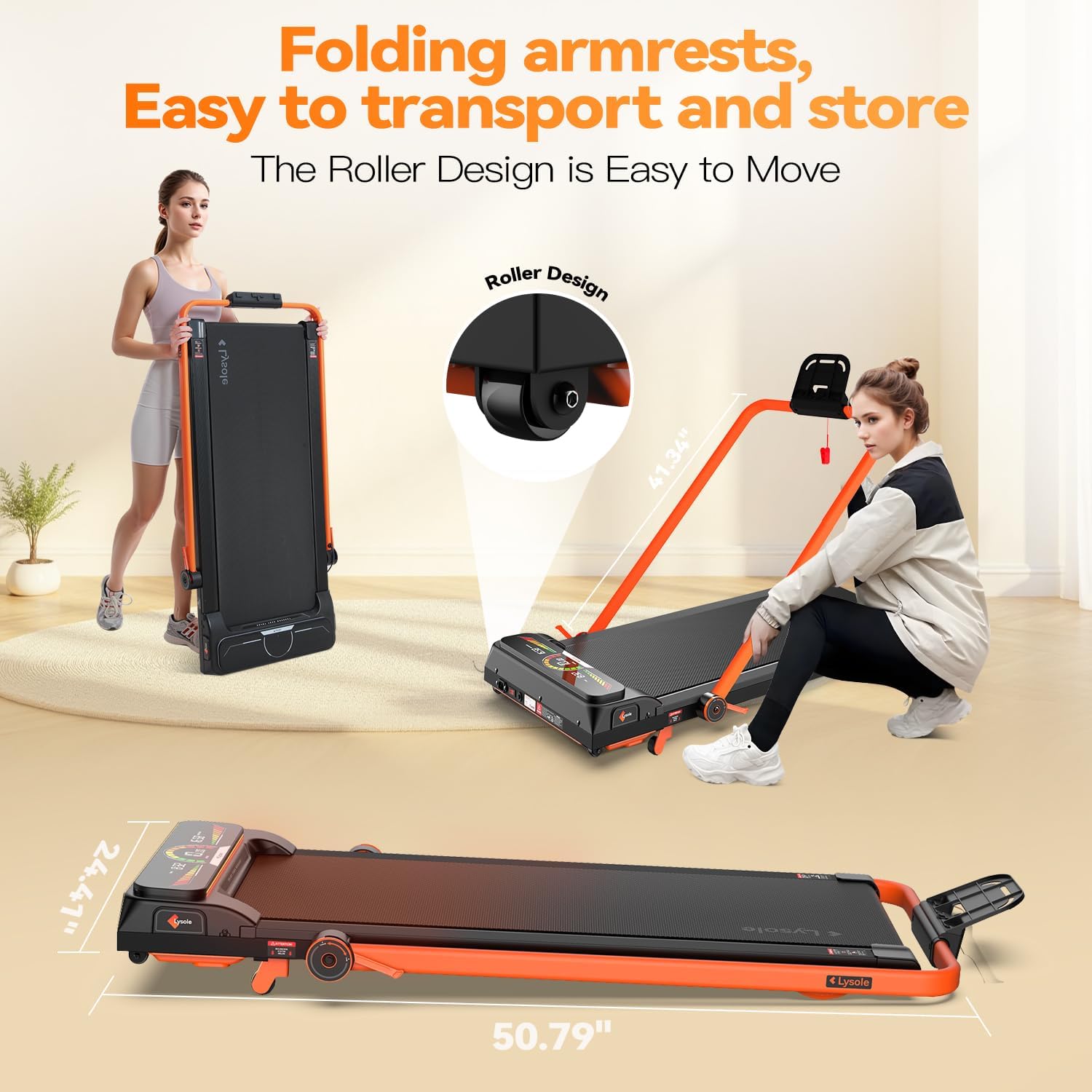
Figure 4.1: The Lysole treadmill in its flat configuration, highlighting its compact design and transport wheels for easy movement.
5. Operating Instructions
Familiarize yourself with the controls and display before beginning your workout.
5.1 Using the Remote Control
- Start/Stop: Press the Play/Pause button to start or stop the treadmill. A 3-second countdown will appear before starting.
- Speed Adjustment: Use the '+' button to increase speed and the '-' button to decrease speed. The speed range is 0.6-6.2 MPH.
- Mode Selection: Press the 'MODE' button to cycle through display modes (Time, Distance, Calories).
5.2 Understanding the LED Display
The oversized LED display provides real-time workout data:
- TIME: Displays the duration of your workout.
- SPEED: Shows your current walking/running speed in MPH.
- DISTANCE: Tracks the total distance covered during your session.
- CALORIES: Estimates the calories burned during your workout.

Figure 5.1: The LED display and remote control for the Lysole Walking Pad Treadmill.
5.3 Workout Modes
- Walking Mode: Speed range 0.6-1.5 MPH. Ideal for light activity or warm-ups.
- Jogging Mode: Speed range 0.6-3.8 MPH. Suitable for a moderate pace.
- Running Mode: Speed range 3.8-6.2 MPH. For more intense cardio.
- Mountaineering Mode: Utilizes the 5% incline for a more challenging workout, engaging different muscle groups.
6. Maintenance
Regular maintenance ensures the longevity and optimal performance of your treadmill.
6.1 Cleaning
- Wipe down the treadmill surface with a damp cloth after each use to remove sweat and dust.
- Avoid using abrasive cleaners or solvents that may damage the display or finish.
6.2 Lubrication
The running belt requires periodic lubrication to reduce friction and wear. Use the provided lubricant or a silicone-based treadmill lubricant.
- Turn off and unplug the treadmill.
- Loosen the belt tension by turning the rear rollers counter-clockwise using the L-shaped wrench.
- Lift the edge of the running belt and apply a thin line of lubricant along the center of the deck.
- Tighten the belt tension by turning the rear rollers clockwise until the belt is snug but not overly tight.
- Plug in the treadmill and run it at a low speed for 1-2 minutes to distribute the lubricant.

Figure 6.1: Adjusting the treadmill belt for proper tension and lubrication.
6.3 Belt Adjustment
If the running belt is off-center or slipping, adjust it using the L-shaped wrench at the rear rollers. Turn the bolt clockwise to move the belt to the right, and counter-clockwise to move it to the left. Adjust in small increments and test the belt after each adjustment.
7. Troubleshooting
Refer to this section for common issues and their solutions.
- Treadmill not starting: Ensure the power cord is securely plugged in and the main power switch is ON. Check if the remote control batteries are correctly inserted.
- Running belt slipping: The belt may be too loose. Refer to Section 6.3 for belt adjustment.
- Unusual noise during operation: Check for any loose parts. Ensure the treadmill is on a flat surface. Lubricate the running belt if necessary (Section 6.2).
- Inaccurate display readings: Ensure the treadmill is properly calibrated. If issues persist, contact customer support.
8. Specifications
| Feature | Specification |
|---|---|
| Brand | Lysole |
| Model Name | L400A |
| Material | Alloy Steel |
| Maximum Speed | 6.2 Miles per Hour |
| Minimum Speed | 0.6 Miles per Hour |
| Maximum Horsepower | 2.5 Horsepower |
| Maximum Incline Percentage | 5% (Manual) |
| Maximum Weight Recommendation | 340 Pounds |
| Deck Length | 40 Inches |
| Running Belt Dimensions | 16.54" x 40" |
| Noise Level | < 45dB |
| Assembly Required | No |
| Power Source | Corded Electric |
| Connectivity Technology | Bluetooth |

Figure 7.1: Key specifications and features of the Lysole treadmill, including motor power and weight capacity.
9. Official Product Video
Video 9.1: An official overview of the Lysole Walking Pad Treadmill with Incline, demonstrating its features and usage.
10. Warranty and Support
Lysole is committed to customer satisfaction. For warranty information, technical support, or any questions regarding your treadmill, please refer to the contact details provided in your purchase documentation or visit the official Lysole website. Our commitment to supporting customers 24 hours a day to ensure timely resolution of issues while providing satisfactory solutions remains unwavering.