
1. Product Overview
The SEICANE 12.1-inch Android Stereo Upgrade is designed to enhance the in-car entertainment and navigation experience for Ford F-150 models manufactured between 2015 and 2020. This unit features an Android operating system, a large touch screen, and supports various functionalities including wireless CarPlay, Android Auto, GPS navigation, and integration with existing vehicle systems.
Compatibility
- Vehicle Models: Specifically designed for Ford F-150 models from 2015 to 2020. Not compatible with other model years.
- Dashboard Types: Compatible with ten different dashboard configurations.
- Audio Systems: Supports factory Sony sound systems and B&O audio systems.
- Climate Control: Retains functionality of factory manual and automatic air conditioning controls.
- Steering Wheel Controls: Supports existing steering wheel controls.
- Backup Camera: Supports factory backup cameras, parking sensors, and reverse trajectory. A SEICANE backup camera is included if your vehicle does not have one.
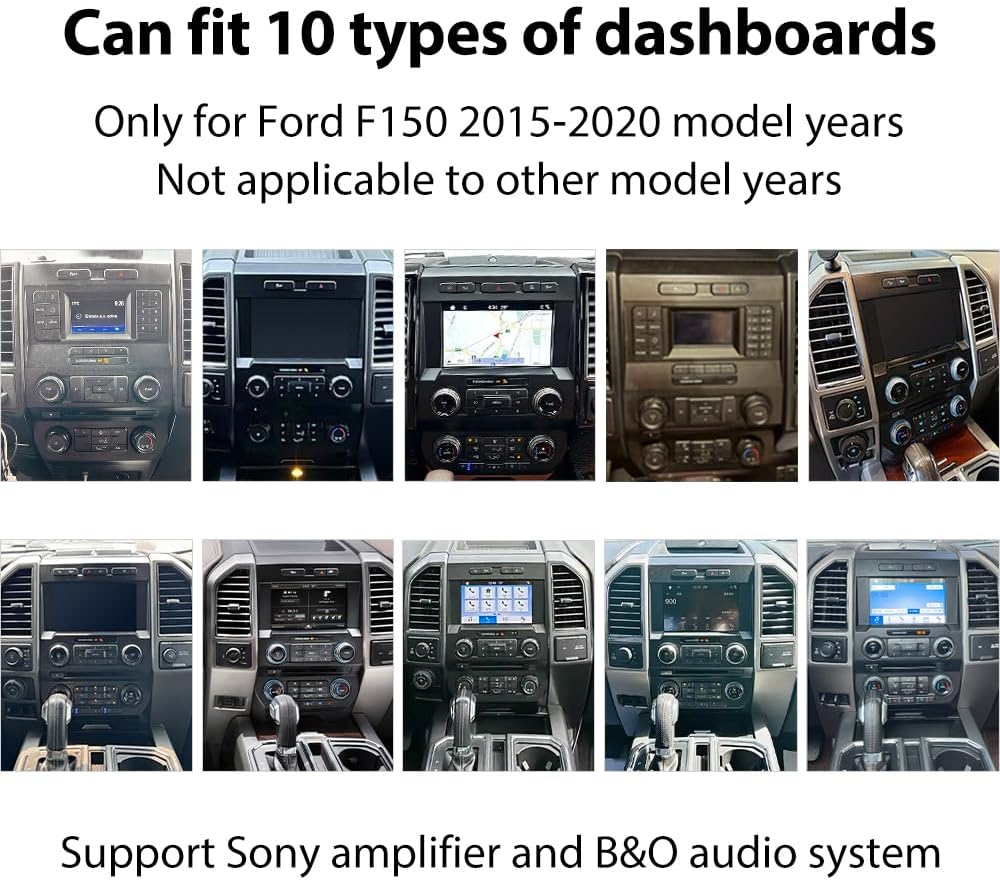
This image illustrates the ten different Ford F-150 dashboard types (2015-2020) that are compatible with the SEICANE 12.1-inch Android Stereo Upgrade.

This image demonstrates the seamless installation of the 12.1-inch screen, showing how it fits perfectly into the dashboard for both manual and automatic air conditioning systems.
What's in the Box
- 12.1-inch Radio Upgrade Unit
- Reversing Camera (if needed)
- Canbus Box
- Mounting Tools
- Power Harness
- RCA Cable
- Manual AC Frame (if applicable)
- Automatic AC Frame (if applicable)
- AC Installation Tools
- Original Car's USB Cable
- Backup Camera Cable
- Radio Adapter
- GPS Antenna
- USB Cable

This image displays the complete package content, including the 12.1-inch screen, various cables, AC frames, installation tools, and accessories.
2. Setup and Installation
The SEICANE Android Stereo Upgrade is designed for a plug-and-play installation. While the process is generally straightforward, professional installation is recommended to ensure proper functionality and avoid damage. The wiring harness is designed to match your car's existing wiring, minimizing errors.
Installation Steps Overview
- Prepare the Dashboard: Carefully remove the storage bin and any necessary trim pieces from your vehicle's dashboard.
- Remove Factory Components: Disconnect and remove the factory CD screen and other original radio components.
- Transfer AC Controls: Move the AC knobs and buttons from the original unit to the new AC frame provided.
- Connect Wiring: Connect the new unit's wiring harness, radio antenna, camera plug, and other necessary plugs. Ensure the Canbus box is connected for power and proper communication.
- Install New Unit: Secure the new 12.1-inch Android stereo unit into the dashboard frame.
- Test Functionality: Before fully reassembling, power on the unit and test all functions, including audio, touch screen, AC controls, and steering wheel controls.
- Final Assembly: Reassemble any removed trim pieces.
Wiring Diagram

This image provides a detailed wiring diagram, illustrating how to connect the power harness, RCA cable, radio antenna, GPS antenna, USB cables, and Canbus box.
Connecting Plugs
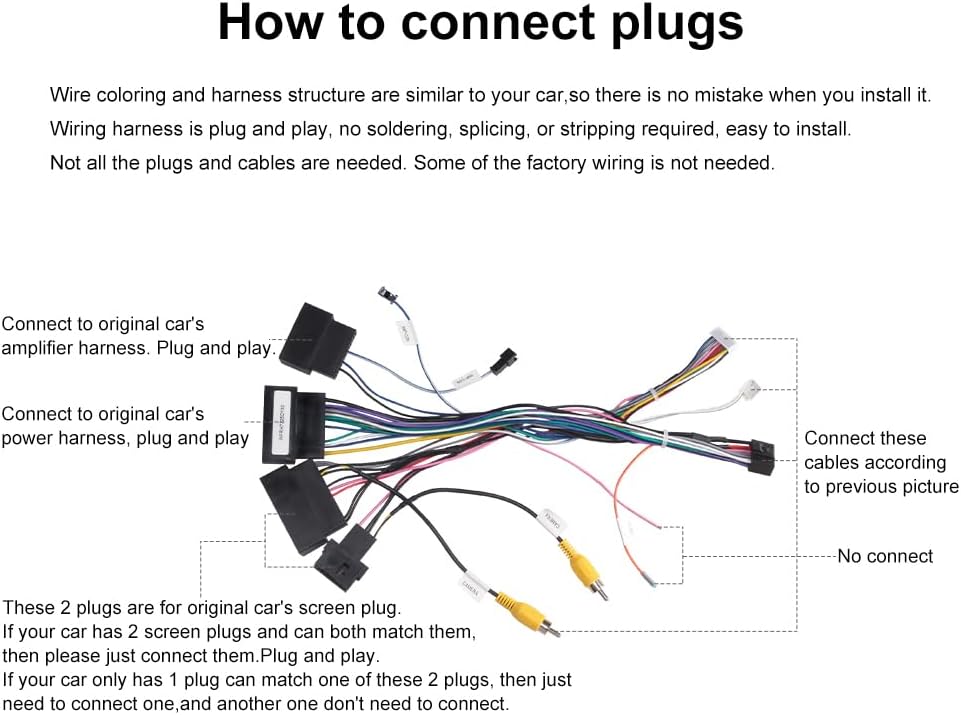
This image shows the connection points for the original car's amplifier harness, power harness, and screen plugs. Note that not all factory wiring may be needed.
Installation Video Guides
Video: How to Remove Factory CD Unit
This video demonstrates the initial steps of removing the factory CD unit from the Ford F-150 dashboard, a crucial step before installing the new SEICANE stereo. Warning: Professional operation. Do not attempt without proper knowledge.
Video: How to Disconnect Cables
This video guides you through the process of safely disconnecting the various cables and harnesses from the original radio system in your Ford F-150. Warning: Professional operation. Do not attempt without proper knowledge.
Video: How to Install the Frame
This video demonstrates the correct procedure for installing the new frame for the SEICANE unit into the Ford F-150 dashboard, ensuring a secure and gap-free fit. Warning: Professional operation. Do not attempt without proper knowledge.
Video: How to Put New Unit In
This video shows the final steps of placing the new SEICANE 12.1-inch Android stereo unit into the installed frame and connecting the necessary cables. Warning: Professional operation. Do not attempt without proper knowledge.
3. Operating Instructions
The SEICANE Android Stereo operates on an Android system, providing a user-friendly interface similar to a tablet. The 8-core CPU and 4GB RAM ensure smooth performance and fast boot times.
Key Features and Functions
- Touchscreen Interface: Navigate through menus and applications using the responsive 12.1-inch capacitive IPS touchscreen.
- Wireless CarPlay & Android Auto: Easily sync your smartphone for access to GPS navigation, music, calls, and other apps directly on the stereo screen.
- GPS Navigation: Utilize built-in GPS with worldwide map support for accurate navigation. You can listen to music while navigating.
- Multimedia Playback: Enjoy various media formats through USB, Bluetooth, or streaming apps.
- Steering Wheel Control: Control audio volume, track changes, and other functions directly from your vehicle's steering wheel buttons.
- Backup Camera Display: The screen automatically displays a clear image from the backup camera with reverse trajectory when the vehicle is in reverse.
- Air Conditioning Control: Adjust your vehicle's climate settings directly from the touchscreen interface, maintaining full control over manual and automatic AC systems.

This image demonstrates the wireless CarPlay and Android Auto functionality, allowing seamless integration of your smartphone's features onto the large display.

This image highlights the ability to navigate using GPS while simultaneously enjoying music playback on the stereo.
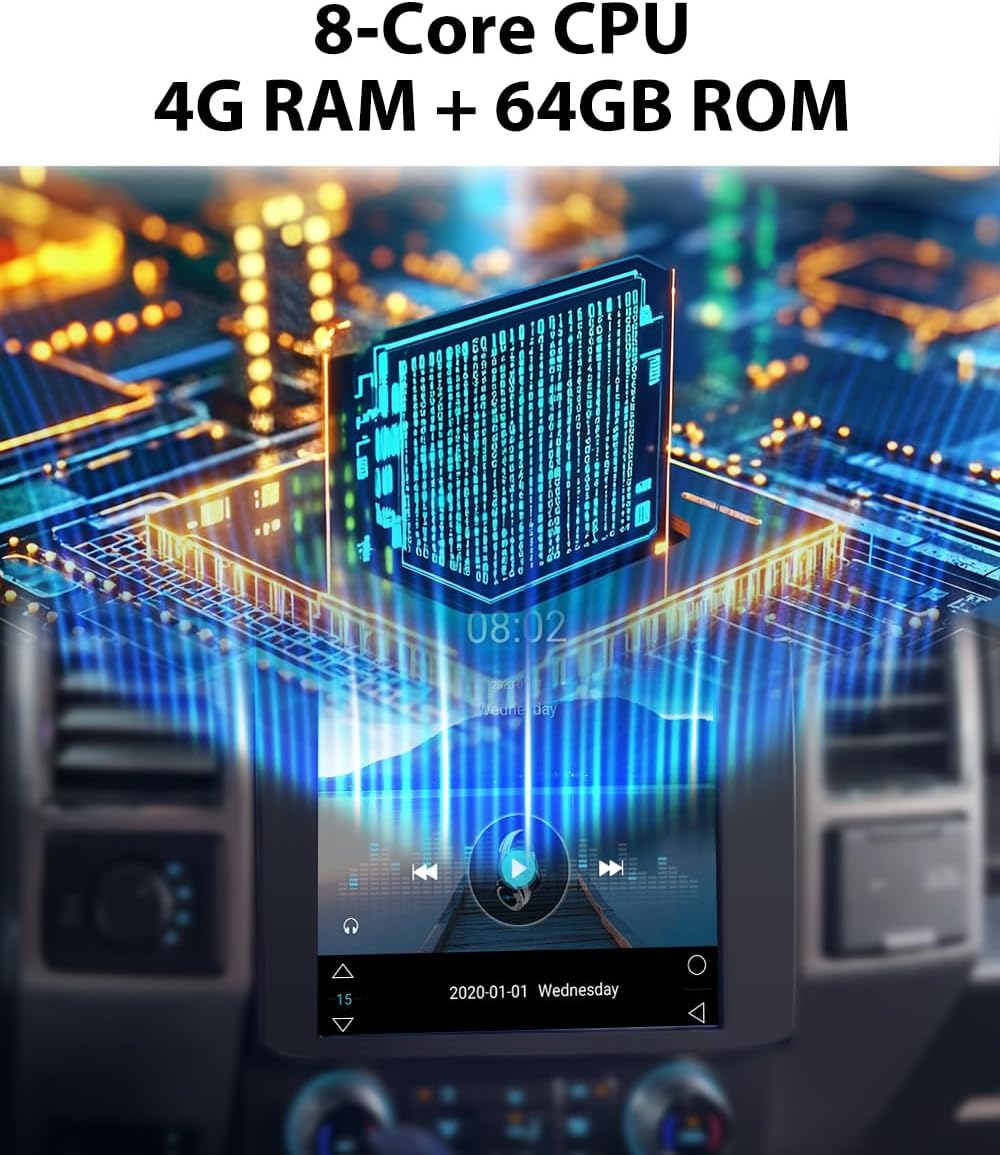
This image illustrates the powerful internal components, including the 8-Core CPU, 4GB RAM, and 64GB ROM, ensuring smooth and stable operation.
Operation Video Guide
Video: Radio Upgrade After Installation
This video provides a demonstration of the SEICANE radio unit in operation after installation, showcasing its interface, air conditioning controls, and steering wheel control functionality.
4. Maintenance
To ensure the longevity and optimal performance of your SEICANE Android Stereo, follow these general maintenance guidelines:
- Screen Cleaning: Use a soft, lint-free cloth specifically designed for electronics to clean the touchscreen. Avoid abrasive materials or harsh chemical cleaners.
- Software Updates: Periodically check for and install any available software updates to ensure the system runs efficiently and has the latest features and security patches.
- Avoid Extreme Temperatures: While designed for automotive use, prolonged exposure to extreme heat or cold can affect electronic components.
- Cable Connections: Ensure all cables remain securely connected. Loose connections can lead to intermittent issues.
5. Troubleshooting
If you encounter issues with your SEICANE Android Stereo, refer to the following common troubleshooting tips:
- Unit Does Not Power On:
- Check all power connections, especially the Canbus box connection.
- Ensure the vehicle's ignition is on.
- No Sound or Poor Audio Quality:
- Verify all audio cables are securely connected.
- Check the volume settings on the unit and your vehicle's amplifier.
- Ensure compatibility with your factory Sony or B&O sound system.
- CarPlay/Android Auto Not Connecting:
- Ensure your phone's Bluetooth and Wi-Fi are enabled.
- Restart both the stereo unit and your smartphone.
- Check for any software updates for the stereo.
- Screen Unresponsive or Frozen:
- Perform a soft reset by holding the power button (if available) or turning off the vehicle and restarting.
- Ensure the screen is clean and free of debris.
- Backup Camera Issues (No Image or Incorrect Guidelines):
- Verify the backup camera cable (yellow plugs) is correctly connected.
- Check camera settings within the stereo's menu.
- Accessing Advanced Settings: Some advanced settings may require a specific code. Try 8888 to access these settings.
- Polarized Glasses Issue: If you wear polarized sunglasses, the screen may appear dim or black. This is a characteristic of some display technologies and not a defect of the unit.
If these steps do not resolve your issue, please contact SEICANE technical support for further assistance.
6. Specifications
| Feature | Specification |
|---|---|
| Brand | SEICANE |
| Model Number | H7725 |
| Vehicle Service Type | 2015-2020 Ford F150, Truck |
| Screen Size | 12.1 inches |
| Operating System | Android |
| Memory (RAM) | 4 GB |
| Storage (ROM) | 64 GB |
| Connectivity Technology | Bluetooth, USB, Wi-Fi |
| Special Features | Backup camera support, Bluetooth, CarPlay, Android Auto, Touchscreen |
| Map Type | Worldwide |
| Audio Output Mode | Stereo |
| Mounting Type | Dashboard Mount |
| Display Type | IPS |
| Human-Interface Input | Touchscreen |
| Control Method | Touch |
| Supported Satellite Navigation System | GPS |
| Item Dimensions (L x W x H) | 9.65"L x 9.57"W x 11.73"H |
7. Warranty Information
The SEICANE 12.1-inch Android Stereo Upgrade comes with a 1-year warranty from the date of purchase. This warranty covers manufacturing defects and malfunctions under normal use. Please retain your proof of purchase for warranty claims. The warranty does not cover damage caused by improper installation, misuse, accidents, or unauthorized modifications.
8. Customer Support
For any technical assistance, installation questions, or troubleshooting not covered in this manual, the SEICANE technical service team is available to assist you. Please feel free to contact us for professional technical support.
Contact Information: Refer to the contact details provided with your product packaging or on the official SEICANE website.