
Marsyu MT500
Marsyu MT500 Smartwatch User Manual
Model: MT500 | Brand: Marsyu
Introduction
Thank you for choosing the Marsyu MT500 Smartwatch. This manual provides essential information for setting up, operating, and maintaining your device. Please read it carefully to ensure optimal performance and longevity of your smartwatch.

Image: The Marsyu MT500 Smartwatch, showcasing its sleek design and digital display on a user's wrist.
Setup
1. Package Contents
Ensure all items are present in the package:
- Marsyu MT500 Smartwatch
- Watch Strap
- Charging Cable
- User Manual
2. Charging the Smartwatch
Before first use, fully charge your smartwatch.
- Connect the magnetic charging cable to the charging contacts on the back of the smartwatch.
- Plug the USB end of the cable into a standard USB power adapter (5V/1A recommended).
- The watch display will indicate charging status. A full charge typically takes 2-3 hours.

Image: The smartwatch connected to its magnetic charging cable, illustrating the charging process and battery life expectations.
3. Installing the G Band App
To unlock all features, download and install the 'G Band' app on your smartphone.
- Scan the QR code in the manual or on the watch packaging, or search for 'G Band' in your smartphone's app store (Google Play Store for Android, Apple App Store for iOS).
- The app is compatible with Android 4.4+ and iOS 8.2+ devices.
4. Pairing with Your Smartphone
- Ensure Bluetooth is enabled on your smartphone.
- Open the 'G Band' app and follow the on-screen instructions to create an account and set up your profile.
- In the app, navigate to 'Device' or 'Add Device' and select your Marsyu MT500 Smartwatch from the list of available devices.
- Confirm the pairing request on both your smartphone and the smartwatch.
Operating Instructions
Basic Navigation
- Touch Screen: Swipe left/right, up/down to navigate through menus and features. Tap to select.
- Side Button: Press to return to the home screen or wake the device. Long press for power options.
Key Features
Bluetooth Calling & Smart Notifications
Once paired, the smartwatch allows you to make and receive calls directly from your wrist, and receive real-time notifications.
- Making/Receiving Calls: Use the integrated Hi-Fi speaker and waterproof microphone. Access call history and contacts via the watch interface.
- Notifications: SMS, WhatsApp, Instagram, and other app notifications will display on the screen.

Image: The smartwatch screen showing an incoming call and icons for various social media and messaging app notifications.
24/7 Health Monitoring
The MT500 continuously monitors various health metrics. Note: This device is not a medical device and test details are for reference only.
- Heart Rate: Real-time heart rate tracking.
- Blood Oxygen (SpO2): Monitors blood oxygen saturation levels.
- Blood Pressure: Provides blood pressure readings.
- Stress Levels: Tracks and analyzes stress.
- Sleep Monitoring: Records deep sleep, light sleep, and awake times, providing a comprehensive sleep quality analysis.
- ECG/HRV: Utilizes non-invasive cardiac monitoring for ECG and Heart Rate Variability (HRV) trends.

Image: The smartwatch interface showing detailed sleep analysis (deep, shallow, awake, REM) and real-time health data for heart rate, blood oxygen, and blood pressure.

Image: A smartphone screen connected to the smartwatch, showing an ECG waveform, heart rate, and HRV analysis. A disclaimer states the product is not a medical device.
Sports Modes
The smartwatch supports over 130 activity modes to track your workouts.
- Select your desired sport mode (e.g., walking, running, hiking, cycling) from the watch menu.
- The watch will track steps, distance, calories burned, and other relevant metrics in real-time.
- All training data is stored in the G Band app for progress tracking.

Image: The smartwatch showing a selection of sports icons and an active "Outdoor Run" screen with metrics like calories, heart rate, pace, distance, and steps.
LED Flashlight
Access the integrated LED flashlight with four modes:
- Warning Mode
- SOS Mode
- Constant Light Mode
- Night Running Mode
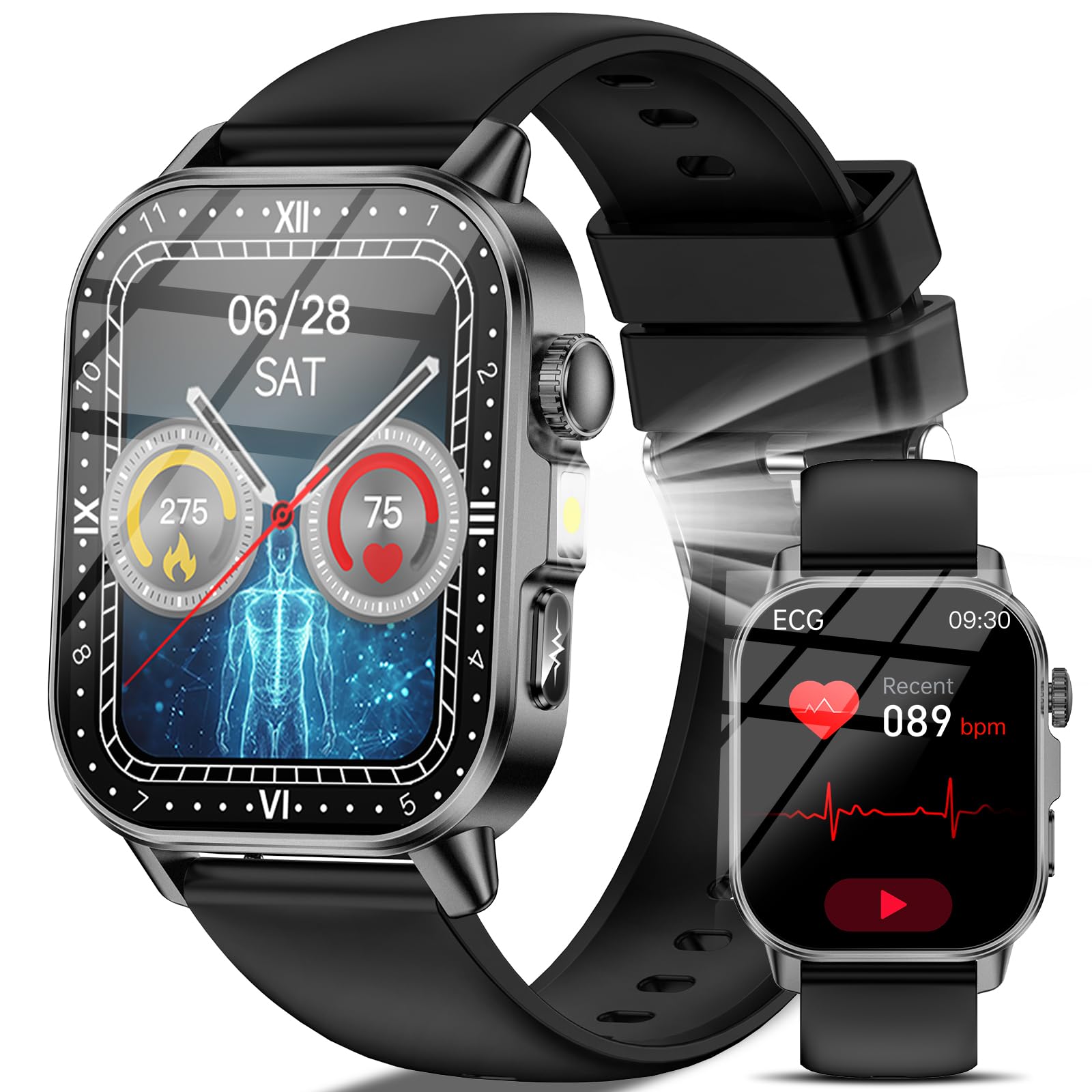
Image: A user wearing the smartwatch with its LED flashlight activated, demonstrating its use in various scenarios and highlighting the four available modes.
Customizable Watch Faces
Personalize your smartwatch with over 140 watch faces available online via the G Band app. You can also import your own photos.

Image: The smartwatch showcasing multiple customizable watch faces, emphasizing the 2.0-inch HD display and the 450mAh battery capacity.
Other Functions
The MT500 includes additional features for daily convenience:
- Date Display
- Alarm Clock
- Weather Forecasts
- Music Control
- Camera Shutter Control
- Timer & Stopwatch
- Body Composition, Temperature, Mood, Fatigue Monitoring

Image: The smartwatch screen showing a grid of icons representing its multi-functional capabilities, including weather, alarms, and various health and utility features.
Maintenance
Cleaning
- Wipe the watch screen and strap regularly with a soft, damp cloth.
- Avoid using harsh chemicals or abrasive materials.
- Ensure the charging contacts are clean and dry before charging.
Water Resistance (IP68)
The smartwatch has an IP68 water resistance rating, meaning it is protected against dust and can withstand immersion in water up to 1 meter for 30 minutes.
- It is suitable for daily use, such as hand washing or light rain.
- Avoid hot water, saunas, or diving, as steam and high pressure can compromise the seal.
- Do not operate the watch buttons underwater.
Battery Care
- Avoid extreme temperatures, which can affect battery life.
- Charge the watch regularly, but avoid leaving it fully discharged for extended periods.
Troubleshooting
Watch Not Turning On
- Ensure the watch is fully charged. Connect it to the charger for at least 30 minutes.
- Long press the side button for 5-10 seconds to force a restart.
Bluetooth Connection Issues
- Make sure Bluetooth is enabled on your smartphone and the watch is within range.
- Restart both your smartphone and the smartwatch.
- Unpair the device from your phone's Bluetooth settings and re-pair it through the G Band app.
- Ensure the G Band app has necessary permissions (location, Bluetooth) enabled on your phone.
Inaccurate Health Data
- Ensure the watch is worn snugly on your wrist, about one finger's width from your wrist bone.
- Keep the sensor clean and free from sweat or dirt.
- Remember that the smartwatch is not a medical device; readings are for reference only.
Notifications Not Appearing
- Check if notifications are enabled in the G Band app for specific applications.
- Ensure your phone's notification settings allow the G Band app to display alerts.
- Verify that the watch is connected via Bluetooth.
Specifications
| Model Number | MT500 |
| Brand | Marsyu |
| Screen Size | 2.0 inches HD |
| Resolution | 320 x 385 pixels |
| Battery Capacity | 450 mAh Lithium-polymer |
| Charging Time | 2-3 hours |
| Battery Life (Normal Use) | 3-6 days |
| Battery Life (Standby) | 20+ days |
| Connectivity | Bluetooth 5.3 |
| Memory | 128 MB |
| Operating System | Proprietary OS |
| Water Resistance | IP68 (up to 1 meter for 30 minutes) |
| Case Material | Metal |
| Band Material | Silicone |
| Supported Apps | G Band (iOS 8.2+, Android 4.4+) |
| Health Monitoring | ECG, HRV, Heart Rate, SpO2, Blood Pressure, Stress, Sleep |
| Sports Modes | 130+ modes |
| Special Features | Bluetooth Call, LED Flashlight, Customizable Watch Faces, Music Control, Camera Control |
| Dimensions (Watch Face) | 56mm (H) x 41mm (W) x 11mm (D) |
| Band Length | Min: 155mm, Max: 235mm |
| Total Length | 260mm |
| Country of Origin | China |
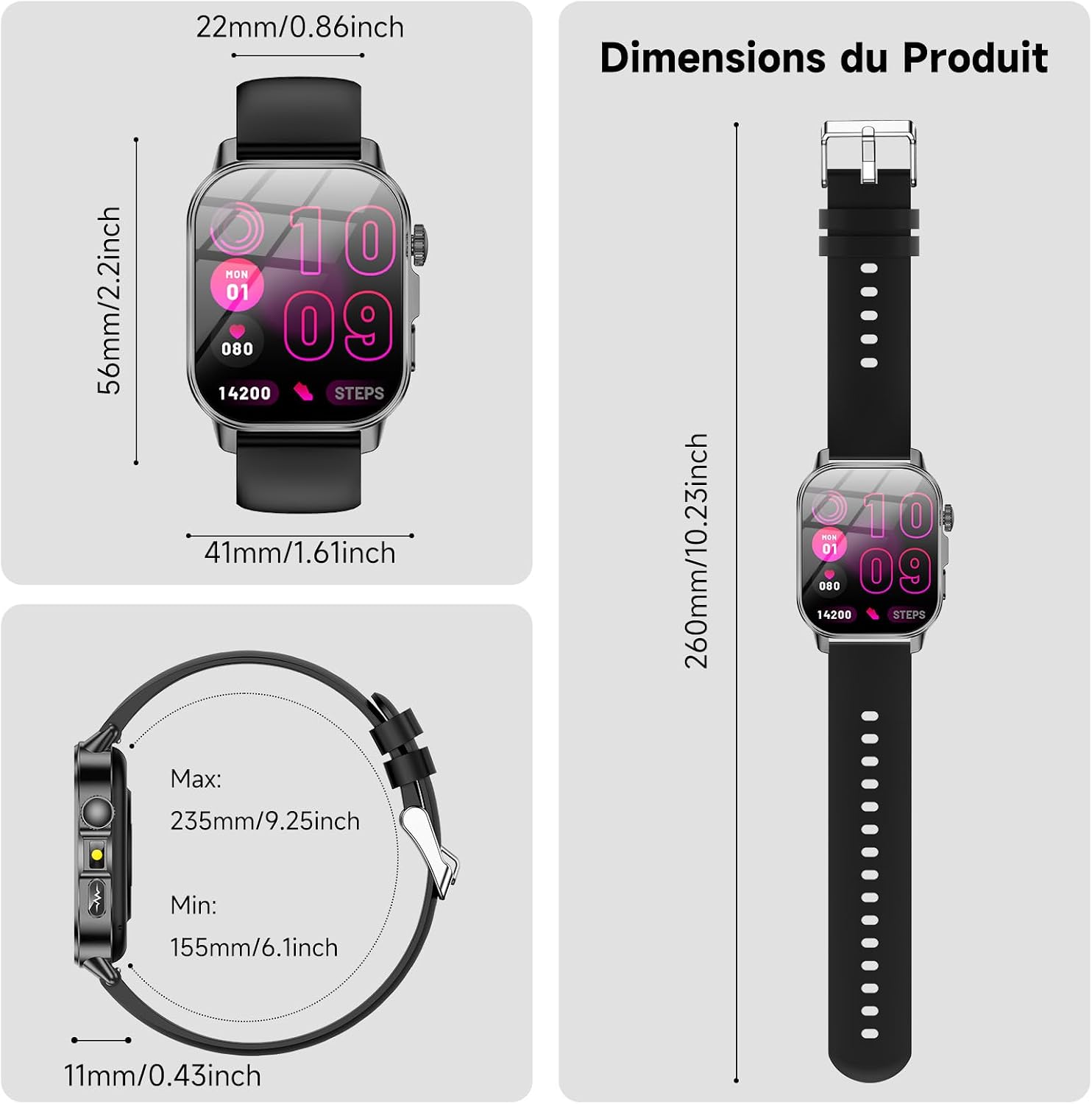
Image: Detailed product dimensions of the smartwatch and its strap.
Warranty Information
The Marsyu MT500 Smartwatch comes with a six-month limited warranty from the date of purchase. This warranty covers manufacturing defects under normal use.
The warranty does not cover:
- Damage caused by misuse, accident, abuse, negligence, or improper operation.
- Damage caused by unauthorized modification or repair.
- Normal wear and tear, including scratches, dents, or cosmetic damage.
- Battery degradation over time.
Please retain your proof of purchase for warranty claims.
Support
For further assistance, technical support, or warranty inquiries, please contact Marsyu customer service through the retailer where you purchased the product or visit the official Marsyu website.
You can also refer to the 'Help' or 'FAQ' section within the G Band application for common issues and solutions.
Ask a question about this manual
Ask about setup, troubleshooting, compatibility, parts, safety, or missing instructions. Manuals+ will review the question and use this page’s manual context to help answer it.