
Introduction
Welcome to your new Oubayajia Mid Century Modern TV Stand. This manual provides detailed instructions for assembly, operation, maintenance, and troubleshooting to ensure optimal use and longevity of your product.
Key Features
- Mid-Century design with sturdy solid wood legs and slatted sliding doors.
- Breathable storage for media equipment.
- Integrated cable management holes for organized wiring.
- Foot pads on legs to protect floors.
- Constructed from high-quality, environmentally friendly, and durable MDF wood.
- Overall dimensions: 51.2 inches wide x 15.75 inches deep x 22.7 inches high.
- Suitable for televisions up to 50/55 inches.
- Easy assembly with included instructions and parts.
Safety Information
Please read all instructions carefully before assembly and use. Keep this manual for future reference.
- Ensure all parts are present before beginning assembly.
- Do not overtighten screws.
- Place the TV stand on a flat, stable surface.
- Do not exceed the recommended weight capacity for the top surface or shelves.
- Keep small parts away from children during assembly.
Parts List
Verify that all components are present before starting assembly. If any parts are missing or damaged, please contact customer support.
- Top Panel
- Bottom Panel
- Side Panels (2)
- Middle Divider Panels (2)
- Adjustable Shelf (1)
- Sliding Doors (2)
- Legs (4)
- Hardware Pack (screws, dowels, cam locks, door glides, handles, foot pads)
Assembly Instructions
Follow these steps carefully for proper assembly. It is recommended to have two people for assembly.
- Unpack all components and lay them out on a clean, soft surface to prevent scratches.
- Attach the legs to the bottom panel using the provided hardware.
- Connect the side panels and middle divider panels to the bottom panel.
- Insert the adjustable shelf into the desired position.
- Attach the top panel to the assembled structure.
- Install the sliding door tracks.
- Attach the handles to the sliding doors.
- Carefully insert the sliding doors into the tracks. Ensure they slide smoothly.
- Place the TV stand in its final location.
- Utilize the cable management holes on the back panel to organize wires.
Assembly Tip: Door Alignment
If the sliding doors rub or do not align correctly, adjust the wheels on the bottom of the doors. Ensure both wheels are evenly aligned and raise them slightly if rubbing occurs. Refer to the assembly instructions for detailed wheel adjustment steps.
Visual Aid: Assembly Diagram
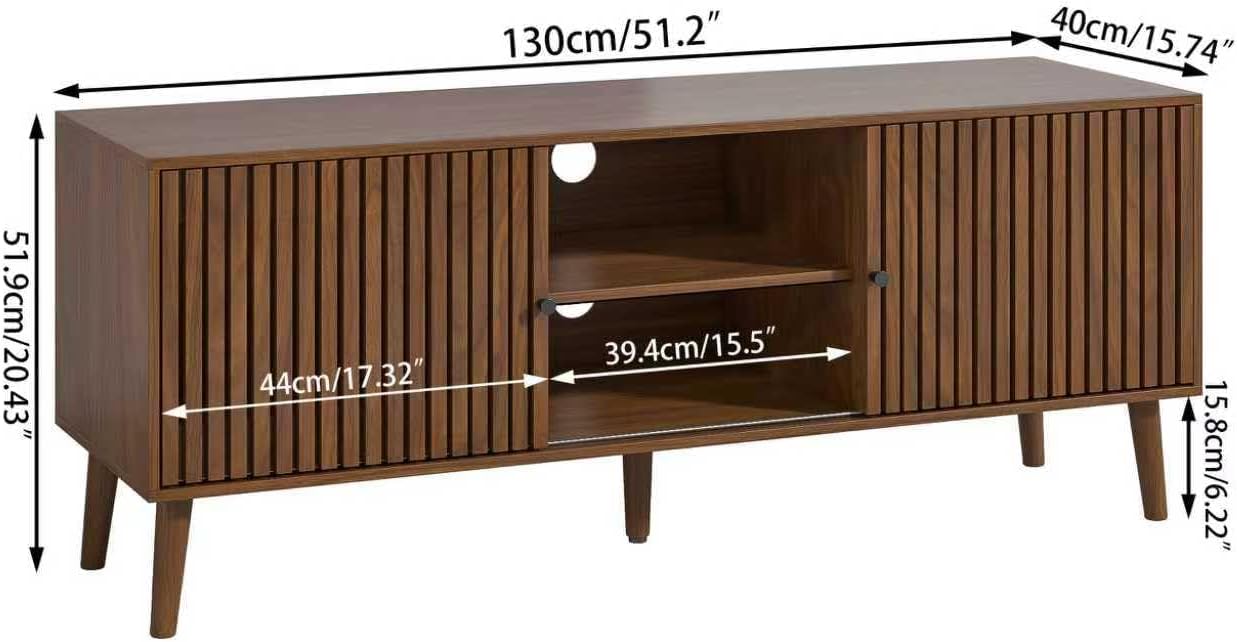
Image Description: A detailed diagram illustrating the dimensions of the Oubayajia Mid Century Modern TV Stand. Key measurements are shown for the overall width (130cm / 51.2 inches), depth (40cm / 15.74 inches), and height (51.9cm / 20.43 inches). Internal shelf dimensions are also provided, showing a width of 39.4cm / 15.5 inches for the central open compartment and a height of 15.8cm / 6.22 inches for the lower shelf.
Operation
Sliding Doors
The TV stand features two sliding doors that can be moved to cover the central open shelves or the side compartments. This allows for flexible storage and display options. Gently slide the doors along their tracks to open or close sections as needed.
Cable Management
The back panel includes pre-drilled holes for routing cables. Use these to keep your electronic device wires organized and out of sight, contributing to a tidy entertainment area.
Storage Capacity
The central open shelves are designed to accommodate various media devices such as gaming consoles, DVD players, or soundbars. The side compartments provide additional enclosed storage.
Visual Aid: TV Stand in Use
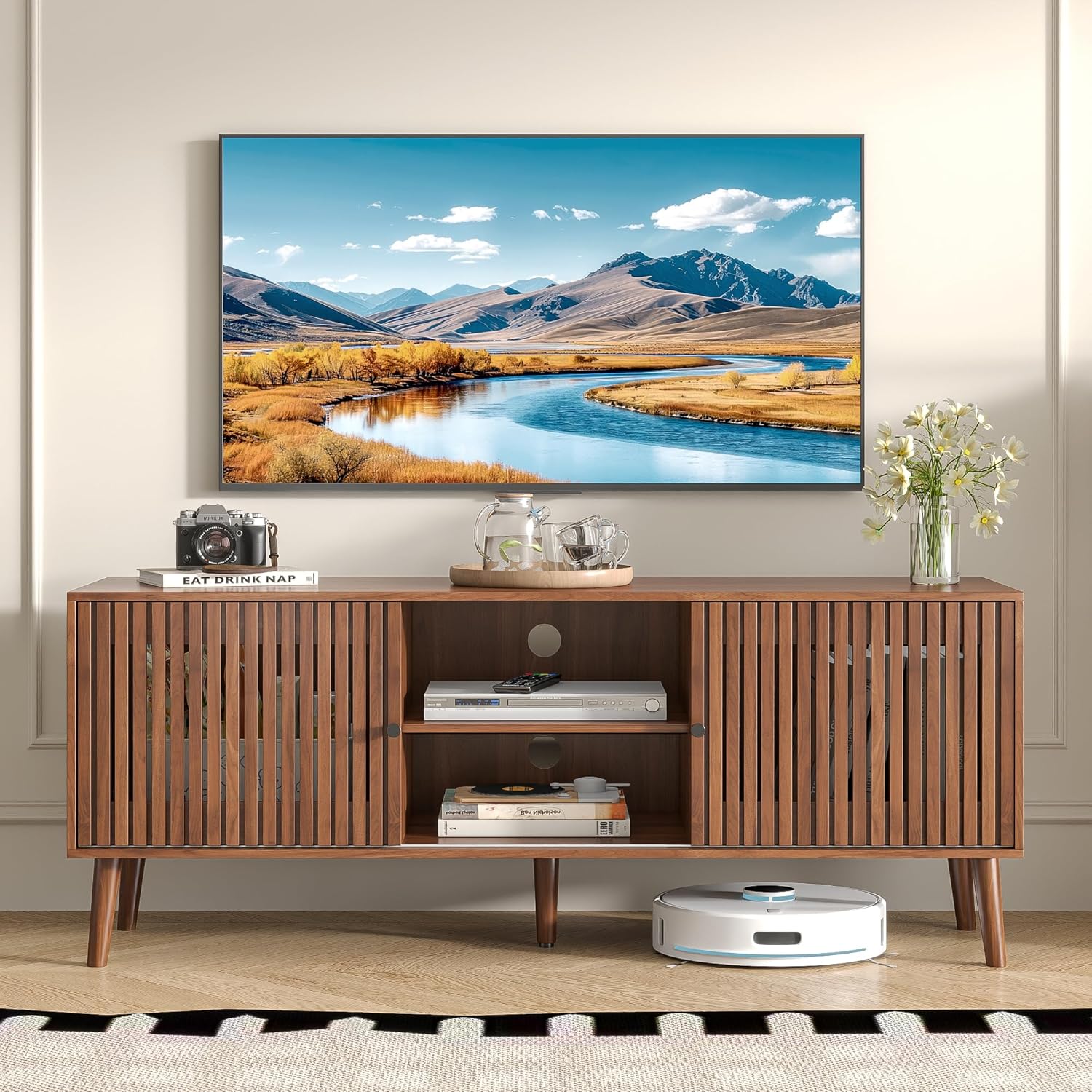
Image Description: The Oubayajia Mid Century Modern TV Stand, in a walnut finish, positioned in a living room. A large television is mounted on the wall above the stand. The stand's slatted sliding doors are configured to reveal the central open storage compartment, which holds a media player on the top shelf and books on the bottom. A robot vacuum cleaner is visible on the floor beneath the stand. The overall aesthetic is clean and modern.
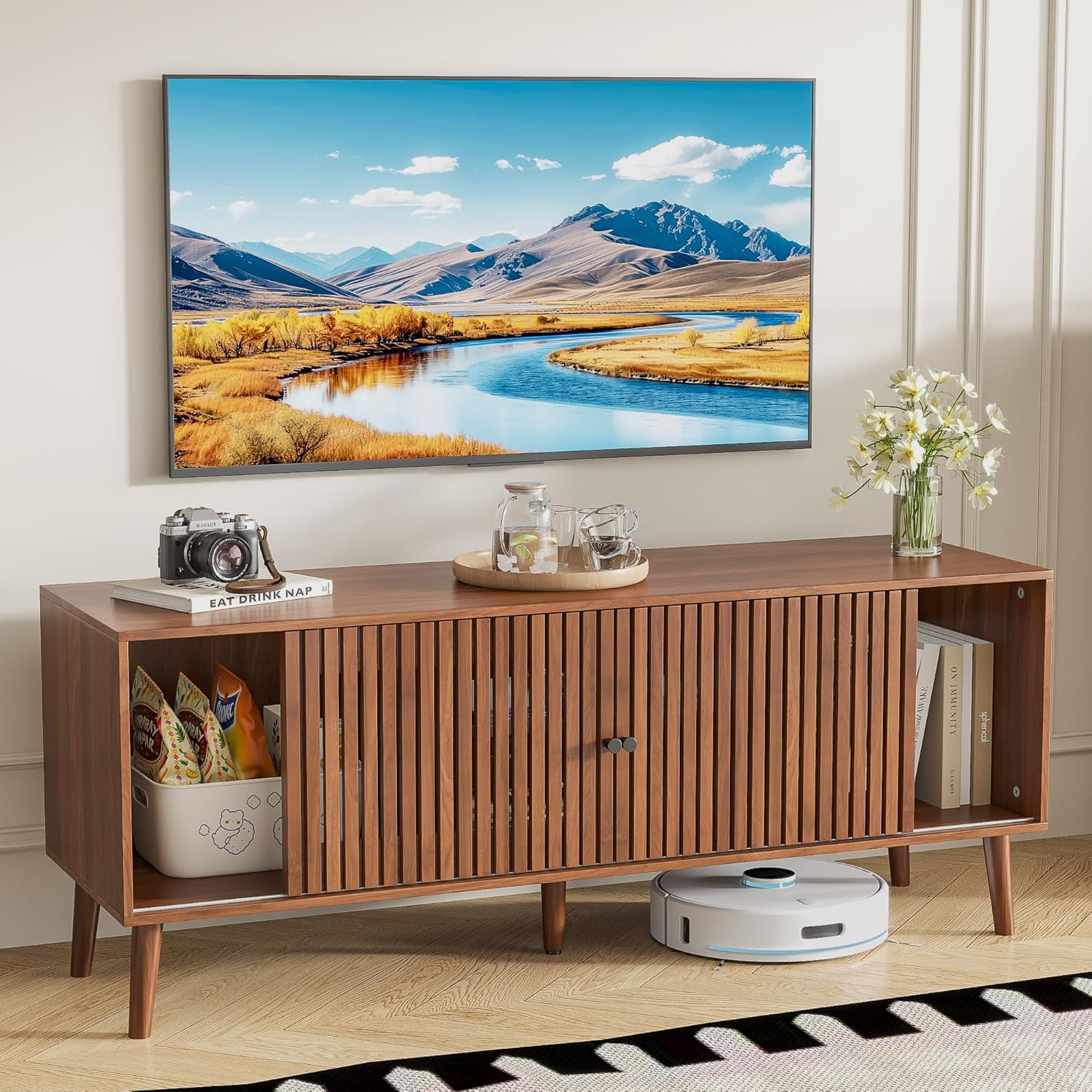
Image Description: A close-up view of the Oubayajia Mid Century Modern TV Stand. One of the slatted sliding doors is open, revealing a side storage compartment containing a white basket filled with snacks. The other side compartment is also visible, holding a stack of books. The top surface of the stand is adorned with a camera, a plant, and a tray with glasses, showcasing its versatility for decor and storage.
Maintenance and Care
To maintain the appearance and longevity of your TV stand, follow these care instructions:
- Cleaning: Wipe surfaces with a soft, damp cloth. Avoid harsh chemicals or abrasive cleaners, which can damage the finish.
- Dusting: Regularly dust with a dry, soft cloth.
- Spills: Blot spills immediately with a clean, dry cloth.
- Sunlight: Avoid prolonged exposure to direct sunlight to prevent fading.
- Heat: Do not place hot items directly on the surface. Use coasters or protective pads.
- Weight Distribution: Distribute weight evenly across the top surface and shelves to prevent warping or damage.
Troubleshooting
Doors are difficult to slide or rub against the frame.
This can occur if the door wheels are not properly aligned or adjusted.
- Solution: Carefully inspect the wheels on the bottom of each sliding door. Ensure they are aligned evenly within their tracks. If rubbing persists, slightly raise the wheels by adjusting their mechanism. Refer to the assembly instructions for detailed wheel adjustment steps.
Stand feels wobbly after assembly.
This usually indicates that some screws are not fully tightened.
- Solution: Re-check all screws and fasteners, ensuring they are securely tightened. Do not overtighten, as this can damage the wood. Ensure the stand is placed on a level surface.
Missing or damaged parts.
If you discover any missing or damaged components during unpacking or assembly.
- Solution: Do not proceed with assembly. Contact Oubayajia customer support immediately for replacement parts.
Specifications
| Feature | Detail |
|---|---|
| Brand | Oubayajia |
| Model Number | TV Stand-111 |
| Color | Walnut-51.2inch |
| Material | Engineered Wood, Wood |
| Product Dimensions (Overall) | 51.2" W x 15.75" D x 22.7" H |
| Recommended TV Size | Up to 50/55 inches |
| Item Weight | 63.1 Pounds |
| Number of Doors | 2 (Sliding) |
| Storage Options | Open shelves, enclosed compartments |
| Assembly Required | Yes |
| Installation Type | Freestanding |
Warranty and Support
For any questions, concerns, or assistance with your Oubayajia TV Stand, please refer to your purchase documentation or the retailer's website for customer support contact information.
Please refer to your purchase documentation for specific warranty details.