
1. Introduction and Safety Information
Welcome to the Braun Silk-Épil 9 Flex SkinSpa experience. This device is designed for efficient hair removal and comprehensive skin care. Please read this manual thoroughly before using the product to ensure safe and effective operation.
Important Safety Warnings:
- Always read the label, warnings, and instructions provided on the product packaging before use.
- Keep the appliance dry when not in use.
- Do not use on irritated skin, open wounds, or if you have skin conditions. Consult a doctor if unsure.
- This appliance is not intended for use by persons with reduced physical, sensory or mental capabilities, or lack of experience and knowledge, unless they have been given supervision or instruction concerning use of the appliance by a person responsible for their safety.
- Keep out of reach of children.
2. Package Contents
Your Braun Silk-Épil 9 Flex SkinSpa package includes the following items:
- Braun Epilator (main unit)
- FaceSpa Epilator with brushes
- Mini Facial Epilator
- Shaver Head
- Trimmer Cap
- Exfoliating Brush with protective cap
- Body Massage Accessory
- Skin Contact Cap
- Storage Pouch
- Cleaning Brush
- Power Adapter

Image: The Braun Silk-Épil 9 Flex SkinSpa epilator shown with its full set of accessories, including various heads, brushes, and the mini facial epilator.
3. Product Overview
The Braun Silk-Épil 9 Flex SkinSpa is an advanced hair removal and skin care system featuring a fully flexible head for optimal contour adaptation. It is designed for both wet and dry use, offering a comfortable experience.
Key Features:
- 360° Flexible Head: Adapts to body contours for thorough hair removal, even in difficult areas.
- MicroGrip Tweezer Technology: 40 tweezers designed to capture hairs as short as 0.5 mm.
- Smart Touch Technology: Automatically adjusts pressure for powerful or gentle modes.
- Wet & Dry Use: Suitable for use in the bath or shower to reduce discomfort.
- Multiple Attachments: Includes epilator, shaver, trimmer, exfoliator, and massage heads for a complete routine.
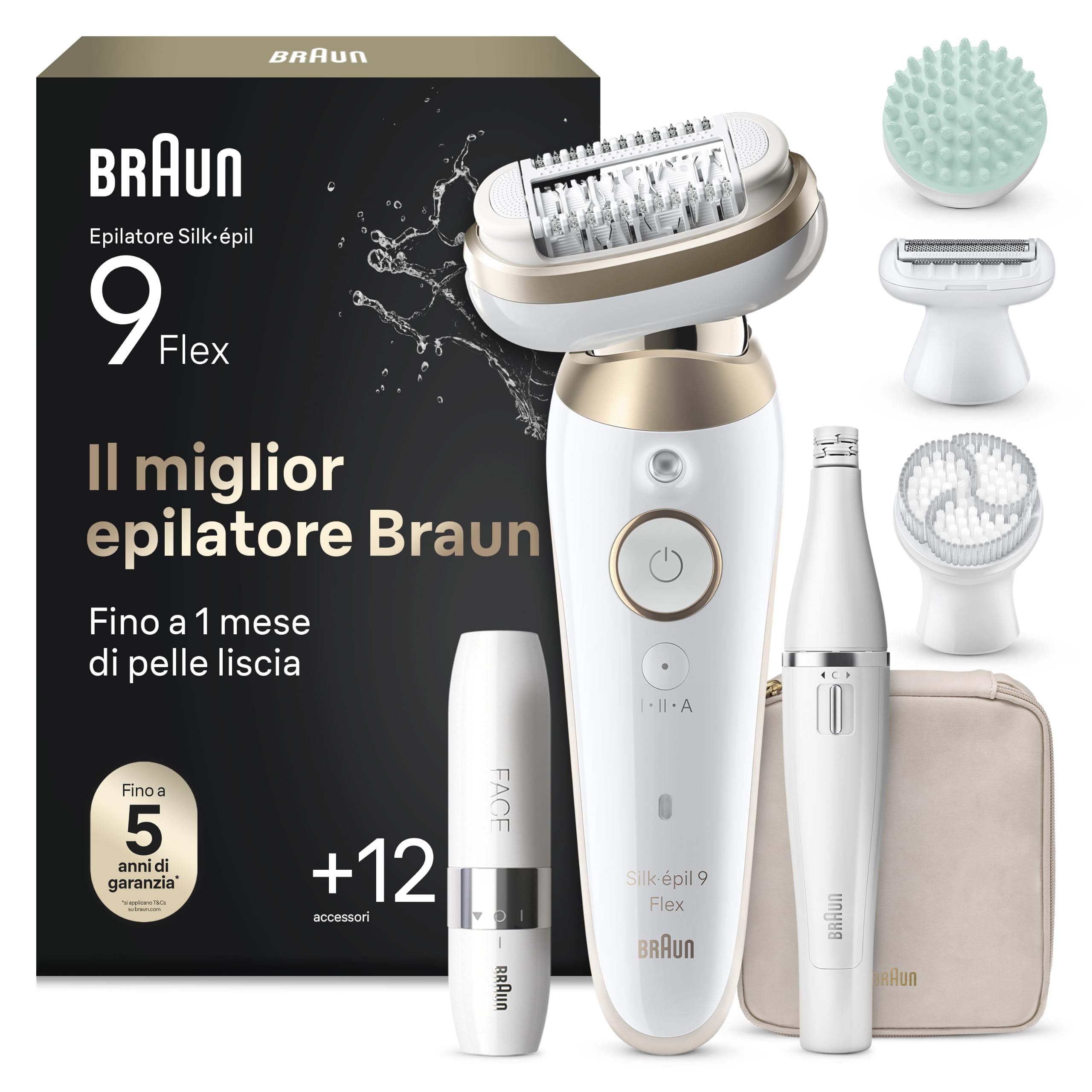
Image: The main unit of the Braun Silk-Épil 9 Flex SkinSpa epilator, highlighting its flexible head design.
4. Setup
4.1 Charging the Device
- Ensure the device is switched off.
- Connect the power adapter to the epilator and plug it into an electrical outlet.
- The charging indicator light will illuminate. A full charge takes approximately 2 hours.
- Once fully charged, the device provides up to 50 minutes of cordless operation.

Image: The epilator connected to its power adapter for charging.
4.2 Attaching and Detaching Heads
- To attach a head, align it with the main unit and press firmly until it clicks into place.
- To detach a head, press the release button (if present) and pull the head away from the main unit.
5. Operating Instructions
5.1 Epilation (Hair Removal)
For best results, ensure your skin is clean and dry, or use the device in the shower/bath for a gentler experience.
- Attach the epilator head to the main unit.
- Turn on the device.
- Hold the epilator at a 90-degree angle to your skin, moving it slowly against the direction of hair growth.
- The flexible head will adapt to your body contours, ensuring maximum skin contact.
- Use the Smart Touch technology to adjust pressure as needed for sensitive areas.

Image: The epilator being used on a leg, showcasing its flexible head adapting to the knee area.
5.2 Exfoliation
Use the exfoliating brush to prepare your skin before epilation or as part of your regular skin care routine to help prevent ingrown hairs.
- Attach the exfoliating brush head.
- Apply your preferred body wash or scrub to the brush or directly to your skin.
- Gently move the brush in circular motions over your skin.

Image: A user demonstrating the exfoliating brush attachment on the shoulder area.
5.3 Shaving and Trimming
For sensitive areas or quick touch-ups, use the shaver head and trimmer cap.
- Attach the shaver head. For trimming, add the trimmer cap over the shaver head.
- Move the shaver head gently against the direction of hair growth for a close shave.
- For trimming, glide the device over the desired area to shorten hairs.

Image: The epilator with the shaver head attachment being used on the bikini line.
5.4 Body Massage
The body massage accessory helps to revitalize and tone the skin.
- Attach the body massage accessory.
- Turn on the device and gently glide the massager over your skin.

Image: A user applying the body massage accessory to her arm.
5.5 FaceSpa and Mini Facial Epilator
The FaceSpa epilator and mini facial epilator are designed for precise hair removal and skin care on the face.
- For the FaceSpa, attach the desired brush (e.g., exfoliating brush) or the epilator head.
- For the mini facial epilator, ensure it is charged and ready for use.
- Carefully use these devices on facial areas, following the specific instructions for each attachment.

Image: A woman using the Braun FaceSpa epilator on her cheek for facial hair removal.

Image: A woman using the Braun mini facial epilator for precise hair removal above her lip.
6. Maintenance and Cleaning
Regular cleaning ensures optimal performance and hygiene of your device.
- After Each Use: Turn off and unplug the device. Remove the head and use the cleaning brush to remove any trapped hairs.
- Wet Cleaning: Since the device is Wet & Dry, you can rinse the epilator head and other attachments under running water. Ensure they are completely dry before reattaching or storing.
- Main Unit: Wipe the main unit with a damp cloth. Do not submerge the main unit in water unless specifically designed for it (refer to product markings).
- Storage: Store the device and its accessories in the provided pouch in a dry place.
7. Troubleshooting
| Problem | Possible Cause | Solution |
|---|---|---|
| Device does not turn on. | Battery is depleted. | Charge the device for at least 2 hours. |
| Poor epilation performance. | Hairs are too short or too long; device not held correctly. | Ensure hair length is optimal (0.5-5mm). Hold device at 90 degrees and move slowly against hair growth. Clean epilator head. |
| Skin irritation after use. | Sensitive skin; improper technique. | Use Wet & Dry feature in shower/bath. Apply less pressure. Use the sensitive area cap. Exfoliate regularly. |
| Device stops during use. | Battery is low. | Recharge the device. |
8. Specifications
| Feature | Detail |
|---|---|
| Model Number | SES9-681 3D |
| Power Source | Battery Powered |
| Battery Charge Time | 2 Hours |
| Operating Time (Cordless) | Up to 50 minutes |
| Special Feature | 360° Flexible Head |
| Blade Material | Stainless Steel |
| Recommended Uses | Underarms, Legs (lower and upper), Bikini Line |
| Wet & Dry Use | Yes |
| Country of Origin | Germany |
| Item Weight | 1.02 kg (1020.31 Grams) |
9. Warranty and Support
9.1 Manufacturer's Warranty
This Braun Silk-Épil 9 Flex SkinSpa epilator comes with a 2-year manufacturer's warranty from the date of purchase. This warranty covers defects in materials and workmanship under normal use. It does not cover damage resulting from misuse, accidents, unauthorized modifications, or normal wear and tear.
9.2 Customer Support
For further assistance, troubleshooting, or warranty claims, please contact Braun customer service. Refer to the contact information provided on your product packaging or visit the official Braun website for support details in your region.
Online Support: www.braun.com


