
1. Introduction
This manual provides essential information for the safe and efficient use of your O'CELL 36V 105Ah LiFePO4 Golf Cart Battery. Please read it thoroughly before installation and operation. The O'CELL LiFePO4 battery offers a long lifespan, integrated 200A BMS, and convenient monitoring via a 4.9-inch LCD display and Bluetooth application.
2. Safety Information
WARNING: Failure to follow these safety instructions may result in electric shock, fire, serious injury, or death.
- Always wear appropriate personal protective equipment (PPE), including safety glasses and insulated gloves, when handling batteries.
- Do not short-circuit the battery terminals.
- Do not expose the battery to fire, excessive heat, or direct sunlight for prolonged periods.
- Do not immerse the battery in water or other liquids. The battery is IP67 rated for water and dust resistance, but immersion is not recommended.
- Ensure proper ventilation during charging and operation.
- Keep the battery away from children and pets.
- Only use the O'CELL 36V 25A charger provided with the battery. Using an incompatible charger may damage the battery or cause fire.
- Do not attempt to open, disassemble, or modify the battery.
- In case of fire, use a Class D fire extinguisher. Water can exacerbate LiFePO4 battery fires.
3. Package Contents
Verify that all items listed below are included in your package:
- O'CELL LiFePO4 Battery (36V 105Ah)
- Smart LCD Display
- Battery Terminals & LCD Bolts
- Mounting Bracket / Hold Down Plate with Rods Kit
- 36V 25A Charger
- Service Card
- User's Manual (this document)

Figure 3.1: Contents of the O'CELL 36V 105Ah LiFePO4 Golf Cart Battery package, including battery, smart LCD display, terminals, mounting bracket, charger, service card, and user manual.
4. Setup and Installation
4.1. Battery Placement and Mounting
The O'CELL 36V 105Ah LiFePO4 battery is designed for easy installation, often replacing six 6V lead-acid batteries. The included mounting bracket and hold-down plate are pre-adjusted for common golf cart models such as Club Car DS/RXV, EZ GO RXV, and Yamaha G29, eliminating the need for drilling or custom modifications. The compact size (16.5×6.3×10.2 inches) and lighter weight (68 lbs) facilitate placement in original battery bays.
- Remove existing batteries from the golf cart.
- Place the O'CELL LiFePO4 battery into the battery bay.
- Secure the battery using the provided mounting bracket and hold-down plate. Ensure the anti-slip pad on the bracket is in place to prevent rattling and shifting.

Figure 4.1: Diagram illustrating the O'CELL 36V 105Ah LiFePO4 battery dimensions and its fit within a golf cart battery bay, highlighting its smaller width and lighter weight compared to traditional batteries.

Figure 4.2: A golf cart with the O'CELL 36V 105Ah LiFePO4 battery installed, demonstrating the use of the included hold-down plate and rods kit for secure placement.
4.2. Wiring Connections
The battery features M8 dual terminals (1.25×12MM/16MM brass) to support main power and backup device connections without requiring additional adapters. The mounting bracket has pre-drilled holes aligned with the terminal positions for easier wiring.
- Refer to the wiring diagram below for correct connections.
- Connect the main power cables (positive and negative) to the battery terminals. Ensure ring terminals are sized appropriately, with the largest cable (highest draw) connected closest to the battery.
- If using a 12V converter for accessories, connect it as shown in the diagram.
- Connect the yellow wire to a switched B+ power source (e.g., the ON side of the key switch). Alternatively, for constant 12V power, connect the yellow wire directly to the positive terminal on the battery.
- Connect the LCD port cable to the Smart LCD Display.

Figure 4.3: Wiring diagram for O'CELL 36V 105Ah LiFePO4 Golf Cart Battery, showing connections to motor controller, solenoid, 12V converter, 12V devices, and battery charger.
5. Operation
5.1. Charging the Battery
Use the provided O'CELL 36V 25A charger for optimal performance. This charger is designed to fully charge the 105Ah battery in approximately 4.2 hours. It features a 16.4FT long cable for convenience and 0V activation to revive deeply discharged batteries.
- Connect the charger to a standard 100-240V AC wall outlet.
- Connect the charger output cable to the battery's charging port.
- The charger will indicate charging status. Disconnect the charger once the battery is fully charged.
- If the power is less than 50%, charge it in time. It takes approximately 2 hours to reach 100% from 50%.
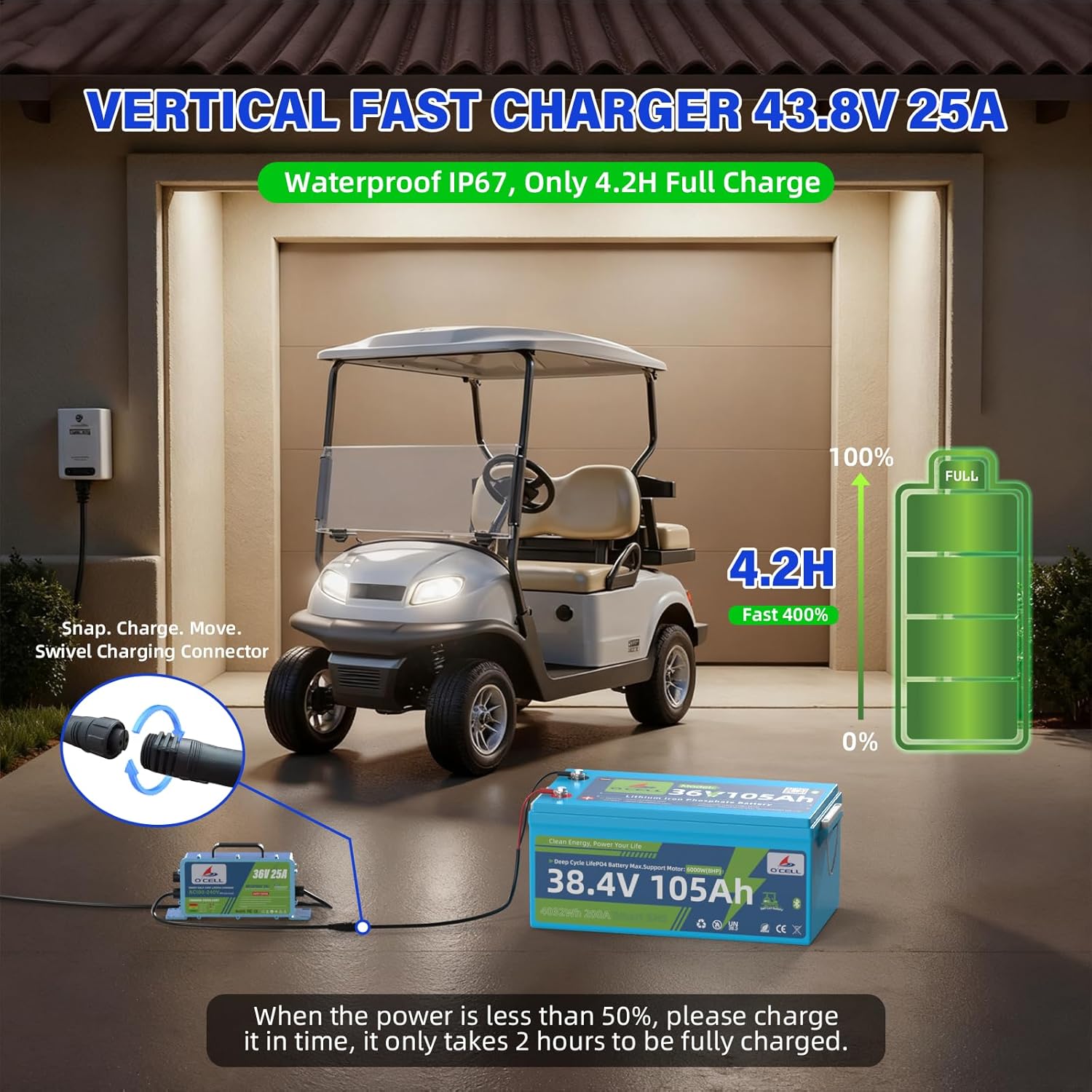
Figure 5.1: O'CELL 36V 105Ah LiFePO4 battery being charged by the 25A fast charger next to a golf cart in a garage, illustrating the 4.2-hour full charge time.

Figure 5.2: The O'CELL 43.8V 25A charger connected to the battery, demonstrating charging from 50% to 100% in 2.1 hours and 0% to 100% in 4.2 hours.
5.2. Battery Monitoring (LCD & Bluetooth App)
The battery status can be monitored in real-time using either the 4.9-inch touch LCD display or the Bluetooth application. Both methods provide accurate data on battery level, voltage, and current.
- LCD Display: The 4.9-inch touch LCD provides direct access to battery parameters. It does not require Wi-Fi.
- Bluetooth App: Download the O'CELL app to your smartphone. Establish a Bluetooth connection (stable up to 30-40m) to view real-time data.
- Note: Only one device (LCD or Bluetooth app) can be connected at a time. Disconnect your phone's Bluetooth before using the LCD, and vice-versa.

Figure 5.3: A user in a golf cart monitoring the O'CELL 36V 105Ah LiFePO4 battery status using both the Bluetooth app on a smartphone and the integrated 4.9-inch LCD touch screen.

Figure 5.4: Screenshot of the smartphone app and the LCD display interface, both showing real-time parameters such as battery level, voltage, current, and temperature for the O'CELL 36V 105Ah LiFePO4 battery.
5.3. Low-Temperature Protection
The battery features an integrated temperature sensor for protection in cold conditions:
- Charging will stop if the temperature drops below 19.4°F (-7°C).
- Discharging will stop if the temperature drops below -4°F (-20°C).
- The battery will automatically recover and resume normal operation when the temperature rises above 32°F (0°C).
6. Maintenance
- Regular Inspection: Periodically check the battery and connections for any signs of damage, corrosion, or loose terminals. Ensure the mounting bracket is secure.
- Cleaning: Keep the battery clean and free from dust and debris. Use a dry cloth to wipe the exterior. Do not use solvents or abrasive cleaners.
- Storage: If storing the battery for an extended period, ensure it is charged to approximately 50-80% capacity. Store in a cool, dry place away from direct sunlight and extreme temperatures. Recharge every 3-6 months to maintain battery health.
- Waterproofing: The IP67 rating provides protection against dust and temporary immersion in water. However, avoid prolonged exposure to moisture or high-pressure water jets.
7. Troubleshooting
| Problem | Possible Cause | Solution |
|---|---|---|
| Battery not charging | Charger not connected properly; Charger malfunction; Battery BMS protection activated (e.g., low temperature, over-discharge) | Check charger connections and power outlet. Ensure charger is functioning. Allow battery to warm up if ambient temperature is too low. If deeply discharged, the 0V activation feature of the O'CELL charger should revive it. |
| No power output from battery | Battery discharged; BMS protection activated (e.g., over-discharge, over-current, low temperature); Loose connections | Check battery charge level via LCD or app. Recharge if necessary. Check for loose wiring connections. Allow battery to warm up if ambient temperature is too low. If over-current protection is triggered, it will auto-release in 32 seconds. |
| LCD display or Bluetooth app not showing data | Loose LCD cable; Bluetooth not paired; Multiple devices connected | Ensure LCD cable is securely connected. For Bluetooth, ensure it is paired correctly. Remember only one device (LCD or app) can be connected at a time; disconnect the other. |
| Battery rattling or shifting in bay | Mounting bracket not secured; Anti-slip pad missing or dislodged | Ensure the mounting bracket and hold-down plate are tightened correctly. Verify the 3mm rubber anti-slip pad is properly positioned under the battery. |
8. Specifications
| Feature | Specification |
|---|---|
| Brand | OCELL |
| Model | 36V 105Ah LiFePO4 Golf Cart Battery |
| Nominal Voltage | 38.4 Volts (36V system) |
| Capacity | 105 Ah |
| Energy | 4032 Wh |
| BMS | 200A Smart BMS |
| Continuous Discharge Current | 200A |
| Maximum Discharge Current (40S) | 320A |
| Peak Discharge Current (2S) | 600A |
| Lifespan | 4000+ Cycles (10+ Years) |
| Monitoring | 4.9'' LCD Display / Bluetooth App |
| Charger | 43.8V 25A (Included) |
| Charging Time (0-100%) | Approx. 4.2 Hours |
| Low-Temperature Protection | Charging stops below 19.4°F (-7°C); Discharging stops below -4°F (-20°C) |
| Waterproof Rating | IP67 |
| Terminals | M8 Dual Brass Terminals |
| Dimensions (L×W×H) | 16.5×6.3×10.2 inches (41.9×16×25.9 cm) |
| Weight | 68 lbs (30.8 kg) |
| UPC | 727636603534 |
9. Warranty and Support
Your O'CELL 36V 105Ah LiFePO4 Golf Cart Battery comes with a Service Card. Please refer to this card for specific warranty terms and conditions. For technical assistance, troubleshooting beyond this manual, or warranty claims, please contact O'CELL customer support through the contact information provided on your Service Card or the official O'CELL website.