
GEYILO WD-R1206U
GEYILO AC1200 Dual Band WiFi Repeater/Extender (Model WD-R1206U) Instruction Manual
Comprehensive guide for setup, operation, and maintenance.
1. Product Overview
The GEYILO AC1200 Dual Band WiFi Repeater/Extender (Model WD-R1206U) is designed to expand your existing WiFi coverage and improve signal strength. It supports dual-band frequencies (2.4GHz and 5GHz) for versatile connectivity and high-speed data transfer.
Key Features:
- Stable and Fast WiFi: Offers 1200Mbps high-speed transmission with dual-band (2.4G and 5.0G) support, suitable for lag-free gaming and rapid downloads.
- Extensive Coverage: Equipped with four external omni-directional antennas, providing 360° signal coverage up to 12880 Sq.ft. Supports WiFi Mesh for seamless expansion.
- Easy Setup: Simple wall-mount design for quick installation. Plug into any socket, connect to a router, and extend WiFi coverage.
- Device Compatibility: Supports up to 105 devices, including mobile phones, tablets, laptops, smart TVs, security cameras, and printers.
- Secure and Energy-Efficient: Features advanced security protocols and an energy-efficient design for stable performance.
- Compact Design: A sleek design that blends into various environments, suitable for home or office use.

Image 1.1: The GEYILO AC1200 WiFi Repeater/Extender, showing its compact design and antennas, plugged into a wall outlet.
2. Setup Guide
Setting up your GEYILO WiFi Repeater is a straightforward process. Follow these steps to extend your wireless network.
2.1. Initial Placement
For optimal performance, place the extender near your main router initially. Once setup is complete, you can relocate the extender to a more suitable location to maximize coverage, ensuring it still receives a strong signal from the router.

Image 2.1: The GEYILO AC1200 WiFi Repeater alongside its user guide, illustrating the initial setup recommendation to place it near the router.
2.2. Powering On and Connection
- Plug the WiFi Repeater into a standard wall outlet.
- Wait for the indicator lights to stabilize, indicating it's ready for configuration.
- On your mobile device or computer, connect to the WiFi network broadcast by the repeater (e.g., "wifi-5g-0DA8" or similar, as shown in the video).
- Open a web browser and navigate to the default setup address (often 192.168.188.1 or wdlogin.com, check the device label or user guide for specifics).
- Follow the on-screen instructions to select your main router's WiFi network and enter its password to extend the signal.
Video 2.2: A demonstration of the GEYILO WiFi Extender's setup process, including plugging it in and connecting a mobile device to its network for configuration.

Image 2.3: A user setting up the GEYILO AC1200 WiFi Repeater with a laptop, highlighting the "1-Tap Setup" feature for quick configuration.
3. Operating Modes
The GEYILO WiFi Repeater supports three primary operating modes to suit various networking needs:
- AP Mode (Access Point Mode): Converts a wired network connection into a wireless network. Ideal for creating a new WiFi hotspot from an Ethernet port.
- Repeater Mode: Extends the coverage of an existing WiFi network. This is the most common use case for eliminating WiFi dead zones.
- Router Mode: Functions as a primary router, converting an internet connection into a wireless network.
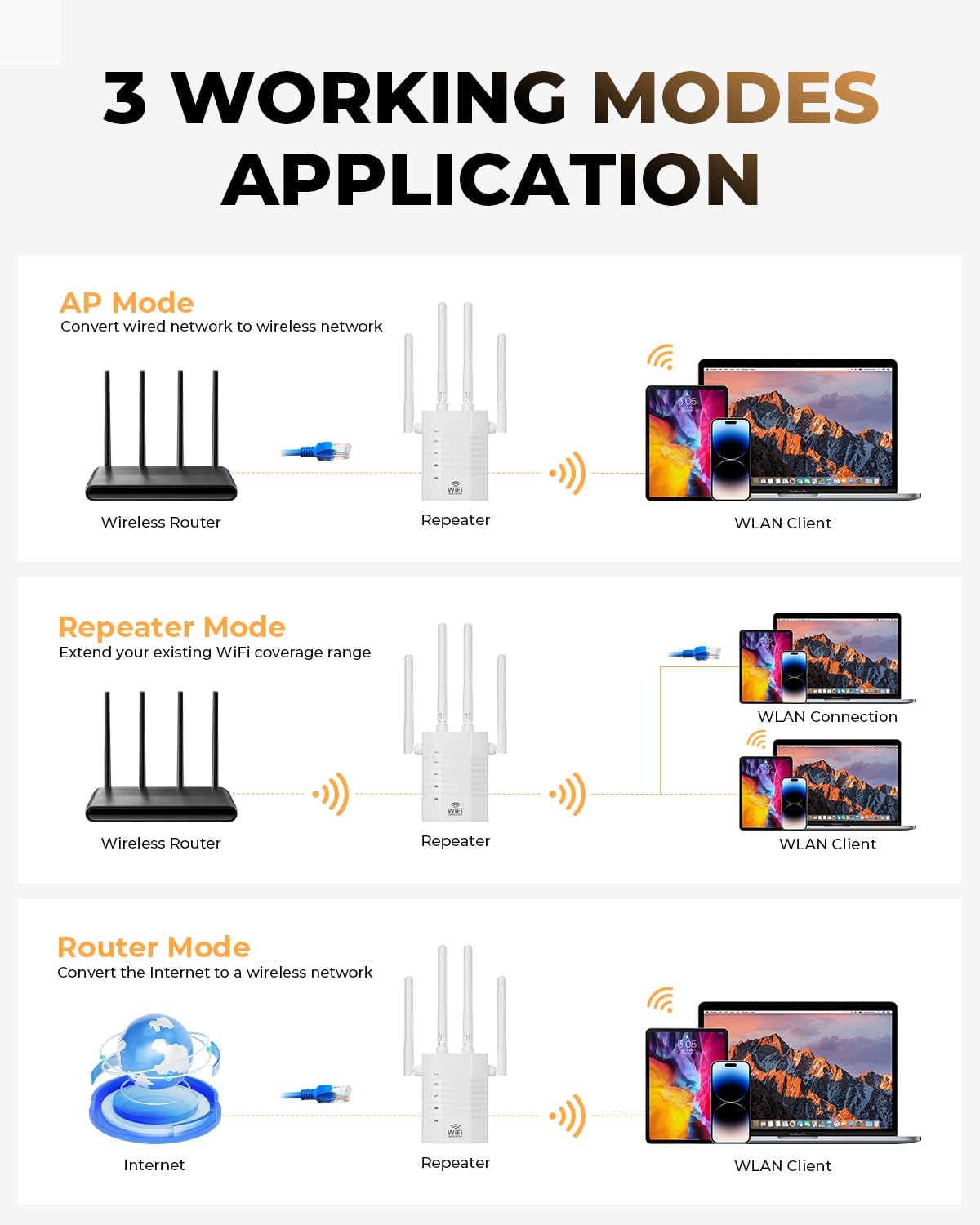
Image 3.1: Visual representation of the three operating modes: AP Mode, Repeater Mode, and Router Mode, showing how the device integrates into different network setups.
4. Specifications
| Feature | Detail |
|---|---|
| Product Dimensions | 7.68 x 3.82 x 2.48 inches |
| Item Weight | 5.8 ounces |
| Item Model Number | WD-R1206U |
| Wireless Communication Standard | 802.11a/b/g/n/ac |
| Frequency | 2.4 GHz and 5 GHz (Dual Band) |
| Special Features | 1-Tap Setup, 360 Degree Coverage, Directional Antenna, Firewall, WiFi Mesh |
| Ethernet Ports | One Ethernet Port (Gigabit) |
| Manufacturer | Shenzhen Century Xinyang Tech Co..Ltd |

Image 4.1: An illustration detailing the product specifications, including dimensions, and highlighting features like external antennas and Gigabit Ethernet ports.
5. Troubleshooting
If you encounter issues with your GEYILO WiFi Repeater, consider the following common troubleshooting steps:
- No Signal/Weak Signal:
- Ensure the repeater is placed within the range of your main router.
- Relocate the repeater closer to the router or to a location with fewer obstructions (e.g., thick walls, large appliances).
- Check the indicator lights on the repeater to confirm it's powered on and connected to the main network.
- Unable to Connect to Repeater's Network:
- Verify you are selecting the correct network name (SSID) for the repeater.
- Ensure you are entering the correct password for your main router's network during setup.
- Try restarting both your main router and the WiFi repeater.
- Slow Speed:
- Confirm the repeater is receiving a strong signal from your main router. Poor placement can lead to reduced speeds.
- Minimize interference from other electronic devices.
- Ensure your main router is providing adequate internet speed.
- Resetting the Device:
- If issues persist, you may need to perform a factory reset. Locate the reset button (often a small pinhole) on the device.
- Press and hold the reset button for approximately 8 seconds until the lights flash, then release. This will restore the device to its default settings, requiring re-setup.
6. Maintenance
Proper maintenance ensures the longevity and optimal performance of your GEYILO WiFi Repeater:
- Cleaning: Regularly wipe the device with a soft, dry cloth to remove dust. Avoid using liquid cleaners or abrasive materials.
- Ventilation: Ensure the device's ventilation slots are not blocked to prevent overheating. The multi-side heat dissipation design helps maintain stable operation.
- Firmware Updates: Periodically check the manufacturer's website (GEYILO) for any available firmware updates. Updates can improve performance, add features, or enhance security.
- Environmental Conditions: Operate the device within recommended temperature and humidity ranges. Avoid direct sunlight or extreme temperatures.

Image 6.1: The GEYILO AC1200 WiFi Repeater, emphasizing its multi-side heat dissipation design for safe and stable operation.
7. Warranty and Support
For warranty information, technical support, or further assistance, please refer to the official GEYILO website or contact their customer service. Keep your purchase receipt for warranty claims.
Manufacturer: Shenzhen Century Xinyang Tech Co..Ltd
For the most up-to-date support resources, visit the GEYILO Store on Amazon.
Ask a question about this manual
Ask about setup, troubleshooting, compatibility, parts, safety, or missing instructions. Manuals+ will review the question and use this page’s manual context to help answer it.