
Introduction
The V60XL PTZ camera is a professional-grade camera designed for broadcasting, conferencing, education, and AV integration. It features a 1/2.8" CMOS sensor, delivering Full HD 1080p video at 60fps. Key capabilities include a 20x optical zoom, a wide 60.7° horizontal field of view, and advanced AI-powered human tracking. The camera offers extensive pan-tilt ranges and multiple output options for versatile professional setups.
What's in the Box
- PTZ Camera
- Remote Control
- Power Adapter
- USB Cable
- User Manual (this document)
Safety Information
Please read and follow these safety instructions carefully to ensure safe operation and to prevent damage to the device.
- Do not expose the camera to rain or moisture.
- Do not disassemble the camera. Refer all servicing to qualified personnel.
- Use only the provided power adapter.
- Ensure proper ventilation around the camera to prevent overheating.
- Avoid pointing the lens directly at extremely bright light sources for extended periods.
Product Overview
The V60XL PTZ camera is equipped with advanced features for professional video production.
Key Features
- Professional Imaging: Full HD 1080P60 with 1/2.8" CMOS sensor for crystal-clear 2.07MP resolution.
- Advanced Zoom: 20x optical zoom with a 60.7° horizontal field of view.
- Intelligent Tracking: AI-powered human tracking with automatic identification, smart framing, and privacy protection.
- Versatile Connectivity: Multiple simultaneous outputs including HDMI 1.3, 3G-SDI, USB, and NDI|HB support for network streaming with ultra-low latency.
- Pan-Tilt Mechanism: Smooth pan-tilt with ±170° horizontal and -30° to +90° vertical rotation ranges.
Camera Components
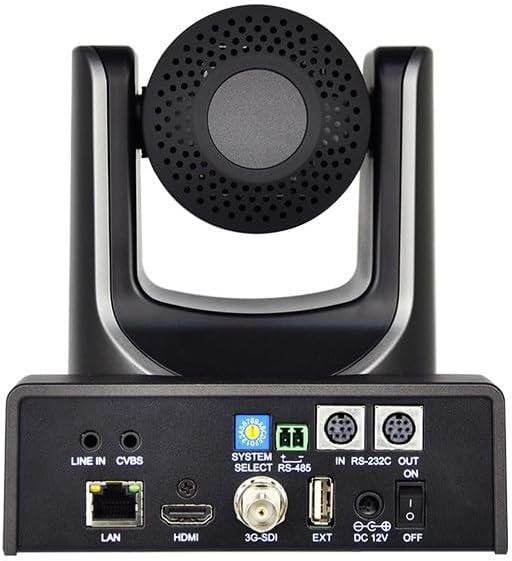
Figure 1: Front and side view of the V60XL PTZ Camera, showing the lens and the pan-tilt mechanism.
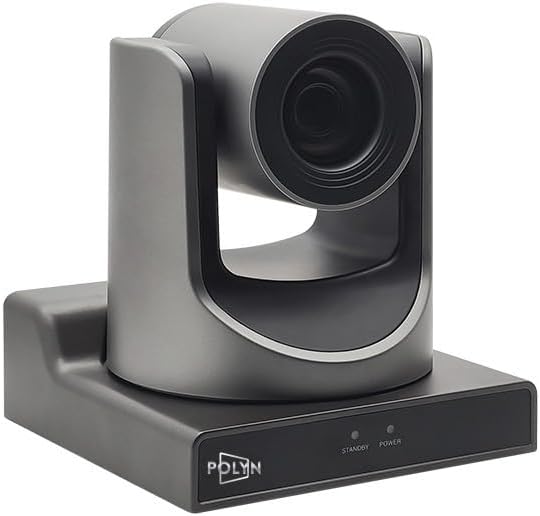
Figure 2: Rear view of the V60XL PTZ Camera, highlighting the various input/output ports including LAN, HDMI, 3G-SDI, USB, RS-232, RS-485, and power input.

Figure 3: Top-down view of the V60XL PTZ Camera, showing the lens and the top of the camera head.
Setup
Follow these steps to set up your V60XL PTZ Camera.
- Mounting: Securely mount the camera on a stable surface or compatible mounting bracket. Ensure the camera has a clear line of sight to the desired capture area.
- Power Connection: Connect the provided power adapter to the DC 12V input port on the rear of the camera (refer to Figure 2). Plug the adapter into a suitable power outlet.
- Video Output:
- HDMI: Connect an HDMI cable from the camera's HDMI port to an HDMI display or capture device.
- 3G-SDI: Connect a 3G-SDI cable from the camera's 3G-SDI port to an SDI compatible device.
- USB: Connect a USB cable from the camera's USB port to a computer for use as a webcam or for video capture.
- LAN (NDI|HB): Connect an Ethernet cable from the camera's LAN port to your network switch or router for NDI|HB streaming and IP control.
- Audio Input: If external audio is required, connect an audio source to the LINE IN port.
- Control Connections:
- RS-232/RS-485: Connect control cables to the RS-232 or RS-485 ports for external PTZ control systems.
- Remote Control: Ensure the provided remote control has batteries installed for wireless operation.
- Power On: Flip the power switch on the rear of the camera to the "ON" position. The camera will perform a self-test and initialize.
Operating Instructions
This section covers the basic operation of your V60XL PTZ Camera.
Pan, Tilt, and Zoom Control
- Use the directional buttons on the remote control or your connected control system (RS-232/RS-485/IP) to pan (horizontal movement) and tilt (vertical movement) the camera.
- Adjust the optical zoom using the zoom in/out buttons on the remote or control interface. The camera supports 20x optical zoom.
- The camera offers a wide pan range of ±170° and a tilt range of -30° to +90°.
AI Tracking Function
The V60XL features AI-powered human tracking for automatic subject following.
- Activate Tracking: Refer to your remote control or IP control software for the specific button or menu option to enable AI tracking.
- Subject Identification: The camera will automatically identify and frame human subjects within its field of view.
- Smart Framing: The camera will adjust its pan, tilt, and zoom to keep the tracked subject centered and optimally framed.
- Privacy Protection: Specific settings may be available to manage privacy during tracking; consult the advanced settings menu if available.
Video Output and Settings
- The camera outputs Full HD 1080p video at 60 frames per second (1080P60).
- Access the camera's OSD (On-Screen Display) menu via the remote control or IP interface to adjust image parameters such as exposure, white balance, and color settings.
- For NDI|HB streaming, ensure your network is properly configured and use compatible NDI software or hardware.
Maintenance
Proper maintenance ensures the longevity and optimal performance of your V60XL PTZ Camera.
- Cleaning the Lens: Use a soft, dry, lint-free cloth to gently wipe the lens. For stubborn smudges, use a lens cleaning solution specifically designed for optical surfaces. Avoid abrasive materials.
- Cleaning the Body: Wipe the camera body with a soft, slightly damp cloth. Do not use strong detergents or solvents.
- Dust Removal: Regularly remove dust from the camera's vents and moving parts using a soft brush or compressed air.
- Storage: When not in use for extended periods, store the camera in a clean, dry, and dust-free environment.
- Firmware Updates: Check the manufacturer's website periodically for firmware updates to ensure optimal performance and access to new features.
Troubleshooting
Refer to this section for solutions to common issues.
| Problem | Possible Cause | Solution |
|---|---|---|
| No power | Power adapter not connected; Power outlet faulty; Power switch off. | Ensure power adapter is securely connected. Test power outlet. Turn power switch to "ON". |
| No video output | Incorrect cable connection; Input source not selected on display; Camera output resolution incompatible. | Check HDMI/SDI/USB/LAN cable connections. Select correct input on display. Verify display supports 1080p60. |
| PTZ control not working | Remote control batteries low; Incorrect RS-232/RS-485 wiring; IP address conflict; Control software not configured. | Replace remote batteries. Check control cable wiring. Verify IP settings. Configure control software correctly. |
| AI tracking not engaging | Tracking feature disabled; Subject not clearly visible; Insufficient lighting. | Enable AI tracking via remote/menu. Ensure subject is well-lit and not obscured. Adjust lighting conditions. |
Specifications
| Model Name | V60XL |
| Sensor Type | 1/2.8" CMOS |
| Effective Still Resolution | 2.07 MP |
| Video Capture Resolution | 1080p (1920x1080p at 60fps) |
| Optical Zoom | 20x |
| Viewing Angle | 60.7 Degrees (Horizontal) |
| Pan Range | ±170° |
| Tilt Range | -30° to +90° |
| Connectivity Technology | Ethernet (NDI|HB), HDMI, RS-232, SDI, USB |
| Special Features | AI Tracking, Auto Exposure, Low Latency, Multiple Output Interfaces, Pan-tilt-zoom |
| Item Weight | 3 Pounds |
| Manufacturer | Polyn |
Warranty and Support
For warranty information and technical support, please refer to the documentation provided with your purchase or contact the seller directly. Keep your proof of purchase for warranty claims.
Manufacturer: Polyn