
Introduction
This manual provides detailed instructions for the operation and maintenance of your AMNVOLT V4 ATS MINI Radio. This portable, all-band receiver supports FM, AM, SSB, LSB, and USB modes, offering a versatile listening experience. Equipped with an advanced ESP32-S3 main controller and SI4732 DSP chip, it features a 1.9-inch IPS color screen and robust audio capabilities. Please read this manual thoroughly before using the device to ensure proper function and longevity.
Package Contents
Verify that all items listed below are included in your package. If any items are missing or damaged, please contact customer support.
- 1 x AMNVOLT V4 ATS MINI Radio
- 1 x Circle Antenna
- 1 x Telescopic Antenna
- 1 x Instruction Manual (this document)

Image: The AMNVOLT V4 ATS MINI Radio connected to the included circle antenna.
Product Overview
The AMNVOLT V4 ATS MINI Radio is designed for portability and high performance. It features a compact design with an intuitive interface.
Key Components:
- 1.9-inch IPS Color Screen: Displays frequency, mode, battery status, and other operational information.
- Rotary Encoder: Used for tuning, volume control, and menu navigation.
- Antenna Connector (SMA-KE female): For connecting the telescopic or circle antenna.
- USB Type-C Charging Port: For charging the internal battery.
- 3.5mm Audio Jack: For connecting headphones or external audio devices.
- Built-in Speaker: Provides clear audio output.
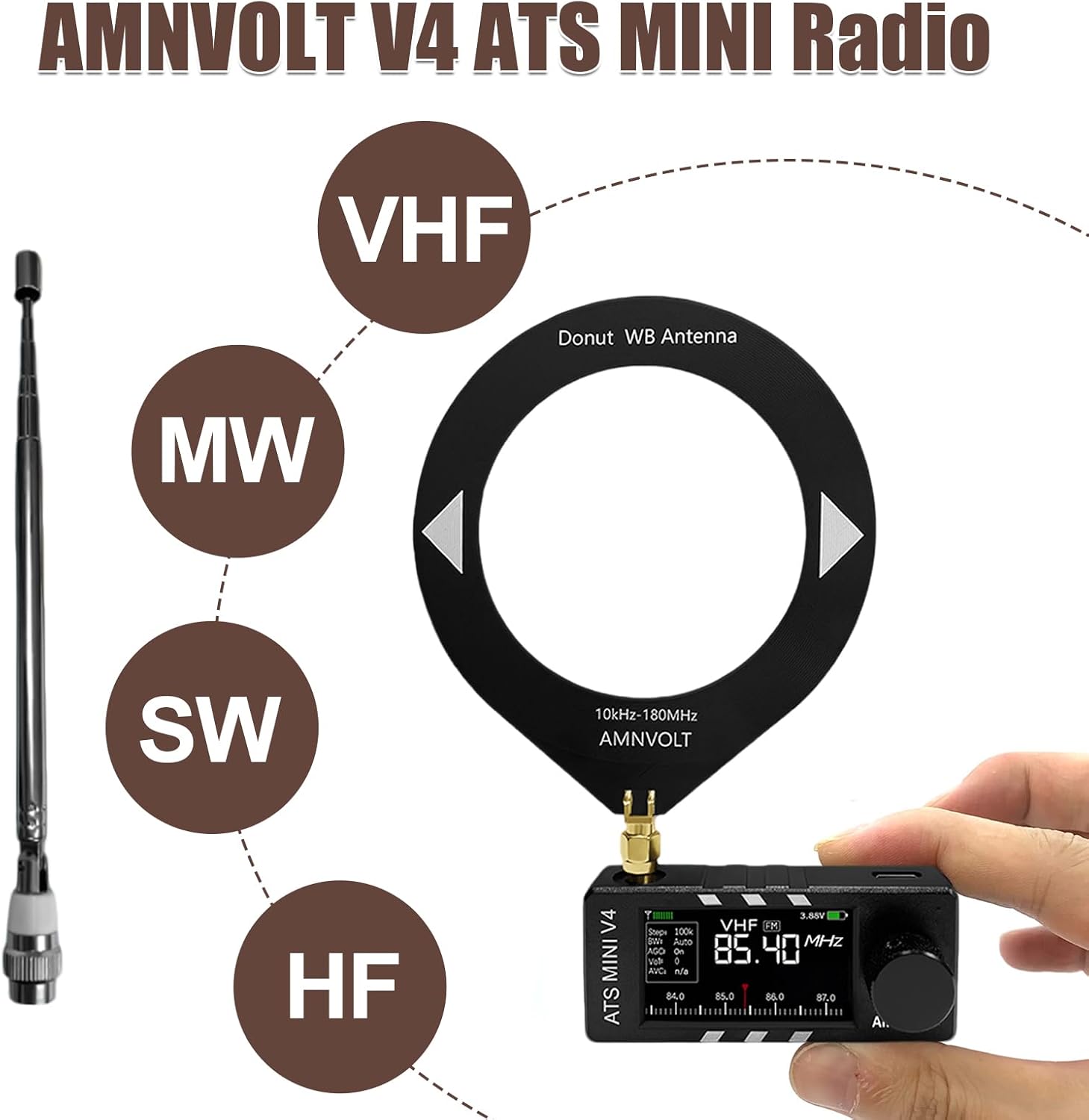
Image: The radio demonstrating compatibility with both telescopic and circle antennas, and indicating support for VHF, MW, SW, and HF bands.

Image: A detailed diagram highlighting the 1.9-inch display, adjustable brightness, Type-C charging port, 3.5mm audio jack, SMA-KE antenna connector, and 800mAh battery capacity.
Setup
1. Initial Charging
Before first use, fully charge the radio's internal 800mAh battery. Connect a USB Type-C cable (not included) to the charging port on the device and to a standard USB power adapter (5V, 1A recommended).Important: Do not use fast chargers, as this may damage the device. The screen will display the battery status during charging.
2. Antenna Connection
The radio comes with two types of antennas: a telescopic antenna and a circle antenna.
- Telescopic Antenna: Suitable for general FM and VHF reception. Screw the telescopic antenna onto the SMA-KE connector on the top of the radio. Extend it fully for optimal reception.
- Circle Antenna: Ideal for improved reception on AM, Shortwave (SW), and HF bands. Screw the circle antenna onto the SMA-KE connector. Position it away from metallic objects for best performance.
Operating Instructions
1. Power On/Off
- To power on, press and hold the power button (usually integrated with the rotary encoder or a dedicated button) for a few seconds until the screen illuminates.
- To power off, press and hold the power button again until the screen turns off.
2. Tuning and Mode Selection
- Frequency Tuning: Rotate the rotary encoder to adjust the frequency. The tuning step can usually be changed via the menu settings.
- Band Selection: Press the mode button (refer to device specific button layout) to cycle through available bands: FM, AM, Shortwave (SW), and other supported bands.
- Mode Selection (SSB/LSB/USB): When in applicable bands (e.g., Shortwave), press the mode button repeatedly or use menu options to select between AM, SSB (Single Sideband), LSB (Lower Sideband), and USB (Upper Sideband).
3. Volume Control
The volume is typically controlled by a dedicated volume knob or by a short press of the rotary encoder followed by rotation. Adjust to a comfortable listening level. The radio features a 1W cavity speaker and an upgraded earphone amplifier for clear audio.
4. Display Settings
The 1.9-inch IPS color screen offers adjustable backlight levels (32-255 levels). Access the display settings through the menu to adjust brightness for optimal visibility in various lighting conditions. The screen also shows real-time battery status.
Maintenance
1. Cleaning
Wipe the radio with a soft, dry cloth. Do not use liquid cleaners or solvents, as these may damage the finish or internal components.
2. Storage
When not in use for extended periods, store the radio in a cool, dry place. Avoid extreme temperatures and direct sunlight.
3. Firmware Upgrades
The Si4732 DSP radio supports firmware upgrades. Periodically check the manufacturer's website or support channels for the latest firmware versions and instructions on how to update your device. This ensures optimal performance and access to new features.
Troubleshooting
| Problem | Possible Cause | Solution |
|---|---|---|
| Radio does not power on. | Low battery; power button not pressed long enough. | Charge the radio fully. Press and hold the power button for 3-5 seconds. |
| Poor reception. | Antenna not connected or extended; interference; weak signal. | Ensure antenna is properly connected and extended. Try repositioning the radio or using the appropriate antenna (telescopic for FM/VHF, circle for AM/SW/HF). Move away from electronic devices causing interference. The Hi-Z circuit improves weak signal resolution. |
| No sound from speaker/headphones. | Volume too low; headphones not fully inserted; faulty headphones. | Increase volume. Ensure headphones are fully plugged into the 3.5mm audio jack. Test with different headphones. |
| Screen is dim or unreadable. | Backlight brightness set too low. | Adjust the display backlight brightness through the menu settings. |
Specifications
| Feature | Detail |
|---|---|
| Model | AMNVOLT V4 ATS MINI Radio |
| Main Controller | ESP32-S3 |
| DSP Chip | SI4732 |
| Supported Bands | All broadcast bands (12-Band support) |
| Supported Modes | FM, AM, SSB, LSB, USB |
| Display | 1.9-inch IPS Color Screen, 170*320 resolution, adjustable backlight (32-255 levels) |
| Audio Output | Built-in 1W cavity speaker, upgraded earphone amplifier circuit |
| Antenna Connector | SMA-KE (female) |
| Connectivity | Auxiliary, USB (Type-C for charging) |
| Power Source | Corded Electric (via USB Type-C), Internal Rechargeable Battery |
| Battery Capacity | 800mAh |
| Charging Port | USB Type-C (not compatible with fast chargers) |
| Audio Jack | 3.5mm 3-pin stereo |
| Product Dimensions (L x W x H) | 3.15" x 0.79" x 1.38" (8cm x 2cm x 3.5cm) |
| Special Features | Built-In AM Antenna, Lightweight, Portable, Rechargeable, Shockproof, Hi-Z circuit for improved weak signal resolution, Firmware Upgradable |

Image: The AMNVOLT V4 ATS MINI Radio with its dimensions labeled.
Warranty Information
This product comes with a limited warranty. Please refer to the warranty card included in your package or contact customer support for specific details regarding warranty coverage and duration. The warranty period is generally 6 months from the date of purchase.
Support
For further assistance, technical support, or inquiries regarding your AMNVOLT V4 ATS MINI Radio, please contact the retailer or manufacturer's customer service. Keep your purchase receipt and model number handy when contacting support.


