
Product Overview
The BOSMILLER Executive Office Chair (Model B0G43PLVPT) is engineered for comfort and durability, supporting individuals up to 650 lbs. It features a reinforced metal base, high-density sponge padding, and adjustable ergonomic functions to provide optimal support during extended periods of use. This manual provides detailed instructions for assembly, operation, maintenance, and troubleshooting.

Figure 1: BOSMILLER Executive Office Chair showcasing its robust design and key features.
Setup and Assembly
Assembly of your BOSMILLER Executive Office Chair is designed to be straightforward. All necessary tools and detailed instructions are included in the package. Please ensure you have ample space and follow the steps carefully.
Assembly Steps:
- Unpack Components: Carefully remove all parts from the packaging. Verify that all components listed in the instruction manual are present.
- Attach Casters to Base: Insert the five quiet rubber casters into the holes on the heavy-duty metal base. Push firmly until they click into place.
- Install Gas Lift: Place the gas lift cylinder into the center hole of the assembled base. Cover it with the telescopic cover.
- Secure Mechanism to Seat: Attach the chair mechanism to the underside of the seat cushion using the provided bolts. Ensure the 'FRONT' indicator on the mechanism aligns with the front of the seat.
- Attach Armrests: Connect the armrests to both the seat and the backrest using the designated bolts. Do not fully tighten all bolts until the backrest is also attached to ensure proper alignment.
- Connect Backrest to Seat: Align the backrest with the seat and armrests, then secure all remaining bolts. Once all bolts are in place, tighten them firmly.
- Place Assembled Top onto Gas Lift: Carefully place the assembled seat and backrest onto the gas lift cylinder.

Figure 2: Key components of the chair, highlighting the robust base and multi-layered cushion.
Video 1: A seller-provided video demonstrating the assembly process of the BOSMILLER Executive Office Chair.
Operating Instructions
Your BOSMILLER Executive Office Chair is equipped with several adjustable features to customize your seating experience for maximum comfort and ergonomic support.
1. Height Adjustment:
To adjust the chair's height, locate the lever on the right side beneath the seat. While seated, lift the lever to lower the chair. To raise the chair, stand up and lift the lever. Release the lever to lock the height in place.
2. Tilt and Rocking Function:
The chair features a 90°-110° tilt and rocking function. To enable rocking, pull the same lever used for height adjustment outwards. To lock the chair in an upright position, push the lever inwards. The tension of the rocking mechanism can be adjusted by turning the round knob located at the front underside of the seat. Turn clockwise to increase tension (stiffer rock) and counter-clockwise to decrease tension (looser rock).

Figure 3: Illustration of the chair's tilt and rocking capabilities, along with the control levers.
3. Adjustable Lumbar Support:
The chair includes an adjustable lumbar support to conform to your back's natural curve. Locate the knob on the right side of the backrest. Turn the knob to increase or decrease the lumbar support, moving it forward or backward to find your personalized fit.
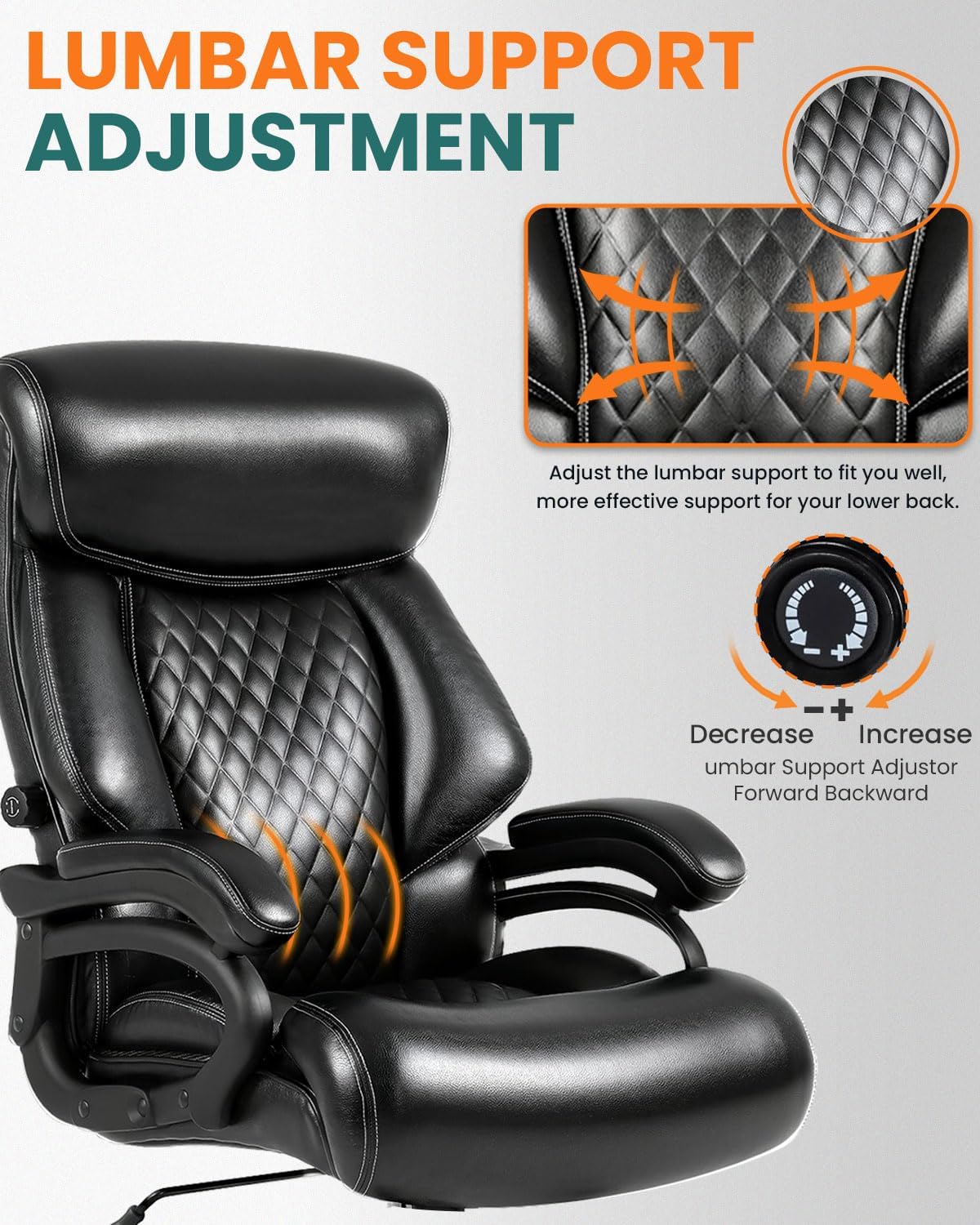
Figure 4: Detailed view of the adjustable lumbar support and its control knob.
4. Armrests:
The integrated armrests are designed for comfort and support. They are fixed in position to provide stable support.
5. Footrest (if applicable):
This model does not include an integrated footrest.
Video 2: A seller-provided video demonstrating the chair's features and suitability for heavy users.
Maintenance
Proper care and maintenance will extend the life and appearance of your BOSMILLER Executive Office Chair.
- Cleaning: Wipe the leather surface with a soft, damp cloth. For tougher stains, use a mild soap solution and immediately wipe dry. Avoid harsh chemicals or abrasive cleaners.
- Inspection: Periodically check all bolts and screws to ensure they are tight. Re-tighten if necessary to maintain stability and safety.
- Caster Care: Keep the rubber casters clean from debris (hair, dust) to ensure smooth movement and prevent scratching floors.
- Avoid Direct Sunlight: Prolonged exposure to direct sunlight can cause the leather to fade or crack.
Troubleshooting
If you encounter any issues with your chair, please refer to the following common solutions:
- Chair Sinks or Won't Stay Up: This usually indicates an issue with the gas lift cylinder. Contact customer support for a replacement.
- Chair Wobbles: Ensure all assembly bolts are securely tightened. Check the base and casters for any damage or loose connections.
- Casters Not Rolling Smoothly: Inspect casters for trapped debris (hair, lint) and clean them thoroughly. Ensure they are properly inserted into the base.
- Backrest Does Not Recline/Rock: Check the tilt lock lever and the tension knob. Ensure the lever is pulled out to enable rocking and adjust the tension knob to your preference.
Specifications
| Feature | Detail |
|---|---|
| Brand | BOSMILLER |
| Model | B0G43PLVPT |
| Color | Duck Black |
| Product Dimensions | 33"D x 26"W x 48.1"H |
| Weight Capacity | 650 lbs |
| Material | Leather, Metal, High-Density Sponge |
| Special Features | Adjustable Lumbar Support, Adjustable Height, Ergonomic, Heavy Duty, Arm Rest |
| Back Style | Solid Back |
| Seat Depth | 22.3 inches |
| Reclining Position Count | 1 (90°-110° tilt) |
| Casters | Quiet Rubber Wheels |
Warranty and Support
BOSMILLER is committed to providing responsive after-sales support. For any questions, concerns, or warranty claims, please refer to the contact information provided with your purchase documentation or visit the official BOSMILLER website.
This product is designed for durability and comes with detailed instructions for easy assembly and long-term use.