
WQE623
Generic L-Shaped Twin Gaming Bed Frame User Manual
Model: WQE623
1. Introduction
Thank you for purchasing the Generic L-Shaped Twin Gaming Bed Frame. This manual provides essential information for the safe assembly, operation, and maintenance of your new bed frame. Please read all instructions carefully before beginning assembly and retain this manual for future reference.
2. Safety Information
- Always follow assembly instructions precisely. Do not skip steps or modify the product.
- Ensure all hardware is securely tightened before use. Periodically check and re-tighten as necessary.
- Do not exceed the maximum weight capacity for each twin bed.
- Keep small parts and packaging materials away from children during assembly to prevent choking hazards.
- Use on a level surface to prevent tipping.
- Do not allow children to play on or under the bed frame without supervision.
- Exercise caution when using electrical components (RGB lights, USB ports). Ensure proper connection and avoid liquid exposure.
3. Package Contents
Before assembly, verify that all components listed below are present and undamaged. If any parts are missing or damaged, contact customer support.
- Wooden Panels for Bed Frames (2 Twin Beds)
- Wooden Slats for Mattress Support
- Ladders (2 units)
- Desk Surfaces (2 units)
- Storage Shelves and Dividers
- RGB LED Light Strips (2 units)
- USB Charging Ports and Power Outlets Unit
- Assembly Hardware (screws, bolts, nuts, dowels, etc.)
- Assembly Tools (e.g., Allen wrench)
4. Assembly Instructions
Assembly requires at least two adults. Please follow the steps in order. Refer to the provided diagrams for visual guidance.
4.1. Overview and Dimensions
Familiarize yourself with the overall structure and dimensions of the bed frame before starting assembly. The L-shaped design allows for a reversible layout to suit your room configuration.
This diagram illustrates the complete dimensions of the L-shaped gaming bed frame, including height, width, and depth of each section, as well as the individual bed sizes and shelf dimensions.
4.2. Assembling the Main Bed Frames
- Unpack all components and lay them out on a clean, soft surface to prevent scratches.
- Begin by assembling the side panels for each twin bed frame. Connect the headboard and footboard panels using the provided bolts and nuts.
- Attach the support beams to the side panels, ensuring they are level and secure.
- Repeat for the second twin bed frame.
4.3. Integrating Storage and Desk Units
The bed frame includes integrated storage shelves and desk areas. These units form part of the structural support.

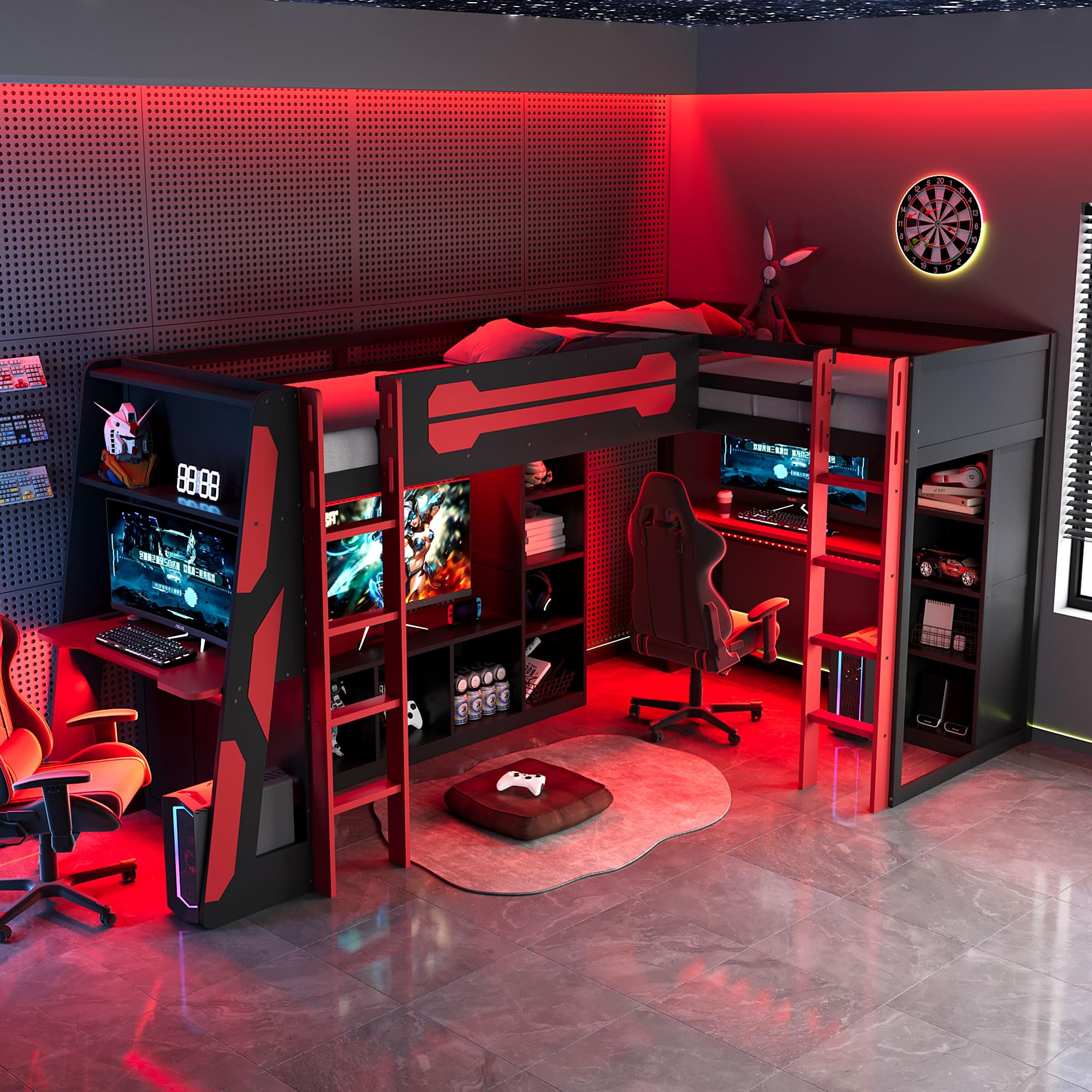
A comprehensive view of the assembled L-shaped bed frame, highlighting the dual twin sleeping areas, access ladders, and the various storage shelves and desk spaces.
- Connect the storage shelf units and desk panels to the assembled bed frames according to the diagrams. Ensure all connections are tight.
- The L-shaped configuration can be reversed during this step. Decide on your preferred left or right orientation before securing these components.
- Install the internal shelves and dividers within the storage units.
4.4. Attaching Ladders and Slats
- Securely attach the two ladders to the designated access points on the bed frames.
- Place the wooden mattress slats across the bed frame supports. Ensure they are evenly spaced and secured with the provided fasteners.
4.5. Electrical Component Installation
Install the RGB LED light strips and the USB charging/power outlet unit.

This image details the built-in power strip, featuring two USB charging ports and two standard electrical outlets, designed for convenient device charging and power access.
- Carefully adhere the RGB LED light strips to the designated areas on the bed frame, typically along the edges or under the bed. Connect them to the power source as instructed.
- Install the USB charging ports and power outlets unit into the pre-drilled opening on the desk surface. Connect the power cable to a wall outlet.
After completing all steps, double-check all connections and hardware for tightness and stability before using the bed frame.
5. Operating Instructions
5.1. RGB LED Lights
The RGB LED light strips are controlled via a remote control (if included) or a button on the strip itself. Refer to the separate LED light instruction sheet for specific functions.
- Power On/Off: Press the power button.
- Color Selection: Use the color buttons to choose from various static colors.
- Mode Selection: Cycle through different dynamic lighting modes (e.g., flash, fade, strobe).
- Brightness Adjustment: Increase or decrease the light intensity.
5.2. USB Charging Ports and Power Outlets
The integrated USB ports and power outlets provide convenient access to charge electronic devices and power small appliances.
- Ensure the bed frame's power cable is securely plugged into a functional wall outlet.
- Connect your USB-compatible devices to the USB ports for charging.
- Plug standard electrical devices into the AC outlets.
- Do not overload the outlets. Refer to the power unit's specifications for maximum wattage.
6. Maintenance
- Cleaning: Wipe the wooden surfaces with a soft, damp cloth. Avoid harsh chemicals or abrasive cleaners. For the LED strips and electrical components, use a dry cloth only.
- Hardware Check: Periodically inspect all bolts, screws, and connections. Re-tighten any loose hardware to maintain stability and safety.
- Electrical Components: Ensure power cables are not pinched or damaged. If any electrical component malfunctions, discontinue use and consult a qualified technician.
7. Troubleshooting
- Bed Frame Wobbles: Check all assembly hardware. Ensure all bolts and screws are fully tightened. Verify the bed is on a level surface.
- RGB Lights Not Working: Ensure the power cable for the LED strips is properly connected to a power source and the strip itself. Check the remote control battery if applicable.
- USB Ports/Outlets Not Providing Power: Confirm the bed frame's main power cable is securely plugged into a working wall outlet. Check for any tripped circuit breakers.
- Missing Parts: Review the package contents list. If parts are genuinely missing, contact customer support with your purchase details.
8. Specifications
| Model Number | WQE623 |
| Size | Twin (Dual) |
| Color | Red |
| Material | Engineered Wood, Wood |
| Product Dimensions | 94.5 x 78.7 x 67.5 inches (L x W x H) |
| Item Weight | 355 Pounds |
| Special Features | RGB LED Lights, Dual Twin Beds, USB Ports, TV Stand & Storage Shelves, Reversible Layout, Space Saving |
| Assembly Required | Yes |
9. Warranty and Support
This product comes with a standard manufacturer's warranty. Please refer to your purchase documentation for specific warranty terms and conditions. For technical support, missing parts, or warranty claims, please contact the retailer or manufacturer directly with your model number (WQE623) and proof of purchase.
no relevant documents
Ask a question about this manual
Ask about setup, troubleshooting, compatibility, parts, safety, or missing instructions. Manuals+ will review the question and use this page’s manual context to help answer it.