
1. Introduction
Thank you for choosing the Gosvor PRE1-G Robotic Pool Cleaner. This manual provides essential information for the safe and efficient operation, maintenance, and troubleshooting of your new pool cleaner. Please read this manual thoroughly before first use and retain it for future reference.
2. Safety Information
- Always read and understand all instructions before operating the appliance.
- Do not operate the pool cleaner when people or animals are in the pool.
- Use only the original power adapter provided by the manufacturer.
- Ensure the charging port is dry before connecting the charger.
- Do not operate the cleaner out of water. This can damage the motor seals.
- Keep the cleaner away from children and pets.
- Regularly inspect the cleaner and charger for any damage. Do not use if damaged.
- Store the cleaner in a cool, dry place away from direct sunlight when not in use.
3. Package Contents
Verify that all items are present in the package:
- Gosvor PRE1-G Robotic Pool Cleaner Unit
- Charging Adapter
- User Manual
- Filter Basket (pre-installed)
4. Product Overview
Familiarize yourself with the main components of your Gosvor PRE1-G Robotic Pool Cleaner.
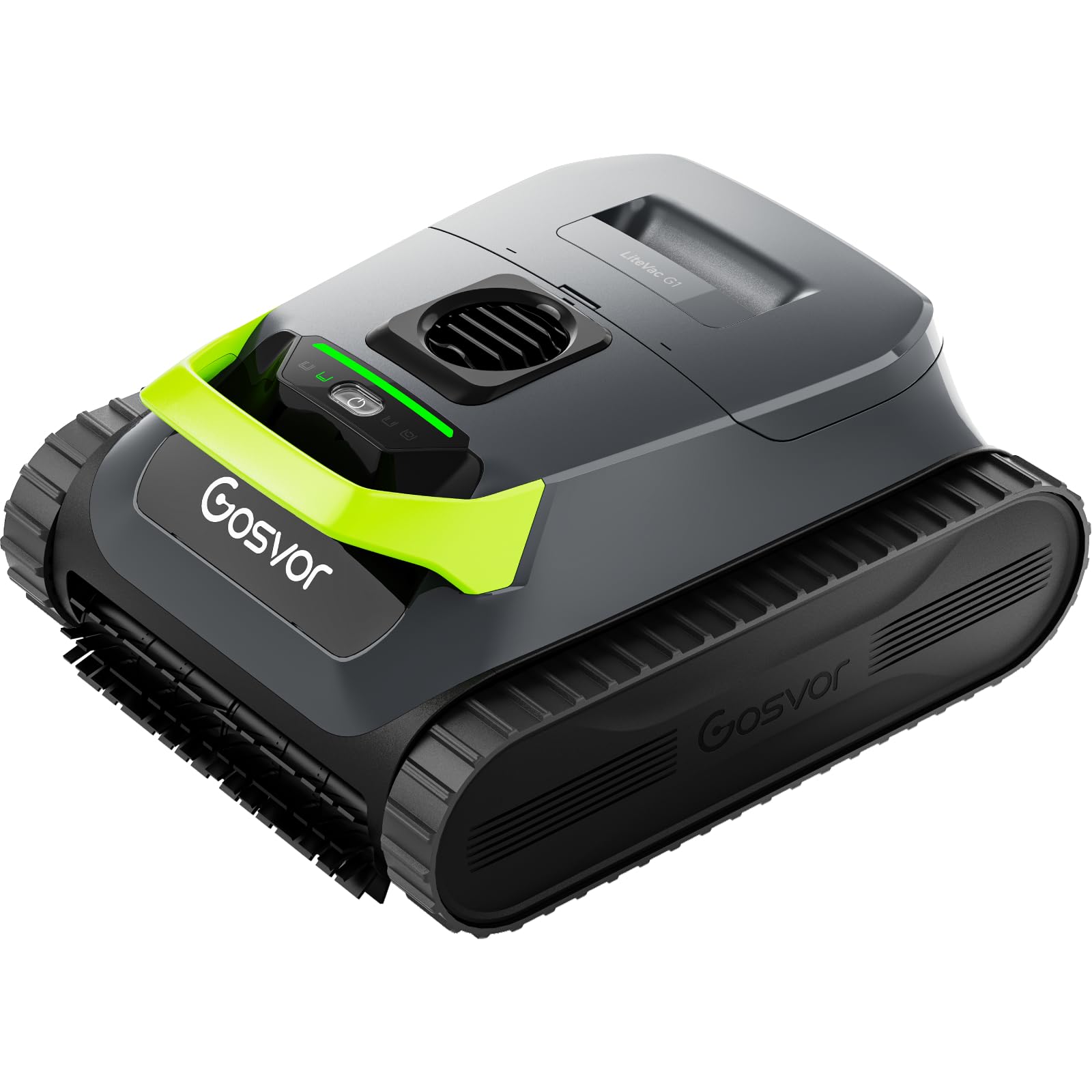
Image of the Gosvor PRE1-G Robotic Pool Cleaner in a pool, demonstrating its compact design and operation.
The cleaner features a robust main unit, a top-load filter basket for easy access, and an indicator light for operational status. The design is optimized for efficient movement across pool surfaces and walls.
5. Setup
5.1 Initial Charging
- Ensure the pool cleaner is completely dry before charging.
- Connect the charging adapter to the cleaner's charging port.
- Plug the adapter into a power outlet. The indicator light will show charging status.
- Charge the unit fully before its first use.
5.2 App Connection
- Download the official Gosvor app from your device's app store.
- Enable Bluetooth on your smartphone or tablet.
- Open the Gosvor app and follow the on-screen instructions to pair with your PRE1-G cleaner.
- The app allows for convenient control, scheduling, and OTA updates. Note: The app cannot be used underwater.
6. Operating Instructions
6.1 Placing the Cleaner in the Pool
- Gently lower the cleaner into the pool. Ensure it sinks to the bottom.
- Wait for any trapped air to escape from the cleaner before starting operation.
6.2 Starting a Cleaning Cycle
- Manual Start: Press the power button on the cleaner. The indicator light will illuminate, and the cleaner will begin its cycle.
- App Control: Use the Gosvor app to select a cleaning mode (e.g., ECO Mode for extended runtime) and start the cleaning cycle.
6.3 Smart Navigation
The PRE1-G utilizes smart navigation, combining S and N paths to cover the entire pool floor, walls, and waterline. It adapts to various pool shapes, including complex designs, to ensure thorough cleaning without missing areas.
6.4 Retrieving the Cleaner
- Once the cleaning cycle is complete or the battery is low, the cleaner will typically move to the edge of the pool.
- Carefully lift the cleaner out of the water using its handle. Allow excess water to drain.
- Do not pull the cleaner out by its power cord or any other part not designed for lifting.
7. Maintenance
7.1 Cleaning the Filter Basket
Regular cleaning of the filter basket is crucial for optimal performance.
- After each cleaning cycle, remove the cleaner from the pool.
- Open the top-load filter basket access.
- Remove the dual-filter system (180-micron standard basket and 3-micron fine filter).
- Rinse both filters thoroughly with a garden hose until all debris and fine particles are removed.
- Reinsert the clean filters and close the filter basket access securely.
7.2 General Care and Storage
- Wipe down the exterior of the cleaner with a soft cloth after each use.
- Store the cleaner in a shaded, dry area when not in use, especially during off-season.
- Ensure the battery is charged periodically during long storage periods to maintain battery health.
8. Troubleshooting
If you encounter issues with your Gosvor PRE1-G, refer to the following common problems and solutions:
| Problem | Possible Cause | Solution |
|---|---|---|
| Cleaner does not start. | Low battery; Power button not pressed; Obstruction. | Charge the battery fully; Press the power button firmly; Check for debris blocking movement. |
| Poor cleaning performance. | Clogged filter basket; Low battery; Incorrect cleaning mode. | Clean the filter basket thoroughly; Ensure battery is fully charged; Select appropriate cleaning mode via app. |
| Cleaner gets stuck. | Obstruction; Pool shape complexity. | Remove any large debris; The smart navigation is designed for complex shapes, but extreme features might occasionally cause issues. Reposition the cleaner. |
| App connection issues. | Bluetooth off; Cleaner out of range; App not updated. | Ensure Bluetooth is enabled and cleaner is within range; Update the app to the latest version. |
9. Specifications
| Feature | Detail |
|---|---|
| Brand | Gosvor |
| Model Name | LiteVac G1-GS (PRE1-G) |
| Control Method | App (Bluetooth) |
| Power Source | Battery Powered |
| Battery Type | Lithium-Ion (1 included) |
| Battery Energy Content | 112.32 Watt Hours |
| Runtime | Up to 200 minutes (ECO Mode via App) |
| Filtration System | Dual-filter (180-micron standard, 3-micron fine) |
| Max Pool Size | Up to 2,153 sq.ft |
| Item Weight | 15.2 lbs |
| Product Dimensions | 17.4 x 14.2 x 8.3 inches |
| Material | Plastic |
| Color | Gray-Green |
| Special Feature | Lightweight, Smart Navigation |
10. Warranty and Support
The Gosvor PRE1-G Robotic Pool Cleaner comes with a limited warranty. For specific details regarding warranty coverage, duration, and terms, please refer to the warranty card included in your product packaging or contact Gosvor customer support.
For technical assistance, troubleshooting beyond this manual, or to inquire about replacement parts, please contact Gosvor customer support through their official website or the contact information provided with your product.