
1. Introduction
This manual provides detailed instructions for the AOC GK330 Gaming Keyboard. The GK330 is an 81-key, 75% compact mechanical keyboard designed for both gaming and productivity, offering versatile connectivity options and extensive customization features. It features a US layout, gasket mount design, 5-layer sound dampening, durable PBT keycaps, and vibrant RGB backlighting.
2. Package Contents
Please verify that all items listed below are included in your package:
- AOC GK330 Mechanical Keyboard
- Type-C Charging Cable
- Keycap Puller
- User Manual
- 2.4G Wireless Receiver

3. Product Overview
The AOC GK330 keyboard is engineered for a superior user experience with several advanced features:
- US Layout: Designed with a sleek US layout, preferred by many for its clean aesthetic.
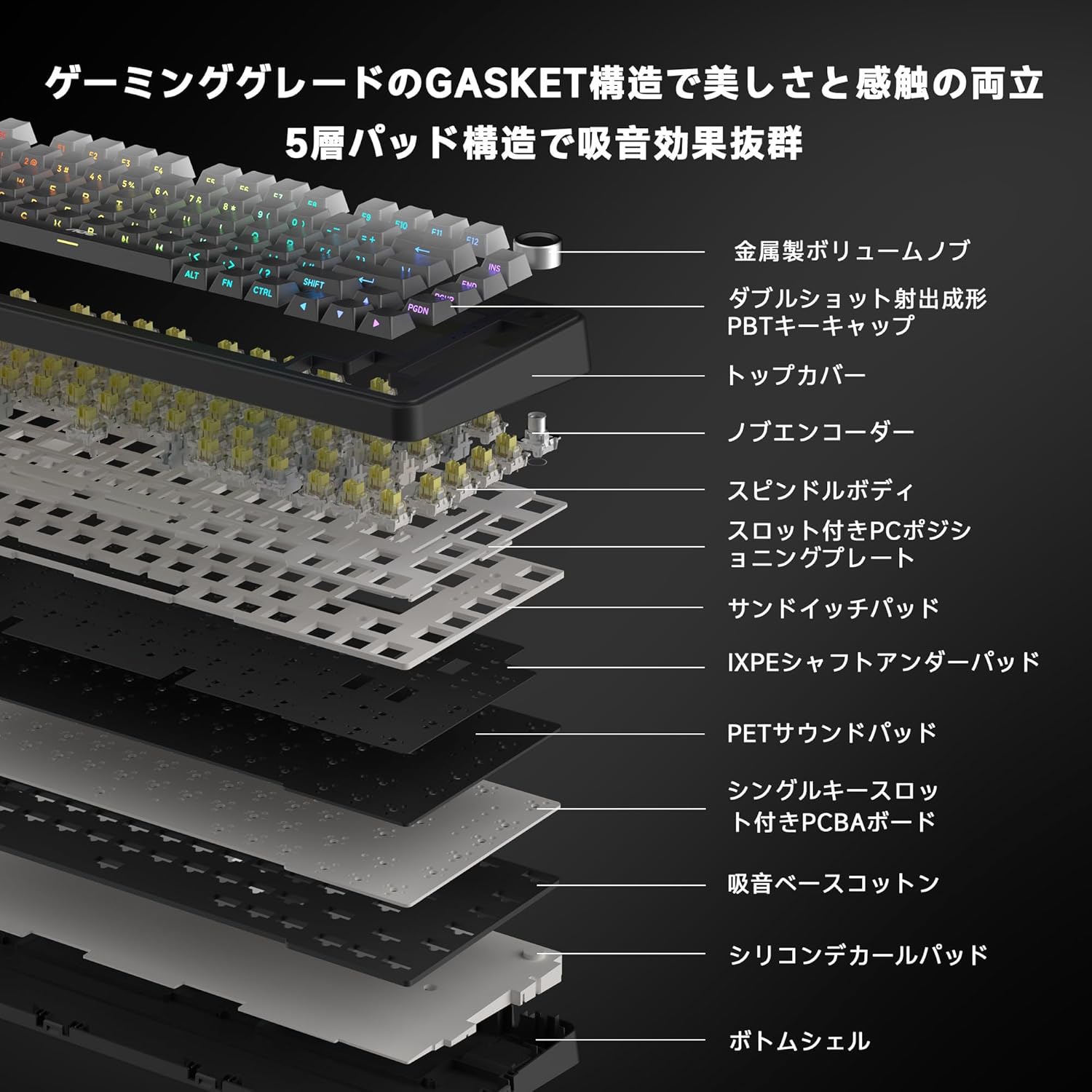
- Gasket Mount & 5-Layer Sound Dampening: Features a gasket mount structure combined with five layers of sound-absorbing materials to eliminate metallic resonance and produce a satisfying 'thocky' typing sound.
- Hot-Swappable Switches: Allows for easy replacement of switches without soldering, enabling full customization of typing feel.
- 3-Way Connectivity: Supports wired (Type-C), 2.4GHz wireless (low latency), and Bluetooth 5.0 connections, allowing seamless switching between up to three devices (Windows, Mac, tablets).
- 4000mAh Battery: Provides extended usage, approximately 180 hours with RGB off, and 35-40 hours with RGB on.
- PBT Keycaps: Equipped with durable PBT keycaps for excellent wear resistance and a refined texture.
- RGB Backlighting & Dedicated Software: Features 16.8 million color RGB backlighting with customizable effects, key remapping, and macro settings via dedicated software.
- Volume Knob: A multi-function knob for quick volume adjustment and backlight control.



4. Setup
4.1. Connecting the Keyboard
The AOC GK330 supports three connection modes: Wired (Type-C), 2.4GHz Wireless, and Bluetooth 5.0. You can switch between these modes using the dedicated switches on the keyboard.

4.2. 2.4GHz Wireless Connection
- Locate the 2.4G wireless receiver in the package.
- Plug the receiver into an available USB port on your computer or device.
- Set the keyboard's connection switch to '2.4G'. The keyboard should automatically connect.
4.3. Bluetooth Connection
- Set the keyboard's connection switch to 'BT'.
- On your device (PC, tablet, phone), enable Bluetooth and search for new devices.
- Select 'AOC GK330' from the list of available devices to pair.
4.4. Wired (Type-C) Connection
- Connect the provided Type-C cable to the keyboard's Type-C port.
- Connect the other end of the cable to a USB port on your computer.
- The keyboard will automatically switch to wired mode and begin charging.
4.5. OS Compatibility Switch
Use the 'WIN/MAC' switch on the keyboard to select the appropriate operating system layout for optimal functionality.
5. Operating Instructions
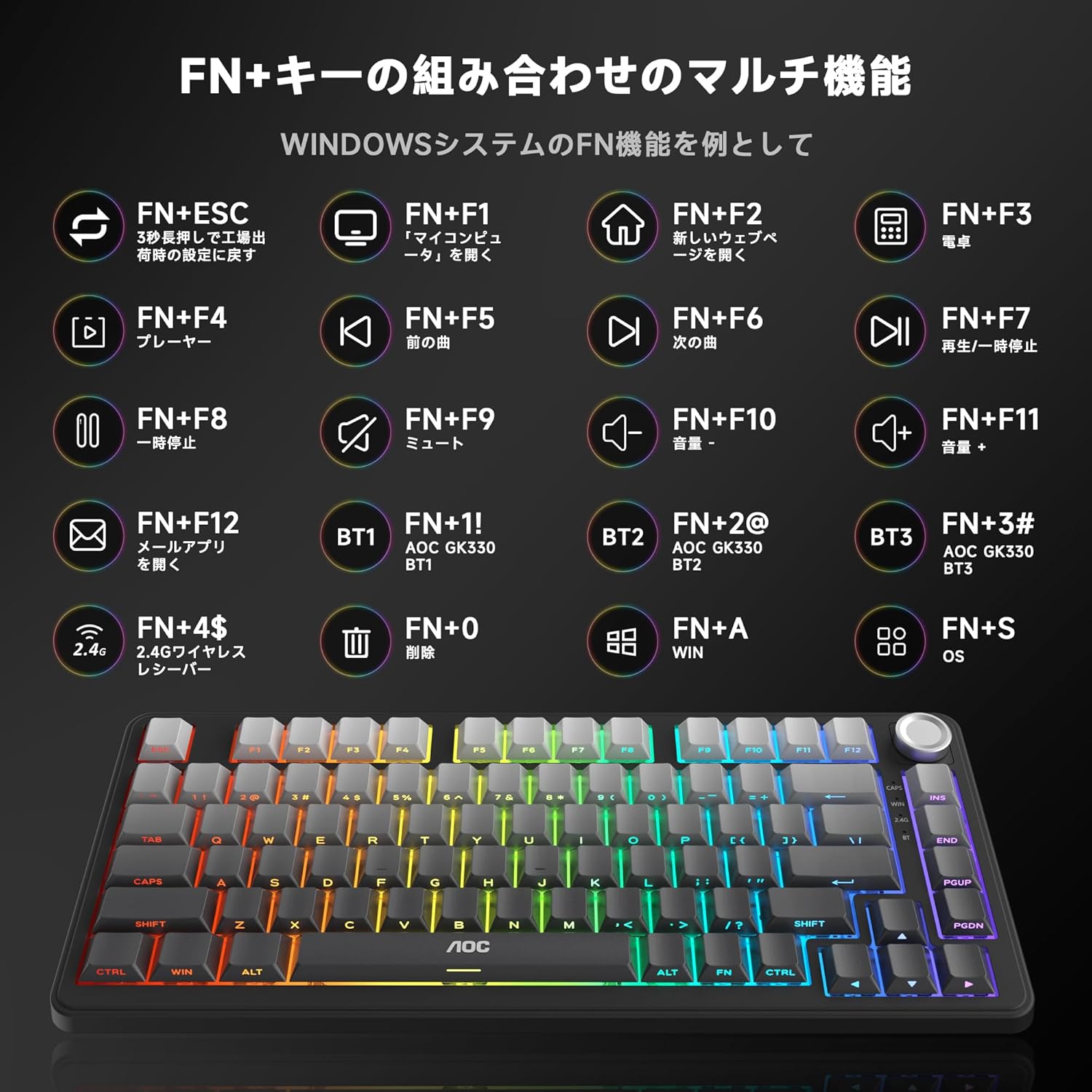
5.1. Multimedia and Function Keys (FN+Key Combinations)
The keyboard features various multimedia and function shortcuts accessible by pressing the 'FN' key in combination with other keys. Refer to the diagram below for common Windows system functions:
5.2. Volume Knob
The multi-function knob located on the top right of the keyboard allows for quick audio and backlight adjustments:
- Press: Mute/Unmute audio.
- Rotate Clockwise: Increase volume.
- Rotate Counter-clockwise: Decrease volume.

5.3. RGB Backlight Control
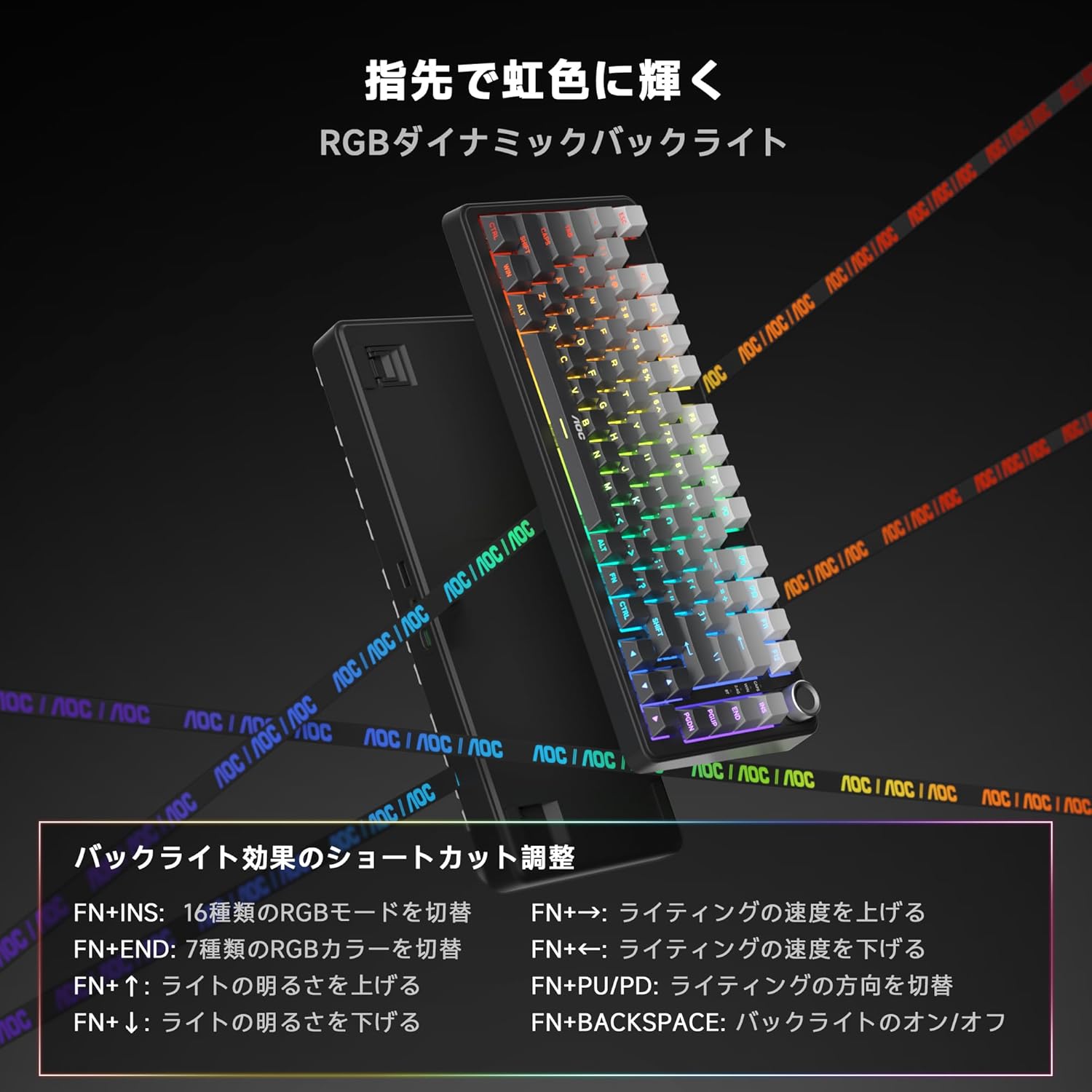
Customize the 16.8 million color RGB backlighting using the following FN key combinations:
- FN + INS: Switch between 16 RGB modes.
- FN + END: Switch between 7 RGB color types.
- FN + ↑: Increase light brightness.
- FN + ↓: Decrease light brightness.
- FN + →: Increase lighting speed.
- FN + ←: Decrease lighting speed.
- FN + PU/PD: Change lighting direction.
- FN + BACKSPACE: Toggle backlight On/Off.
6. Customization
6.1. Hot-Swappable Switches
The GK330 features a hot-swappable design, allowing users to easily change mechanical switches without soldering. This enables personalized customization of the typing feel. It supports most 3-pin/5-pin mechanical switches.

6.2. Dedicated Software
Utilize the dedicated software to further customize your keyboard. This software allows for:
- Advanced RGB lighting effects and customization.
- Key remapping to assign different functions to keys.
- Macro settings for complex command sequences.
This allows you to evolve your keyboard into a personalized device for gaming and daily work.
7. Maintenance
To ensure the longevity and optimal performance of your AOC GK330 keyboard, follow these maintenance guidelines:
- Cleaning: Regularly clean the keyboard with a soft, dry cloth. For deeper cleaning, use the provided keycap puller to remove keycaps and gently brush away dust and debris.
- Avoid Liquids: Do not expose the keyboard to liquids. In case of spills, immediately disconnect the keyboard and allow it to dry completely before re-connecting.
- Storage: Store the keyboard in a cool, dry place away from direct sunlight and extreme temperatures.
8. Troubleshooting
If you encounter any issues with your AOC GK330 keyboard, please try the following steps:
- No Response: Ensure the keyboard is properly connected (wired, 2.4G receiver, or Bluetooth paired) and the battery is charged.
- Wireless Connection Issues: For 2.4G, ensure the receiver is securely plugged in and the keyboard is in 2.4G mode. For Bluetooth, ensure the keyboard is in BT mode and correctly paired with your device. Try re-pairing if necessary.
- Incorrect Key Input: Verify the OS compatibility switch (WIN/MAC) is set correctly for your operating system.
- RGB Lighting Not Working: Check the backlight control shortcuts (FN+keys) to ensure it's not turned off or set to minimum brightness.
- Software Issues: Ensure you have the latest version of the dedicated software installed.
If the problem persists, please refer to the Warranty and Support section for further assistance.
9. Specifications
| Feature | Detail |
|---|---|
| Brand | AOC |
| Model | GK330 |
| Connectivity Technology | Bluetooth, USB-C (3-Way: BT5.0/2.4G/Wired) |
| Key Count | 81 keys |
| Keyboard Layout | QWERTY (US Layout) |
| Switch Type | Mechanical |
| Backlight Color Support | RGB (16.8 million colors) |
| Battery Capacity | 4000mAh |
| Product Dimensions (L x W x H) | 33 x 14 x 2.5 cm |
| Product Weight | 0.87 kg |
| Compatible Devices | Game consoles, Tablets, Laptops, PCs |
10. Warranty and Support
Your AOC GK330 keyboard comes with a 1-year manufacturer's warranty, ensuring quality and peace of mind.
10.1. Customer Support
For any inquiries or support needs, please contact us through your Amazon account:
- Go to your Order History.
- Select the relevant order for the AOC GK330.
- Click on 'Contact Seller'.
Support is available from 10:00 to 19:00, excluding weekends and manufacturer holidays.


