
Introduction
This manual provides instructions for the VINABTY RC45135P replacement universal remote control. This remote is designed to function as a direct replacement for original remote controls of various HANSEATIC, Kendo, and Clayton TV models.
It operates using infrared (IR) technology and does not require programming or pairing, offering a straightforward solution for your television control needs.
Compatible TV models include:
- CL32LED23BSW, CL43UHDSW22B
- 32H500FDS, 39H500FDS, 50H600UDS
- 24DVD3201B, 39LED3221B, 40LED5192B
- F32ST2000, ED40A01FHD-VE, ED50AE04UHD-VE
- ED65A01UHD-VE, ED65A01UHD-HD
- ED43A06UHD-VE, ED49A02UHD-VE, ED50A0A0A02UHD-VE
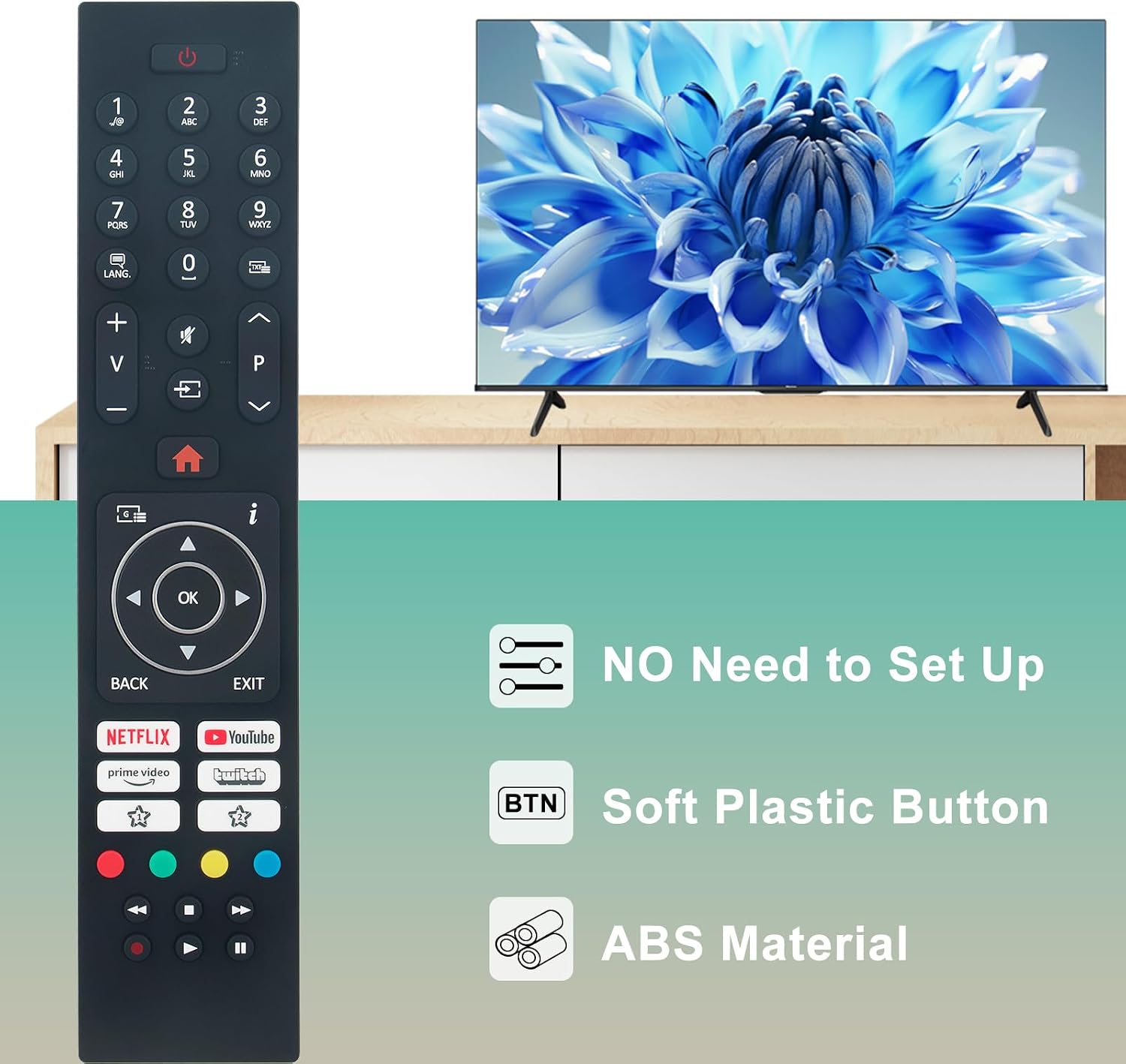
Image: The VINABTY RC45135P remote control, highlighting its plug-and-play functionality with no setup required.
Setup
1. Battery Installation
The VINABTY RC45135P remote control requires two AAA batteries (not included).
- Step 1: Locate the battery compartment on the back of the remote control.
- Step 2: Slide the battery compartment cover downwards to open it.
- Step 3: Insert two AAA batteries, ensuring the positive (+) and negative (-) terminals align correctly with the markings inside the compartment.
- Step 4: Slide the battery compartment cover back into place until it clicks securely.

Image: Rear view of the remote control, illustrating the open battery compartment for AAA battery insertion.
2. Initial Use
This remote control is pre-programmed and does not require any additional setup or pairing. Once batteries are installed, it is ready for immediate use with compatible TV models.
Operating Instructions
The VINABTY RC45135P remote control provides full functionality for your compatible television. Point the remote directly at your TV's infrared receiver for optimal performance.

Image: Front view of the remote control, displaying the complete button layout for operation.
Basic Functions
- Power Button (Red Circle with Line): Turns the TV on or off.
- Number Buttons (0-9): Directly select channels.
- Volume Up/Down (+/-): Adjusts the TV volume.
- Channel Up/Down (P^/P˅): Changes TV channels sequentially.
- Mute Button (Speaker with X): Mutes or unmutes the TV audio.
- Input/Source Button (Rectangle with Arrow): Cycles through available input sources (HDMI, AV, etc.).
- Home Button (House Icon): Accesses the TV's main menu or smart TV interface.
- Navigation Pad (Up, Down, Left, Right Arrows with OK): Navigates through menus and selects options.
- Back Button: Returns to the previous menu or screen.
- Exit Button: Exits the current menu or application.
Smart TV and App Buttons
Dedicated buttons provide quick access to popular streaming services:
- Netflix Button: Launches the Netflix application.
- Prime Video Button: Launches the Amazon Prime Video application.
- YouTube Button: Launches the YouTube application.
- Twitch Button: Launches the Twitch application.
Infrared Technology
This remote utilizes infrared 3.0 technology, providing a strong signal with a range of over 10 meters (33 feet) and an operating angle of 120 degrees. Ensure no obstructions are between the remote and the TV's IR receiver for optimal performance.

Image: The remote control in use, illustrating its capability for long-distance and precise control through infrared technology.
Maintenance
To ensure the longevity and proper functioning of your remote control, follow these maintenance guidelines:
- Cleaning: Wipe the remote control with a soft, dry cloth. Do not use liquid cleaners or abrasive materials, as these can damage the surface or internal components.
- Battery Replacement: Replace batteries when the remote's response becomes sluggish or it stops functioning. Always replace both batteries at the same time with new AAA batteries. Do not mix old and new batteries, or different types of batteries.
- Storage: Store the remote control in a cool, dry place away from direct sunlight, extreme temperatures, and high humidity.
- Avoid Drops: While made from durable ABS material, avoid dropping the remote control, as this can cause internal damage.
Troubleshooting
If you experience issues with your VINABTY RC45135P remote control, refer to the following common solutions:
Remote Not Responding
- Check Batteries: Ensure batteries are correctly inserted with the correct polarity (+/-). Replace old or depleted batteries with new ones.
- Line of Sight: Verify there are no obstructions between the remote control and the TV's infrared receiver. Ensure you are pointing the remote directly at the TV.
- Distance: Confirm you are within the effective operating range (up to 10 meters).
Partial Functionality
- Compatibility: Double-check that your TV model is listed as compatible with the VINABTY RC45135P remote control. Refer to the "Introduction" section for a list of compatible models.
- TV Settings: Some advanced functions might require specific TV settings. Consult your TV's original user manual for details.
Buttons Not Working
- Clean Buttons: Ensure buttons are free from dirt or debris that might prevent proper contact.
- Internal Damage: If specific buttons consistently fail, there might be internal damage. In such cases, consider contacting customer support.
Specifications
| Feature | Detail |
|---|---|
| Brand | VINABTY |
| Model Name | RC45135P |
| Connectivity Technology | Infrared (IR 3.0) |
| Maximum Range | 10 Metres (33 feet) |
| Compatible Devices | Television (Specific HANSEATIC, Kendo, Clayton models) |
| Max Number of Supported Devices | 1 |
| Special Features | Ergonomic design, No programming required |
| Material | ABS |
| Colour | Black |
| Item Weight | 70 Grams |
| Product Dimensions (L x W x H) | 18L x 4W x 1.5H centimetres |
Warranty and Support
Product Warranty
This VINABTY remote control comes with a 2-Year Limited Warranty. Please retain your proof of purchase for warranty claims.
Customer Support
If you encounter issues not covered in this manual or require further assistance, please contact VINABTY customer support. Refer to the contact information provided with your purchase or visit the official VINABTY website for support details.
When contacting support, please provide your product model (RC45135P) and a detailed description of the issue to facilitate a quicker resolution.