
Product Overview
The TUSK Soft Upper Doors are designed to enhance your Can-Am Maverick Trail UTV experience by providing protection from various weather conditions. These doors enclose the open area above your vehicle's original half doors, offering improved comfort during rides.
Constructed with durable, UV and cold-crack tested materials, the upper door frames are made from powder-coated steel. The design allows for easy removal of sections using an integrated quick-release mechanism.
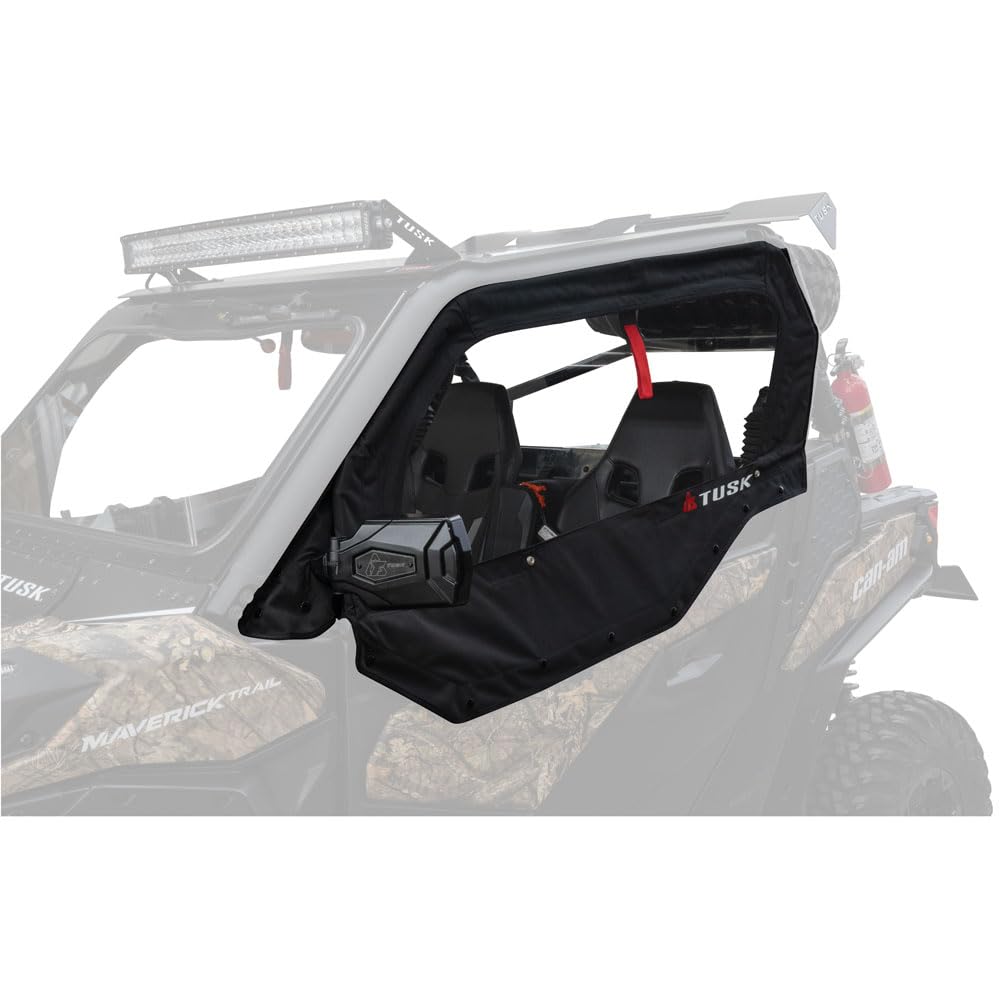
Image: TUSK Soft Upper Doors installed on a Can-Am Maverick Trail UTV. These doors provide an enclosed cabin for protection against elements.
Key Features
- Designed to fit securely within the channel of the Can-Am roll cage.
- Mounts directly to the factory door frame for a seamless integration.
- Features an integrated quick-release design, allowing for easy removal after installation.
- Constructed with materials tested to resist cracking at temperatures as low as -15° F.
Vehicle Compatibility
This TUSK Soft Upper Door set is compatible with the following Can-Am Maverick Trail models:

Image: Compatibility chart for TUSK Soft Upper Doors. This chart lists various Can-Am Maverick Trail models and their corresponding model years that are compatible with this product.
- Can-Am Maverick Trail 1000 2018-2021
- Can-Am Maverick Trail 700 DPS 2022-2024
- Can-Am Maverick Trail 1000 DPS 2018-2024
- Can-Am Maverick Trail 800 2018-2021
- Can-Am Maverick Trail 700 2022-2023
- Can-Am Maverick Trail 800 DPS 2018-2021
Setup and Installation
Proper installation is crucial for the functionality and longevity of your TUSK Soft Upper Doors. Please read all instructions carefully before beginning.
- Preparation: Ensure your Can-Am Maverick Trail UTV is parked on a level surface and the engine is off. Gather all components and tools required for installation.
- Door Frame Mounting: Position the upper door frames onto the factory door frames. Ensure proper alignment with the existing door structure.
- Roll Cage Integration: Align the upper door frames with the channel of the Can-Am roll cage. This ensures a secure and sealed fit.
- Drilling Requirement: Note: Installation requires drilling into the factory door skin. Carefully mark the drilling locations as per the specific product instructions (not provided here, refer to manufacturer's detailed guide). Use appropriate drill bits and take necessary safety precautions.
- Secure Fasteners: Once aligned and drilled, secure the upper door frames using the provided fasteners. Ensure all connections are tight and stable.
- Soft Panel Attachment: Attach the soft door panels to the installed frames. Verify that all zippers, snaps, or hook-and-loop closures are properly engaged to create a weather-tight seal.
- Final Check: After installation, open and close the doors several times to ensure smooth operation and proper sealing. Check for any obstructions or loose connections.
For detailed, step-by-step installation instructions, always refer to the specific guide provided by TUSK with your product packaging.
Operation
The TUSK Soft Upper Doors are designed for ease of use and adaptability to changing weather conditions.
- Opening/Closing: Utilize the integrated zippers or closures to open and close the soft door panels. Ensure they are fully closed to prevent water or debris entry.
- Quick Removal: The upper door sections can be quickly removed when not needed. This feature allows for open-air riding when weather permits. Consult the manufacturer's specific instructions for the quick-release mechanism.
- Visibility: Always ensure clear visibility through the door windows. Clean them regularly to maintain optimal sightlines.
Maintenance
Regular maintenance will extend the life and appearance of your TUSK Soft Upper Doors.
- Cleaning: Clean the soft panels with mild soap and water. Avoid harsh chemicals or abrasive cleaners, as these can damage the material and clear vinyl windows. Rinse thoroughly and allow to air dry.
- Zipper Care: Periodically lubricate zippers with a silicone-based lubricant to ensure smooth operation and prevent sticking.
- Frame Inspection: Regularly inspect the powder-coated steel frames for any signs of rust, damage, or loose fasteners. Tighten fasteners as needed.
- Storage: If removing the doors for extended periods, clean them thoroughly and store them in a dry, cool place away from direct sunlight to prevent material degradation.
Troubleshooting
This section addresses common issues you might encounter with your TUSK Soft Upper Doors.
- Poor Seal/Drafts:
- Check that all zippers and closures are fully engaged.
- Inspect the door frames for proper alignment with the roll cage and factory door. Re-adjust if necessary.
- Ensure no debris is caught in the seals.
- Sticking Zippers:
- Clean any dirt or grit from the zipper teeth.
- Apply a silicone-based zipper lubricant.
- Loose Fit:
- Verify all mounting fasteners are securely tightened.
- Re-check the fitment against the Can-Am roll cage channel.
- Material Damage (Tears/Cracks):
- Small tears may be repairable with a suitable vinyl repair kit.
- For significant damage, contact TUSK customer support for replacement options.
Specifications
| Attribute | Detail |
|---|---|
| Brand | TUSK |
| Model Number | 2022470007ff41-84c12a |
| Item Weight | 67.3 pounds |
| Product Dimensions | 51 x 32 x 8 inches |
| Material | UV and cold crack tested materials, powder-coated steel frames |
| Temperature Resistance | Tested at -15° F to resist cracking |
| Compatibility | Can-Am Maverick Trail series (refer to compatibility list) |
Warranty and Support
For specific warranty information regarding your TUSK Soft Upper Doors, please refer to the documentation included with your purchase or visit the official TUSK website. Warranty terms and conditions may vary.
If you require technical assistance, have questions about installation, or need to report a product issue, please contact TUSK customer support directly. Contact information can typically be found on the product packaging or the manufacturer's website.
Manufacturer: TUSK
Website: Visit the TUSK Store on Amazon (for general brand information)