
1. Product Overview
The Philips Sonicare 6700 Series Electric Toothbrush (Model HX7411/06) utilizes advanced sonic technology to provide an effective and gentle cleaning experience. This manual provides instructions for proper use, maintenance, and care of your device.
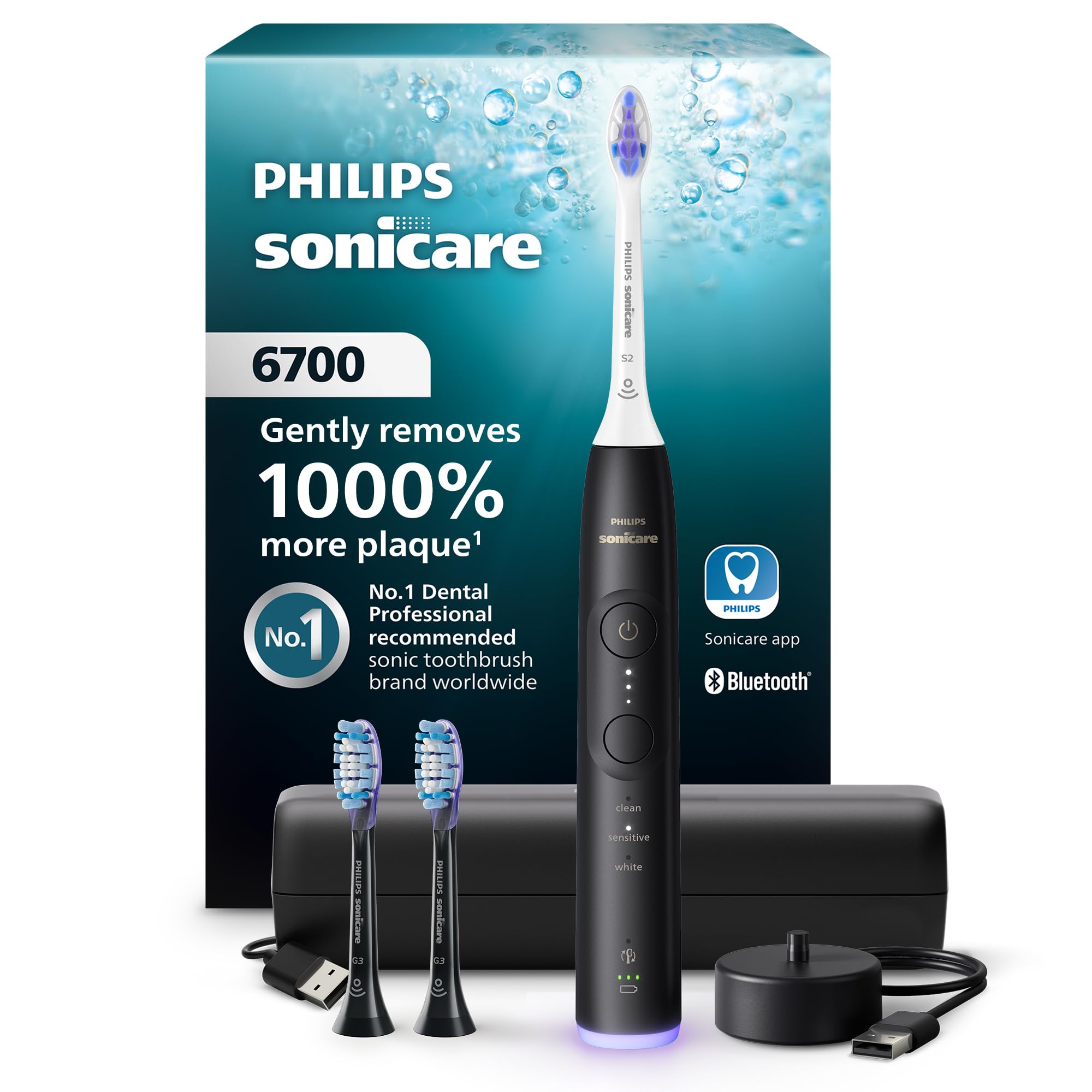
Image: Philips Sonicare 6700 Series Electric Toothbrush, main product view.
Key Features:
- Next-Generation Sonicare Technology for powerful yet gentle cleaning.
- Visual Pressure Sensor to protect gums from excessive brushing force.
- 9 Brushing Settings: 3 modes (Clean, Sensitive, White) with 3 intensity levels.
- SmarTimer and BrushPacer for guided brushing sessions.
- Up to 21-day battery runtime on a single charge.
- Includes S2 Sensitive and G3 Premium Gum Care brush heads.
- Charging travel case for convenience.
2. Setup and First Use
2.1 Unpacking
Carefully remove all components from the packaging. The package includes the toothbrush handle, brush heads (S2 Sensitive, G3 Premium Gum Care), a charging travel case, and a charging stand. A power adapter is not included.
2.2 Charging the Toothbrush
- Place the charging stand on a stable, flat surface.
- Connect the charging stand to a USB power adapter (not supplied) and plug it into a wall outlet.
- Place the toothbrush handle onto the charging stand. The battery indicator lights will illuminate to show charging progress.
- Allow the toothbrush to charge for at least 24 hours before first use to ensure a full charge. A full charge provides up to 21 days of regular brushing.
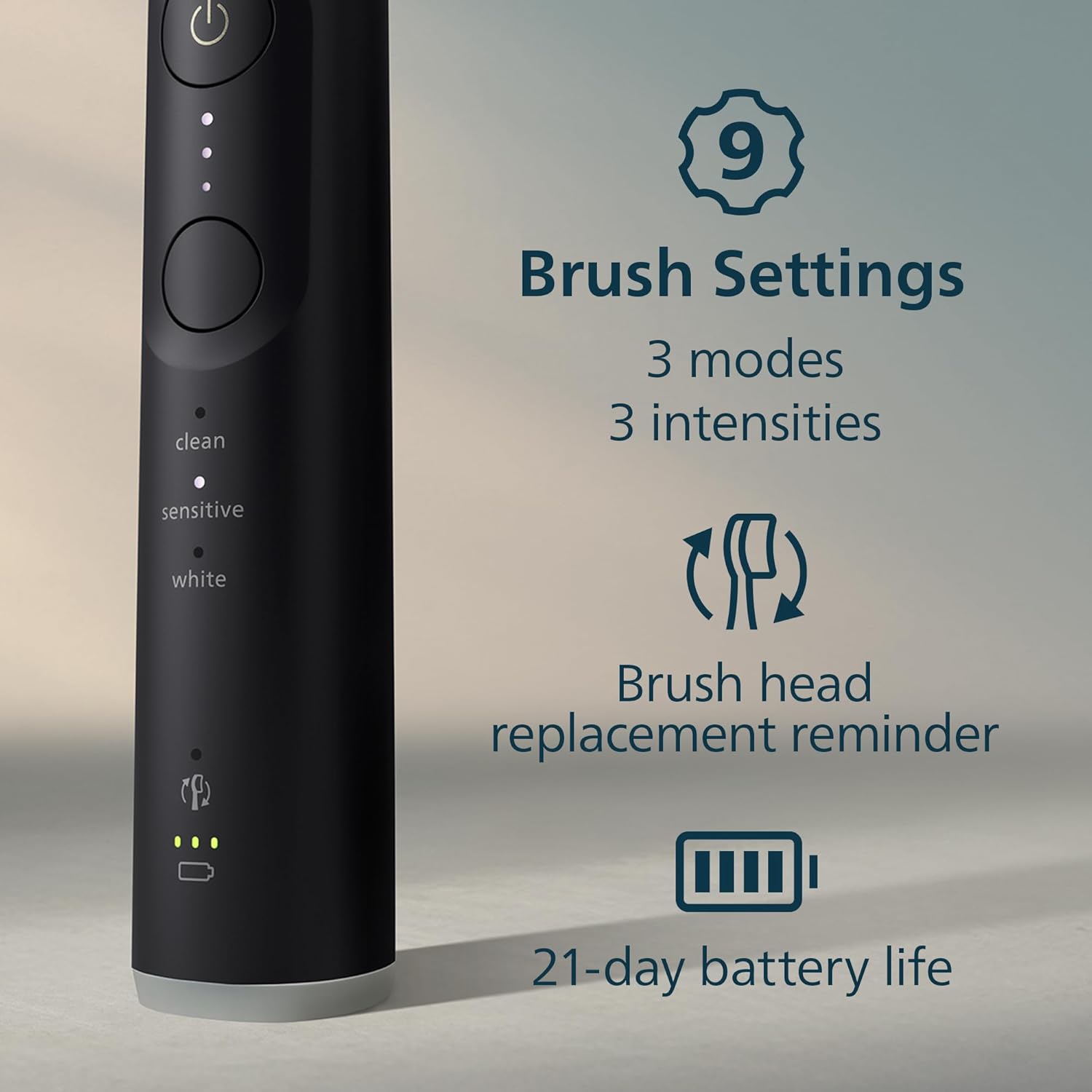
Image: Toothbrush handle placed on its charging stand.
2.3 Attaching a Brush Head
- Align the brush head with the metal shaft on the toothbrush handle.
- Push the brush head down firmly until it clicks into place. There should be a small gap between the brush head and the handle.

Image: A Philips Sonicare toothbrush with a brush head properly attached.
3. Operating Instructions
3.1 Brushing Your Teeth
- Wet the bristles and apply a small amount of toothpaste.
- Place the toothbrush bristles against your teeth at a slight angle towards the gumline.
- Press the power button to start brushing.
- Gently move the brush head slowly across your teeth in small back-and-forth motions, allowing the sonic action to clean between teeth and along the gumline.
- The BrushPacer will pause briefly every 20 seconds to indicate when to move to a new section of your mouth.
- The SmarTimer will automatically turn off the toothbrush after 2 minutes of brushing (or 3 minutes for White mode).

Image: Visual representation of SmarTimer and BrushPacer functions.
3.2 Brushing Modes and Intensity Levels
The Philips Sonicare 6700 Series offers 3 brushing modes and 3 intensity levels to customize your cleaning experience.
- Clean Mode: Standard mode for an exceptional everyday clean.
- Sensitive Mode: Gentle yet thorough cleaning for sensitive gums and teeth.
- White Mode: Designed to remove surface stains for a brighter smile.
To change modes, press the mode selection button below the power button. To adjust intensity, press the mode selection button repeatedly until the desired intensity level (indicated by dots) is selected.

Image: Toothbrush handle displaying brushing modes and intensity indicators.
3.3 Visual Pressure Sensor
The toothbrush features a visual pressure sensor at its base. If you apply too much pressure during brushing, the light ring will illuminate. Reduce pressure immediately to protect your gums and teeth.

Image: Toothbrush in use, demonstrating the visual pressure sensor.
3.4 Sonicare App Integration
For enhanced guidance and personalized insights, you can connect your Philips Sonicare 6700 Series toothbrush to the Sonicare app via Bluetooth. The app provides guided brushing, tips, and tracks your brushing history.
- Download the Philips Sonicare app from your device's app store.
- Follow the in-app instructions to pair your toothbrush.
- Utilize the app for real-time feedback on pressure and coverage.
Image: Smartphone showing the Philips Sonicare app in use.
4. Maintenance and Care
4.1 Cleaning the Toothbrush
- After each use, rinse the brush head thoroughly under running water while the toothbrush is still on.
- Remove the brush head and rinse the metal shaft area with warm water.
- Wipe the entire surface of the handle with a damp cloth. Do not immerse the handle in water.
- Store the toothbrush in a dry place.
4.2 Replacing Brush Heads
Dental professionals recommend replacing your brush head every 3 months, or sooner if the bristles are splayed or worn. The Philips Sonicare 6700 Series includes a brush head replacement reminder feature that tracks usage and alerts you when it's time for a new brush head.
Image: S2 Sensitive brush head, highlighting its design.
4.3 Battery Care
To maintain optimal battery life, ensure the toothbrush is fully charged before its first use. Recharge the toothbrush when the battery indicator shows low power. Avoid completely draining the battery frequently.
5. Troubleshooting
| Problem | Possible Cause | Solution |
|---|---|---|
| Toothbrush does not turn on. | Battery is depleted. | Place the toothbrush on the charger for at least 24 hours. |
| Toothbrush does not charge. | Charger not properly connected or faulty. | Ensure the charger is securely plugged into a working outlet and the toothbrush is correctly seated on the charging stand. Try a different USB power adapter. |
| Vibrations feel weak. | Low battery or brush head worn. | Recharge the toothbrush. Replace the brush head if it is old or worn. |
| Pressure sensor light illuminates frequently. | Applying too much pressure. | Reduce the force applied during brushing. Allow the sonic action to do the work. |
| App connection issues. | Bluetooth interference or app error. | Ensure Bluetooth is enabled on your device. Restart the app and your toothbrush. Try re-pairing the device. |
6. Specifications
- Model Number: HX7411/06
- Brand: Philips Sonicare
- Power Source: Battery Powered
- Battery Type: Rechargeable
- Runtime: Up to 21 days (based on 2 minutes of brushing, twice a day)
- Special Features: Brushing Timer, Lightweight, Rechargeable, Sonic Technology, Pressure Sensor
- Item Firmness Description: Extra Soft (for included S2 Sensitive brush head)
- Package Dimensions: 9.29 x 6.73 x 2.64 inches
- Item Weight: 15.36 ounces
7. Warranty and Support
For warranty information and customer support, please refer to the warranty card included in your product packaging or visit the official Philips Sonicare website. You can also contact Philips Sonicare customer service for assistance with product registration, troubleshooting, or replacement parts.
Online Support: www.philips.com/sonicare
8. Safety Information
- Replace brush head every 3 months.
- May not be suitable for users with extremely sensitive gums or teeth. Consult your dental professional if you experience discomfort.
- Do not use this product for any purpose other than oral hygiene.
- Keep out of reach of children.
- Do not modify the product in any way.
- If the product is damaged (e.g., brush head, handle), discontinue use.