Introduction
This manual provides instructions for the Genius Solutions AIRPRO Smart Watch Activity Tracker. It covers setup, operation, maintenance, and troubleshooting to ensure optimal use of your device. The AIRPRO Smart Watch is designed to assist with fitness tracking, connectivity, and daily convenience.
The device features a 1.69-inch display, an aluminum body, and a silicone strap. It is rated IP67 for water resistance, making it suitable for splashes, rain, and sweat.
Included Components
The package includes the following items:
- AIRPRO Smart Watch Face
- Silicone Strap
- Charging Cable
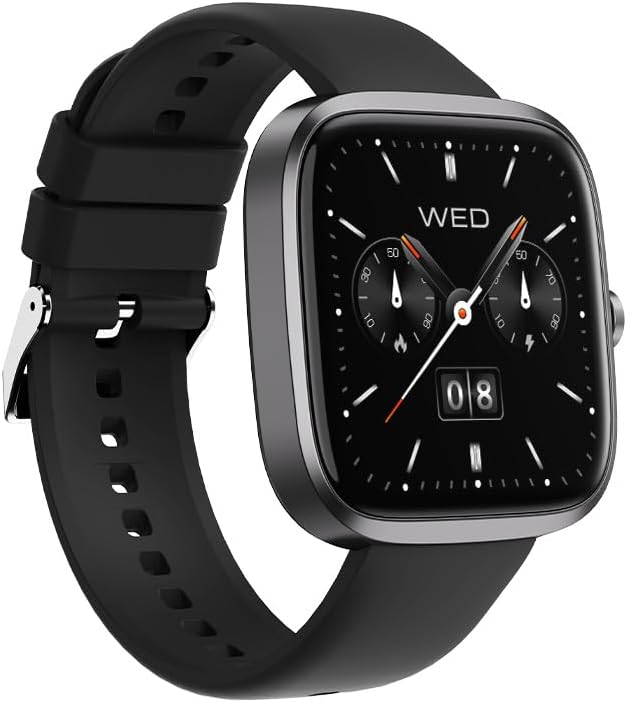
Figure 1: Front view of the AIRPRO Smart Watch with a classic watch face.
Setup
1. Charging the Device
Before initial use, fully charge your AIRPRO Smart Watch. Connect the provided charging cable to the charging port on the back of the watch and to a standard USB power adapter.
- Battery Capacity: 230 mAh
- Charging Time: Approximately 1.5 hours for a full charge
- Usage Time: Up to 10 days
- Standby Time: Up to 20 days

Figure 2: Rear view of the watch, highlighting the sensors and charging contacts.
2. App Installation and Pairing
To unlock the full functionality of your AIRPRO Smart Watch, download the companion application on your smartphone. The watch is compatible with both iOS and Android devices.
- Search for the official "AIRPRO" application in your device's app store (Apple App Store for iOS, Google Play Store for Android).
- Install the application and create an account or log in.
- Ensure Bluetooth is enabled on your smartphone.
- Open the AIRPRO app and follow the on-screen instructions to pair your watch. The watch uses Bluetooth version 5.2 for connectivity.
- Confirm the pairing request on both your watch and smartphone.
The app supports integration with STRAVA for fitness data synchronization.
Operating Instructions
Basic Navigation
The AIRPRO Smart Watch features a 1.69-inch crystal-clear display with intuitive touch navigation. Swipe left, right, up, or down to access different functions and menus. Press the side button to return to the home screen or activate specific features.

Figure 3: Digital watch face displaying time, date, and battery status.
Health and Fitness Tracking
The watch offers comprehensive health and fitness monitoring features:
- Heart Rate Monitor: Continuously tracks your heart rate.
- Blood Oxygen Sensor: Measures blood oxygen levels.
- Sleep Monitor: Analyzes sleep patterns and quality.
- Calories Burned Tracker: Estimates calorie expenditure based on activity.
- 100+ Sports Modes: Select from various sports modes for accurate activity tracking.
- GPS & Phone Tracker: Utilizes connected phone's GPS for route tracking.
- Sedentary Reminder: Alerts you to move after periods of inactivity.
Smart Features
Access various smart functions directly from your watch:
- Music Control: Play, pause, skip tracks on your connected phone.
- Camera Control: Remotely trigger your phone's camera shutter.
- Alarm Clock: Set alarms and receive silent vibrations.
- Weather Forecast: View current weather conditions and forecasts.
- Stopwatch & Timer: Use for timing activities.
- Find Phone Function: Locate your paired smartphone.
- Flashlight: Activates the screen as a temporary light source.
- Calculator: Perform basic calculations.
The watch also supports Bluetooth Calling, allowing you to make and receive calls directly from your wrist when connected to your smartphone.
Maintenance
Cleaning
Regularly clean your watch and strap to prevent skin irritation and maintain device functionality. Use a soft, damp, lint-free cloth. Avoid harsh chemicals or abrasive materials.
Water Resistance
The AIRPRO Smart Watch has an IP67 water resistance rating. This means it is resistant to splashes, rain, and sweat. It is not suitable for swimming, showering, or diving. Avoid exposing the watch to hot water or steam.
Battery Care
To prolong battery life, avoid fully discharging the watch frequently. Charge the device when the battery level is low. Store the watch in a cool, dry place when not in use for extended periods.
Troubleshooting
- Watch not turning on: Ensure the watch is fully charged. Connect it to the charging cable and a power source for at least 15 minutes.
- Unable to pair with smartphone:
- Ensure Bluetooth is enabled on your phone and the watch.
- Make sure the watch is within range of your phone.
- Restart both the watch and your smartphone.
- Check if the AIRPRO app is updated to the latest version.
- Inaccurate health data: Ensure the watch is worn snugly on your wrist, about one finger's width above your wrist bone. Clean the sensors regularly.
- Short battery life: Reduce screen brightness, disable unnecessary notifications, and limit continuous heart rate monitoring if not required.
Specifications
| Model Number | F3 G1 Blue |
| Display | 1.69-inch Crystal-Clear Display |
| Material | Aluminium Body, Silicone Strap |
| Waterproof Rating | IP67 (Splash, Rain, Sweat Resistant) |
| Battery Capacity | 230 mAh |
| Charging Time | 1.5 hours |
| Usage Time | Up to 10 days |
| Standby Time | Up to 20 days |
| Bluetooth Version | 5.2 |
| Compatibility | iOS & Android |
| Health Tracking | Heart Rate, Blood Oxygen, Sleep, Calories, Sedentary Reminder |
| Sports Modes | 100+ |
| Special Features | Bluetooth Calling, Music/Camera Control, Alarm, Weather, Stopwatch, Find Phone, Flashlight, Calculator |
Warranty Information
The Genius Solutions AIRPRO Smart Watch comes with a 2-Year Manufacturing Warranty. This warranty covers defects in materials and workmanship under normal use. It does not cover damage caused by misuse, accidents, unauthorized modifications, or failure to follow the instructions in this manual.
Please retain your proof of purchase for warranty claims.
Support
For further assistance, technical support, or warranty inquiries, please contact Genius Solutions customer service. Refer to the contact information provided with your product packaging or visit the official Genius Solutions website.


