
1. Introduction
This manual provides essential information for the safe and effective use of the KEYAYEYA NGG-3410-1 K 400 Temperature Controller. It covers installation, operation, maintenance, and troubleshooting procedures. Please read this manual thoroughly before operating the device and retain it for future reference.
The NGG-3410-1 K 400 is compatible with AISET temperature control systems, including models NGG-3400V-1 E 400, NGG-3400V-1 K 600, NGG-3410-1 K 400, NGG-3410V-1 E 400, NGG-3411-1 K 400, and NGG-3411V-1 K 400.
2. Product Overview
The KEYAYEYA NGG-3410-1 K 400 is a precision temperature controller designed for industrial applications. It features a clear display and intuitive controls for accurate temperature management.
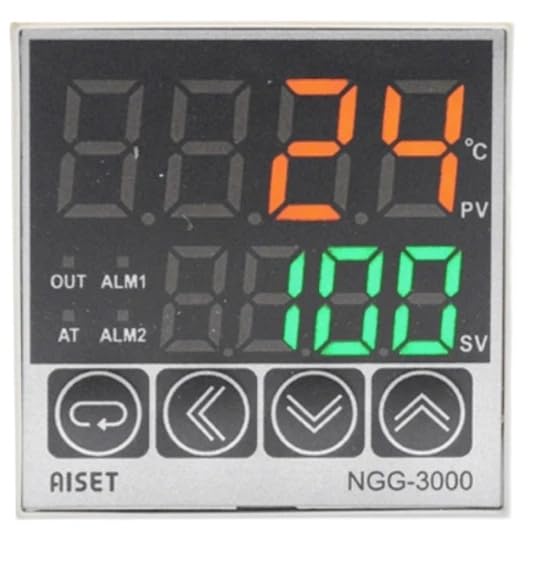
Figure 1: Front panel of the NGG-3410-1 K 400 temperature controller, showing its display screen and control buttons.
3. Setup and Installation
Proper installation is crucial for the performance and safety of the temperature controller. Ensure all power is disconnected before proceeding with installation.
- Mounting: Securely mount the controller in a suitable enclosure or panel, ensuring adequate ventilation and protection from environmental factors like moisture and excessive heat.
- Wiring: Connect the power supply, temperature sensor (thermocouple or RTD), and output load according to the wiring diagram provided with your specific unit. Pay close attention to polarity and voltage requirements.
- Initial Power-Up: After all connections are verified, apply power to the controller. The display should illuminate, indicating the device is operational.
- Parameter Configuration: Access the controller's menu to set initial parameters such as temperature unit (Celsius/Fahrenheit), control mode (PID, ON/OFF), alarm settings, and sensor type. Refer to the detailed parameter list for specific settings.
4. Operating Instructions
Once installed and configured, the temperature controller is ready for operation.
- Setting the Setpoint: Use the designated buttons (e.g., UP/DOWN arrows, SET button) to adjust the desired temperature setpoint. The display will typically show both the current process value (PV) and the setpoint value (SV).
- Monitoring: Continuously monitor the process value on the display to ensure the system is maintaining the desired temperature.
- Alarm Functions: If configured, the controller will activate alarms (visual or audible) when the temperature deviates from the set limits. Address any alarm conditions promptly.
- Manual Control (if applicable): Some models may offer a manual control mode for specific operations. Consult the detailed operational guide for your specific model if this feature is required.
5. Maintenance
Regular maintenance ensures the longevity and reliable performance of your temperature controller.
- Cleaning: Keep the controller's front panel clean and free from dust and debris. Use a soft, dry cloth. Avoid abrasive cleaners or solvents.
- Inspection: Periodically inspect all wiring connections for tightness and signs of wear or damage. Ensure the temperature sensor is securely in place and free from corrosion.
- Environmental Conditions: Ensure the operating environment remains within the specified temperature and humidity ranges to prevent damage to internal components.
- Calibration: If accurate temperature control is critical, periodic calibration of the sensor and controller may be necessary. Consult a qualified technician for calibration services.
6. Troubleshooting
Refer to the following table for common issues and their potential solutions.
| Problem | Possible Cause | Solution |
|---|---|---|
| Controller not powering on | No power supply; incorrect wiring; blown fuse | Check power connections; verify wiring diagram; replace fuse if necessary. |
| Incorrect temperature reading | Sensor fault; incorrect sensor type setting; poor sensor connection | Check sensor wiring; verify sensor type in settings; replace faulty sensor. |
| Temperature not reaching setpoint | Output not activating; heating/cooling element fault; incorrect control parameters | Check output wiring and load; verify PID parameters or ON/OFF hysteresis. |
| Display shows error code | Sensor open/short; internal fault | Refer to the specific error code in the full product manual or contact support. |
If the problem persists after attempting these solutions, please contact technical support.
7. Specifications
- Brand: KEYAYEYA
- Model: NGG-3410-1 K 400
- Manufacturer: Original manufacturer
- Package Contents: One NGG-3410-1 K 400 Temperature Controller
- ASIN: B0G3P1YZLD
- Compatibility: AISET NGG-3400V-1 E 400, NGG-3400V-1 K 600, NGG-3410-1 K 400, NGG-3410V-1 E 400, NGG-3411-1 K 400, NGG-3411V-1 K 400
8. Warranty Information
This product is covered by a one-year limited warranty from the date of purchase. This warranty covers manufacturing defects under normal use. Please retain your proof of purchase for warranty claims.
9. Support
For any questions regarding your KEYAYEYA NGG-3410-1 K 400 Temperature Controller, including technical assistance or model inquiries, please contact the seller directly. They can provide specialized support and guidance.