
Introduction
This manual provides detailed instructions for the installation, operation, and maintenance of your ZUZZEE KT-LCD8H 72V Ebike LCD Display Screen. This instrument panel is designed to work specifically with KT electric bike controllers and features a 5-pin SM connector for reliable communication. It offers clear visibility of essential riding data such as speed, battery level, and mileage, enhancing your ebike experience.
Safety Information
- Ensure the ebike is powered off before attempting any installation or connection.
- Always verify that the controller uses the correct communication protocol and connector wiring compatible with the KT-LCD8H display. Incompatible connections can cause damage.
- Avoid exposing the display to extreme temperatures or direct impact.
- Do not attempt to disassemble or modify the display unit, as this may void the warranty and cause malfunction.
- Keep the display screen clean and free from obstructions to ensure clear visibility during operation.
Package Contents
Please check the package to ensure all items are present:
- 1 x KT-LCD8H LCD Display Screen
- 1 x Control Button Unit
- Installation Fasteners (Mounting bracket and rubber shims)

Image: Contents of the ZUZZEE KT-LCD8H package, showing the LCD display, separate control button, and various installation fasteners including a mounting bracket and rubber shims.
Setup and Installation
Follow these steps to properly install your KT-LCD8H display on your ebike.
1. Mounting the Display
- Choose a suitable location on your ebike handlebars for optimal visibility and accessibility.
- Attach the mounting bracket to the handlebars using the provided fasteners. Use the rubber shims if necessary to ensure a snug fit and prevent rotation.
- Secure the KT-LCD8H display unit to the mounting bracket. Ensure it is firmly attached and angled correctly for your riding position.
- Mount the separate control button unit next to the display or in another easily accessible location on the handlebars.

Image: The ZUZZEE KT-LCD8H display unit securely mounted on ebike handlebars, showing its position relative to other controls and cables.

Image: The ZUZZEE KT-LCD8H display connected to its control button unit, illustrating how the two components are linked for operation.
2. Connecting the Display
- Locate the 5-pin SM connector on the KT-LCD8H display cable.
- Connect this 5-pin SM connector to the corresponding port on your KT electric bike controller. Ensure the connection is firm and secure.
- Important: This display is specifically designed for KT controllers. Using it with non-KT controllers or incompatible communication protocols may result in malfunction or damage.
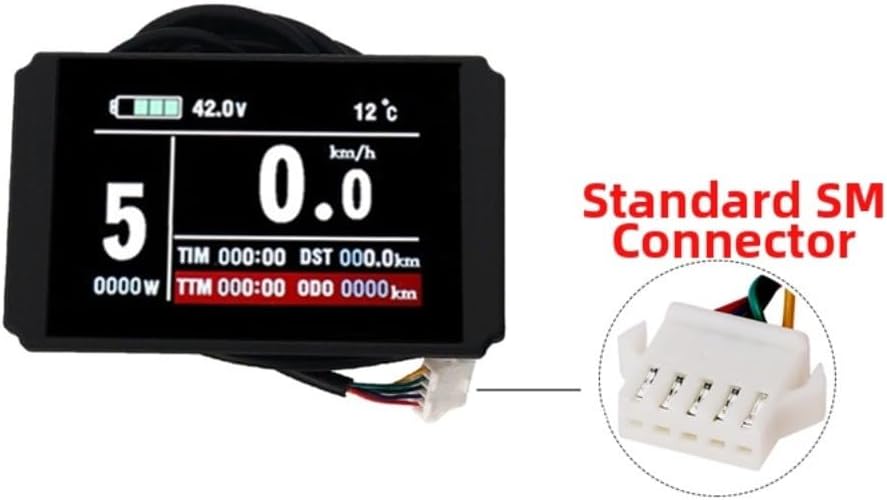
Image: The ZUZZEE KT-LCD8H display unit showing its standard 5-pin SM connector, which is essential for connecting to a compatible KT electric bike controller.
Operating Instructions
Once installed and connected, the KT-LCD8H display provides real-time information and control over your ebike's functions.
Powering On/Off
- To power on the display, press and hold the power button on the control unit for a few seconds.
- To power off, press and hold the power button again until the display shuts down.
Display Functions and Navigation
The display provides various metrics and settings:

Image: A close-up view of the ZUZZEE KT-LCD8H display screen, clearly showing various metrics such as battery voltage, temperature, speed (km/h), power assist level, trip time (TIM), trip distance (DST), power output (W), total trip time (TTM), and odometer (ODO).
- Speed Display: Shows real-time speed. Options for average speed and top speed are also available and can be cycled through using the control buttons.
- Battery Level: Indicates the current battery charge level.
- Mileage: Displays current trip distance (DST) and total odometer (ODO) readings.
- Power Assist Level: Shows the current level of motor assistance.
- Unit Adjustment: You can switch between kilometers (km) and miles (mi) for speed and distance readings through the display settings. Refer to your KT controller manual for specific button combinations to access settings.
Fault Code Display
The display is equipped with a fault code system to assist in troubleshooting. If an issue occurs, a specific fault code will be shown on the screen. Refer to your KT controller's manual for a comprehensive list of fault codes and their corresponding solutions. This feature helps in quickly identifying and resolving common problems.
Maintenance
- Cleaning: Use a soft, damp cloth to gently wipe the display screen. Avoid abrasive cleaners or solvents that could damage the screen surface.
- Weather Resistance: The display is designed to maintain normal function in various weather conditions. However, prolonged exposure to heavy rain or submersion should be avoided. Ensure the connector is always dry before connecting or disconnecting.
- Storage: When not in use for extended periods, store the ebike and display in a dry, temperate environment.
Troubleshooting
- Display Not Powering On:
- Check if the ebike battery is charged and powered on.
- Ensure the 5-pin SM connector is securely plugged into the KT controller.
- Verify that the KT controller itself is functioning correctly.
- Incorrect Readings (Speed/Distance):
- Confirm that the wheel circumference setting in your KT controller is correctly configured for your ebike.
- Check if the speed sensor (if external) is properly installed and functioning.
- Fault Code Displayed:
- Note the specific fault code shown on the screen.
- Consult your KT controller's user manual for the meaning of the fault code and recommended troubleshooting steps.
- Display Flickering or Intermittent Operation:
- Inspect all cable connections for looseness or damage.
- Ensure there is no moisture ingress in the connectors.
Specifications
| Feature | Detail |
|---|---|
| Product Name | Electric bicycle LCD instrument panel |
| Model | KT-LCD8H |
| Brand | ZUZZEE |
| Material | ABS |
| Voltage | 72V |
| Connector Type | 5-pin SM connector |
| Product Dimensions | 4.72 x 3.15 x 3.15 inches (approx. 45*65mm for screen size) |
| Item Weight | 8.1 ounces (approx. 230-235g) |
| Compatibility | KT Electric Bike Controllers |
Warranty and Support
For warranty information and technical support, please refer to the documentation provided with your purchase or contact ZUZZEE customer service. Ensure you have your product model number (AQ3565XZ06VZ0W2RMO2M4IJ) and purchase details available when seeking support.