
Introduction
This manual provides detailed instructions for the proper use, care, and maintenance of your SEEDEAR JH-A260 Rechargeable OTC Hearing Aids. Please read this manual thoroughly before using the device to ensure optimal performance and longevity. Keep this manual for future reference.
Safety Information
- Consult a medical professional if you experience sudden hearing loss, ear pain, or discharge before using hearing aids.
- Do not expose the hearing aids to extreme temperatures, humidity, or direct sunlight.
- Keep the device out of reach of children and pets to prevent accidental ingestion of small parts.
- Do not attempt to repair or modify the hearing aids yourself. Contact customer support for assistance.
- Remove hearing aids before showering, swimming, or using hairspray/perfume.
Package Contents
Verify that all items are present in your package:
- SEEDEAR JH-A260 Hearing Aids (Left and Right)
- Portable Charging Case
- USB Charging Cable
- Assorted Silicone Ear Tips (various sizes and styles)
- Cleaning Brush/Tool
- User Manual
Product Overview
Familiarize yourself with the components of your hearing aids.
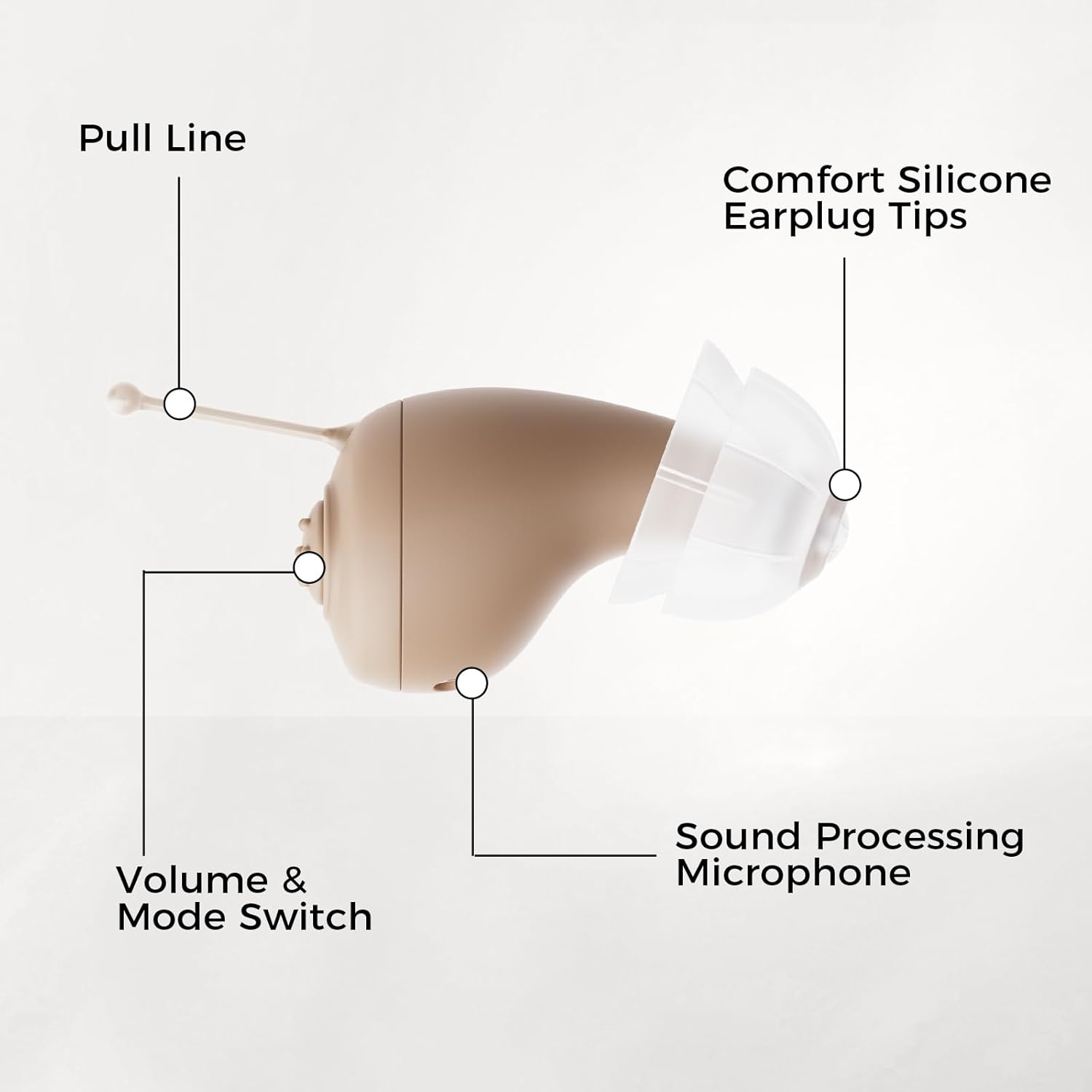
Image: Detailed view of the hearing aid, highlighting the Pull Line, Comfort Silicone Earplug Tips, Volume & Mode Switch, and Sound Processing Microphone.
- Pull Line: Used for easy removal of the hearing aid from the ear canal.
- Comfort Silicone Earplug Tips: Soft tips that conform to the ear canal for comfortable wear and sound delivery. Available in various sizes and styles.
- Volume & Mode Switch: A tactile button for adjusting volume levels and switching between listening modes.
- Sound Processing Microphone: Captures sound from the environment for amplification and processing.
Setup
1. Charging the Hearing Aids
Before first use, fully charge the hearing aids and the portable charging case.

Image: The SEEDEAR JH-A260 hearing aids placed inside their portable charging case, indicating the charging process.
- Connect the USB charging cable to the charging case and a power source.
- Place the hearing aids into their respective slots (L for left, R for right) in the charging case. Ensure they are seated correctly.
- The indicator lights on the case will show the charging status. A full charge typically takes 2 hours.
- Once fully charged, the hearing aids provide approximately 48 hours of continuous operation. The portable charging case can provide multiple charges.
2. Selecting Ear Tips
Choosing the correct ear tip size is crucial for comfort and sound quality. Experiment with the included ear tips to find the best fit for your ear canal. A proper fit prevents whistling and ensures clear sound.
- Select an ear tip that feels snug but comfortable in your ear canal.
- The ear tip should create a good seal to prevent sound leakage.
3. Inserting the Hearing Aid

Image: A person demonstrating the correct way to insert the SEEDEAR JH-A260 hearing aid into the ear.
- Hold the hearing aid with the ear tip facing your ear canal.
- Gently insert the ear tip into your ear canal until it feels secure and comfortable.
- Adjust the position until the device sits discreetly and comfortably in your ear.
Operating Instructions
1. Power On/Off
- Automatic Power On/Off: The hearing aids automatically power on when removed from the charging case and power off when placed back into the case.
- Manual Power On/Off: Press and hold the tactile button on the hearing aid for 2 seconds to manually power it on or off. An 8-second intelligent start-up delay prevents sudden noise jolts.
2. Adjusting Volume
- Press the tactile button briefly to cycle through 5 levels of precise volume adjustment.
- Adjust the volume to a comfortable level for your environment.
3. Switching Listening Modes
- The hearing aids offer 2 listening modes for different environments.
- Press and hold the tactile button for a slightly longer duration (e.g., 1 second, but less than 2 seconds for power) to switch between modes. Refer to the quick start guide for specific button press durations for mode switching.
- Each mode is designed to optimize sound clarity in specific situations (e.g., quiet conversation, noisy environment).

Image: The hearing aids in their charging case, illustrating different scenarios where they can be used, such as watching TV, chatting with family, working, making phone calls, attending parties, and outdoor travel.
Maintenance
1. Cleaning the Hearing Aids
Regular cleaning is essential for optimal performance and hygiene.
- Use the provided cleaning brush to gently remove any earwax or debris from the ear tips and sound processing microphone.
- Wipe the surface of the hearing aids with a soft, dry cloth. Do not use water or cleaning solutions directly on the device.
- Clean the charging contacts on both the hearing aids and the charging case regularly.
2. Storing the Hearing Aids
- When not in use, store the hearing aids in their charging case to protect them and keep them charged.
- Store in a cool, dry place away from direct sunlight and extreme temperatures.
3. Replacing Ear Tips and Wax Filters
- Ear tips should be replaced periodically for hygiene and optimal sound. Gently pull off the old tip and push on a new one.
- The hearing aids are equipped with wax filters to protect the internal components. If you notice a decrease in sound quality or blockages, the wax filters may need replacement. Refer to the manufacturer's website or contact customer support for information on obtaining compatible replacement wax filters.
Troubleshooting
| Problem | Possible Cause | Solution |
|---|---|---|
| No sound or weak sound | Low battery; Ear tip blocked by wax; Incorrect volume setting; Device not powered on. | Charge the hearing aids; Clean the ear tip and wax filter; Increase volume; Power on the device. |
| Whistling or feedback sound | Improper fit of ear tip; Ear tip too small; Earwax buildup in ear canal. | Re-insert the hearing aid for a snug fit; Try a larger ear tip; Consult a doctor for earwax removal if necessary. |
| Hearing aids not charging | Poor contact with charging pins; Charging cable or adapter faulty; Charging case battery low. | Ensure hearing aids are correctly seated in the case; Clean charging contacts; Try a different cable/adapter; Charge the charging case. |
| Difficulty adjusting volume/modes | Button malfunction; User unfamiliar with controls. | Refer to "Operating Instructions" section; Contact customer support if button is unresponsive. |
If the problem persists after trying these solutions, please contact SEEDEAR customer support.
Specifications
| Feature | Detail |
|---|---|
| Model Name | JH-A260 |
| Brand | SEEDEAR |
| Color | Light Gray |
| Material | Silicone |
| Fit Type | In-Ear |
| Control Type | Button Control |
| Noise Control | Adaptive Noise Cancellation |
| Battery Type | Rechargeable Lithium-Polymer |
| Charging Time | Approx. 2 hours (for full charge) |
| Operating Time | Up to 48 hours (per charge cycle) |
| Compatible Devices | Smartphone, Tablet, Television (via direct sound capture, not Bluetooth pairing) |
Warranty and Support
- Two-Year Guardianship: Your SEEDEAR JH-A260 hearing aids come with a 24-month unconditional warranty and replacement service.
- 60-Day Refund: A 60-day unconditional refund policy allows you to return the product if it does not meet your needs.
- All-Weather Support: For any questions, issues, or technical assistance, contact SEEDEAR customer support. Online problem-solving is available 7 days a week, 24 hours a day.
- For support, please visit the official SEEDEAR website or refer to the contact information provided in your product packaging.