
Introduction
The Mivi Nex 800 Dolby Audio Soundbar system is designed to deliver an immersive 5.1 channel surround sound experience for your home entertainment. Featuring 800W of dynamic power and Nex SurroundSphere Technology, this system enhances audio clarity and depth. This manual provides essential information for setting up, operating, maintaining, and troubleshooting your soundbar system.
What's in the Box
Carefully unpack all components and ensure the following items are included:
- 1 x Soundbar
- 1 x Wired Subwoofer
- 2 x Satellite Speakers
- 1 x Remote Control
- Power Cable(s)
- User Manual (this document)

Product Features
- Cinematic Dolby Audio Clarity: Experience enhanced voices, richer detail, and balanced sound powered by Dolby Audio for a cinematic audio experience.
- 800W Dynamic Signature Sound: Enjoy powerful, room-filling sound with 800 watts of clean output designed for deeper bass and clear, impactful audio.
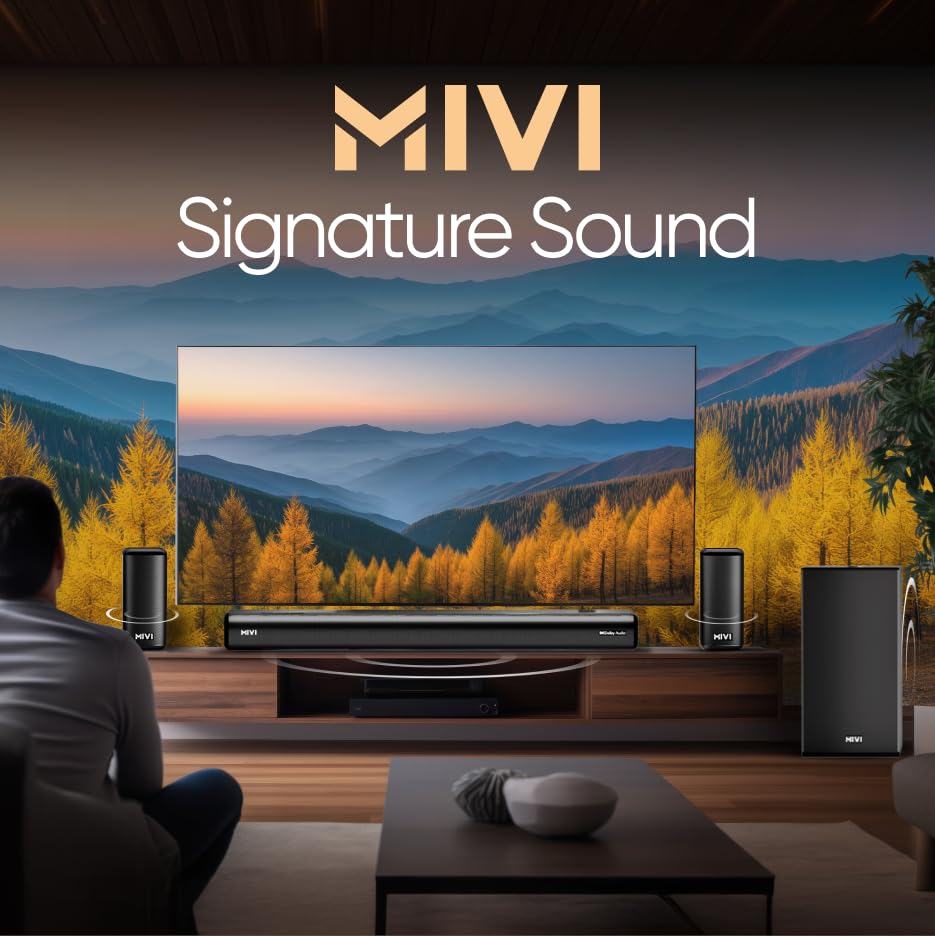
- 5.1 Channel Surround Sound: A complete 5.1 configuration with a soundbar, subwoofer, and satellite speakers delivers wider coverage and immersive audio.
- Nex SurroundSphere Immersion: Advanced tuning creates a seamless 360-degree sound field that surrounds you with detailed and natural audio movement.
- Multiple Input Modes: Bluetooth v5.3, HDMI ARC, Optical, Coaxial, and USB offer simple and versatile connectivity for easy setup.

Setup
1. Placement
- Soundbar: Place the soundbar centrally below your television. Ensure it is on a stable, flat surface or securely wall-mounted.
- Subwoofer: Position the subwoofer on the floor, preferably near the soundbar. Avoid placing it in a corner directly, as this can sometimes lead to boomy bass.
- Satellite Speakers: Place the satellite speakers behind your listening position, to the left and right, for optimal surround sound effect. Ensure they are at ear level when seated.

2. Connections
- Connect the wired subwoofer to the soundbar using the dedicated subwoofer output cable.
- Connect the satellite speakers to the soundbar or subwoofer (depending on the specific model's wiring) using the provided cables.
- Connect your desired audio source (TV, media player, etc.) to the soundbar using one of the available input methods (HDMI ARC, Optical, Coaxial, AUX, or USB). Refer to the 'Connectivity' section for details.
- Connect the soundbar and subwoofer to a power outlet using their respective power cables.
3. Power On
Press the Power button on the soundbar or the remote control to turn on the system. The indicator light on the soundbar will illuminate.
Operating Instructions
1. Power On/Off
Press the Power button on the remote control or the soundbar to turn the system on or off.
2. Input Selection
Press the Input or Source button on the remote control to cycle through available input modes: Bluetooth, HDMI ARC, Optical, Coaxial, AUX, and USB. The selected input will be indicated on the soundbar's display (if available) or via an LED indicator.
3. Volume Control
Use the Volume Up (+) and Volume Down (-) buttons on the remote control or soundbar to adjust the master volume. Press the Mute button to temporarily silence the audio.
4. EQ Modes
The soundbar features multiple Equalizer (EQ) modes optimized for different content types. Use the dedicated EQ buttons on the remote control (e.g., Movie, Music, Sports, News) to select the desired audio profile.
Connectivity
The Mivi Nex 800 offers various connection options to suit your devices:
- Bluetooth v5.3: For wireless audio streaming from smartphones, tablets, and other Bluetooth-enabled devices. To pair, select Bluetooth input on the soundbar, then search for 'Mivi Nex 800' on your device's Bluetooth settings and connect.
- HDMI ARC: Connect to your TV's HDMI ARC port for high-quality digital audio and control (e.g., TV remote controlling soundbar volume). Ensure your TV's HDMI ARC function is enabled.
- Optical: Connect to your TV or other audio source's optical digital output for high-fidelity digital audio.
- Coaxial: Connect to your TV or other audio source's coaxial digital output.
- AUX: Use a 3.5mm audio cable to connect to devices with an analog audio output.
- USB: Insert a USB drive containing audio files (MP3, WAV, etc.) for direct playback.

Maintenance
Cleaning
- Always unplug the soundbar system from the power outlet before cleaning.
- Use a soft, dry, lint-free cloth to wipe the surfaces of the soundbar, subwoofer, and satellite speakers.
- Do not use liquid cleaners, aerosol sprays, or abrasive cleaning agents, as they may damage the finish or internal components.
Storage
If storing the unit for an extended period, ensure it is clean, dry, and stored in a cool, well-ventilated area away from direct sunlight and extreme temperatures.
Troubleshooting
If you encounter issues with your Mivi Nex 800 Soundbar, refer to the following common problems and solutions:
| Problem | Possible Cause | Solution |
|---|---|---|
| No power | Power cable not connected; Power outlet not active | Ensure power cables are securely connected to the soundbar/subwoofer and a working power outlet. |
| No sound | Incorrect input selected; Volume too low; Mute activated; Incorrect audio cable connection | Select the correct input source. Increase volume. Deactivate mute. Check audio cable connections. Ensure TV audio output is set correctly. |
| Bluetooth pairing failed | Soundbar not in pairing mode; Device too far; Interference | Ensure soundbar is in Bluetooth input mode and discoverable. Move device closer. Avoid strong interference sources. Try re-pairing. |
| Remote control not working | Batteries depleted; Obstruction; Remote not aimed correctly | Replace batteries. Remove any obstructions between remote and soundbar. Aim remote directly at the soundbar's sensor. |
Specifications
| Model | SWFTR360 |
| Mounting Type | Wall Mount |
| Speaker Type | Surround Sound |
| Special Features | Dolby Enabled, USB Port |
| Compatible Devices | Home Theater, Laptop, Smartphone, Tablet, Television |
| Surround Sound Channel Configuration | 5.1 |
| Product Dimensions | 97D x 58W x 29H Centimeters |
| Item Weight | 13.4 Kilograms |
| Maximum Range (Bluetooth) | 10 metres |
| Control Method | Remote |
| Wireless Communication Technology | Bluetooth |
| Power Source | Corded Electric |
| Audio Driver Type | Dynamic Driver |
| Wattage | 800 Watts |
| Frequency Response | 35 KHz |
| Connectivity Technology | Bluetooth, Coaxial, HDMI, Optical, USB |
| Audio Output Mode | Surround |
Warranty and Support
Warranty Information
This Mivi Nex 800 Dolby Audio Soundbar comes with a Limited Warranty. Please refer to the warranty card included in your product packaging for specific terms and conditions, including coverage duration and claim procedures.
Customer Support
For technical assistance, troubleshooting beyond this manual, or warranty claims, please contact Mivi customer support:
- Manufacturer: Mivi, Plot No, 29, Rd Number 76, Jubilee Hills, Hyderabad, Telangana 500033
- Online Store: Visit the Mivi Store on Amazon