
1. Introduction
Thank you for choosing the AiTURE 6.5 Inch Wall Mounted Bluetooth 5.4 Speakers. These speakers are designed to provide high-quality audio for both indoor and outdoor environments, featuring advanced Bluetooth 5.4 connectivity, multi-sync capabilities for up to 200 speakers, and a waterproof design. This manual provides essential information for setup, operation, maintenance, and troubleshooting to ensure optimal performance and longevity of your speakers.
Please read this manual thoroughly before using the product and retain it for future reference.
2. Package Contents
Carefully unpack your AiTURE speakers and verify that all items listed below are included:
- 2 x Powered Outdoor Speakers
- 2 x Power Adapters
- 1 x Infrared Remote Control
- 1 x User Manual
- 2 x U-brackets (for mounting)
- Mounting Hardware (screws, anchors)
- Warranty Card

3. Setup
3.1. Speaker Placement and Installation
These speakers are designed for wall mounting and are suitable for patios, garages, homes, poolsides, decks, and backyards. Ensure the mounting surface is sturdy enough to support the weight of the speakers.
- Preparation & Location: Choose a suitable location for your speakers. Mark the drilling points on the wall using the U-bracket as a template.
- Mounting the Bracket: Drill pilot holes and securely attach the U-bracket to the wall using the provided screws and anchors.
- Attaching Speaker to Bracket: Align the speaker with the mounted U-bracket and secure it using the bracket's attachment points.
- Adjustment & Locking: Adjust the speaker angle for optimal sound projection and tighten the locking screws to fix its position.

3.2. Initial Power On and Bluetooth Pairing
- Connect the power adapters to each speaker and plug them into a power outlet. The speakers will power on automatically.
- On your Bluetooth-enabled device (smartphone, tablet, laptop), go to the Bluetooth settings.
- Search for available devices. You should see "AT6W" or a similar name listed. Select it to pair.
- Once paired, the speaker will indicate a successful connection (e.g., an audible prompt or LED indicator).
3.3. Multi-Speaker Sync (Auto-Pair Network Technology)
The AiTURE speakers feature seamless auto-pair network technology, allowing you to connect up to 200 speakers wirelessly for an expansive sound system.
- Ensure all speakers are powered on and within the 120-foot wireless connection range.
- Pair your primary device to one speaker (the 'Master' speaker) via Bluetooth as described in section 3.2.
- The other speakers (the 'Slave' speakers) will automatically detect and sync with the Master speaker, creating a unified audio system.
- For stereo pairing with two speakers, use the remote control to assign channels. Point the remote at Speaker 1 and press [L] (sets Left channel). Point the remote at Speaker 2 and press [R] (sets Right channel). This creates a true right-channel/left-channel stereo experience.


4. Operating Instructions
4.1. Remote Control Functions
The included infrared remote control allows convenient operation of your speakers. Ensure the remote is aimed at the Master speaker for synchronized control of all paired units (except for power ON).
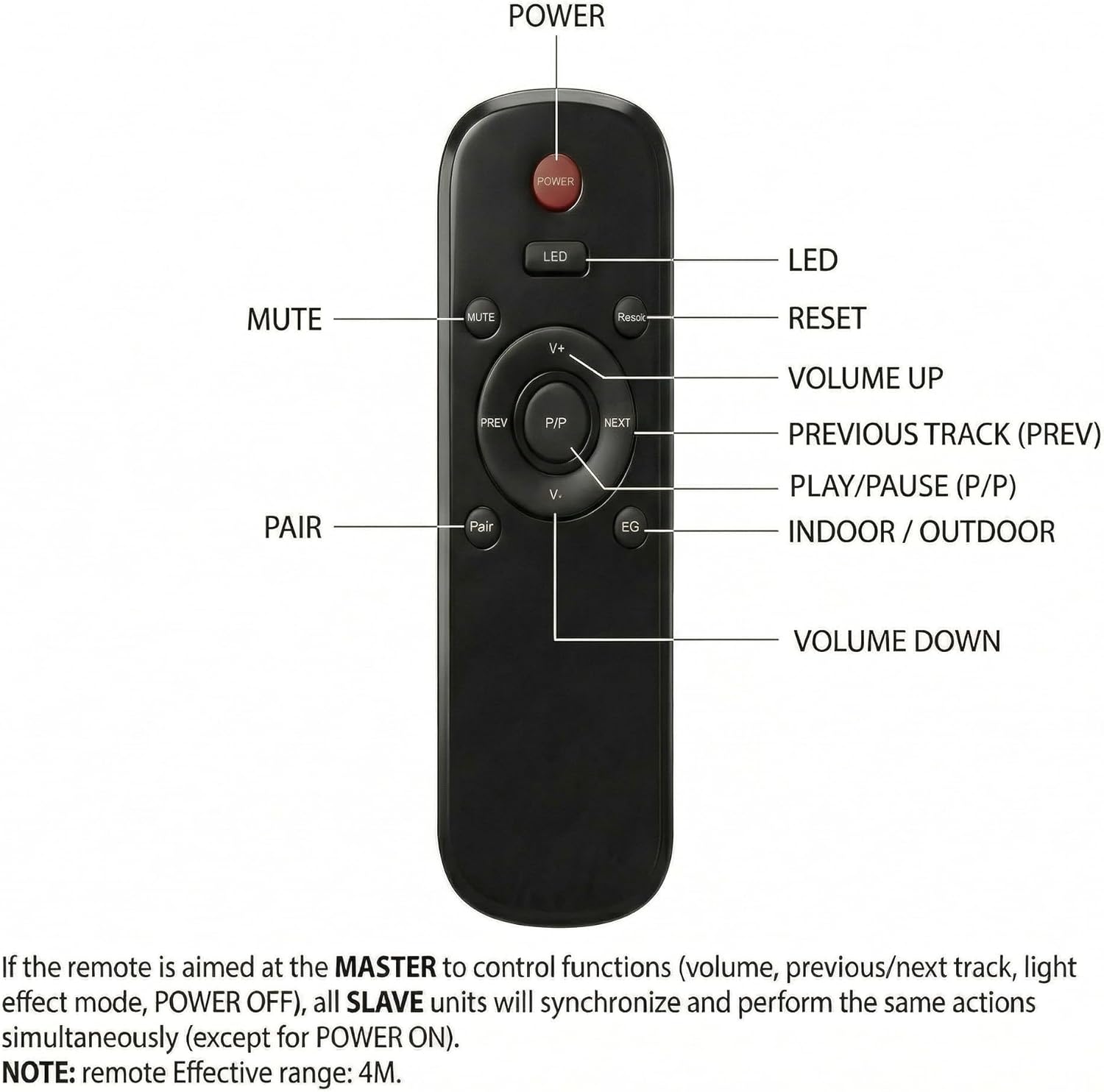
- POWER: Turns the speaker ON/OFF.
- LED: Controls any integrated LED lighting features (if applicable).
- MUTE: Mutes or unmutes the audio output.
- RESET: Resets the speaker to factory settings or clears pairing information.
- V+/V-: Increases/Decreases volume.
- PREV/NEXT: Skips to the previous or next track.
- P/P (Play/Pause): Plays or pauses the current audio track.
- PAIR: Initiates Bluetooth pairing mode.
- EQ (Indoor/Outdoor): Toggles between Indoor and Outdoor sound equalization modes.
Note: The remote's effective range is approximately 4 meters (13 feet).
4.2. Volume Control
Volume can be adjusted using the V+/V- buttons on the remote control or the independent knob located on the back of each speaker. This allows for individual volume adjustment per speaker in a multi-zone setup.
4.3. EQ Modes
Press the EQ button on the remote control to switch between 'Indoor' and 'Outdoor' sound modes. The 'Outdoor' mode is optimized for open-air environments, enhancing clarity and projection.
4.4. Wireless Microphone Function (for Microphone Versions)
If you have purchased a version of these speakers that includes a wireless microphone, follow these steps for use:
- First, ensure your primary speaker (Master) is connected via Bluetooth to your device.
- Turn on the wireless microphone. It will automatically connect to the main speaker unit.
- For multi-speaker setups, the microphone's audio will be synchronized across all connected speakers, enabling voice amplification for announcements or karaoke.

5. Maintenance
To ensure the longevity and optimal performance of your AiTURE speakers, follow these maintenance guidelines:
- Cleaning: Wipe the speaker surfaces with a soft, damp cloth. Avoid using harsh chemicals, solvents, or abrasive cleaners, as these can damage the finish or internal components.
- Waterproof Design: While the speakers are waterproof, avoid submerging them in water. Ensure all ports and covers are securely closed when exposed to rain or moisture.
- Storage: If storing the speakers for an extended period, especially in harsh weather conditions, it is recommended to remove them from their mounts and store them in a dry, protected environment.
- Power Adapters: Regularly inspect power adapters and cables for any signs of damage. Do not use damaged adapters or cables.
6. Troubleshooting
If you encounter issues with your AiTURE speakers, refer to the following common problems and solutions:
| Problem | Possible Cause | Solution |
|---|---|---|
| No sound from speakers | Speakers not powered on; Bluetooth not connected; Volume too low; Audio source issue. | Ensure speakers are plugged in and powered on. Verify Bluetooth connection on your device. Increase speaker and device volume. Check audio source playback. |
| Unable to pair via Bluetooth | Speakers not in pairing mode; Device too far; Interference; Previously paired device. | Press the PAIR button on the remote. Move device closer to the speaker. Turn off other Bluetooth devices. Disconnect from previously paired devices. |
| Multi-sync not working | Speakers out of range; Master speaker not properly paired. | Ensure all speakers are within 120 ft of each other. Confirm the Master speaker is successfully paired to your device. |
| Remote control not responding | Low battery; Obstruction; Out of range; Not aimed at Master speaker. | Replace remote batteries. Ensure no obstructions between remote and speaker. Stay within 4m range. Aim remote directly at the Master speaker. |
| Sound distortion | Volume too high; Poor audio source quality; Speaker damage. | Reduce volume on both speaker and device. Try a different audio source. If distortion persists, contact support. |
If the problem persists after trying these solutions, please contact AiTURE customer support for further assistance.
7. Specifications
| Feature | Specification |
|---|---|
| Brand | AiTURE |
| Model Number | AT6W |
| Speaker Size | 6.5 inches |
| Speaker Maximum Output Power | 400 watts (Peak) |
| Frequency Response | 70 hertz |
| Connectivity Technology | Bluetooth 5.4 |
| Bluetooth Range | Up to 100 feet (30 meters) |
| Wireless Connection Range (Multi-Sync) | Up to 120 feet (37 meters) |
| Max Multi-Sync Speakers | Up to 200 speakers |
| Audio Output Mode | Stereo |
| Mounting Type | Wall Mount |
| Water Resistance Level | Waterproof |
| Control Method | Remote Control, Knob Volume Control |
| Power Source | Corded Electric (120 volts input) |
| Item Dimensions (D x W x H) | 10"D x 9"W x 17"H |
| DSP Processor | Built-in 32-bit RISC-V core with HIFI4 DSP |
| Amplifier | Texas Instruments TPA3116 |
8. Warranty and Support
8.1. Warranty Information
Your AiTURE AT6W speakers come with a 1-Year Limited Warranty from the date of purchase. This warranty covers manufacturing defects in materials and workmanship under normal use. It does not cover damage caused by misuse, accident, unauthorized modification, or external causes such as power surges or natural disasters.
Please retain your proof of purchase for warranty claims.
8.2. Customer Support
For technical support, warranty service, or any questions regarding your AiTURE speakers, please contact our customer support team. Refer to the contact information provided on the warranty card included in your package or visit the official AiTURE website.