1. Introduction
This manual provides essential information for the setup, operation, maintenance, and troubleshooting of your MINISFORUM MS-02 Ultra Workstation. Please read this manual thoroughly before using the product to ensure proper functionality and longevity.
The MS-02 Ultra is a high-performance mini PC designed for demanding tasks such as 3D rendering, video editing, and advanced computing workloads. It features an Intel Core Ultra 9 285HX processor, extensive connectivity, and flexible expansion options.
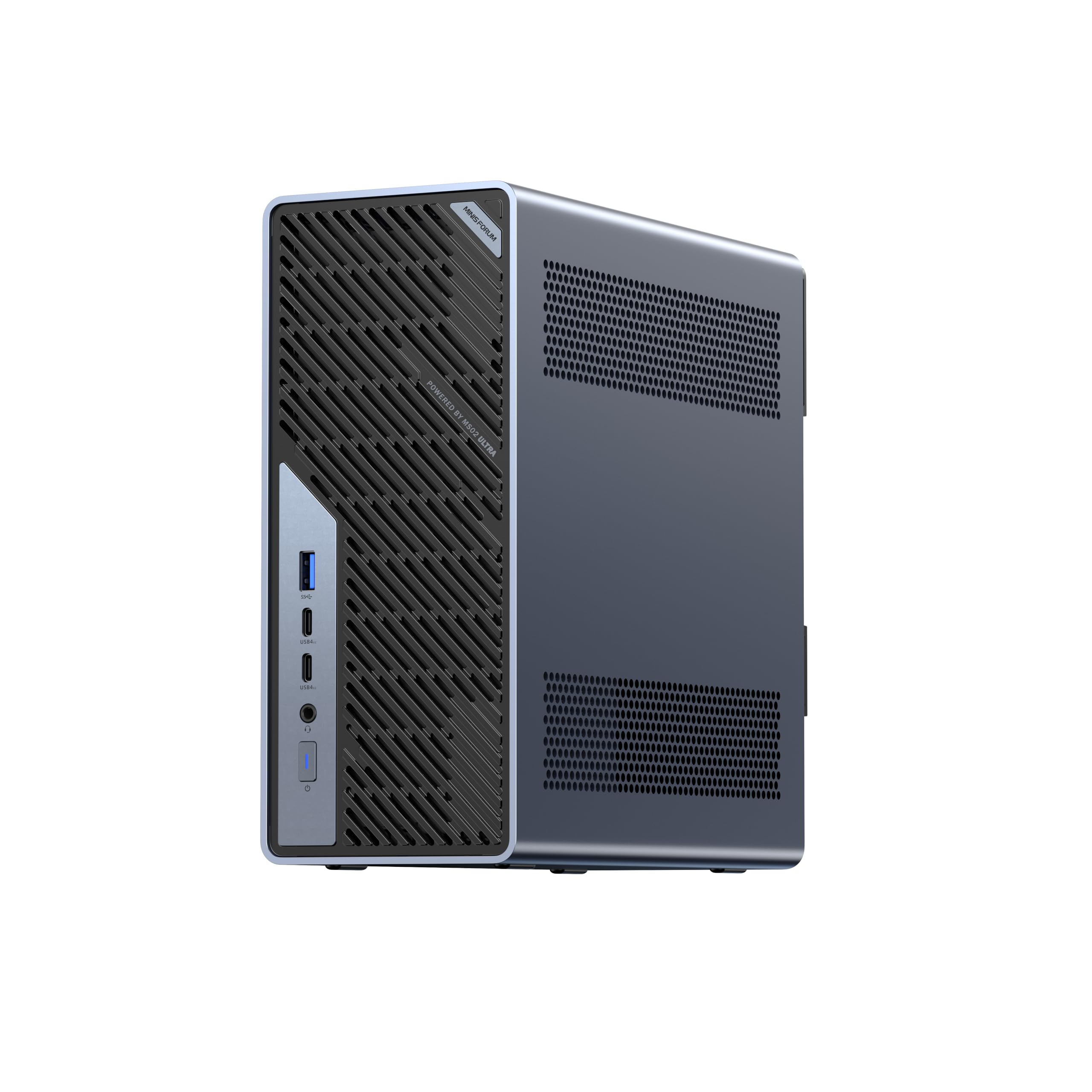
Image: Front view of the MINISFORUM MS-02 Ultra Workstation.
2. What's in the Box
Verify that all items are present in the package:
- 1x MS-02 Ultra 285HX Mini Workstation
- 1x HDMI Cable
- 1x US Power Adapter
- 1x Manual (this document)
3. Setup Guide
3.1 Initial Connections
- Connect Display: Use the provided HDMI cable to connect your monitor to the HDMI 2.1 port on the rear of the workstation. Alternatively, use a USB4 or USB4 V2 port with DP Alt Mode for display output.
- Connect Peripherals: Connect your keyboard and mouse to the available USB-A ports.
- Connect to Network: For wired connectivity, connect an Ethernet cable to either the 2.5G RJ45, 10G RJ45, or one of the 25G SFP+ ports. For wireless, ensure the Wi-Fi antennas are properly connected (if external) and configure Wi-Fi 7 in the operating system.
- Connect Power: Plug the US Power Adapter into the AC input port on the rear of the workstation, then plug the adapter into a power outlet.
3.2 Memory (RAM) Installation (Barebone Models)
The MS-02 Ultra supports up to 256GB DDR5 SO-DIMM memory across four slots. For barebone models, follow these guidelines for memory installation:
- Two memory sockets are located on the top side of the motherboard (nearest to the CPU).
- Two additional memory sockets are located on the rear side of the motherboard.
- Important: If installing one or two memory modules, always populate the sockets on the top side of the motherboard first. The system may not boot if memory is installed only in the rear sockets while the top sockets are empty.
- The system supports ECC memory but does not support XMP overclocking. Default memory frequency is 4400/4800MHz.

Image: Internal view highlighting the DDR5 SO-DIMM memory slots. The MS-02 Ultra supports up to 256GB DDR5 memory across four slots.
3.3 Storage (SSD) Installation (Barebone Models)
The MS-02 Ultra provides extensive storage options with four M.2 2280 PCIe SSD slots:
- Two M.2 2280 NVMe SSD slots (PCIe 4.0 x4, up to 8TB each).
- Two M.2 2280 NVMe SSD slots (integrated on the 25GbE NIC; up to 8TB/slot PCIe 3.0 x4 or 4TB/slot PCIe 4.0 x4).
- These SSD slots are compatible with RAID 0/1/5/10 configurations.
- The high-end version includes two NVMe heatsinks and thermal pads for the motherboard slots. The add-in 25GbE card has built-in heatsinks for its NVMe drives.

Image: Internal view demonstrating the slide-out structure and M.2 SSD slots for storage expansion.
4. Operating Instructions
4.1 Powering On/Off
- Power On: Press the power button located on the front of the workstation.
- Power Off:
- Standard Shutdown: Use the operating system's shutdown procedure.
- Forced Shutdown: Press and hold the power button for approximately 5-7 seconds until the unit powers off. Use this only when the system is unresponsive.
4.2 Operating System
The MINISFORUM MS-02 Ultra Workstation supports Windows operating systems. For barebone models, you will need to install your preferred operating system.
4.3 Connectivity Overview

Image: Detailed view of the front and rear ports of the MS-02 Ultra Workstation.
| Port | Location | Description |
|---|---|---|
| USB-A 10Gbps (USB 3.2 Gen 2) | Front (1x), Rear (3x) | High-speed data transfer for peripherals. |
| USB4 V2 Type-C Ports (80 Gbps, DP 2.0 Alt Mode 15W PD) | Front (2x) | Ultra-fast data, display output, and power delivery. |
| USB4 Type-C Port (40 Gbps, DP 2.0 Alt Mode 15W PD) | Rear (1x) | High-speed data, display output, and power delivery. |
| 3.5mm Audio Jack | Front (1x) | For headphones or external audio devices. |
| HDMI™ 2.1 FRL | Rear (1x) | High-resolution display output (up to 8K@60Hz, 4K@120Hz). |
| 2.5GbE RJ45 Port (Intel I226-LM, vPro Enabled) | Rear (1x) | Standard high-speed wired network connection. |
| 10GbE RJ45 Port (Realtek RTL8127) | Rear (1x) | Ultra-fast wired network connection. |
| 25GbE SFP+ Ports (Intel E810) | Rear (2x) | Extremely high-speed network connections for servers and storage. |
| Kensington Security Slot | Rear (1x) | For physical security lock. |
| PCIe x16 and x4 expansion slots | Rear (pre-installed I/O shield) | For installing expansion cards (e.g., low-profile GPU). |

Image: Close-up view of the dual 25GbE SFP+ ports, demonstrating high-speed networking capabilities.

Image: Illustration of the multi-tier LAN architecture, including 10Gb and 2.5Gb RJ45 ports.
4.4 Wireless Connectivity
The workstation supports Wi-Fi 7 (6 GHz Band) and Bluetooth 5.4 for wireless networking and peripheral connections.

Image: The MS-02 Ultra Workstation with an illustration of Wi-Fi 7 connectivity.
5. Maintenance
5.1 Cleaning and Airflow
To ensure optimal performance and longevity, regularly clean the workstation to prevent dust buildup. The MS-02 Ultra features a server-grade airflow design with dedicated CPU/GPU airflow channels and dual fans. Ensure that the ventilation openings are not obstructed.

Image: Illustration depicting the efficient cooling performance and airflow within the MS-02 Ultra Workstation.
5.2 Accessing Internal Components (Slide-Out Structure)
The MS-02 Ultra features a slide-out structure design for easy access to internal components for upgrades or maintenance. This allows for straightforward installation of memory, SSDs, or expansion cards.
Image: The slide-out structure design of the MS-02 Ultra, facilitating easy access for upgrades and maintenance.
6. Troubleshooting
6.1 No Power / System Not Booting
- Ensure the power adapter is securely connected to both the workstation and a working power outlet.
- If installing RAM on a barebone model, verify that the memory modules are correctly seated in the top-side sockets first, as per the setup instructions. Incorrect memory population can prevent booting.
- Check all internal cable connections if you have opened the chassis for upgrades.
6.2 No Display Output
- Confirm the display cable (HDMI, USB4) is securely connected to both the workstation and the monitor.
- Ensure the monitor is powered on and set to the correct input source.
- If a discrete GPU is installed in the PCIe slot, video output will typically come from the discrete GPU's ports, not the integrated HDMI or USB4 ports.
6.3 Network Connectivity Issues
- For wired connections, check Ethernet cables and router/switch status.
- For Wi-Fi, ensure Wi-Fi is enabled in the operating system and that the correct network is selected with the proper password.
6.4 PCIe Stability with Add-in Card
The add-in card for the two 25GbE SFP+ network connections and two additional NVMe slots is set to PCIe Gen3 by default for stability. While it can theoretically support Gen4, changing this setting in the BIOS may lead to system instability. If you experience issues after modifying PCIe settings, revert to default settings.
7. Specifications
| Feature | Detail |
|---|---|
| Brand | MINISFORUM |
| Model Name | MS-02 Ultra Workstation (DeskMini) |
| CPU Model | Intel Core Ultra 9 Processor 285HX (24 Cores, 24 Threads) |
| CPU Speed | Up to 5.5 GHz |
| Graphics | Integrated Intel Graphics (up to 2GHz) |
| Operating System Support | Windows |
| RAM Memory Technology | DDR5 SO-DIMM (4 slots, ECC Support) |
| Max RAM Memory Size | 256 GB |
| Memory Speed | 4800 MT/s |
| Storage | 4x M.2 2280 PCIe4.0 SSD slots (RAID 0/1/5/10 compatible) |
| Video Output | 1x HDMI 2.1 (8K@60Hz, 4K@120Hz), 1x USB4 (DP Alt Mode), 2x USB4 V2 (DP Alt Mode) |
| Network Ports | 2x 25G SFP+, 1x 10G RJ45, 1x 2.5G RJ45 |
| Wireless Connectivity | Wi-Fi 7 (802.11ax), Bluetooth 5.4 |
| USB Ports | 1x USB-A 3.2 Gen 2 (front), 3x USB-A 3.2 Gen 2 (rear), 2x USB4 V2 Type-C (front), 1x USB4 Type-C (rear) |
| PCIe Expansion | 1x PCIe 5.0 x16 Slot (bifurcation support), 1x PCIe 4.0 x4 Slot, 1x PCIe 4.0 x16 Slot (populated by 25GbE NIC & 2x M.2 SSD Slots) |
| Cooling Method | Server-Grade Airflow Design, 6 heat pipes, dual fans (36 dB quiet operation) |
| Power Design | Integrated 350W |
| Dimensions (Chassis) | 4.8 L |
| Color | Black |
8. Warranty and Support
MINISFORUM provides support and warranty services for its products. For specific warranty terms and conditions, please refer to the warranty card included with your product or visit the official MINISFORUM website. For technical assistance or customer service, please contact MINISFORUM support directly.
The manufacturer, Micro Computer (HK) Tech Limited, is committed to product quality and customer satisfaction.
9. Product Overview Video
Video: An introductory video providing an overview of the MINISFORUM MS-02 Ultra Workstation's features and design.


