
1. Product Overview
The ZOGGCOX XZL003 is a discreet security camera designed to resemble a smoke detector, providing 1080P HD video surveillance. This device is intended for monitoring purposes in indoor environments such as homes, nurseries, or offices. Please note: This device functions solely as a camera and does not provide actual smoke detection capabilities.
Key Features:
- 1080P HD Video: Captures clear, high-definition video.
- Wireless Connectivity: Supports 2.4GHz WiFi for remote monitoring via a dedicated application.
- Motion Detection: Equipped with smart sensors to detect movement and send alerts to your device.
- Loop Recording: Supports continuous recording with automatic overwriting of older files when a Micro SD card (up to 128GB, not included) is installed.
- Night Vision: Features infrared night lights for video recording in low-light conditions.
- Wide Angle Lens: Offers a 150-degree viewing angle for broader coverage.
2. Package Contents
Before proceeding with installation, please ensure all items are present:
- ZOGGCOX XZL003 Surveillance Camera
- Mounting Screws and Anchors
- User Manual (this document)
3. Setup and Installation
3.1 Mounting the Camera
The camera is designed for ceiling or wall mounting to provide an optimal viewing angle. Use the included screws and anchors for secure installation.
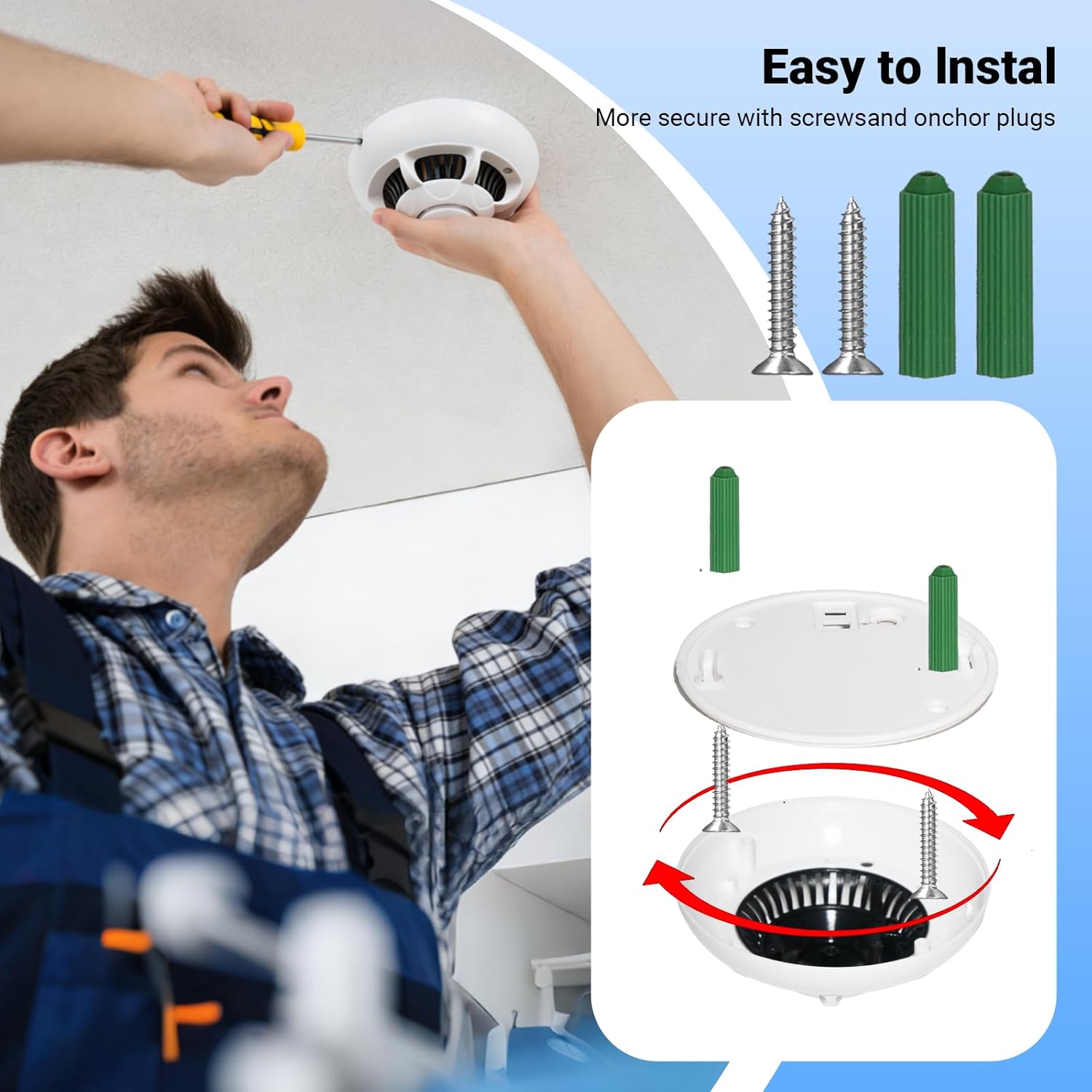
Figure 3.1: Easy Installation. The image illustrates the process of mounting the camera to a ceiling using screws and wall anchors for a secure fit. The camera's base is attached first, then the main unit is twisted into place.
- Choose a suitable location for installation, preferably on a ceiling or high wall for a wide view.
- Separate the mounting plate from the camera unit.
- Mark the drill points on the surface using the mounting plate as a template.
- Drill holes and insert the wall anchors.
- Secure the mounting plate to the surface with the screws.
- Attach the camera unit to the secured mounting plate by twisting it until it locks into place.
3.2 Powering On and Initial Connection
The camera is battery-powered. Ensure the battery is charged before first use. The camera offers two connection methods:
- Direct Connection (No WiFi Required): You can connect your mobile device directly to the camera's own Wi-Fi signal. This allows for real-time viewing within a range of approximately 50 feet (15 meters).
- 2.4GHz WiFi Connection (Remote Monitoring): For remote monitoring from anywhere, connect the camera to your home's 2.4GHz WiFi network. Follow the instructions provided in the camera's dedicated application for P2P (Peer-to-Peer) setup. Ensure the camera is within close proximity to your WiFi router for stable connectivity.

Figure 3.2: 2.4GHz Wi-Fi Connectivity. This image highlights the camera's support for 2.4GHz Wi-Fi, enabling remote viewing on a smartphone, as depicted with a baby monitoring scenario.
3.3 Micro SD Card Installation
To enable local video storage and loop recording, install a Micro SD card (not included, up to 128GB capacity).
- Locate the Micro SD card slot on the camera.
- Gently insert the Micro SD card into the slot until it clicks into place.
- The camera will automatically begin recording and saving videos once powered on.
4. Operating Instructions
4.1 Using the Mobile Application
Download the dedicated mobile application (refer to the packaging or product information for the app name) from your device's app store. The app allows you to:
- View live video feed in 1080P HD.
- Receive motion detection alerts.
- Access recorded footage.
- Adjust camera settings.
4.2 Motion Detection and Alerts
The camera features smart motion detection. When movement is detected within its field of view, the camera will automatically:
- Begin recording (if not already doing so).
- Send an alert notification to your connected mobile application.

Figure 4.1: Motion Detection and Alert Push. This image demonstrates the camera's motion detection capability, where movement (e.g., a dog) triggers an automatic recording and sends an alert notification to the user's phone.
4.3 Loop Recording
With a Micro SD card installed, the camera supports 24/7 loop recording. When the memory card is full, the camera will automatically overwrite the oldest files to continue recording. Cloud services may be available but are typically charged separately; using a Micro SD card is recommended for local storage.
4.4 Night Vision
The integrated infrared night vision allows the camera to record clear video even in complete darkness, ensuring continuous surveillance day and night.

Figure 4.2: Night Vision. This image visually represents the camera's ability to record video both during the day and at night, thanks to its infrared night vision feature, ensuring 24-hour monitoring.
4.5 Wide Angle Lens
The camera is equipped with a 150-degree wide-angle lens, providing a broad field of view to capture more of the monitored area.

Figure 4.3: Wide Angle Lens. This image demonstrates the camera's 150-degree wide-angle lens, capturing a broad view of a room where children are playing, ensuring extensive coverage.
5. Maintenance
To ensure optimal performance and longevity of your ZOGGCOX XZL003 camera, follow these maintenance guidelines:
- Cleaning: Gently wipe the camera lens and exterior with a soft, dry cloth. Avoid using harsh chemicals or abrasive materials.
- Battery Care: If the camera is battery-powered, ensure it is charged regularly. For prolonged storage, charge the battery to approximately 50% and store in a cool, dry place.
- Software Updates: Periodically check the mobile application for any available firmware updates for the camera. Keeping the firmware updated can improve performance and security.
- Environment: Operate the camera within its specified indoor temperature and humidity ranges. Avoid exposing it to extreme temperatures, direct sunlight, or moisture.
6. Troubleshooting
If you encounter issues with your ZOGGCOX XZL003 camera, refer to the following common problems and solutions:
- Camera Not Connecting to WiFi:
- Ensure your WiFi network is 2.4GHz. The camera does not support 5GHz networks.
- Verify the WiFi password is entered correctly in the app.
- Place the camera closer to your WiFi router to improve signal strength.
- Restart both the camera and your router.
- No Video Recording:
- Check if a Micro SD card is properly inserted.
- Ensure the Micro SD card is not full. The loop recording feature should overwrite old files, but a faulty card might prevent this. Try formatting the card via the app or replacing it.
- Verify the camera is powered on.
- Motion Detection Alerts Not Received:
- Confirm that motion detection is enabled in the camera's app settings.
- Check your phone's notification settings to ensure the camera app has permission to send alerts.
- Ensure your phone has an active internet connection.
- Poor Video Quality:
- Ensure the camera lens is clean and free from dust or smudges.
- Check your internet connection speed; a slow connection can affect live stream quality.
- Verify the camera is set to 1080P resolution in the app settings.
7. Specifications
| Feature | Detail |
|---|---|
| Model Number | XZL003 |
| Brand | ZOGGCOX |
| Video Capture Resolution | 1080p |
| Connectivity Technology | Wireless (2.4GHz WiFi) |
| Power Source | Battery Powered |
| Indoor/Outdoor Usage | Indoor |
| Mounting Type | Window Mount (also suitable for ceiling/wall) |
| Item Dimensions (L x W x H) | 6 x 6 x 4 inches |
| Item Weight | 5.6 ounces |
| Special Feature | HD Resolution, Motion Detection, Night Vision |
| Included Components | Surveillance camera, Mounting hardware |
8. Warranty and Support
For warranty information and technical support, please refer to the documentation included with your purchase or contact ZOGGCOX directly through their official website or customer service channels. Keep your purchase receipt as proof of purchase for warranty claims.