
Introduction
This manual provides comprehensive instructions for the fhsbxcvb AA59-00607A TV Remote Control. This remote is designed as a direct replacement for various Samsung TV models, offering full functionality without the need for programming or pairing. Please read this manual carefully to ensure proper use and to maximize your viewing experience.
Compatible Samsung TV Models include: PS51E530, PS60E530, PS43E455, PS51E455, PS43E450A1W, PS51E450A1W, PS43E450, PS51E450.
Setup
1. Battery Installation
The AA59-00607A remote control requires two AAA batteries (not included). Follow these steps to install the batteries:
- Locate the battery compartment on the back of the remote control.
- Slide the battery cover downwards and remove it.
- Insert two AAA batteries, ensuring the positive (+) and negative (-) terminals align correctly with the markings inside the compartment.
- Replace the battery cover by sliding it back into position until it clicks securely.
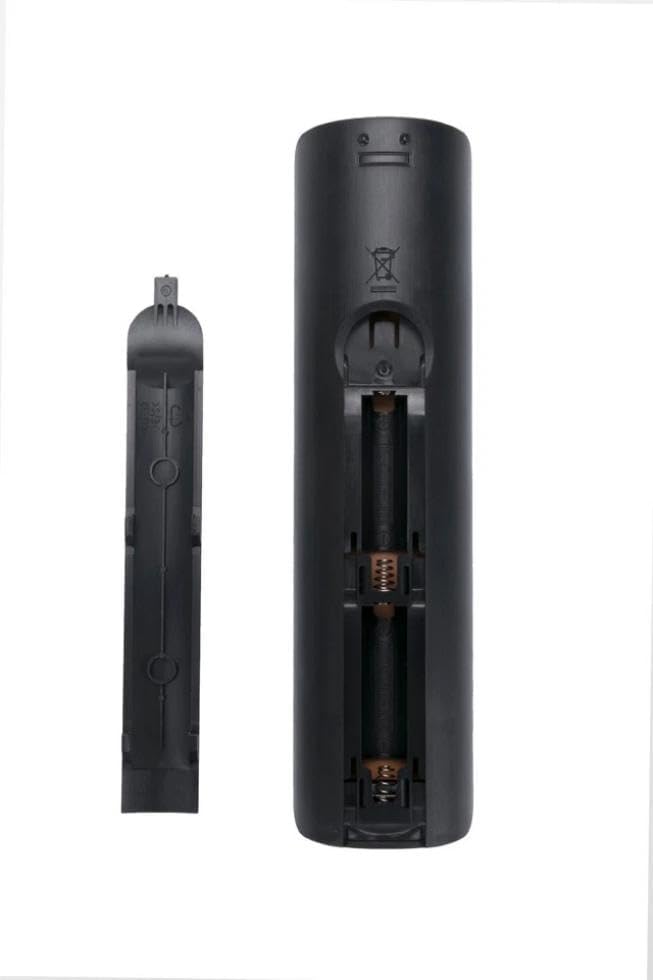
Image: Back of the remote control with the battery compartment open, illustrating where to insert AAA batteries.
2. Initial Use
This remote control is designed for immediate use with compatible Samsung TV models. No programming or pairing is required. Once batteries are installed, point the remote towards your television and begin operation.
Operating Instructions
The AA59-00607A remote control provides intuitive access to your Samsung TV's functions. Below is an overview of the main buttons and their purposes:

Image: Front view of the AA59-00607A remote control, displaying the layout of all control buttons.
- Power (●): Turns the TV on or off.
- Source: Selects the input source (e.g., HDMI 1, AV).
- Number Buttons (0-9): Directly selects channels or inputs numerical values.
- Volume (+/-): Adjusts the TV's volume level.
- Mute: Silences the TV audio.
- Channel (CH List, CH Up/Down): Changes TV channels or accesses the channel list.
- Menu: Opens the TV's main menu for settings and options.
- Tools: Accesses quick settings or context-sensitive options.
- Info: Displays information about the current program or input.
- Directional Pad (Up, Down, Left, Right) & Enter: Navigates through menus and confirms selections.
- Return: Goes back to the previous menu or screen.
- Exit: Closes the current menu or application.
- Colored Buttons (A, B, C, D): Used for specific functions within certain TV applications or menus.
- Media Playback Controls (Play, Pause, Stop, Fast Forward, Rewind): Controls media playback on connected devices or TV's media player.
Maintenance
Battery Replacement
Replace batteries when the remote's response becomes sluggish or it stops functioning. Always replace both batteries at the same time with new AAA batteries. Do not mix old and new batteries, or different types of batteries.
Cleaning
To clean the remote control, gently wipe its surface with a soft, dry cloth. For stubborn dirt, slightly dampen the cloth with water or a mild, non-abrasive cleaner. Avoid using harsh chemicals or excessive moisture, as these can damage the remote's electronics.
Troubleshooting
| Problem | Possible Cause | Solution |
|---|---|---|
| Remote not responding. | Dead or incorrectly installed batteries. Obstruction between remote and TV. Remote out of range. | Replace batteries with new ones, ensuring correct polarity. Remove any objects blocking the signal path. Move closer to the TV. |
| Some buttons not working. | Dirty contacts under buttons. Remote not fully compatible with a specific TV function. | Clean the remote as described in the Maintenance section. Verify TV model compatibility for specific advanced functions. |
| TV responds intermittently. | Weak batteries. Infrared sensor on TV is dirty or obstructed. | Replace batteries. Clean the TV's infrared sensor. |
Specifications
| Feature | Detail |
|---|---|
| Model Number | AA59-00607A |
| Product Dimensions | 7 x 2 x 1 inches |
| Item Weight | 2.08 ounces |
| Connectivity Technology | Infrared |
| Compatible Devices | Television (Samsung models: PS51E530, PS60E530, PS43E455, PS51E455, PS43E450A1W, PS51E450A1W, PS43E450, PS51E450) |
| Special Feature | No Programming Required |
| Max Number of Supported Devices | 1 |
Warranty and Support
For warranty information and customer support, please refer to the documentation provided at the time of purchase or contact the seller directly. As a replacement remote, specific warranty terms may vary.
Manufacturer: fhsbxcvb