1. Introduction
This manual provides essential information for the safe and effective use of the KEYAYEYA Compatible JSCC Speed Controller, model SF06E. Please read this manual thoroughly before installation, operation, or maintenance to ensure proper functionality and to prevent damage or injury. Keep this manual for future reference.
2. Safety Information
WARNING: Electrical shock hazard. Ensure power is disconnected before installation or maintenance.
- Always follow local electrical codes and regulations.
- Installation and wiring should be performed by qualified personnel only.
- Do not operate the controller with wet hands or in damp environments.
- Ensure proper grounding to prevent electrical hazards.
- Do not exceed the specified voltage and current ratings.
- Keep children and unauthorized personnel away from the device during operation.
3. Product Overview
The KEYAYEYA Compatible JSCC Speed Controller SF06E is designed to regulate the speed of compatible motors. It features a robust design suitable for industrial applications.
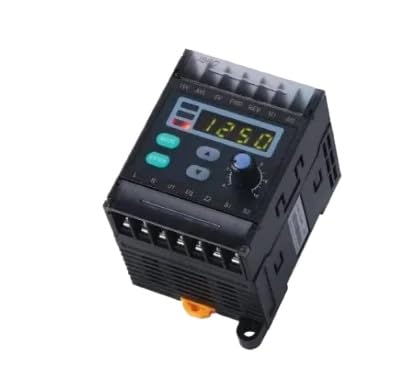
Image 3.1: Front view of the KEYAYEYA Compatible JSCC Speed Controller SF06E. This image displays the compact design of the speed controller, highlighting its main casing and potential control interface.
3.1 Components
- Control Unit: Main housing containing the electronic circuitry.
- Speed Adjustment Knob: For manual speed regulation.
- Terminal Block: For electrical connections to the motor and power supply.
- Mounting Points: For secure installation.
4. Setup
4.1 Mounting
- Select a suitable location for mounting, ensuring adequate ventilation and protection from moisture and excessive heat.
- Secure the controller using appropriate fasteners through the designated mounting points.
4.2 Wiring
CAUTION: Ensure all power is OFF before making any electrical connections.
- Connect the power supply wires to the designated input terminals on the controller. Refer to the wiring diagram provided with your motor for specific connections.
- Connect the motor wires to the designated output terminals on the controller.
- Ensure all connections are tight and secure to prevent loose contacts and potential hazards.
- Verify proper grounding of the controller and motor.
5. Operating Instructions
5.1 Initial Power-Up
- After completing all wiring, turn on the main power supply to the controller.
- Observe the motor for any unusual noises or vibrations. If any occur, immediately turn off the power and check connections.
5.2 Adjusting Motor Speed
- Rotate the speed adjustment knob clockwise to increase motor speed.
- Rotate the speed adjustment knob counter-clockwise to decrease motor speed.
- Adjust the speed gradually to avoid sudden changes that could damage the motor or connected equipment.
6. Maintenance
The KEYAYEYA Compatible JSCC Speed Controller SF06E requires minimal maintenance. Regular inspections are recommended to ensure optimal performance and longevity.
- Cleaning: Periodically clean the exterior of the controller with a dry, soft cloth. Do not use abrasive cleaners or solvents.
- Connection Check: Annually inspect all electrical connections for tightness and signs of corrosion. Re-tighten as necessary.
- Ventilation: Ensure that ventilation openings are clear of dust and debris to prevent overheating.
7. Troubleshooting
If you encounter issues with your speed controller, refer to the following table for common problems and solutions.
| Problem | Possible Cause | Solution |
|---|---|---|
| Motor does not start | No power supply; Incorrect wiring; Faulty motor | Check power connection; Verify wiring against diagram; Test motor independently |
| Motor speed is inconsistent | Loose connections; Overload; Controller malfunction | Check and tighten connections; Reduce motor load; Contact support |
| Controller is overheating | Poor ventilation; Overload; Ambient temperature too high | Ensure clear ventilation; Reduce motor load; Operate in cooler environment |
If the problem persists after attempting these solutions, please contact customer support.
8. Specifications
- Model: SF06E
- Package Dimensions: 3 x 3 x 3 inches
- Item Weight: 4.4 pounds
- Manufacturer: Original manufacturer
- ASIN: B0G37HPG4K
- Date First Available: November 21, 2025
9. Warranty and Support
9.1 Warranty Information
This product is covered by a one-year limited warranty from the date of purchase. This warranty covers manufacturing defects under normal use. It does not cover damage caused by misuse, accident, unauthorized modification, or improper installation.
9.2 Technical Assistance
For any technical assistance or questions regarding your model, please contact the seller directly. It is recommended to contact the seller after receiving the product for any support needs.
