1. Important Safety Information
Please read and understand all instructions before beginning assembly and use. Keep this manual for future reference.
- Weight Capacity: Do not exceed the maximum weight capacity of 1100 lbs (500 kg) for this bed frame. Exceeding this limit may result in injury or damage to the product.
- Assembly: Be cautious of sharp edges and small parts during assembly. Ensure all components are securely fastened before use.
- Children: Keep small parts away from children. This product is not intended for use by children without adult supervision.
- Electrical Components: Ensure the charging station and LED lighting are connected to a suitable power source according to local electrical codes. Do not overload the outlets.
- Placement: Place the bed frame on a level, stable surface.
2. Product Overview and Dimensions
The DWVO King Size Bed Frame features an upholstered headboard with integrated LED lighting, a charging station, and four under-bed storage drawers. It is designed for easy assembly and does not require a box spring.
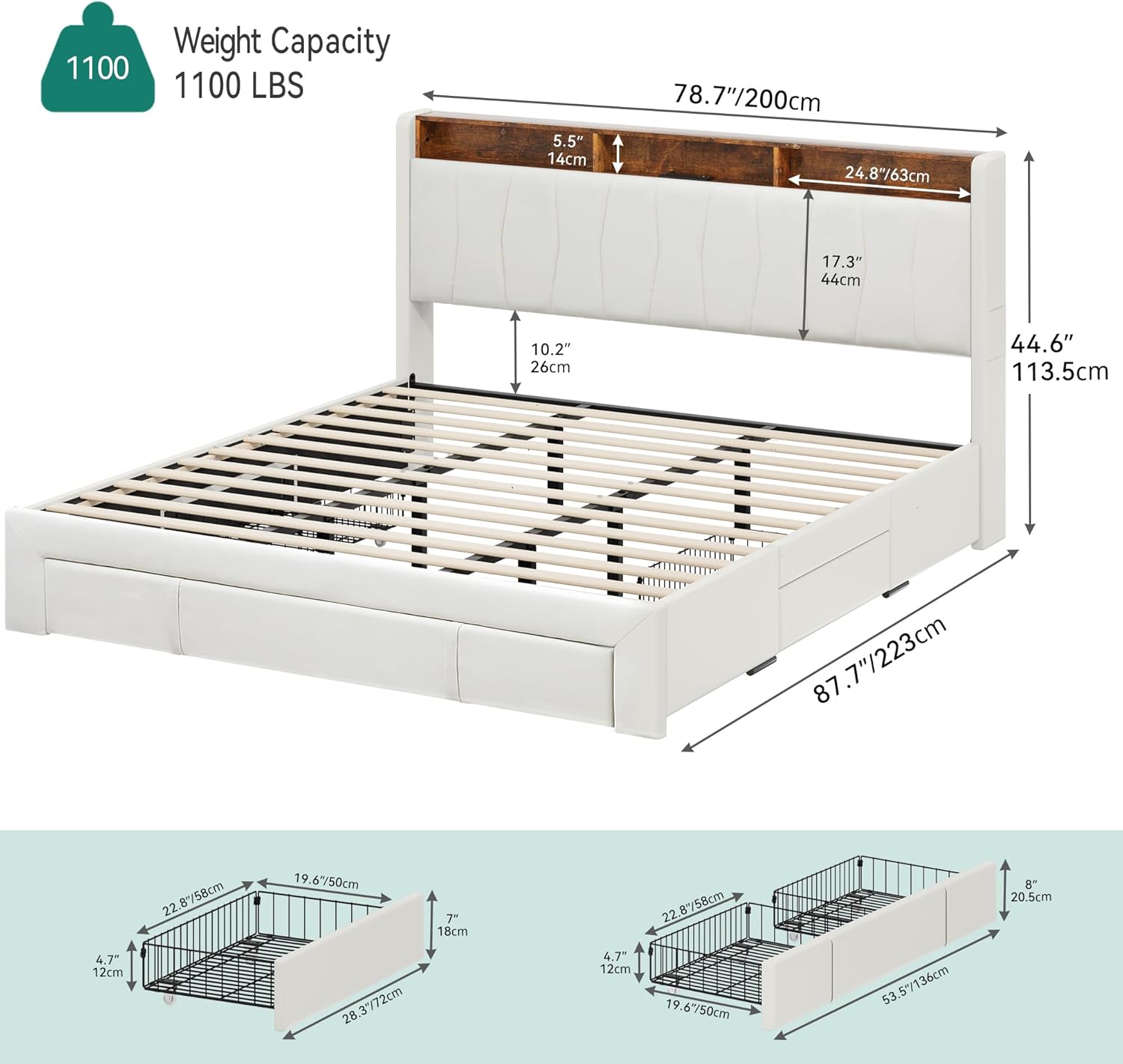
Figure 2.1: Overall dimensions of the King Size Bed Frame. The frame measures approximately 87.7 inches (223 cm) in length, 78.7 inches (200 cm) in width, and 44.6 inches (113.5 cm) in headboard height. The headboard storage area is 5.5 inches (14 cm) deep.

Figure 2.2: The DWVO King Size Bed Frame in a bedroom setting, highlighting the LED lighting, storage headboard, and under-bed drawers.
3. Setup and Assembly
This bed frame is designed for easy assembly. The package may be divided into two parts and may not arrive at the same time. Please ensure all parts are present before beginning assembly.
3.1 Unpacking and Part Identification
- Carefully unpack all components and lay them out on a clean, soft surface to prevent scratches.
- Refer to the included assembly instructions for a complete list of parts and hardware.
3.2 Frame Assembly
Follow the step-by-step instructions provided in the separate assembly manual. Key features designed for easier installation include:
- Hook and Loop Design: The hook and loop fastening system for the slats shortens installation time and ensures a secure fit.
- Noise Reduction: EVA bars are integrated to minimize noise, contributing to a restful sleep environment.

Figure 3.1: Close-up of the bed frame's slat system, illustrating the noise reduction strips and the hook and loop attachment for quick assembly.
3.3 Drawer Assembly
Assemble the four storage drawers according to the instructions. Each drawer is equipped with smooth-rolling wheels for easy access.

Figure 3.2: The four spacious storage drawers, featuring sturdy steel construction and smooth-rolling casters for convenient access.
4. Operating Instructions
4.1 LED Lighting System
The integrated RGB LED light strip in the headboard offers customizable ambiance. It can be controlled via a remote or a dedicated mobile application.
- Color Selection: Choose from over 60,000 colors to match your mood or decor.
- Brightness Adjustment: Adjust the intensity of the light.
- Mode Settings: Select from various dynamic modes, including music synchronization.
- Timer Function: Set timers for automatic on/off functionality.

Figure 4.1: Control options for the RGB LED lighting, including a physical remote and a smartphone application.
4.2 Built-in Charging Station
The headboard includes a convenient charging station for your electronic devices.
- Outlets: Features 2 standard AC plug outlets (125V/12A).
- USB Ports: Includes 1 Type-C and 1 USB port (5V/2A) for direct device charging.
- Power Cord: The charging station is powered by a 6.5-foot plug-in power cord.

Figure 4.2: The built-in charging station with AC outlets, USB, and Type-C ports, allowing convenient charging of multiple devices.
4.3 Storage Features
- Under-bed Drawers: Utilize the four spacious drawers for storing bedding, clothing, or other essentials. The smooth-rolling wheels ensure easy access.
- Headboard Storage: The headboard features open storage shelves and hidden compartments for books, decorative items, or personal belongings. Convenient side pockets are also available for smaller items like remotes or phones.
5. Maintenance
Regular maintenance will help prolong the life and appearance of your DWVO bed frame.
- Cleaning the Upholstery: For general cleaning, gently wipe the upholstered surfaces with a soft, damp cloth. For spills, blot immediately with a clean, dry cloth. Avoid harsh chemicals or abrasive cleaners.
- Cleaning the Frame: Wipe metal and wooden components with a dry or slightly damp cloth.
- Checking Connections: Periodically check all bolts and screws to ensure they remain tight. Retighten if necessary.
- Drawer Maintenance: Keep the drawer tracks clean and free of debris to ensure smooth operation.
- Electrical Components: Ensure the charging station and LED connections are secure. Do not attempt to repair electrical components yourself; contact qualified personnel if issues arise.
6. Troubleshooting
If you encounter any issues with your bed frame, refer to the following common problems and solutions:
| Problem | Possible Cause | Solution |
|---|---|---|
| LED lights not working | Loose connection, power outage, remote battery dead, app issue. | Check all power connections. Ensure the power outlet is functional. Replace remote batteries. Restart the control app. |
| Charging station not providing power | Power cord unplugged, circuit breaker tripped, device not compatible. | Verify the charging station's power cord is fully plugged into a working outlet. Check your home's circuit breaker. Ensure your device is compatible with the charging ports. |
| Drawers are difficult to open/close | Obstruction in the track, wheels dirty, drawer overloaded. | Inspect tracks for any debris and clean if necessary. Check if the drawer is overloaded; redistribute contents. Ensure wheels are clean and functioning. |
| Bed frame is squeaking or unstable | Loose bolts or connections. | Retighten all assembly bolts and screws. Ensure the bed frame is on a level surface. |
If the problem persists after attempting these solutions, please contact customer support.
7. Specifications
- Model Number: MADWV2yQRb
- Size: King (U.S. Standard)
- Product Dimensions: 87.7"L x 78.7"W x 44.6"H (223cm L x 200cm W x 113.5cm H)
- Weight Capacity: 1100 lbs (500 kg)
- Material: Wood, Metal, Fabric (Upholstered)
- Color: Beige
- Finish Type: Laminated
- Included Components: Headboard, Bed Frame, Slats, 4 Drawers
- Compatible Mattress Size: King
- Assembly Required: Yes
- Charging Station: 2 AC Outlets (125V/12A), 1 USB Port (5V/2A), 1 Type-C Port (5V/2A)
- LED Lighting: RGB, App & Remote Control, 60,000+ Colors, Music Mode, Timing Function, Dynamic Modes
- Item Weight: Approximately 78 pounds
- UPC: 197839538597
8. Warranty and Support
8.1 Return Policy
This product is eligible for a 90-day return policy, allowing for refunds or replacements. Please refer to your purchase platform's specific return guidelines for detailed information.
8.2 Optional Protection Plans
Extended protection plans may be available for purchase separately. These plans typically offer additional coverage beyond the standard return period.
- 3-Year Protection Plan
- Complete Protect (monthly subscription)
For specific details on coverage and terms, please consult the provider of these protection plans.
8.3 Customer Support
For any questions, missing parts, or assistance with assembly or operation, please contact DWVO customer support through the retailer where the product was purchased or visit the official DWVO website for contact information.