1. Introduction
Thank you for choosing this Generic replacement remote control. This manual provides essential information for the proper setup, operation, and maintenance of your new remote. This remote is designed as a direct replacement for specific Clayton TV models, including RC4800, RC-4800, 10096118, and CL32DLED15B LED LCD HDTVs.
Please note that as a replacement unit, some advanced or specific functions of your original remote may not be fully supported. This is normal for replacement remotes and does not indicate a defect.
2. Product Overview
The replacement remote control is constructed from durable ABS material, designed for comfortable handling and long-lasting use. It offers stable performance and a reliable transmitting distance.
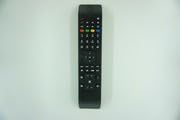
Figure 1: Generic Replacement Remote Control. This image displays the typical layout and appearance of the remote control, featuring various buttons for TV functions.
3. Setup
This replacement remote control requires no programming or complex setup. Simply install the batteries to begin use.
3.1 Battery Installation
- Locate the battery compartment on the back of the remote control.
- Slide open the battery compartment cover.
- Insert two (2) AAA batteries (not included), ensuring the positive (+) and negative (-) terminals align correctly with the markings inside the compartment.
- Close the battery compartment cover securely.
The remote is now ready for use with your compatible Clayton TV.
4. Operating Instructions
Point the remote control directly at your television's infrared receiver. Press the desired function buttons to control your TV.
4.1 Basic Functions
- Power Button: Turns the TV on or off.
- Channel Buttons (CH+/CH-): Changes TV channels up or down.
- Volume Buttons (VOL+/VOL-): Adjusts the TV volume up or down.
- Mute Button: Mutes or unmutes the TV audio.
- Number Buttons (0-9): Directly selects TV channels.
- Input/Source Button: Switches between different input sources (e.g., HDMI, AV).
For other specific functions, refer to your television's original user manual to understand the corresponding button actions.
5. Maintenance
Proper care will ensure the longevity and optimal performance of your remote control.
- Cleaning: Wipe the remote with a soft, dry cloth. Do not use liquid cleaners or abrasive materials.
- Battery Replacement: Replace batteries when the remote's response becomes sluggish or stops working. Always replace both batteries at the same time.
- Storage: Store the remote in a cool, dry place away from direct sunlight and extreme temperatures.
- Avoid Drops: Protect the remote from physical impact, as drops can damage internal components.
6. Troubleshooting
If you encounter issues with your remote control, please refer to the following common solutions:
- Remote not working:
- Check if the batteries are inserted correctly with the correct polarity.
- Replace old batteries with new ones.
- Ensure there are no obstructions between the remote and the TV's IR receiver.
- Confirm the remote is pointed directly at the TV.
- Some functions do not work:
- As a replacement remote, it may not support all functions of the original remote. This is expected behavior and not a defect.
- Verify that your TV model is listed as compatible.
- Short transmitting distance:
- Replace the batteries. Low battery power can reduce the remote's range.
- Ensure no strong light sources (like direct sunlight) are interfering with the IR signal.
7. Specifications
| Feature | Detail |
|---|---|
| Brand | Generic |
| Compatible Devices | Television (Clayton RC4800, RC-4800, 10096118, CL32DLED15B) |
| Max Number of Supported Devices | 1 |
| Material | ABS/Plastic |
| Color | Black or White (color may vary) |
| Power Source | 2 x AAA Batteries (not included) |
8. Warranty and Support
This product is typically covered by a standard 30-day return policy from the date of purchase. For specific return or replacement inquiries, please contact your retailer or seller directly. Keep your purchase receipt as proof of purchase.

