1. Introduction
This manual provides instructions for the Generic AH59-02416A Replacement Remote Control. This remote is designed as a dedicated replacement for specific Samsung DVD Home Theater 5.1 Audio systems. Please verify your original remote's model number or your unit's model to ensure compatibility.
As a replacement unit, some advanced functions of your original remote may not be supported. This is normal and does not indicate a defective product.
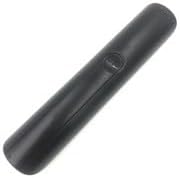
Figure 1: Generic AH59-02416A Replacement Remote Control. This image shows the typical design of the remote, which is available in black or white, featuring an elongated shape with primary control buttons.
2. Setup
No programming or complex setup is required for this replacement remote control. Simply install the batteries, and it will be ready for use with compatible devices.
2.1 Battery Installation
- Locate the battery compartment on the back of the remote control.
- Slide open the battery compartment cover.
- Insert two (2) AAA batteries, ensuring the positive (+) and negative (-) terminals align correctly with the markings inside the compartment.
- Close the battery compartment cover securely.
Note: Batteries are not included with the remote control. Always use new batteries for optimal performance.
3. Operating Instructions
Point the remote control directly at the infrared (IR) receiver on your Samsung DVD Home Theater 5.1 Audio system. Ensure there are no obstructions between the remote and the device.
3.1 Basic Functions
- Power Button: Turns the device on or off.
- Volume Up/Down: Adjusts the audio volume.
- Mute Button: Silences the audio output.
- Play/Pause: Controls media playback.
- Stop: Stops media playback.
- Fast Forward/Rewind: Skips through media content.
- Navigation Buttons (Up, Down, Left, Right, Enter): Used to navigate menus and select options.
- Source/Input: Switches between different input sources.
Specific button labels and their exact functions may vary slightly depending on the original remote's layout and the specific model of your Samsung DVD Home Theater system.
4. Maintenance
Proper care and maintenance will extend the life of your remote control.
4.1 Cleaning
- Wipe the remote control with a soft, dry cloth.
- For stubborn dirt, lightly dampen the cloth with water or a mild, non-abrasive cleaner.
- Do not use harsh chemicals, solvents, or abrasive cleaning pads, as these can damage the remote's surface or internal components.
4.2 Battery Replacement
Replace batteries when the remote's performance degrades or if it stops responding. Always replace both batteries at the same time with new ones of the same type (AAA). Remove batteries if the remote will not be used for an extended period to prevent leakage.
4.3 Storage
Store the remote control in a cool, dry place away from direct sunlight, extreme temperatures, and high humidity.
5. Troubleshooting
If you encounter issues with your remote control, try the following troubleshooting steps:
- Remote not responding:
- Ensure batteries are installed correctly with the correct polarity.
- Replace old batteries with new ones.
- Check for any obstructions between the remote and the device's IR receiver.
- Ensure you are within the effective range of the device.
- Some functions not working:
- As a replacement remote, it may not support all functions of the original remote. This is expected.
- Refer to your device's original manual for specific functions that might require the original remote.
- Remote works intermittently:
- This often indicates low battery power. Replace the batteries.
- Ensure the IR receiver on your device is clean and unobstructed.
6. Specifications
| Feature | Detail |
|---|---|
| Model Number | AH59-02416A |
| Brand | Generic |
| Compatible Devices | Samsung DVD Home Theater 5.1 Audio Systems (also generally compatible with Television, Audio/Video Players, Projectors) |
| Max Number of Supported Devices | 1 |
| Special Feature | Digital Display (if applicable to specific variants) |
| Color | Black or White |
| Material | ABS/Plastic |
| Power Source | 2 x AAA Batteries (not included) |
| ASIN | B0G34P5832 |
| Manufacturer | XHKEB425 |
| Date First Available | November 20, 2025 |
7. Warranty and Support
Specific warranty information for this Generic replacement remote control is not provided in the product details. For any warranty claims, technical support, or further assistance, please contact the seller directly.
Seller: XUANHIEUNH STORE
Please retain your purchase receipt for any warranty or support inquiries.