
Introduction
This document provides instructions for the proper setup, operation, and maintenance of your new Generic Replacement Remote Control. This remote is designed to function with the SDMC Technoserve DV8553 Android 4K OTT TV Box. Please note that as a replacement unit, some advanced or specific functions of the original remote may not be supported.
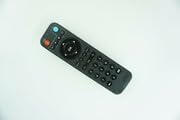
Image: Front view of the Generic Replacement Remote Control. The remote is black with various buttons for navigation, volume, channel, and number input.
Setup
The Generic Replacement Remote Control requires no programming or complex setup procedures. Simply install the batteries to begin use.
Battery Installation
- Locate the battery compartment on the back of the remote control.
- Slide the battery compartment cover downwards or outwards to open it.
- Insert two new AAA batteries (not included), ensuring the positive (+) and negative (-) terminals align correctly with the markings inside the compartment.
- Replace the battery compartment cover by sliding it back into position until it clicks securely.
Once batteries are installed, the remote control is ready for immediate use with your SDMC Technoserve DV8553 Android 4K OTT TV Box.
Operating Instructions
This replacement remote control offers stable performance and a farther transmitting distance for convenient operation of your TV Box.
Basic Functions
- Power Button: Press to turn the TV Box on or off.
- Navigation Buttons (Up, Down, Left, Right): Use these to move through menus and selections on your screen.
- OK/Enter Button: Confirms selections or opens items.
- Volume Up/Down: Adjusts the audio volume.
- Channel Up/Down: Changes channels (if applicable to your TV Box setup).
- Number Buttons (0-9): For direct channel input or other numerical entries.
- Back/Return Button: Returns to the previous screen or menu.
- Home Button: Navigates to the main home screen of your TV Box.
Note: As a replacement remote, certain advanced features or specific application controls present on the original remote may not be fully functional.
Maintenance
To ensure the longevity and optimal performance of your remote control, follow these simple maintenance guidelines:
- Cleaning: Wipe the remote control periodically with a soft, dry cloth. For stubborn dirt, slightly dampen the cloth with water or a mild, non-abrasive cleaner. Avoid using harsh chemicals or solvents.
- Battery Replacement: Replace batteries promptly when the remote's performance degrades or it stops responding. Always replace both batteries at the same time with new ones of the same type.
- Storage: Store the remote control in a cool, dry place away from direct sunlight, extreme temperatures, and high humidity. If the remote will not be used for an extended period, remove the batteries to prevent leakage.
- Handling: Avoid dropping the remote control or subjecting it to strong impacts, as this can damage internal components.
Troubleshooting
If you encounter issues with your replacement remote control, please refer to the following common troubleshooting steps:
- Remote Not Responding:
- Check if the batteries are correctly inserted with the correct polarity (+/-).
- Replace the batteries with fresh ones.
- Ensure there are no obstructions between the remote control and the TV Box's infrared receiver.
- Make sure you are within the effective operating range (up to 15 meters).
- Some Functions Do Not Work:
This remote is a replacement unit. It is designed to provide core functionality for the SDMC Technoserve DV8553 Android 4K OTT TV Box. It is normal for some specific or advanced functions of the original remote to not be supported by this replacement. This is not indicative of a defective product.
- Intermittent Operation:
- Ensure the batteries are not low.
- Check for strong light sources (like direct sunlight or bright fluorescent lights) that might interfere with the infrared signal.
Specifications
| Brand | Generic |
| Model Number | #fRM703f2025 |
| Compatible Devices | SDMC Technoserve DV8553 Android 4K OTT TV Box, Television |
| Special Feature | Digital Display |
| Color | Black or White (Color may vary) |
| Maximum Range | 15 Meters |
| Max Number of Supported Devices | 1 |
| Connectivity Technology | Infrared (IR) |
| Controller Type | Standard Remote Control |
| Manufacturer Part Number | #fRM703f2025 |
| ASIN | B0G34F9TQM |
Note: "Connectivity Technology: Ethernet" and "Controller Type: Windows" from original specifications are likely misattributions for the remote control itself and have been corrected to reflect typical remote control characteristics (Infrared, Standard Remote Control).
Warranty and Support
Specific warranty details for this Generic Replacement Remote Control are not provided in the product information. For any warranty-related inquiries or technical support, please contact the seller directly through your purchase platform.
Please retain your proof of purchase for any support requests.